Progress® Recognized in The Forrester Wave™: Digital Experience Platforms, Q4 2025
Learn More

Integrations

Google Maps Address Field for Sitefinity AdminApp

Extend the Sitefinity AdminApp with Google Maps functionality for address fields. Improve data accuracy, simplify location input and enrich your content workflows with interactive map support—directly in the Sitefinity backend.
Category

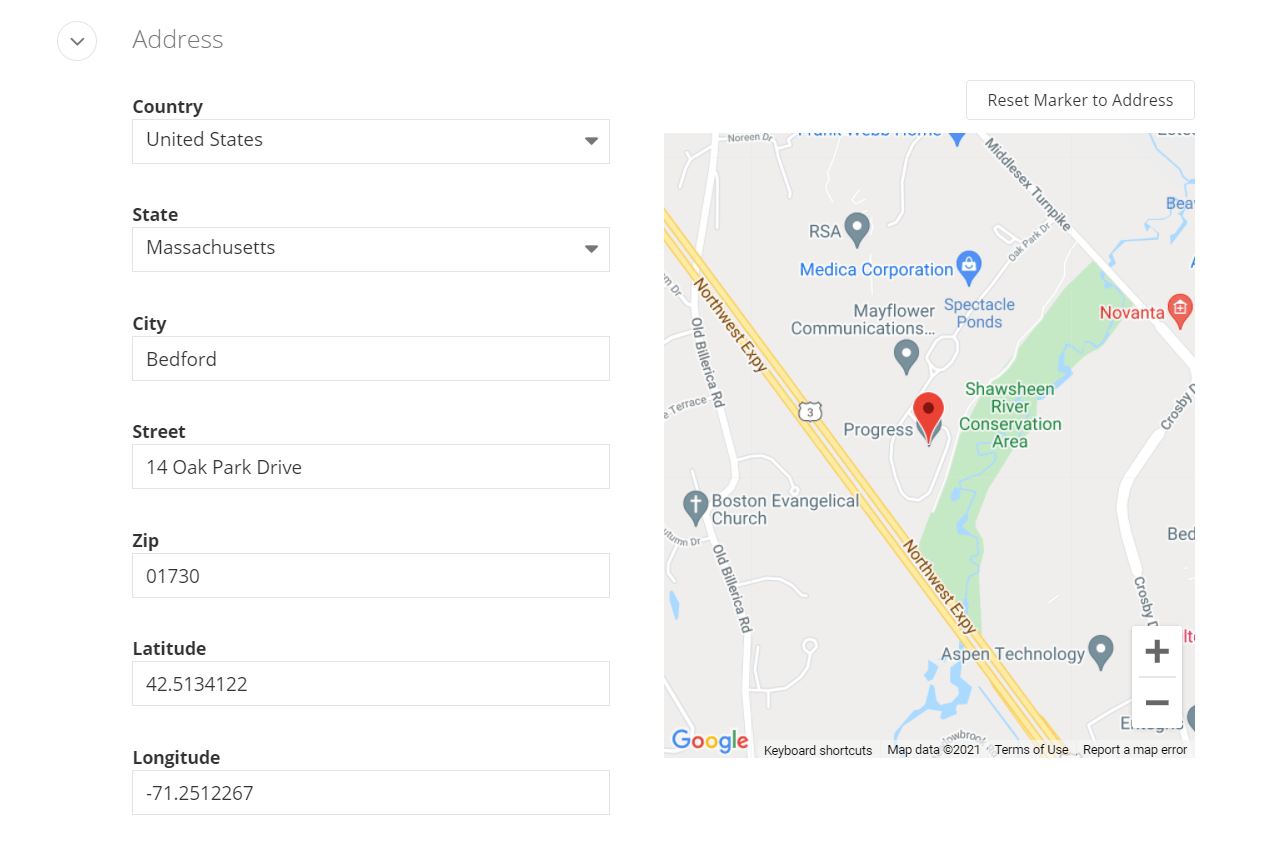
This extension enables Google Maps support within the Sitefinity AdminApp for any content type that includes an address field. Designed for editors and content managers, it embeds an interactive map into the backend editing interface, making it easier to confirm, visualize and update location data.

The package also includes services to retrieve country and city/province data from Sitefinity and leverages your configured Google Maps API key for consistent integration.

What Is the Google Maps Address Extension?

The Google Maps Address Field for Sitefinity is a lightweight AdminApp add-on that enhances address fields with visual location context. Once installed, content editors can drag and drop a marker, confirm coordinates, or reset the pin based on typed addresses—without switching screens or tools.
This extension is ideal for use cases such as:

  • Location directories
  • Event listings
  • Store finders
  • Regional landing pages

Integration Overview

The Google Maps Address Field Extension supports:

  • Automatic enablement upon installation
  • Use with any Sitefinity content type that includes an address field
  • Embedded Google Maps view in the backend editing screen
  • Marker reset to match address input
  • Support for retrieving countries and provinces from Sitefinity
  • Flexible customization via source code

Benefits

  • Visual Data Accuracy
    Allow editors to verify and update locations directly in the AdminApp—reducing input errors and improving geographic precision.
  • Streamlined Editing Workflow
    Embed Google Maps right where it’s needed: within the content editing screen for any address field. No toggling between interfaces or manual map validation.
  • Easy Setup
    Install via NuGet and let Sitefinity automatically enable the extension. Just ensure you’ve configured a valid Google Maps API key.
  • Customizable
    Open source and extensible—tailor the behavior or UI to your needs, such as pre-setting a default country or customizing marker icons.

    Practical Use Cases

    Enable Region-Based Targeting and Filtering
    Use precise address and location data to drive geo-targeted personalization, filter location-based content, or trigger region-specific messaging within Sitefinity CMS.
    Geotag Listings in Service or Location Directories
    Enable editors to attach precise map locations to business or partner listings, improving regional navigation and supporting "near me" search functionality on the frontend.
    Visual Address Entry for Events
    Event planners can place or adjust map markers while entering venue addresses for conferences, workshops, or pop-up events, reducing user confusion and incorrect directions.
    Maintain Accurate Location Data for Branches or Offices

    Content teams managing multiple retail, clinic, or office locations can drag map pins to confirm address accuracy—ensuring that store finders and contact pages show the correct coordinates.

    Installation and Usage

    Requirements

    • Sitefinity CMS license or trial

    • Sitefinity version supporting AdminApp extensions (Sitefinity 13.0+)

    • Google Maps API key

    • NuGet access to install the extension

    Installation & Configuration

    Install via NuGet Package Manager in Visual Studio:

    Install-Package HCT.Sitefinity.GoogleMaps.AddressField
    

    To install a specific version:

    Install-Package HCT.Sitefinity.GoogleMaps.AddressField -Version 1.3.0
    

    After installation:

    • Ensure a valid Google Maps API key is set

    • Use any content type with an address field

    • The map will appear automatically in the AdminApp editor

    Troubleshooting

    • Map not visible? Try clearing your browser cache

    • See “Reset marker to address” but no map? Check if your Google Maps API key is active and valid

    • Still having issues? Visit the NuGet package page for support

    Resources

    Request Integration

    Fill out the form and you'll hear from our representative within one business day.

    Get the Integration
    Loading animation