
This extension enables Google Maps support within the Sitefinity AdminApp for any content type that includes an address field. Designed for editors and content managers, it embeds an interactive map into the backend editing interface, making it easier to confirm, visualize and update location data.
The package also includes services to retrieve country and city/province data from Sitefinity and leverages your configured Google Maps API key for consistent integration.
What Is the Google Maps Address Extension?
The Google Maps Address Field for Sitefinity is a lightweight AdminApp add-on that enhances address fields with visual location context. Once installed, content editors can drag and drop a marker, confirm coordinates, or reset the pin based on typed addresses—without switching screens or tools.
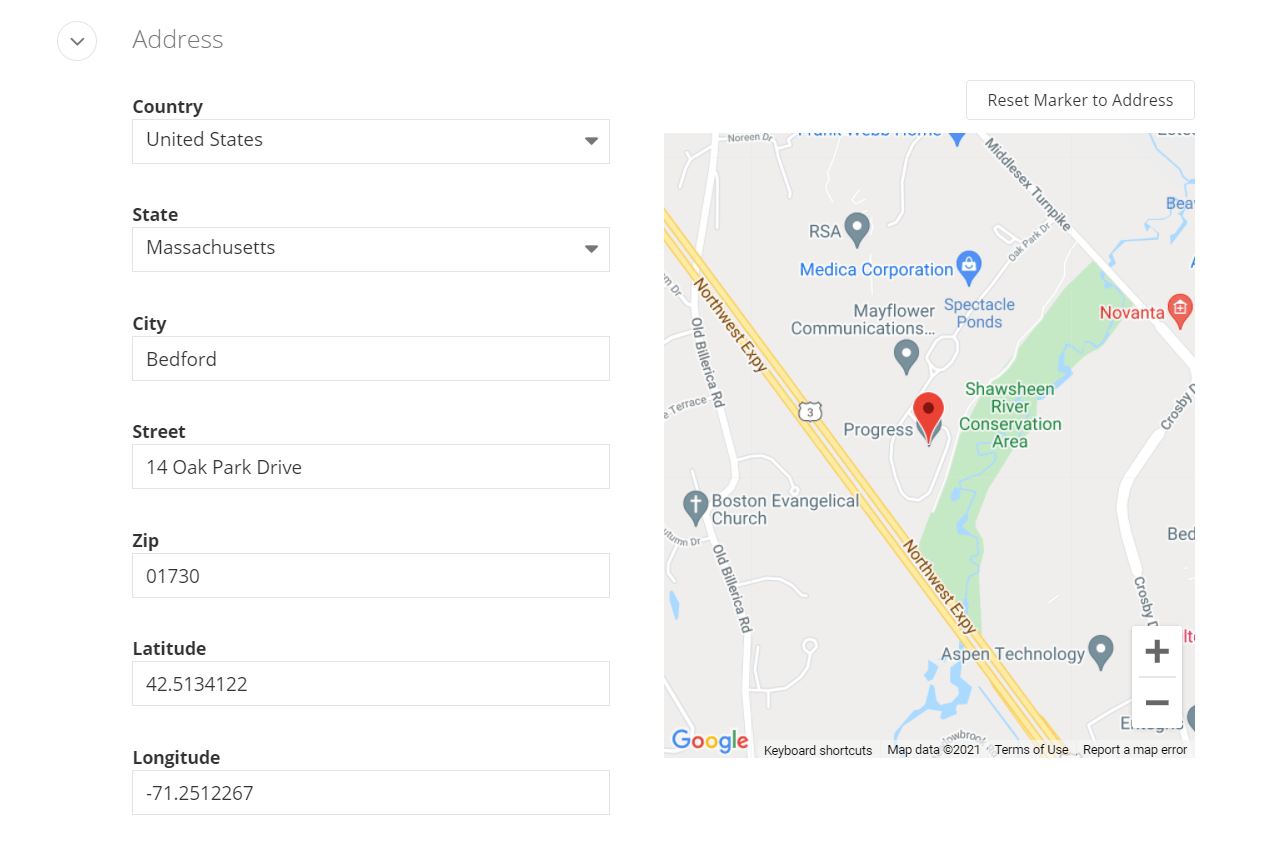
This extension is ideal for use cases such as:
- Location directories
- Event listings
- Store finders
- Regional landing pages
Integration Overview
The Google Maps Address Field Extension supports:
- Automatic enablement upon installation
- Use with any Sitefinity content type that includes an address field
- Embedded Google Maps view in the backend editing screen
- Marker reset to match address input
- Support for retrieving countries and provinces from Sitefinity
- Flexible customization via source code
Benefits
- Visual Data Accuracy
Allow editors to verify and update locations directly in the AdminApp—reducing input errors and improving geographic precision. - Streamlined Editing Workflow
Embed Google Maps right where it’s needed: within the content editing screen for any address field. No toggling between interfaces or manual map validation. - Easy Setup
Install via NuGet and let Sitefinity automatically enable the extension. Just ensure you’ve configured a valid Google Maps API key. - Customizable
Open source and extensible—tailor the behavior or UI to your needs, such as pre-setting a default country or customizing marker icons.