Progress® Recognized in The Forrester Wave™: Digital Experience Platforms, Q4 2025
Learn More

Integrations

Enhanced MVC Form Widgets for Sitefinity CMS

Extend the power of Sitefinity CMS forms with custom MVC widgets for more advanced, user-friendly data collection experiences. These open-source enhancements improve form functionality for modern business requirements.
Category
Resources

The Enhanced MVC Form Widgets package adds expanded functionality to Sitefinity CMS forms by introducing purpose-built widgets for capturing structured data. Designed for developers and form builders, these widgets improve user experience and backend data quality through intuitive input fields.

Available as open-source extensions, these widgets are ideal for organizations needing precise form interactions—whether you're collecting user details, confirming submissions, or standardizing location-based inputs.

What Are the Enhanced MVC Form Widgets?
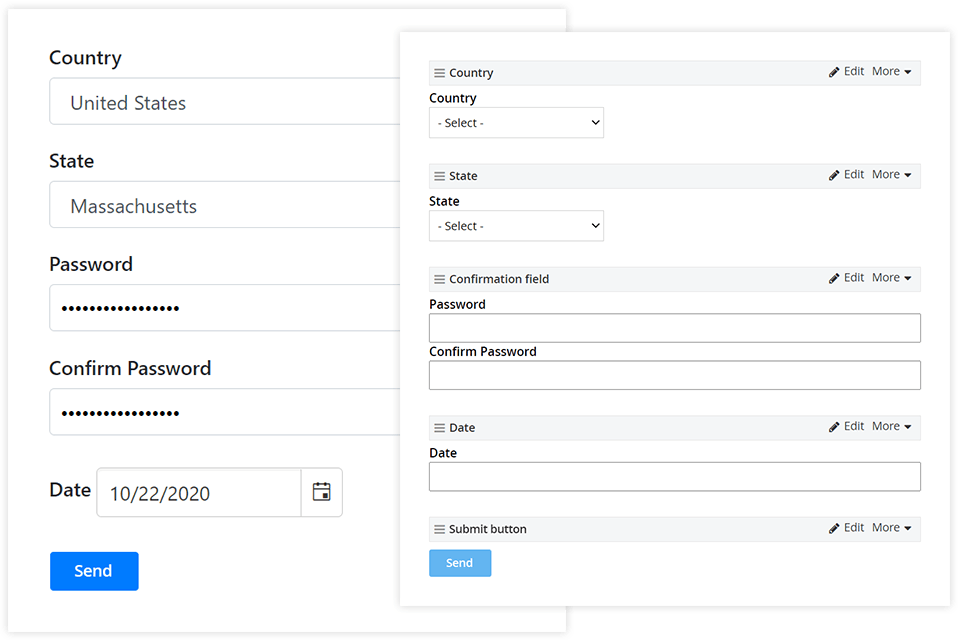
Enhanced MVC Form Widgets

This integration delivers four custom form widgets built on Sitefinity’s MVC framework:

  • Country Field – Standardized dropdown of countries
  • State Field – State or province dropdown linked to selected country
  • Date Field – Modern, user-friendly date picker
  • Confirmation Field – Enforces value confirmation (e.g., re-enter email or password)

Developed by Progress and compatible with Sitefinity 13.0 and above, these widgets align with Bootstrap 4 templates for a seamless frontend experience.

Integration Overview

These widgets are available via open-source code hosted on GitHub. To implement them:

  • Clone the repository into your Sitefinity project
  • Build the project in Visual Studio
  • Reference the enhanced widgets in your main Sitefinity web app
  • Add Bootstrap 4 templates and build your solution
  • Once added, the widgets appear in the forms toolbox for easy drag-and-drop use by content editors.

Benefits

  • Improved Data Input Experience
    Give users clear, familiar inputs for selecting countries, dates and confirming fields, reducing errors and form abandonment.
  • Boost Developer Productivity
    Skip building custom fields from scratch. Drop in production-ready widgets with full source control and adaptability.
  • Faster Form Deployment
    Add the enhanced fields to any Sitefinity form within minutes. Use them in new or existing forms with no need for complex backend logic.
  • Better UX and Standardization
    Use dropdowns and pickers to ensure structured data entry, improving the accuracy of CRM, marketing and analytics integrations.
  • Maintainable and Open Source
    Fully documented, upgradable codebase hosted on GitHub, with continued support from the Sitefinity developer community.

Practical Use Cases

Secure Access Forms

Use confirmation fields for password resets or double-entry validation to improve form security and reduce mistakes.

Global Forms

Support multilingual, location-sensitive forms with accurate geographic input fields.

Event Registration and Appointments

Use date pickers and confirmation fields to improve UX for scheduling or booking forms.

Contact and Lead Forms

Enhance basic forms with dropdowns for country and state, or confirm email inputs to reduce errors in captured lead data.

Installation Overview

To implement the widgets, you need to build them from the source code. Make sure your development setup meets the following minimal requirements:

  • A valid Sitefinity CMS license.
  • Sitefinity CMS 13.0 or later.
  • For more information, see the System requirements for the Sitefinity CMS version you are using.
  • Visual Studio 2015 or later.

Building the widgets

This article assumes that you are using Visual Studio 2019. The older versions of Visual Studio may have small changes in the described UI elements but the process is very similar.

  • To use the Sitefinity.EnhancedForms with your Sitefinity CMS site perform the following:
  • Download this repository it into your Sitefinity CMS solution on your local drive
  • In Visual Studio open your Sitefinity solution, for example SitefinityWebApp.sln
  • Add the downloaded Sitefinity.EnhancedForms.csproj to your Visual Studio solution.
  • In your main Sitefinity project, for example SitefinityWebApp, add a project reference to the Sitefinity.EnhancedForms project.
  • Copy the new Bootstrap 4 templates in your Sitefinity project
  • Build your Visual Studio solution.

Using the widgets

After you build the Sitefinity.EnhancedForms project, you can use the new form widgets in your project's frontend. To do this, perform the following:

  • Start your Sitefinity CMS solution
  • In the browser, navigate to your Sitefinity CMS backend
  • Navigate to Content » Forms and create a new form or edit an existing one
  • In the Common controls toolbox you see four new controls: Country, State, Date, and Confirmation field.
  • Drag and drop them to add to your form.
  • Click Publish to save your form.

Request Integration

Fill out the form and you'll hear from our representative within one business day.

Get the Integration
Loading animation