5 Things You Can Do to Speed Up Your Website Today

Learn five practical website speed optimization techniques to improve page performance, user experience, Core Web Vitals and SEO rankings.
As I’ve talked to business owners over the years, one of the most common concerns they share relates to their website speed (or lack thereof). It’s been drilled into their brains that Google rewards fast websites and that users won’t tolerate slow ones.
While page speed isn’t the only thing that impacts the user experience and, by extension, SEO, it’s one of the easier problems to diagnose and fix. In this post, we’ll discuss five page speed optimization techniques you can use to keep your websites loading fast.
Why Website Speed Optimization Matters
One of the biggest problems we have with websites today is that, although the number of HTTP requests has remained the same, the size of our websites continues to grow.
According to HTTP Archive, here is how the median weight of the (mobile) webpage has changed over the last six years:
| 2020 | 2026 | |
|---|---|---|
| Total Requests | 71 | 72 |
| Total Weight | 1885.3 KB | 2682.9 KB |
| HTML Requests | 3 | 2 |
| HTML Bytes | 24.6 KB | 33.2 KB |
| CSS Requests | 7 | 8 |
| CSS Bytes | 62.9 KB | 81.2 KB |
| JavaScript Requests | 20 | 22 |
| JavaScript Bytes | 413.5 KB | 712.4 KB |
| Image Requests | 28 | 17 |
| Image Bytes | 935.5 KB | 914.3 KB |
| Video Requests | 2 | 2 |
| Video Bytes | 1232.0 KB | 6524.7 KB |
| Font Requests | 4 | 4 |
| Font Bytes | 106.9 KB | 155.3 KB |
Notice how, despite most of the HTTP request numbers remaining the same, the byte size grows exponentially larger. What’s even more astounding is how the number of image requests dropped by almost 50%, yet the image bytes remained pretty much the same.
The heavier our websites get, the slower they run. This impacts the user experience significantly.
According to senior researcher and author Tammy Everts, slow online experiences often feel more exaggerated to users.
“The average web user perceives load times as being 15% slower than they actually are. Later, when recalling the experience, they remember load times as being 35% slower. The average person believes they spend 9 minutes per day waiting for slow websites. This translates to two full days every year.”
Even if the slowness is a misunderstanding, the side effects are real. Users will abandon pages that take too long to load. The experience of engaging with a slow page can also lead to feelings of stress.
Back in 2016, Ericsson Mobility took a look at how streaming delays affected smartphone users. They found that just a two-second delay in a YouTube video load increased a user’s stress by 3%. What’s more, a mid-video pause can increase stress by 15%!
Google reported the same thing:
“A consumer study showed that the stress response to delays in page speed are similar to that of watching a horror movie or solving a mathematical problem, and greater than waiting in a checkout line at a retail store.”
On top of all this, you have Google monitoring your page speeds all the time from PageSpeed Insights.
It’s a vicious cycle. If your site loads too slowly, Google will deboost your website in search rankings. For those who are still able to find your website, the slow-loading pages may be enough to scare them away. Google will detect these high bounce rates and low engagement rates, and continue to deboost your site.
So, it’s absolutely critical that you do what you can to optimize your website for speed.
How to Improve Website Performance and Page Speed
Here are five page speed optimization strategies you should add to your web design or development workflow going forward:
Run a Speed Test
In 2021, Google released its Page Experience Update and a new set of Core Web Vitals.
Since then, Google evaluates the page experience according to four attributes. You can find this info in PageSpeed Insights as well as Lighthouse. The mobile experience is the top priority now.

Performance is the first of the four page experience attributes you see. In addition to scoring your website based on how fast or slowly your website loads (green is good, yellow is OK, red is bad), Google provides specific feedback for improving your score.
For example, you may find recommendations like:
- Remove render-blocking resources
- Improve image delivery
- Use efficient cache lifetimes
- Optimize DOM size
- Limit third-party code
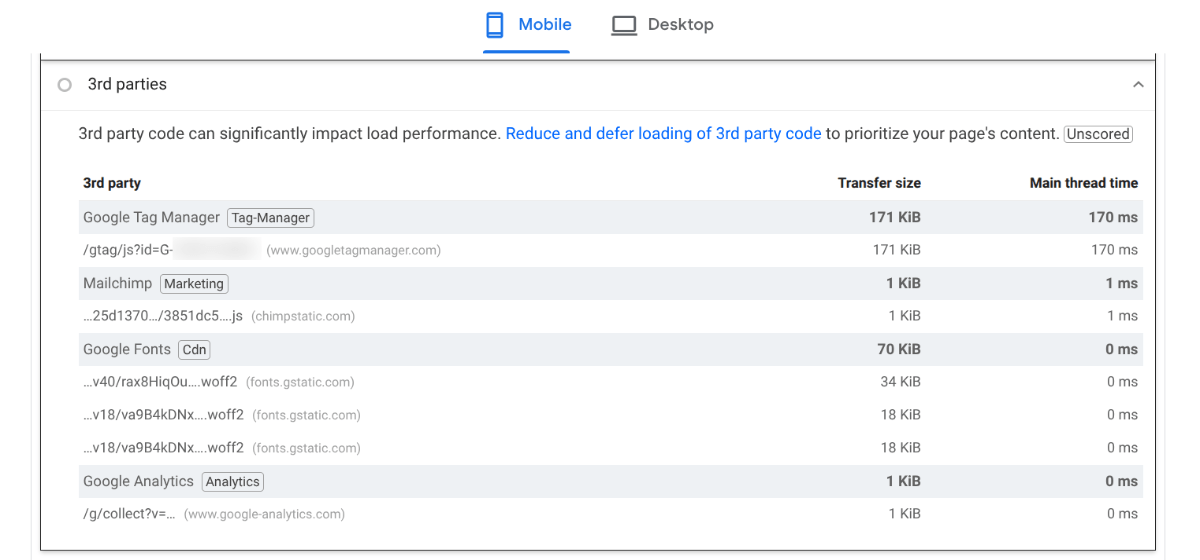
While there are other tools you can use to measure your loading speeds like GTmetrix and Pingdom, I prefer to use Google since that’s who is using my speeds to determine the website ranking.
I would suggest doing page speed audits every six months at least. This will allow you to stay on top of anything that might be making your site load slower than usual. I’d also recommend testing and optimizing the key pages along the primary user journey. That includes the homepage all the way through to your end conversion point.
Optimize Your Images
According to HTTP Archive, the median image sizes per page have more or less stayed the same the last six years, which is a good thing. However, the number of image HTTP requests has significantly fallen.
As a reminder, here’s what the data shows:
| 2020 | 2026 | |
|---|---|---|
| Image Requests | 28 | 17 |
| Image Bytes | 935.5 KB | 914.3 KB |
In other words, images aren’t as frequently used in 2026. But when they are, they’re much heavier than they were in 2020.
Here’s what you can do to optimize your images and lighten their load on your webpages:
Evaluate the images you have on each page. Do you really need all of them?
Stock imagery can be helpful at times when it directly supports the writing on the page. But when it doesn’t, it’s basically fluff.
Sure, it takes away all that scary white space and can make a page with very little content feel more substantial. But if it’s causing the page to load too slowly, that’s a problem. See how your page does without it.
Take a look at each image size. Is it too large for the space it’s in?
This is something that PageSpeed Insights can help with if you’re unsure. Basically, you want the maximum file size to line up with the maximum size you need for the page (i.e., wide-screen or desktop breakpoints).
You might even consider using different images for desktop on mobile so that you can get the sizes down much smaller on mobile.
Should you try a different file type?
If you’re using JPG and PNG mostly, there are more lightweight alternatives you can choose.
SVG is good for graphics, like your logo as well as illustrations. WebP, on the other hand, is a great replacement for photos.
The only problem with WebP is that not every browser or browser version accepts this file format. According to Can I use…, it’s 95.57% compatible with the web right now.
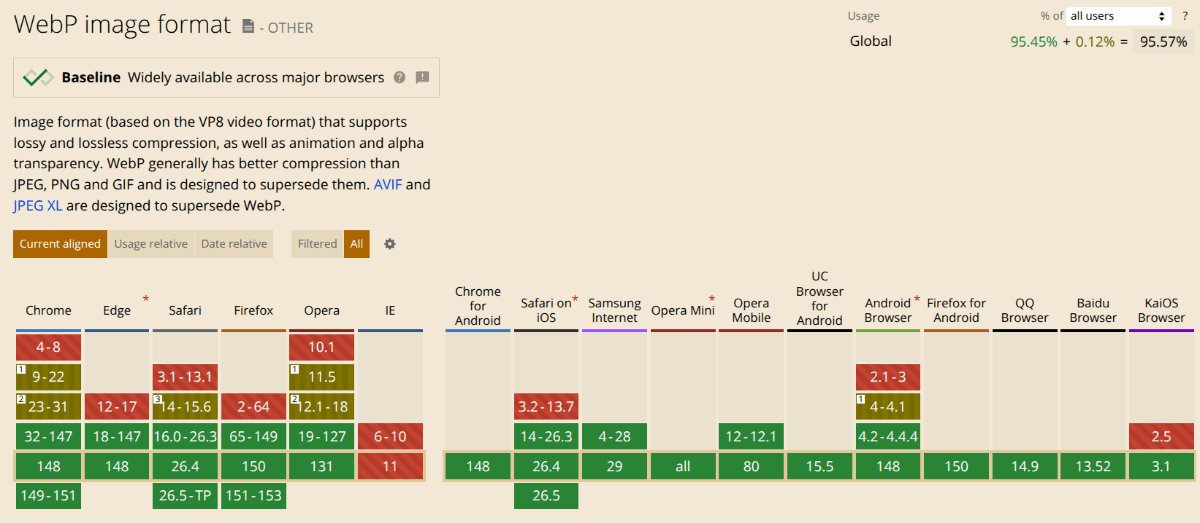
To date, Internet Explorer does not support WebP. All the other browsers have at least one version that does.
Are your images compressed as much as they can be (within reason)?
With WebP and SVG you don’t have to worry much about compression. For the other two image file types, though, you should compress your images before uploading them to your content management system.
JPGs typically use lossy compression. To get the file size down, you’re going to lose some data and, with it, some of the crispness of your image. So you’ll only want to use compressed JPGs for background images and others where there aren’t as many fine details.
PNGs typically use lossless. This preserves the quality of the graphic, but keeps the file sizes relatively on the larger size. So use compressed PNGs when you have very detailed graphics that are necessary to telling your story.
With a platform like Progress Sitefinity CMS, you can use webhooks to automatically handle image optimization with sites like kraken.io, which means you don’t have to ask your design team to do this manually.
Here are some other image optimization tips that can help with speed and SEO.
Use Videos Strategically
The video data from HTTP Archive was quite interesting:
| 2020 | 2026 | |
|---|---|---|
| Video Requests | 2 | 2 |
| Video Bytes | 1232.0 KB | 6524.7 KB |
Although the median number of videos included on a page remained the same from 2020 to 2026, the size more than quintupled. This change is likely due to webpages hosting lengthier videos.
Many years ago when I started out in this field, we were using video, but we kept them short. Oftentimes, they were 30-second explainer videos or intro reels. Nowadays, most marketing experts suggest you use 1- to 2-minute videos on your homepage. So, there’s definitely been a change in terms of what’s accepted.
Like images, videos have a lightweight alternative you can use called WebM. According to Can I use…, this file format has similar limitations as WebP does.
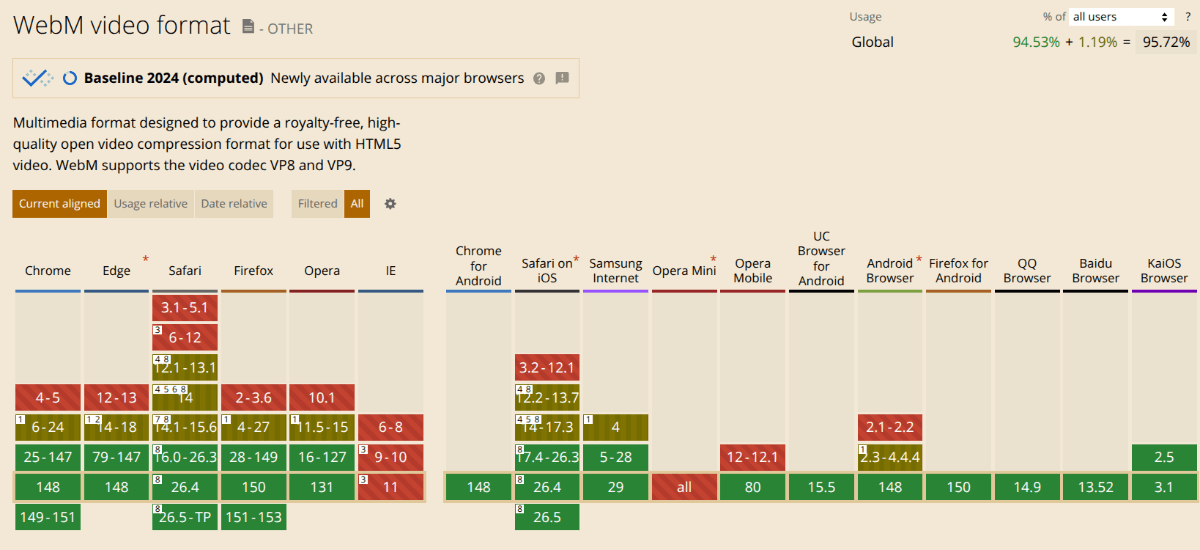
To date, Internet Explorer and Opera Mini do not support WebM. All the other browsers have at least one version that does.
So, let’s talk practical video optimization strategies outside of other file formats:
- For generic background video content, use something else (photo, color, texture, etc.).
- Limit each webpage to one or two videos (if possible).
- Host videos externally on YouTube or Vimeo.
- Use a static image alternative on mobile.
- Limit how much animation you use on any page that contains video.
If you’re not using WebM, resize your video for the space it’s going to occupy. Your video editor software will help you do this. You can also alter the resolution. If you need an external file resizer, something like Clideo works well.
Here are some other video optimization tips that can help with speed and SEO.
Enable Caching
Every time someone visits your website, their browser sends requests to your server for the files and assets that make up the page. According to HTTP Archive, the median number of HTTP requests a browser makes in 2026 is 72.
| 2020 | 2026 | |
|---|---|---|
| Total Requests | 71 | 72 |
| Total Weight | 1885.3 KB | 2682.9 KB |
The user’s browser needs everything that makes up the page—from all the code to your imagery and even fonts. Without caching enabled, this means your server has to deliver a sizable package to the browser each time.
On the other hand, caching allows a browser to store a local copy of the static assets from your webpages. This way, when a visitor returns, the browser doesn’t need to send all those requests to the server again and wait for them to come back. Instead, the static copy is retrieved from the browser and served up more quickly.
So long as you’re not updating your webpages all the time, those cached copies can be reused for a while.
Regardless of which content management system you use, you should be able to turn on server-side caching via your web host or CMS.
To enable browser caching, you can use a Cache-Control header. In this header, you’ll enter as many directives as needed to tell browsers how to manage your HTTP requests and content.
For example, you can use:
No-cacheto force the server to check for updated content before serving up the cacheMax-ageto limit how long it holds onto a cached pagePublicto reuse cached content on multiple browsers
Mozilla has a helpful resource you can use to craft your Cache-Control header policy.
In addition to server and browser caching, a CDN can also help to cache your content. (Progress Sitefinity Cloud supports CDN caching out of the box.) In addition, a CDN will bring your website physically closer to visitors all around the world, which will also help improve your loading times.
Reduce HTTP Server Requests
Now, caching can be incredibly helpful in reducing the time it takes to transmit a page from your server to each visitor’s browser. But caching can’t always be implemented, especially if you perform regular updates or include personalized content on your pages.
To keep your pages optimized for speed regardless, there are other ways to reduce the number of roundtrips from your server to the browser.
Here are some ways to lower the number of HTTP requests your server has to process:
- Remove unnecessary icons and SVGs.
- Combine CSS files.
- Combine JavaScript files.
- Enable Gzip or Brotli compression.
- Do away with any third-party scripts you don’t need.
Another thing you can do is clean up your code. While this won’t reduce the number of HTTP requests or files, it will shrink down the file sizes.
Here are some ways to do this:
- Review your code for errors and clean them up, especially if you’re vibe coding.
- Remove redundant code.
- Minify your code by stripping out unnecessary spaces, line breaks, characters or notes.
- Enable asynchronous loading using “async” or “defer” to keep critical scripts from being blocked from rendering upon load.
One other thing that will help browsers load your website is to fix all error codes and to limit how many redirects (301 and 302) there are. While redirects and 404 errors might not take too long to process, they can add an extra second or two onto the time it already takes the page to load. What’s more, they often take users to a destination they hadn’t intended on going to.
To improve the user experience and your page loading speeds, resolve page redirects as soon as you can. And monitor your site regularly for errors. Google Search Console can help with both, by the way.
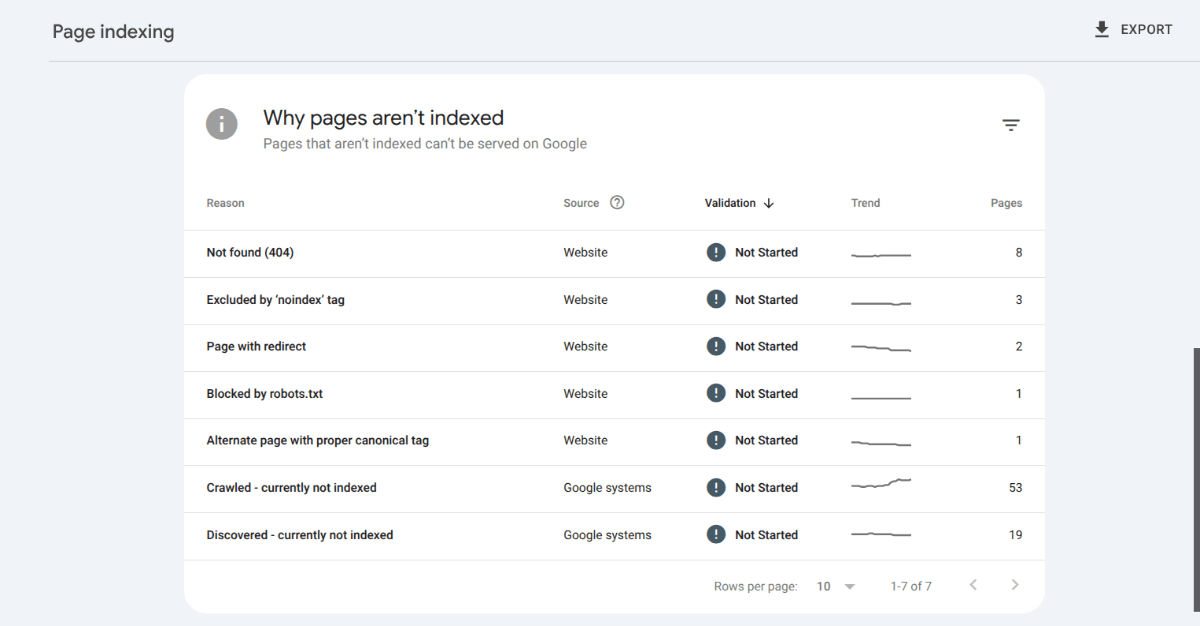
Go to Indexing > Pages and scroll down to the bottom. You’ll find pages that are “Not found (404)” as well as “Pages with redirect” here. Screaming Frog is also a useful tool for auditing your links.
5 Website Speed Optimization Takeaways
We’ve long been told by Google that webpages that take more than three seconds to load are losing visitors—and the losses are incremental with each passing second.
If you’re looking for a relatively fast and easy way to improve your webpage rankings and the user experience, include these page speed optimizations in your web design and development process. Then every three to six months, audit your site speed and continue optimizing.
Now that your pages are optimized for speed, you can focus on optimizing the content. Here are some resources:
Enjoyed this article?
Add Progress as a preferred source to see more of our content in Google search.
Add Progress as a preferred source on Google
Suzanne Scacca
Freelance Writer & Consultant