Web Design Best Practices for the Hero Section

The hero section has a number of roles to play: engagement, education, motivation. These best practices can help make a strong impression above the fold.
People can be so quick to write off brands these days. All it takes is a split-second decision about how the brand doesn’t meet their needs or is misaligned with their values before they’re onto the next.
With search engines sending less traffic to websites thanks to AI, paid links and all the other stuff added to search results pages, it’s absolutely critical that people who visit your site are instantly impressed by it. So, the first impression has to really be on point. In this post, we’re going to talk about the hero section and best practices for designing an effective one.
Best Practices for Designing Your Hero Section
Your homepage’s above-the-fold content has a big job to do. Make this first impression count by following these best practices:
Include Only As Many Elements As You Need
Treat your hero section like a minimum viable product. Take a look at that blank canvas and ask yourself:
“What do I need to do to tell an effective story here?”
This isn’t so much about copywriting (as that’s not your job) as it is about knowing how to present the content you have in the most impactful way.
Start with the background. Can visuals alone tell the story you want to share about your brand? Many times what we see is an image, slider or video in the background, only for it to be covered by text. There’s nothing wrong with that approach. But it’s not the right one for every brand.
Case in point, here’s the hero section for the Compass Hotel:
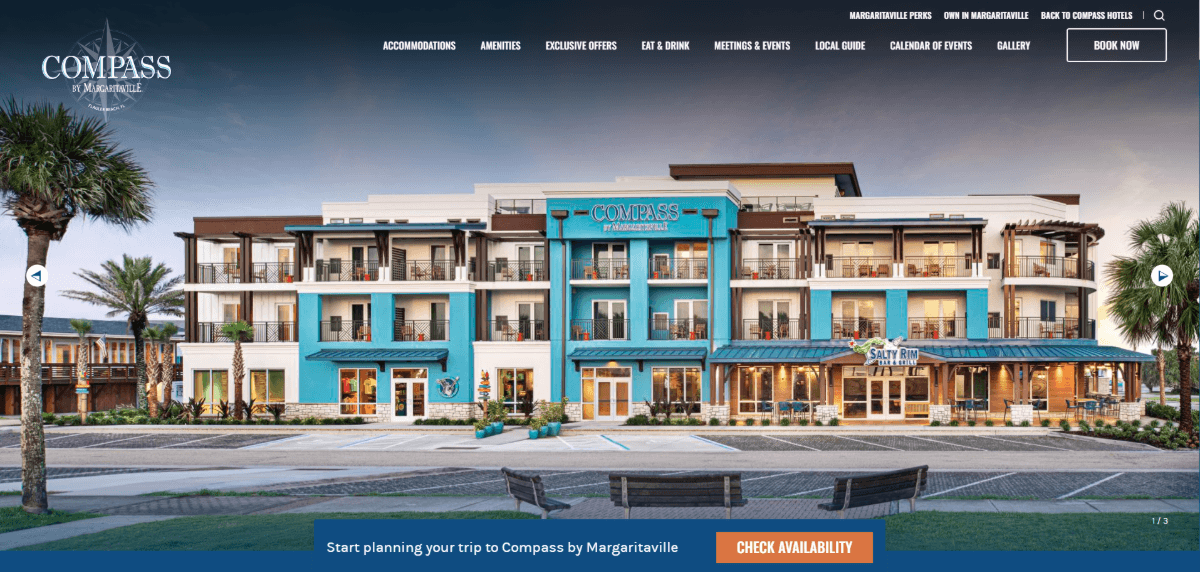
The majority of the content above the fold is this image slider. It even reaches up beneath the header. The first photo shows the full exterior of the hotel, the second is a hotel room, and the third has a photo of a delicious-looking breakfast.
For some brands, visual storytelling is all that’s needed in the hero section. The designer for the Compass Hotel website determined that a little extra text was needed though. Rather than compromise the hotel graphics, they put it in a small blue bar just above the fold—a short invitation to plan a trip and a hard-to-miss “Check Availability” button.
Other brands may need additional content in this section besides an image, a small snippet of text and a button. Trinity College Jacksonville, for instance, has a heading, description line and button over its video hero section:
This is usually the maximum I would suggest for this section, though there are always exceptions to the rule. Like I said, design this section as an MVP. Start small and simple. Then add layers to it as needed. You may find you don’t need as much as you thought you would to tell an effective story.
Use Hierarchy to Control the User Gaze
There are different ways to establish hierarchy in the hero section.
For starters, the order in which you place your layers can influence the order in which they’re read. That said, if you make certain text layers larger than others, users’ eyes may be drawn to them first before any text that appears before them.
Here’s an example from the Florida Aquarium of how to use typographic hierarchy to control what users read first:
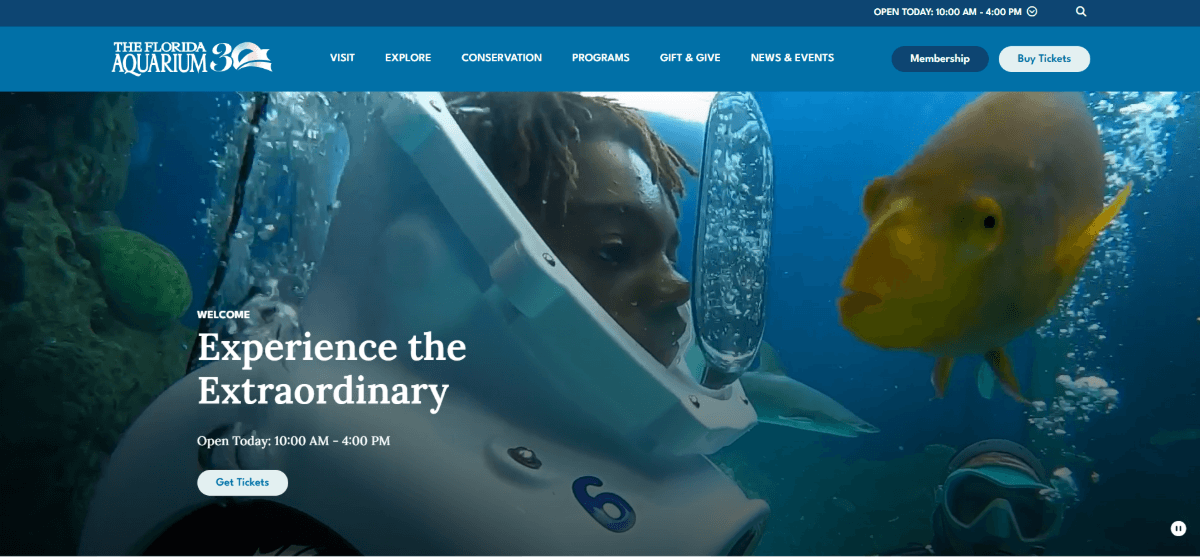
I took a screenshot of this video hero section so we could focus on the text. Which of the three text lines did you read first when you looked at it? It probably wasn’t “Welcome,” despite appearing first. And that’s OK. Visitors aren’t going to miss out on anything if they don’t notice that word before “Experience the Extraordinary.”
When sizing the text in your hero section, the most important lines should be most prominent size-wise.
Another way to establish hierarchy is through color.
Take, for instance, this typographic hero section for Duogeeks:
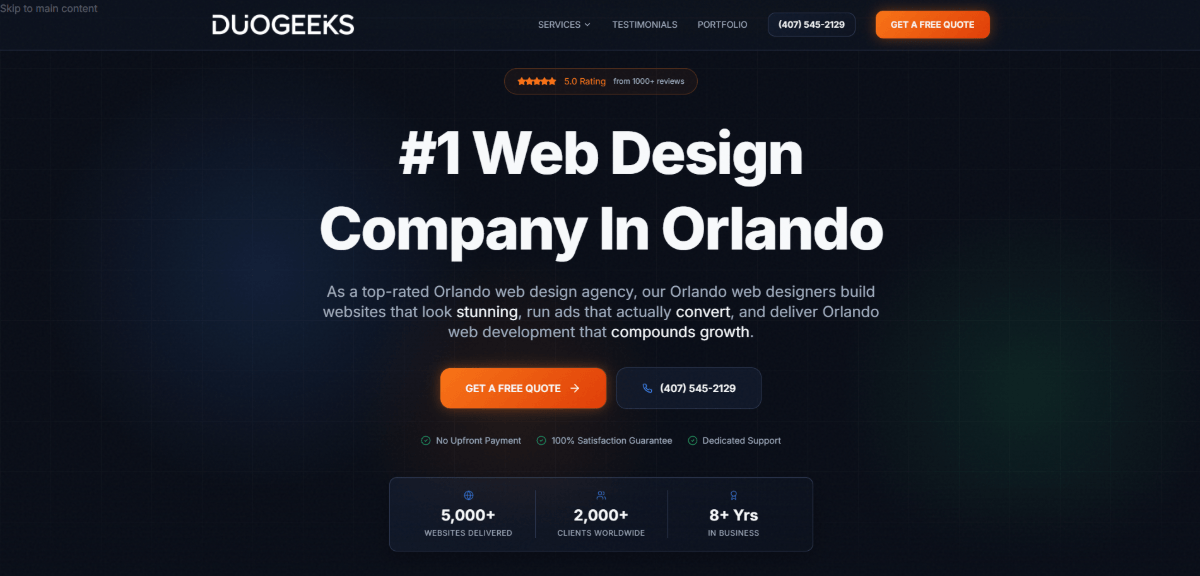
There’s a lot of content in this section. In addition to the headline, description and button, there’s a second button and numerous trust marks around the main content. Yet, it works because of the hierarchical design.
The heading is in a white font and stands larger and brighter than all the other text on the page. There’s also an orange gradient button a few lines below it. It stands out in stark contrast to all the other white-ish text layers surrounding it.
Size, color and contrast have enabled this designer to create an effective hero section hierarchy despite how much info is in there.
Use Motion in a Meaningful Way
To keep your homepage hero section loading quickly, you might be reluctant to add any motion to it. The thing is, movement captures attention. And if your goal is to engage visitors as soon as they enter your site, motion can be very helpful in this regard.
To make it worth your while, add motion that lends itself to your overall message and call-to-action.
Take Snowcat Ridge, an alpine snow park located in Florida. This is part of the video that appears in the hero section:
As you can imagine, it’s a big deal for Floridians to have a place where they can play in the snow. While a simple photo of the sledding or ice skating rink might be intriguing, this video is much more immersive. It’s a pretty long video for the hero section, but it does an excellent job showing off the different parts of the park and how much fun it is for people of all ages.
There’s a lot going on in the video and it’s likely the first thing visitors notice. Once their interest is piqued, the animated Lift Ticket button in the bottom-right corner will take them to the next logical step.
I’d usually say pick one element and add motion to it, then leave the rest alone. But for this fun and lively activity, I think it works.
Coral Castle is another activity that Florida visitors can do. This one, however, has an aura of mystery and some mysticism around it.
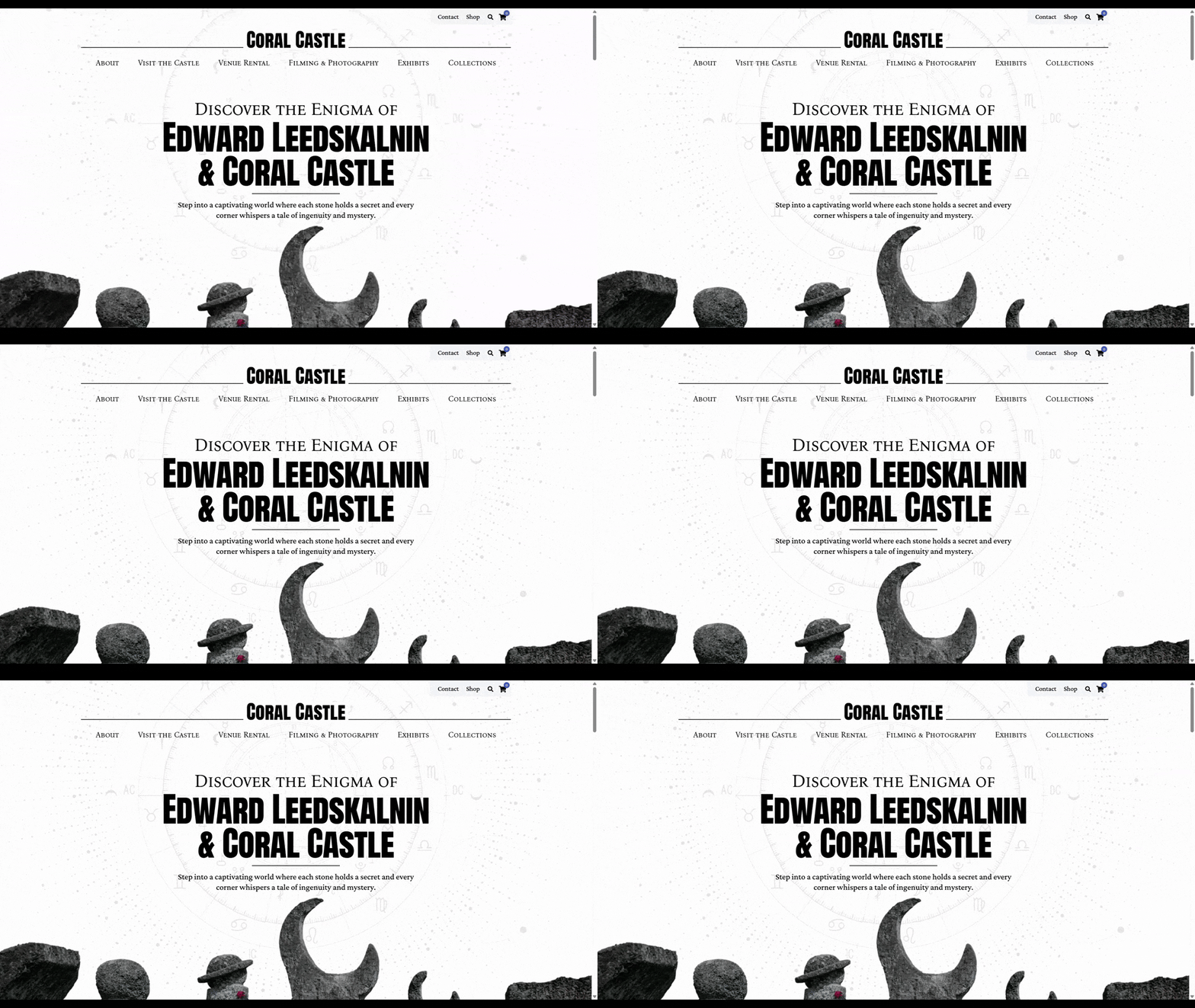
As such, the motion added to this hero section is very subtle but plays into the strange story and conspiracies surrounding the modern stone structure.
The animation lends to the atmosphere of this website and story. While it’s not a necessary component, I think it’s very on-brand and does a good job of setting the mood.
Another way to incorporate motion is to make it scroll-triggered. That way, the movement comes as a delightful surprise and holds the visitors’ interest as they move beyond the fold.
Here’s an example from Outsmart Labs:
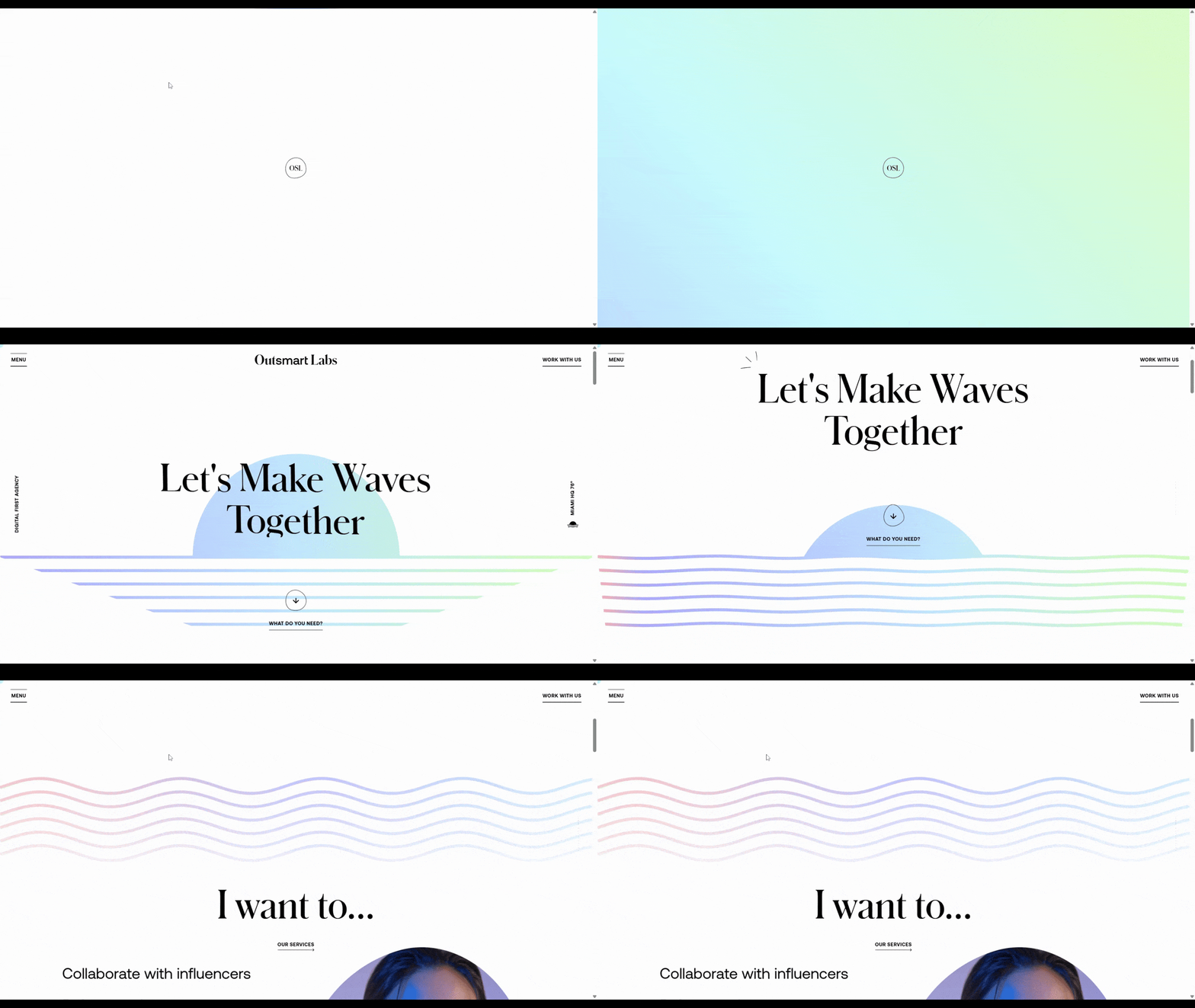
Upon opening the page, the hero section and “Let’s Make Waves Together” headline appear to be static. However, as the user scrolls, the headline and button move up out of view. The gradient-colored lines go from straight to wavy and move up to reveal more content.
This design may not be as initially eye-catching as some of the video backgrounds or animations we’ve looked at already. But syncing the page animation to the users’ scrolling is sure to keep them captivated past the first impression. If you have a strong and clear enough message, this is an approach that might be worth exploring.
Adapt the Layout for Mobile
Making a hero section responsive and making it mobile-adaptive can be two very different things.
In some cases, you might be able to resize your content to fit a tablet or mobile screen. But will that always lead to the optimal user experience?
This is something you’ll have to decide based on the design you’ve come up with on desktop (if you’re not designing in a mobile-first way). For now, let me show you some examples of brands that have created different adaptations of the hero section design for desktop and mobile.
The first is Premium Outlets. Here we see a screenshot of the video hero section:
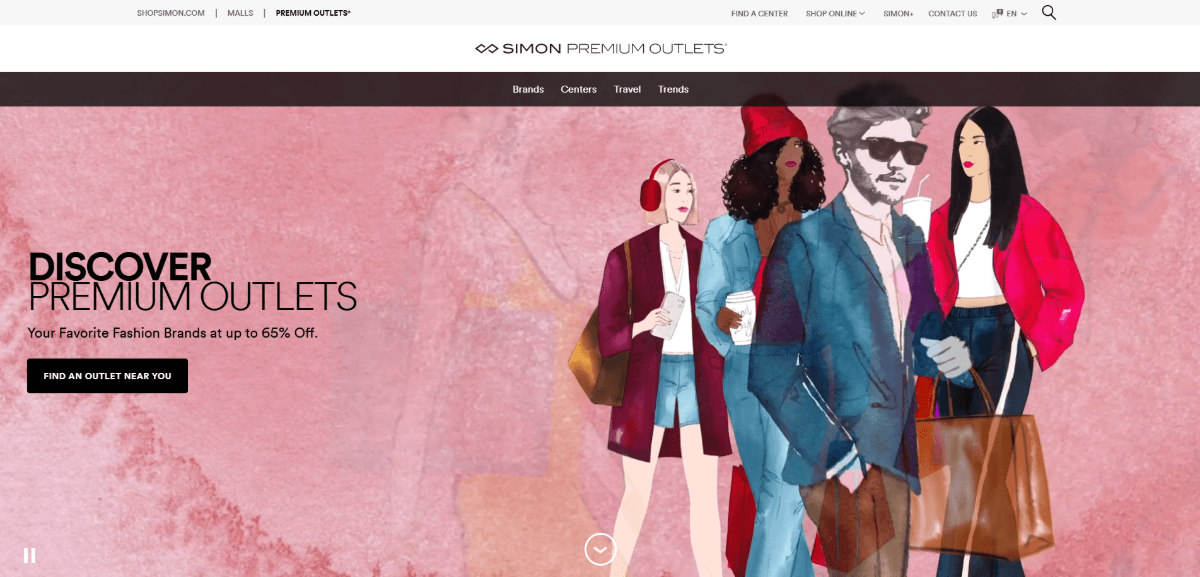
Illustrations of different shoppers move in and out of view while the text on the left stays put. It’s a neat design and stands out from other retailer websites a local shopper might encounter.
If you visit the desktop site, you’ll realize that this illustrated video can’t be resized for a mobile screen along with the text. Right now, the text is off to the side, not interfering with the video content. If the designer had simply shrunk everything down, they would have had to layer the text over the video, which wouldn’t look great.
That’s why the designer’s decision to separate the two components on mobile is a good one. Here’s how it looks:
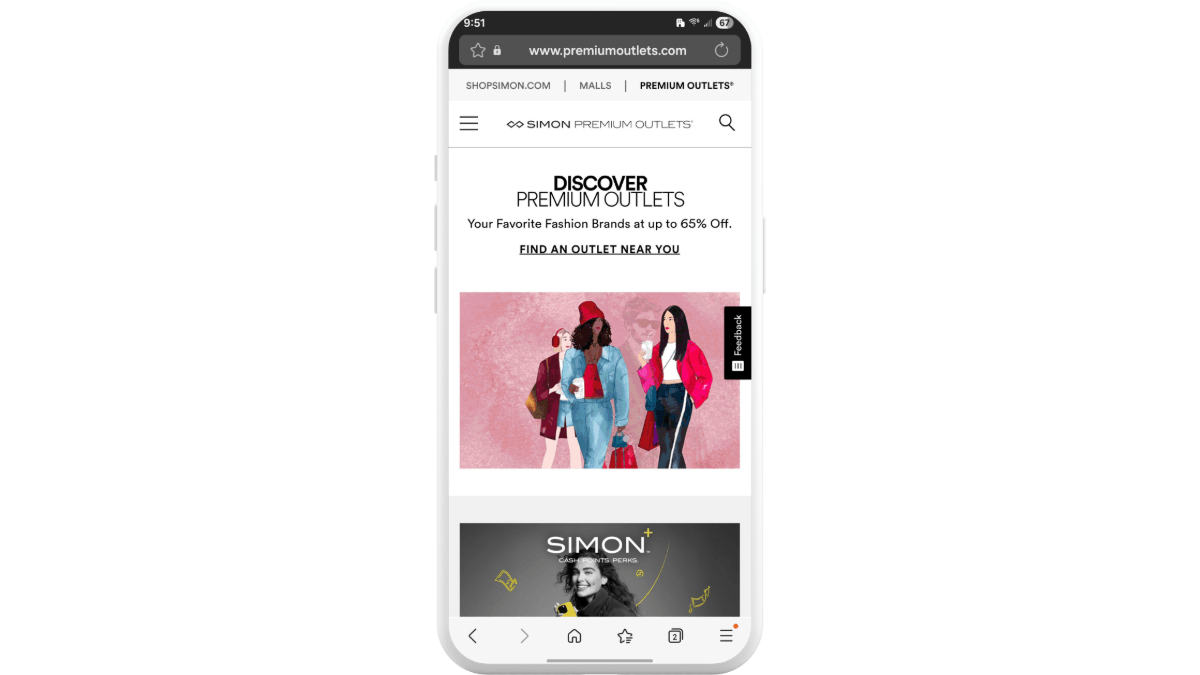
The top area is an all-white section where the heading, description and now text link live. Beneath it in a section all its own is the illustrated video. Both are still simultaneously visible. They’re just not sharing a horizontal container any longer.
Some desktop hero section designs can easily be molded to smaller screens. However, what you might want to do is add different elements that complement the mobile user experience.
Oxygen Tattoos is a good example of how this might play out.
On the desktop version of the site, we see a static hero section. There’s a heading, description and two buttons.
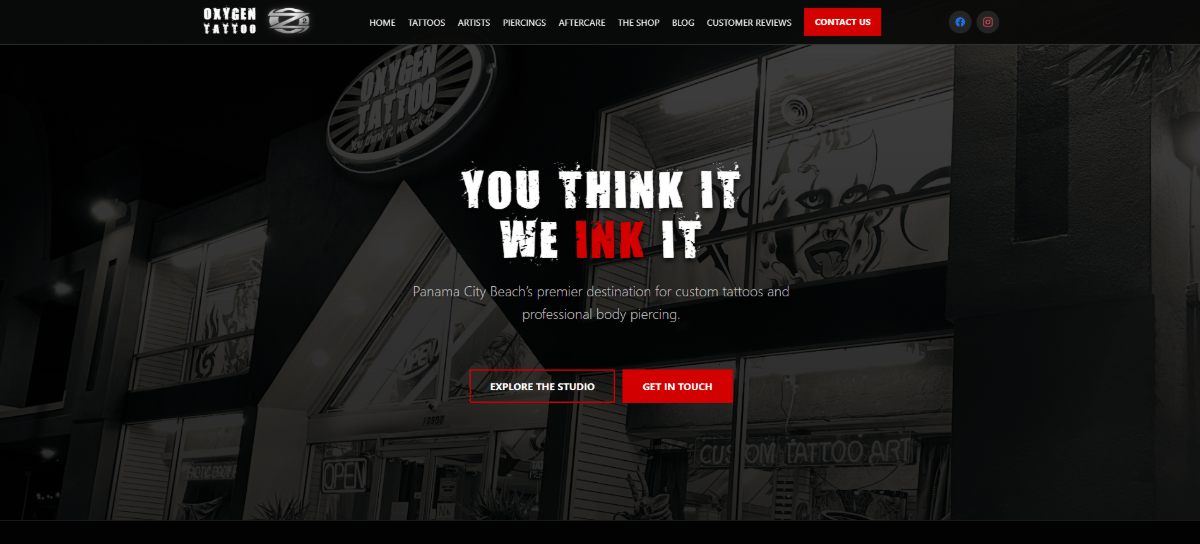
This design looks great. There’s a photo of the tattoo shop in the background with a dark overlay. The headline font looks gritty and the red “Ink” makes the text pop.
On mobile, all of these elements remain. The difference is that extra elements have been added to the page. Namely, a sticky bar at the bottom.
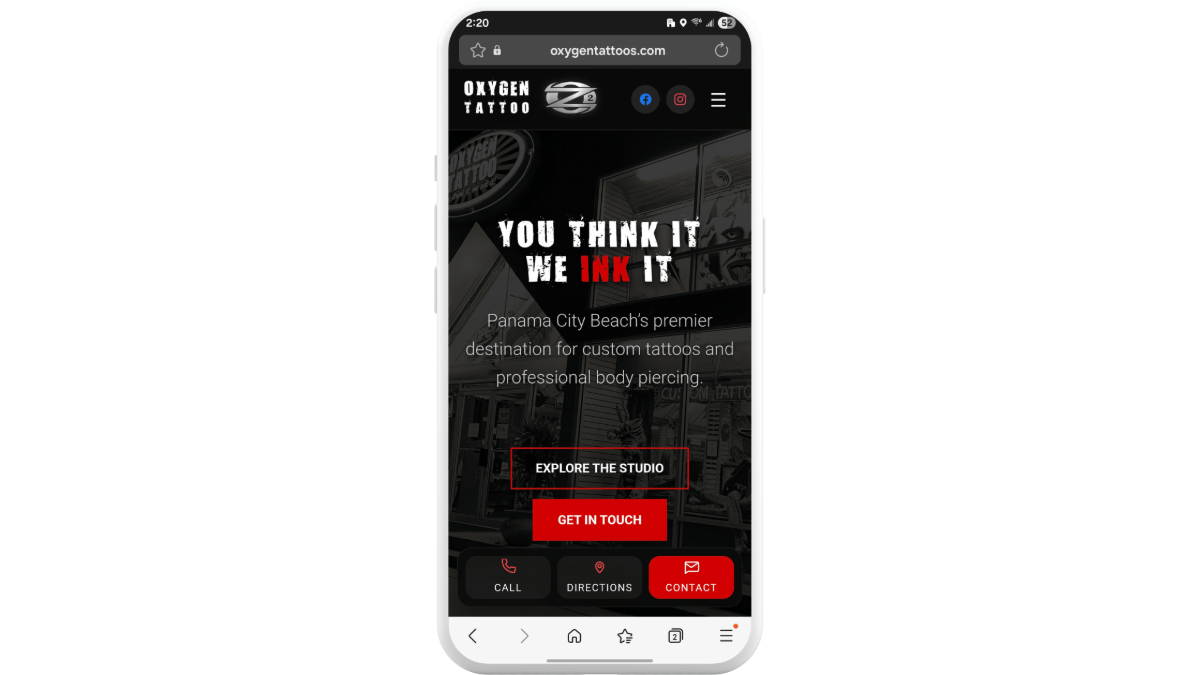
This bar contains three buttons:
- Call – which is a click-to-call button
- Directions – which opens the user’s maps app
- Contact – which goes to the Contact page and form
Mobile users may use the web in different ways than desktop users, especially when looking for local businesses. So, adding this bottom contact bar is a nice touch. It gives users a quick path to conversion, however they prefer to do so.
My one gripe is that the red “Get in Touch” button in the hero section clashes with “Contact,” which performs the same action. If this were my website, I’d remove the “Get in Touch” call-to-action from the mobile hero section and just let the sticky bar handle that job for me. Otherwise, this is the perfect example of how you can adapt a design to the mobile experience.
Wrapping Up
Much like how a shopper might step foot inside a store, not see what they like and back out, visitors will do the same if they’re unimpressed with a website. This is why it’s so crucial that you design your hero section to make the strongest first impression.
You can accomplish this by adding only the most important details to the section, using hierarchy to guide users’ attention, adding motion when it matters and adapting the experience for mobile.
If you can pique your visitors’ interest within a few seconds, you’ll keep your bounce rate low and inspire visitors to stick around awhile and take the next step toward conversion.
Enjoyed this article?
Add Progress as a preferred source to see more of our content in Google search.
Add Progress as a preferred source on Google
Suzanne Scacca
Freelance Writer & Consultant

