How to Get More Local Traffic & Leads to Your Website

Whether you’re building a website for a big brand with physical locations all over the place or a local brand operating in a specific geographic location, there are certain things you can do to bring more leads to your site. This post explores four of these design and content strategies.
We know that there are tons of external platforms that brands can use to direct local consumers to their business’s website, like Google Business, Yelp and Facebook. But can a website alone attract target users within a specific geographic area?
It’s all about sending the right signals. Just as you can optimize an ecommerce site that sells shoes to attract shoppers needing new loafers or work boots, you can do the same for any kind of business targeting a specific city or region.
In this post, we’ll look at four things web designers and developers can do to help strengthen this signal for brands that operate on a local level.
4 Website Strategies to Increase Local Traffic & Leads
It’s expensive to run a brick-and-mortar location. In addition to all the costs of running an online business, you also have to deal with the overhead of running a physical enterprise, like rent, utilities, zoning fees, staff and more.
So, while you could rely on foot traffic and word of mouth to bring business through your doors, it would be more financially prudent to let a website do some of the work for you as well.
Whether you’re building a website for a big brand with locations all over the place or for a company with a smaller geographical footprint, you need to set your site up for success. Let’s look at what you can do to get local consumers to your website and to turn them into leads (if not customers).
1. Incorporate Local Info into the Website Header
Which elements you add to the header will depend on your brand. For instance, a big brand like Home Depot can’t do a ton in the way of localizing the header content since it’s an international company.
However, it would be beneficial to add an area for customers to look up locations and set their “home” store. Home Depot has a spot for this in the top-left corner just next to the logo.
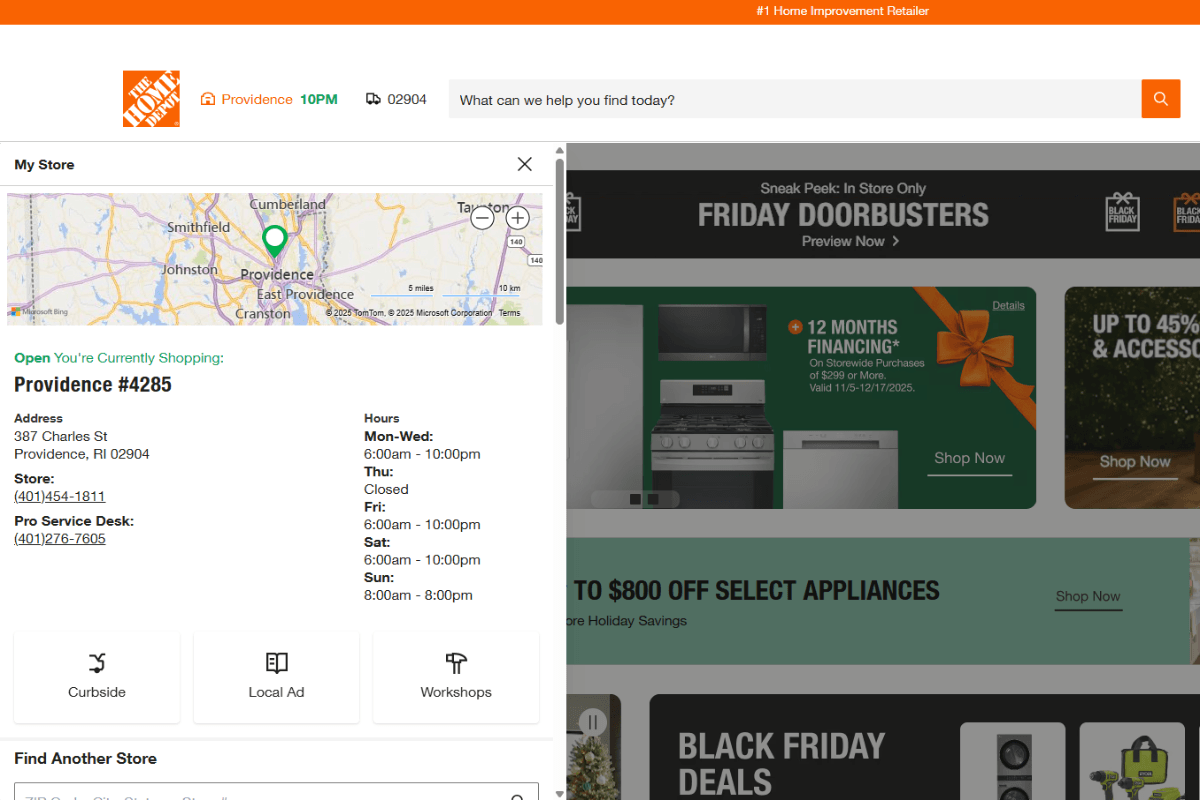
Shoppers have the option of setting a home store in this localized widget space. When they do, this part of the header tells them the city or town where the store is located, the time the store closes and the ZIP code.
If they want more information or to change their home store, they can click on the widget. This opens a full-length panel that shows:
- Map location
- Address
- Phone numbers
- Operating hours
- Links to curbside pickup, local ads and workshops
- Search bar to choose another store
For customers who prefer to do their browsing online and buying in store, or who want to buy online and pick up at the store, this is a very useful component for a website’s header to have.
For businesses with a smaller geographical footprint, the header will incorporate different kinds of localized information. For example, this is the website for a local law firm called Farah & Farah:
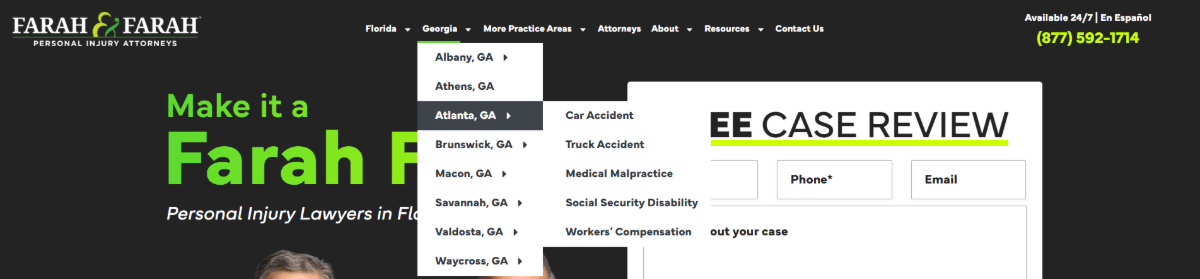
The firm provides legal services in both Florida and Georgia. There are navigation links not only for both states, but the individual cities they serve. What’s more, there are pages associated with each city for the legal services available.
This type of navigation layout and organization is really helpful for businesses that operate within a region as opposed to internationally or even nationally. There are two big benefits to doing it this way. First, these location-specific pages are great for SEO. Second, they allow your business to give customers the exact info they need about what’s available locally instead of generally, which can cut down on customer questions and confusion.
There are other things brands can add to their headers, like a local phone number and email address. Though this is best reserved for brands that operate on a hyper-local level (i.e., independent businesses with one or two locations).
2. Create Detailed Location-specific Pages/Sections
All that information in your header needs to point your visitors on where to go next. What you need to decide is how many location-specific pages you’re going to create.
For example, this is the Topgolf landing page for Jacksonville:
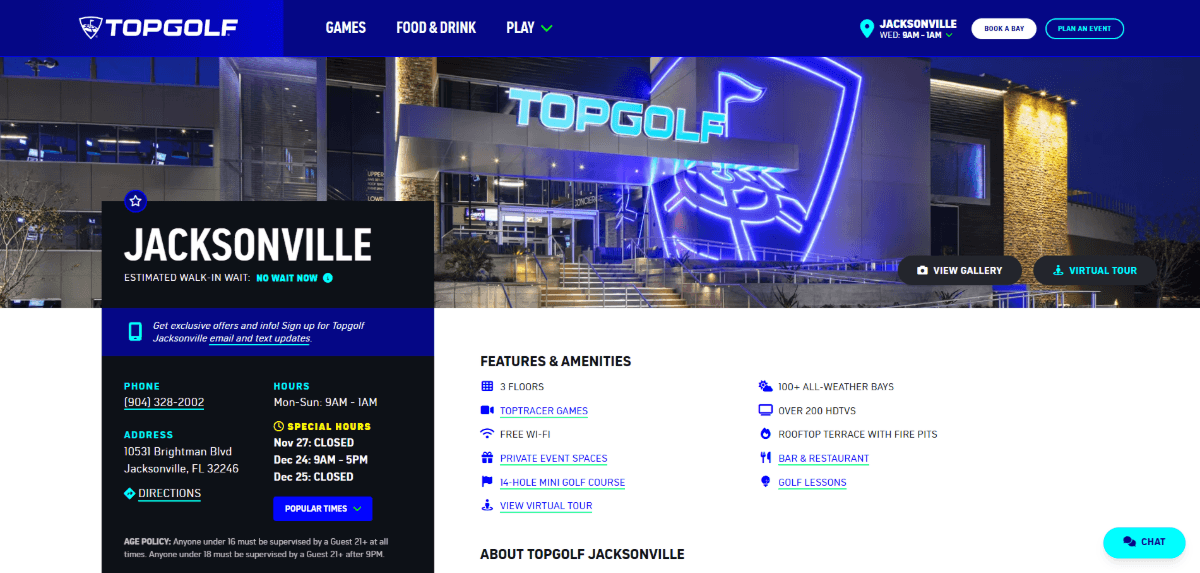
The page includes a high-level summary about the location:
- Phone
- Address & Directions
- Hours & Special Hours
- Popular Times
- Features & Amenities
- Pricing Per Bay
- Promotions
In addition, website visitors can dig even deeper into things like available games, private event spaces, booking golf lessons and the virtual tour. When these links are clicked, visitors arrive at other localized pages on the website.
The Mayo Clinic is another example of a brand that has various locations. How they’ve handled the organization of their local info is quite different from Topgolf.
Here is what the Mayo Clinic in Florida section of the website looks like:
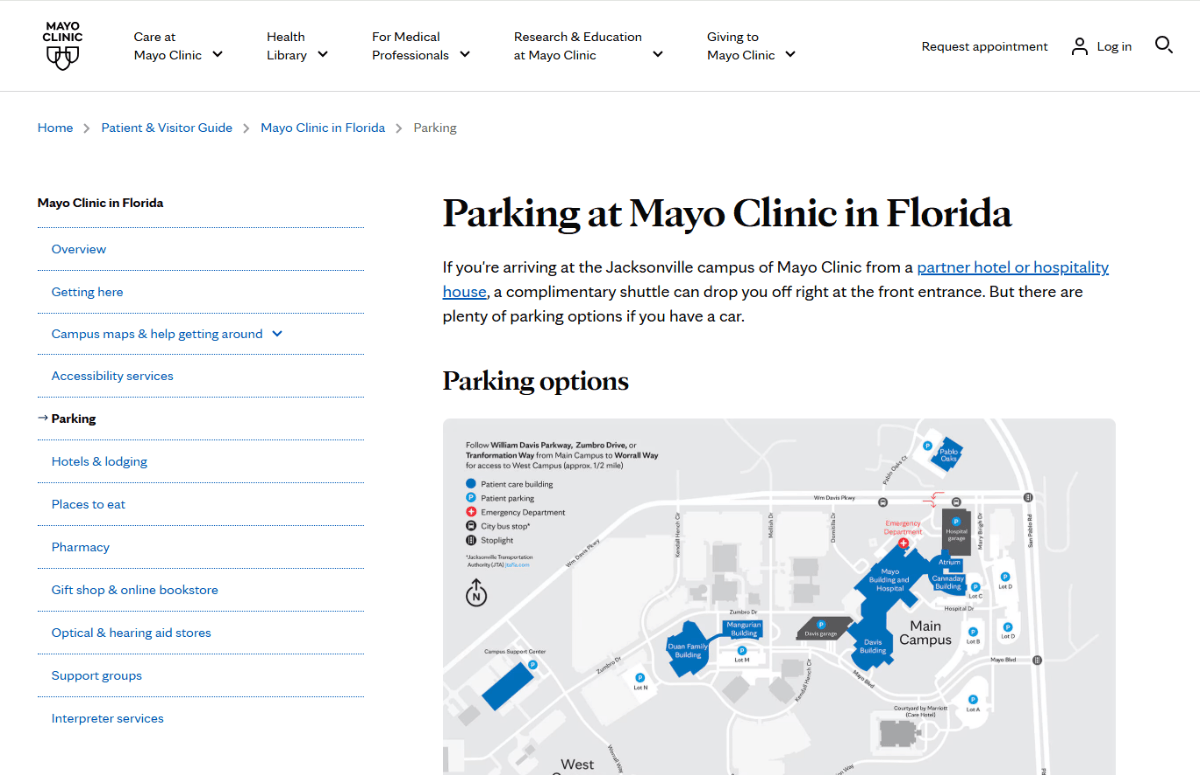
Instead of embedding internal links into the page that direct visitors to more info (if they want it), the Mayo Clinic lays it all out in an easy-to-follow navigation sidebar on the left.
Clicking on the links takes visitors to new pages. However, they won’t necessarily feel that way as the interface stays the same while they’re looking at Florida campus information. The sidebar navigation stays put on the left and the relevant information fills the right side of the screen. It’s like visiting a separate subsite while still being under the Mayo Clinic brand.
Some local business locations might not have this much detail or need as many pages. As a general rule of thumb, if you’re going to copy-and-paste information across all pages for each location, then you probably don’t need them. Nor should you create them as it could be harmful to SEO since Google penalizes duplicate content.
3. Use Local Imagery When It Makes Sense To
Playing into one’s local roots can be really beneficial in your marketing. This shows customers that you’re not just doing business to enrich yourself, but to enrich the community you come from.
Your website imagery is a great opportunity to drive this point home. There are different ways to incorporate local imagery, too. For example, you could include:
- Photos of the local skyline
- Drone footage of your business and the surrounding area
- Pictures of recognizable landmarks, art or architecture
- Storefront imagery
- Photos of your team at local events
Margaritavilla is a chain of hotels and resorts all over the U.S., Caribbean and Central America. The site for the Jacksonville hotel is chock full of location-specific photos. But it goes beyond just showing the hotel’s facade, rooms and amenities.
This is the Destination Guide page for Jacksonville. At the top is a photo of the hotel set against Jacksonville Beach. Below it, though, is the section you see here:
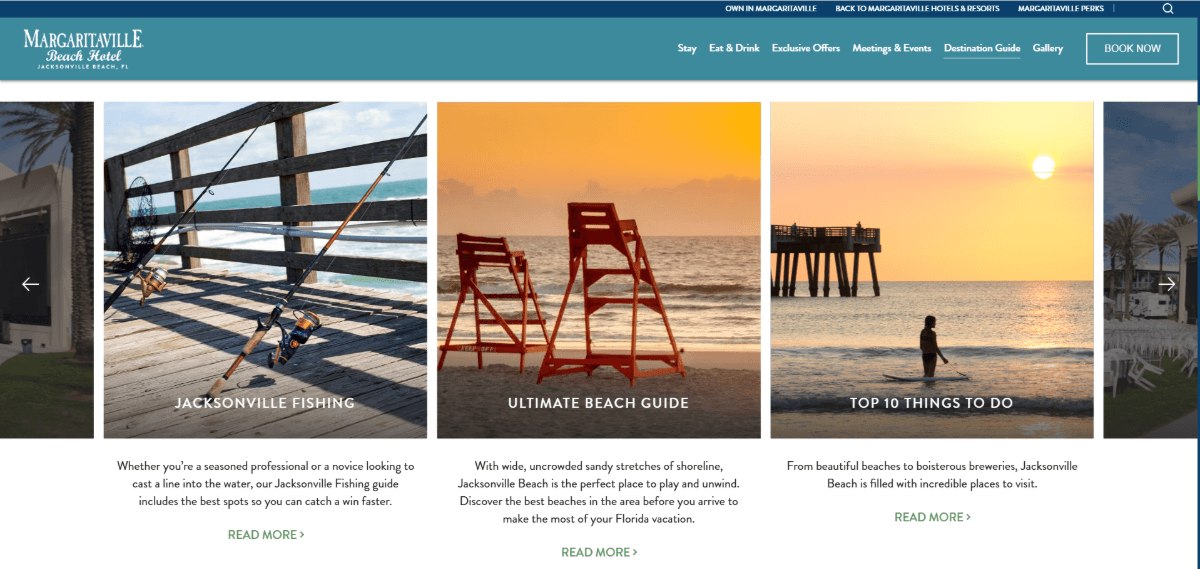
These are summaries of and links to different destination guides. I can attest to the authenticity of these photos.
The first one for Jacksonville Fishing was taken on the pier, which is about a block away from the hotel. The second one shows our highly recognizable lifeguard chairs (which feature in Jacksonville Beach’s branding). The third one with the top things to do shows the pier from another angle (about two blocks away).
I think visitors will appreciate that the designers didn’t just use generic photos of a beach or someone fishing. Instead, they’re getting the real deal. That way, when they do walk the 30 feet from the hotel to the sand, they’re experiencing exactly what they saw in the photos.
Now, this next example is a really interesting one. This is for a store called Fig & Willow.
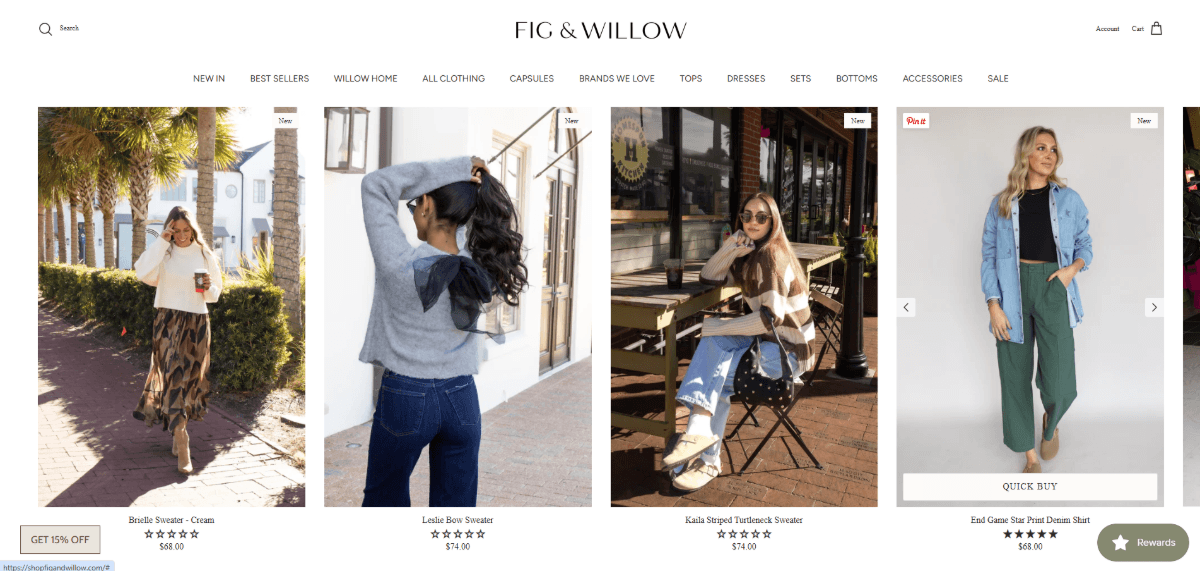
Customers can shop online or they can visit one of the two locations in Jacksonville. Here’s why I love this example:
For online shoppers, the company’s product photos look cute and realistic, beautifully shot outdoors. It gives the brand a unique look.
For eagle-eyed customers located in Jacksonville, they’re going to recognize the backdrops of many of these photos. For example, the first and third photos are taken at the Atlantic Beach town center. The first is the strip of Atlantic Blvd. where many popular restaurants are located. The third is taken in front of Homespun Kitchen, a popular restaurant in that same area.
So, think of this example like Easter eggs. While many customers might not notice the locally taken photography, the locals who shop from this brand will.
By the way, the examples I’ve just shown you are for brands with a smaller geographical footprint. However, if you scroll up to the Topgolf example, the hero image at the top is of the actual location in Jacksonville. The Mayo Clinic also has a photo of the Jacksonville campus, it’s just on a different page than the one I screenshotted.
So, it is possible to integrate local imagery into bigger brand websites. They just have to stay relegated to location-specific pages.
4. Use Localized Keywords in Strategic Spots
Ultimately, the goal in using locale-specific keywords is so that your website shows up in “near me” searches like this one:
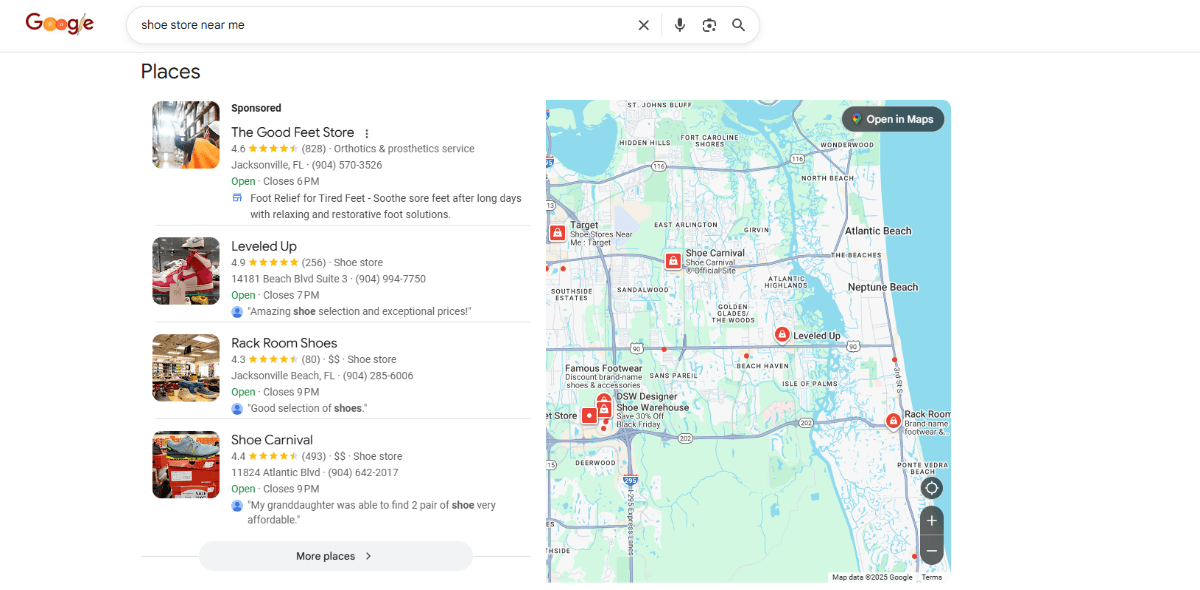
If a user is logged into their search engine, be it Google or otherwise, the results should reflect businesses in or near their location. For instance, I live in Jacksonville, FL. That’s why the search above for “shoe store near me” shows results on a map of Jacksonville.
So, how do we make this happen using our websites?
There are many ways to add locale-specific keywording to your website that will reinforce this SEO signal. Scrolling down the search results page gives us some insight into one of the ways to do this:
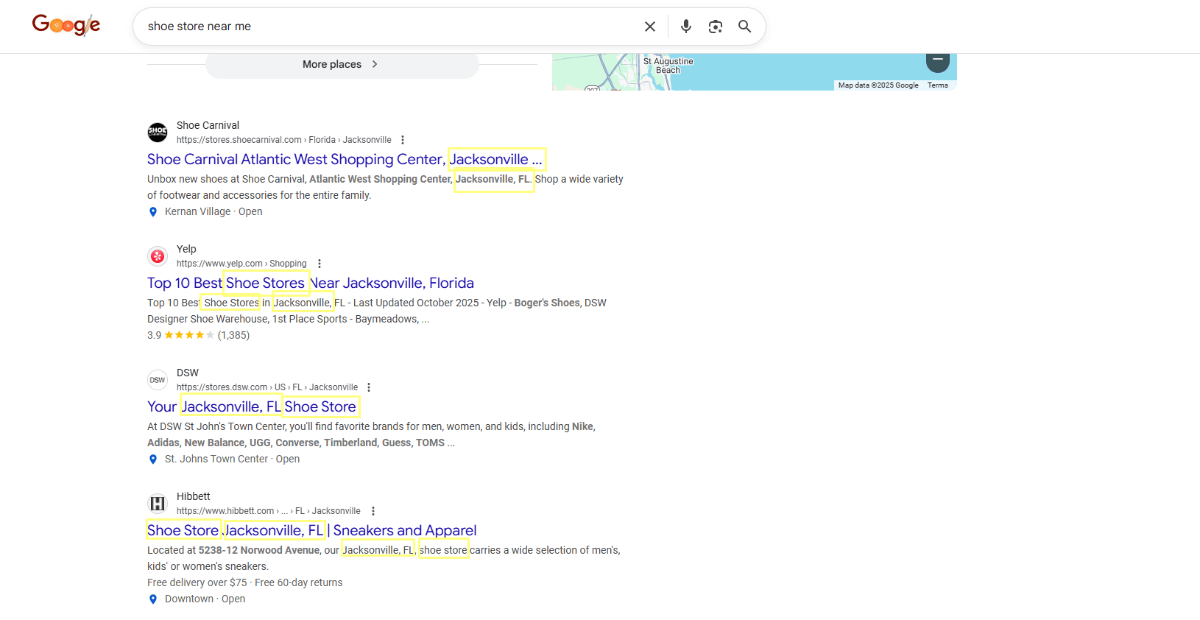
In the above screenshot, I’ve highlighted the words “shoe store,” “shoe stores,” “Jacksonville” and “Jacksonville, FL” in the top four organic results. I could’ve gone further and highlighted location addresses (like “St. John’s Town Center") that also let search engines know where these stores are located. But you get the point.
The trouble is, Google doesn’t always use the meta (SEO) titles and descriptions we write for our pages. So, if we can’t rely on our metadata to be picked up, what other ways can we talk to the search engines?
Structured data is another tool that allows us to send specific details to search engines. For businesses operating a brick-and-mortar location, adding location schema markup to all relevant pages is a must.
Beyond backend coding and metadata, you can also localize your website content. Let’s use Neligan Construction as an example for this one.
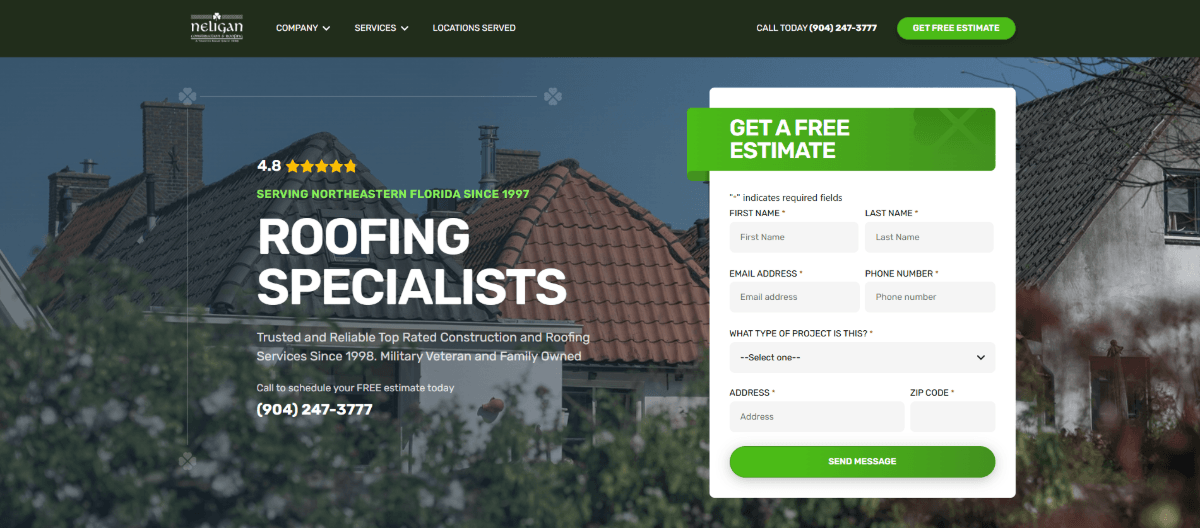
From top to bottom, this homepage is well-optimized for local SEO:
- Header: Click-to-call phone number with local area code
- Navigation: Top-level link to “Locations Served”
- H5 Tagline: “Serving Northeast Florida Since 1997”
- Hero Section: Click-to-call phone number appears again
- Paragraph Text: Numerous mentions of “Jacksonville”
- Localized Section: “We service the following counties” list
- Location Addresses: Full addresses for Jacksonville and St. Augustine
- Footer: Individual page links to each location served
There are a few things they’re missing. Otherwise, this page is really well done.
The first is to include the location name in either the H1 or the first H2. This tells search engines (and also visitors) that this is where the business operates.
Secondly, they need more instances of “Jacksonville” + “roofing” on the page. It’s great that they include the location wording frequently, but it would send a stronger signal with their business/industry directly associated with the city name.
Lastly, I didn’t see any localized alt text. Typically, the first image on a page holds the most weight (just as the first link on the page does). So, when possible, adding the location to the alt text would also help strengthen your page’s local search signal.
For example, for the hero image you see above, I might’ve attached the following alt text to it:
“Bird’s-eye view of a beautiful stucco roof done by Jacksonville’s top roofing specialists: Neligan Construction”
While we often equate alt text with getting our images to rank higher in search results, it can be just as useful for helping us tell a story about our business. In other words, it creates a more holistic picture about who we are and where we do business.
Wrapping Up
It’s absolutely critical that your website be localized (or the relevant parts of it are) before your marketing team starts promoting it on other channels.
With something like social media or Google Ads, they can use location-specific targeting to drive traffic from Jacksonville or wherever you are to your site. While your website needs to look and work great, it should also build trust and help visitors form an emotional bond with your brand. With local info, imagery and wording incorporated into the design, you’ll find it’s much easier to build those relationships with your leads.
Up next: Design & Marketing Trends We’ll See More of in Email in 2026

Suzanne Scacca
Freelance Writer & Consultant

