
Business Overview
The rise of generative AI (GenAI) has hit new hype levels in the past few years. Applications such as ChatGPT, Gemini and Anthropic have entered the mainstream dialog. Businesses are integrating GenAI in everyday workflows and product offerings to elevate user experiences and productivity, including AI agents, chatbots, content summarization, content generation tools and more. While this innovation brings new, competitive opportunities, organizations need to take the direct output of the GenAI with caution—as its inaccuracy can impact brand authenticity and reputation.
Let’s take a look under the metaphorical hood of this evolving technology to understand its business potential, challenges and optimization opportunities.
About GenAI and LLMs
Large language models (LLMs) are pretrained models that enable GenAI. These models contain information from the public domain and use a statistical approach to answer questions. While GenAI and LLMs seem to have an answer to all your questions, they have some major limitations. LLMs produce hallucinations, have data cut-offs and may contain data biases. Hallucinations are a product of an LLM generating an answer that is false or inaccurate. Data cutoffs are based on the time windows for the model training. And data biases are a selection of content used to train the model that could be incomplete or contains inherently biased representations.
As foundational models become more sophisticated, they will be capable of drawing more accurate conclusions. The reality today, however, is that most LLMs still fabricate information and will give you wrong answers. If you see GenAI as a priority enabler of your business’ competitive strategy, you need to be aware that misguided answers carry a cost and can be detrimental for your reputation. A risk mitigation tactic is to augment your interaction with the LLM to share enterprise information. Allowing a foundational model to tap into deep, domain-specific knowledge can significantly increase response accuracy.
Enterprises have a treasure trove of valuable data, such as research, intellectual property and content at varying security levels that should not be publicly available, which means organizations need to be extra cautious about how this information is passed to LLMs securely.
One way to prevent the LLM from retaining information is to provide the data in the prompt context. Retrieval- augmented generation (RAG) is the process of adding additional information to the context of the LLM. It has matured into a well-established pattern implemented by many information management products.
The Progress® MarkLogic® and Progress® Semaphore® teams introduce a unique approach to RAG: semantic RAG. It combines knowledge graphs and multi-model content with semantic tagging and a comprehensive hybrid search in a robust flow. This approach allows you to mix data models, such as semantic concepts, documents and vectors, split them into consumable chunks and retrieve them via a single query API—and has proven to significantly increase the accuracy of LLM responses.
Why Knowledge Graphs and Multimodel Data?
Most of the information produced by the enterprise is unstructured. The IDC, a global market intelligence firm, states that 80% of all information generated is unstructured. Unsurprisingly, Forrester says 80% of new data pipelines are built for ingesting, processing and storing unstructured data. Traditional systems struggle with unstructured and multi-model content. The ability to load data as-is and handle data in varying formats, schemas and sizes is key.
Multi-model data represents items that don’t traditionally fit into rows and columns. Records such as XML, JSON, PDFs and Office Documents are just a few formats the MarkLogic platform can manage.
Knowledge graphs are comprised of interconnected objects and facts. For example, the statement High-Fructose Corn Syrup is a Sweetening Agent expresses the relationship between a subject and an object. A knowledge graph also reflects the world around you. It can mimic business processes, real-life physical objects or even domains of study.
In the context of generative AI and RAG systems, knowledge graphs ground LLMs in facts and provide the semantic context for them to correctly interpret user intent and find the information most relevant to answer a user’s query. Because knowledge graphs are maps of your enterprise’s knowledge, they act as a consistent long-term memory for LLMs that can be easily and frequently updated with fresh facts. This provides a computationally efficient way for an LLM to access and surface insights with repeatable confidence and validate prompts for AI systems.
Additionally, adding a semantic layer on top of your system aids in information classification, organization and discovery. The ability for systems to understand your business’ concepts and terminology is powerful. For example, the R&D organization may call a product by its code name while the marketing department refers to it by its commercial name. Building a knowledge graph of interconnected facts and harmonized terms allows you to operate on even ground.
The MarkLogic platform has the unique ability to handle multi-model content and knowledge graphs in the same database. Content can be structured, semi-structured and unstructured, while objects in the knowledge graph can be documents, business entities or parts of a record. With this fully transactional system you can maintain representations of information in documents, graphs and search indexes. We will discuss how it is possible to manage these different shapes and crossquery them with great efficiency and flexibility.
Constructing the RAG Workflow
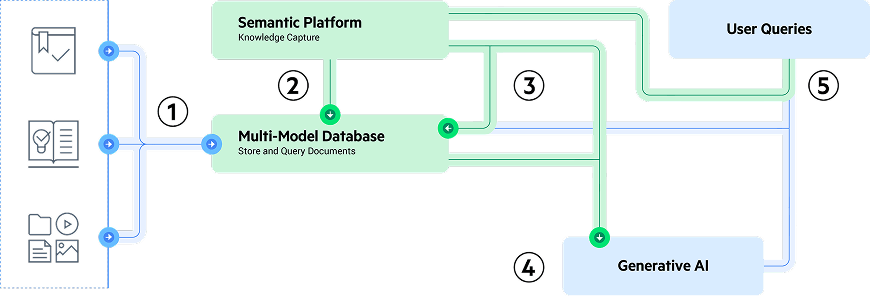
The RAG workflow has two major components: Content preparation and content discovery.
Content Preparation
Content preparation is the process of ingesting, chunking, vectorizing and classifying information to be used as part of the RAG context.
- Ingest the as-is content into MarkLogic Server. This can contain documents (Raw Text, XML, PDFs, Office Documents, etc.). It is important to store the original for lineage and content references for user validation.
- Break each of the records into smaller components called chunks. This will allow you to provide more targeted content to the LLM and stay within the maximum number of tokens available for a context window.
- Classification is the process of semantically tagging content using a knowledge graph. This adds information into the records such as citational metadata and about-ness tags.
- Vector embeddings encode the meaning of content in a numerical representation. Embeddings can also be contained in the chunk record. The LLMs let you create a vector representation of the content that can be used for similarity analysis. The vectors can be leveraged to rerank your results based on the similarity to the question being asked. This will provide better context for the LLM.
Content Discovery
Content discovery is the process of finding relevant information in a large corpus of data. Part of the content discovery process is determining the key concepts within a user’s question, discovering relevant chunks and preparing a prompt.
- By intercepting the user’s question, you can determine the key concepts in the user’s question using the power of knowledge graphs. This is done in a similar fashion to the content preparation workflow.
- Relevance-based search can be used to search for these key concepts across the text body.
- Vector capabilities can be leveraged for reranking and semantic similarity.
- Prompt preparation involves adding the chunks to the context of the LLM so this proprietary knowledge can be used to answer the question.
Technical How-To
Designing a Knowledge Graph
Knowledge graphs can be built in many ways. The Semaphore platform has an interactive user interface that can be leveraged by subject matter experts (SMEs) to build knowledge models. These models consist of topics and concepts that describe a particular knowledge domain. Knowledge models can be imported from public domain ontologies and taxonomies, controlled vocabularies such as product catalogs or defined collaboratively by your SMEs.
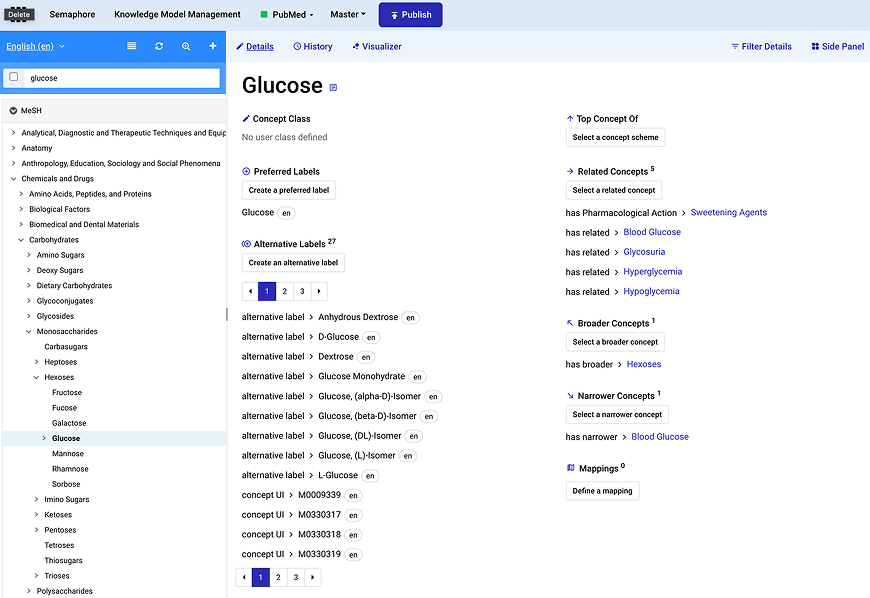
Image 1: Managing concepts of a knowledge model in the Semaphore platform
In addition to the aforementioned process, we can use the rich Semaphore Natural Language Processing (NLP) framework to mine documents for concepts. This process will look for named entities and noun phrases that can be distilled down to a knowledge model.
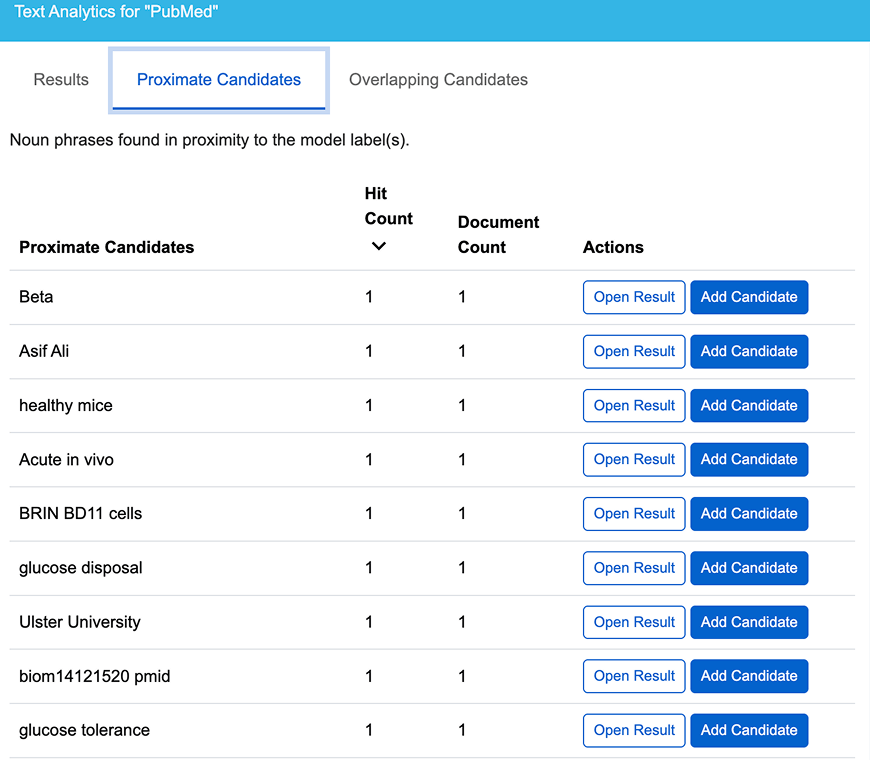
Image 2: A table of noun phrases and entities from text mining
Enriching the Knowledge Graph Through GenAI
While your corpus of data, now mapped in a knowledge graph, contains valuable information, you may want to look to external sources to complement and enrich your model. Semaphore Studio contains GenAI integrations to aid in the development of your knowledge models.
To get started, select a concept in your scheme. Within the concept, you can leverage GenAI to produce additional labels, add narrower concepts and provide additional metadata.
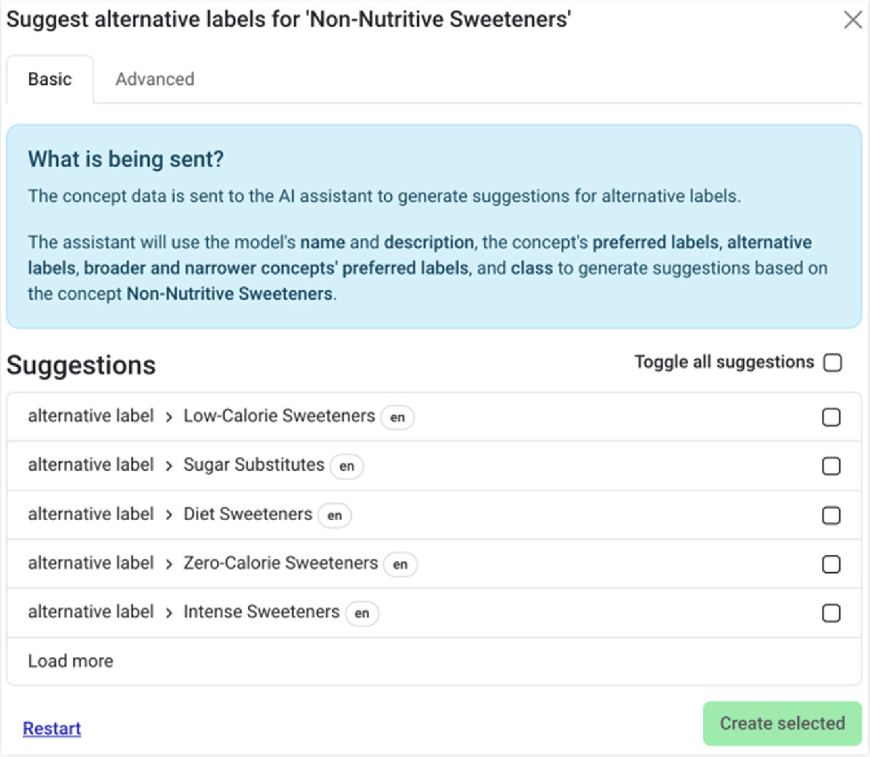
Image 3: Adding additional labels to a concept through GenAI
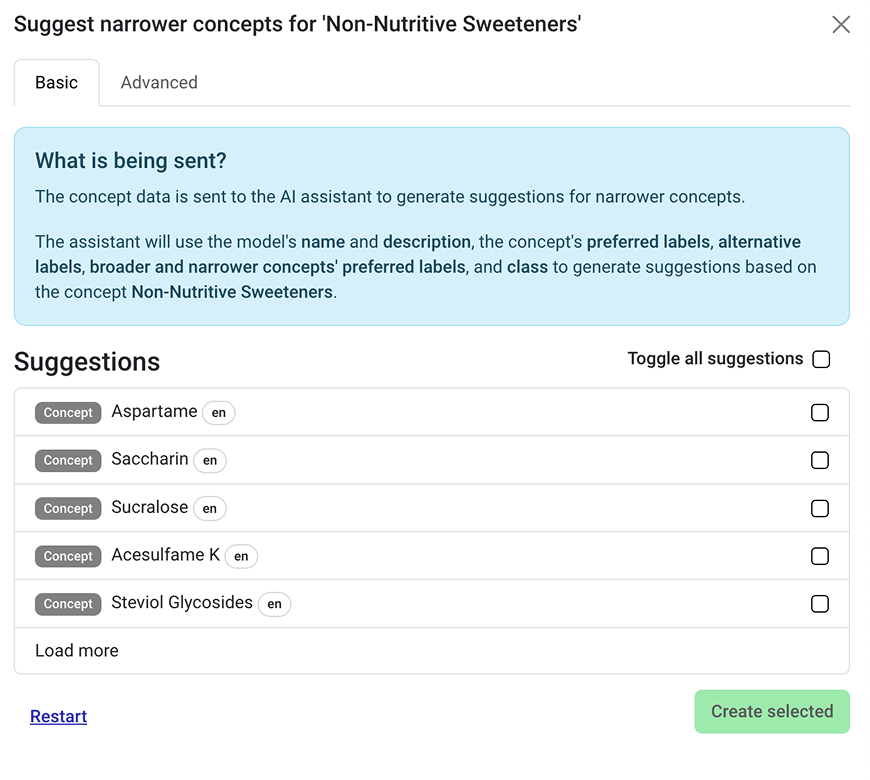
Image 4: Adding narrower concepts through GenAI
Depending on the Large Language Model, you may want to customize your prompt. ТТТ The Semaphore platform also allows you to customize this prompt.
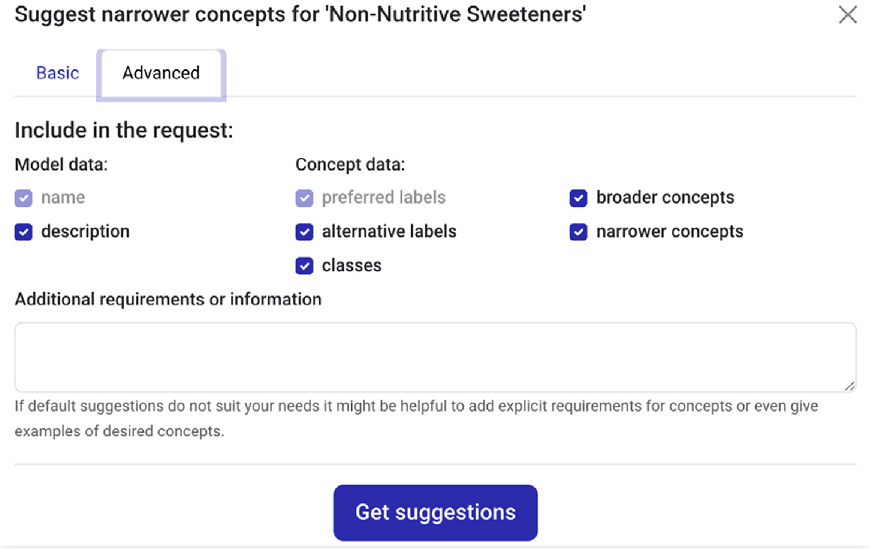
Image 5: Customize the LLM prompt for concept generation
Now that you have a rich knowledge model, you can continue with preparing and classifying your content for consumption.
Preparing Long-Form Content
As part of this example, we will be preparing long-form content using the MarkLogic Flux application. MarkLogic Flux is a highly scalable data movement tool that can be executed from the command line or embedded into your applications. The MarkLogic Flux tool will be used in conjunction with MarkLogic Server, the Semaphore platform and Azure OpenAI for embeddings. To build our data corpus, we will be using the PubMed Abstract content. Note the original files are in XML. MarkLogic is multi-model in nature. We can store the XML alongside JSON and other data formats in a single database. We will keep the original XML intact for search and discovery, while the LLM will use data prepared in JSON format. Note that MarkLogic Flux supports many other data formats and can be adjusted for your workflow.
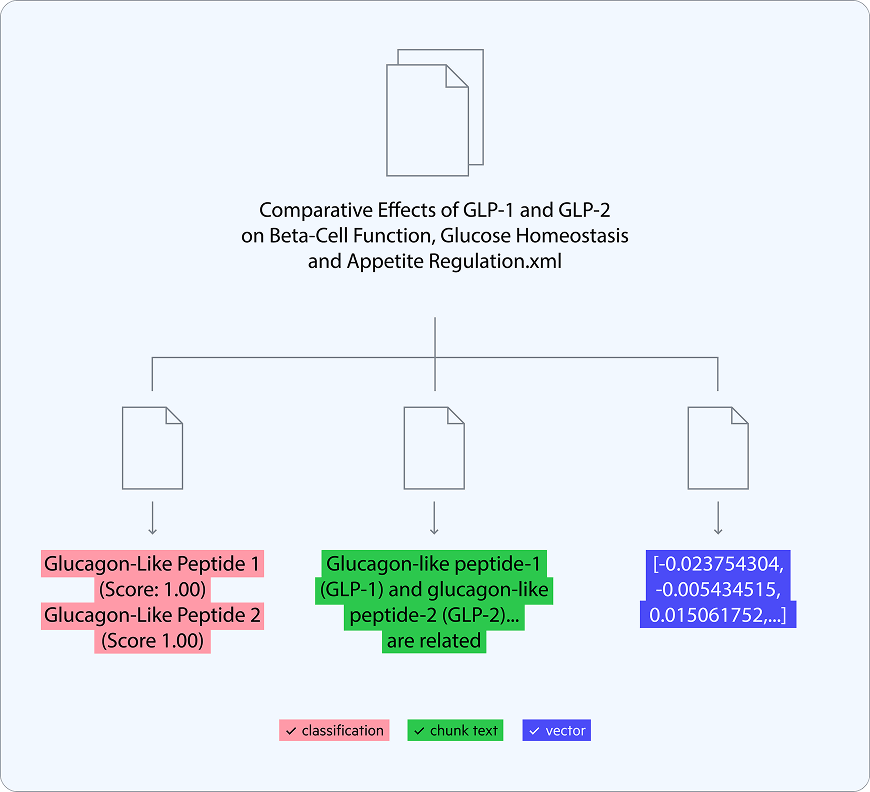
The complete Flux command will have options for loading and chunking documents, classifying text and adding vector embeddings. As we progress through our example you will see the full set of options that you would use to ingest and process documents. One of the more common commands is import-files. We will scan a directory of XML files for this example.
Command Line: ./bin/flux import-files @options.txt
First, we will accept incoming files to be stored in MarkLogic Server. The content will be inserted as-is into the database. You can also run transformations of your choosing on these documents. Note that there are permissions and collections associated with this content so only people with these privileges can see the records. Additionally, collections allow for a logical grouping of content.
--path
/pubmed/
--connection-string
user:password@localhost:8000
--permissions
“rest-reader,read,rest-writer,update”
--collections
https://pubmed.ncbi.nlm.nih.gov
Next, we will be creating small chunks of data to be leveraged by the LLM. This is necessary because, while context windows—or the amount of information an LLM can process in a single prompt—continue to grow, they are still limited. This is why it’s important to be able to provide only the relevant information in a single prompt.
The process of “chunking” takes a larger body of content and breaks it into smaller amounts of data that can be inserted into the context window. These chunks can retain other metadata to support better data discovery. We will retain a pointer to the source file, semantic concepts from classification, vector embeddings and the original text. Let’s look at the chunking options provided by MarkLogic Flux.
--splitter-xpath
/PubmedArticle/MedlineCitation/Article/Abstract/AbstractText
--splitter-max-chunk-size
100000
--splitter-sidecar-max-chunks
1
--splitter-sidecar-document-type
JSON
--splitter-sidecar-root-name
chunk
--splitter-sidecar-collections
https://pubmed.ncbi.nlm.nih.gov/genai/chunks
This configuration will select a part of the article to be used for the textual content. In this case, we are looking at the abstract text of the article. You can also control the size of each chunk. For this, we will be setting the token limit on the higher side to contain the abstract text. Finally, we define the number of chunks we want per document and the output format. For our use case, we want one chunk per document. This will allow us to calculate lexical search relevance on each chunk. Relevance-based ranking of the chunks will be shown later in the article.
While chunks are good on their own, we would like to add additional metadata to enhance discoverability. We will use Semaphore Classification APIs to provide a semantic analysis of the text. This classification also utilizes a rich Natural Language Processing (NLP) engine and the knowledge model to determine key concepts in the text. The engine considers stemming and lemmatization of words and supporting evidence to assign concepts.
--classifier-host
localhost
--classifier-http
--classifier-port
5058
MarkLogic Server 12 supports native vector operations, including storing vector embeddings close to your data. Embeddings can be stored in JSON or XML formats and used for similarity searches. With Template Driven Extraction (TDE), we can specify a unique index for these embeddings to be used later as part of our discovery method.
MarkLogic Flux can directly call the Azure OpenAI embeddings model and other popular LLMs out of the box. Autowire the embedding model to include the utility.
--embedder
azure
-Eapi-key=<your-api-key>
-Edeployment-name=text-test-embedding-ada-002
-Eendpoint=https://gpt-testing-custom-data1.openai.azure.com
A TDE can be generated to produce a View of the chunk metadata along with the vector embedding to be used in future queries.
{

    "template": {

        "description": "Chunk View Template",

        "context": "/chunk",

        "collections": [ "https://pubmed.ncbi.nlm.nih.gov/genai/chunks" ],

        "rows": [

            {

                "schemaName": "GenAI",

                "viewName": "Chunks",

                "viewLayout": "sparse",

                "columns": [

                  {

                        "name": "source",

                        "scalarType": "string",

                        "val": "source-uri",

                        "nullable": false,

                        "invalidValues": "ignore"

                    },

                  {

                        "name": "text",

                        "scalarType": "string",

                        "val": "chunks/text",

                        "nullable": false,

                        "invalidValues": "ignore"

                    },

                    {

                        "name": "embedding",

                        "scalarType": "vector",

                        "nullable": true,

                        "val": "vec:vector(chunks/embedding)",

                        "dimension": "1536"

                    }

                ]

            }

        ]

    }

}
Harnessing the power of TDEs, we can now create a graph of facts and information. This allows us to do multi-model queries against the corpus of data and helps visualize information for exploratory analysis or directly in an application’s UI.
{

  "template": {

    "description": "Content graph template",

    "context": "/chunk",

    "collections": [

      "https://pubmed.ncbi.nlm.nih.gov/genai/chunks"

    ],

    "templates": [

      {

        "context": "chunks/classification/META",

        "triples": [

          {

            "subject": {

              "val": "sem:iri(./ancestor::chunk/source-uri)",

              "invalidValues": "ignore"

            },

            "predicate": {

              "val": "sem:iri('http://purl.org/dc/terms/references')"

            },

            "object": {

              "val": "xs:string(./id)"

            }

          }

        ]

      }

    ]

  }

}
This sample user interface builds a search application that allows you to review the articles and concepts. The semantic graph shows you the relation to the source file and the key concepts identified by classification. Note that the graph also shows parent terms, which can provide additional context. When reviewing the answer from the LLM, you can come back to these documents to understand what content was used to derive the answer. This allows for full lineage and auditability of your GenAI application. The application end-user is always aware of the referenced content and how it fits in your organization.
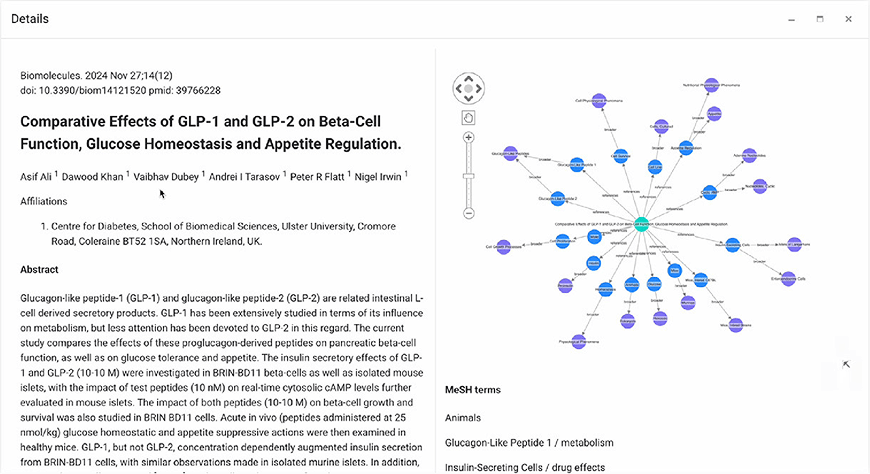
Image 6: Visualizing content and context of the knowledge graph. Content is directly linked to concepts that govern the domain.
Discovering Content and GenAI Q&A
In the following examples, we will be showing Java code snippets that utilize the MarkLogic, Semaphore and LangChain4j SDKs. This will allow us to interact with the components of the MarkLogic, Semaphore and Azure OpenAI. You can place these calls in a middle-tier application that exposes an API for your end users.
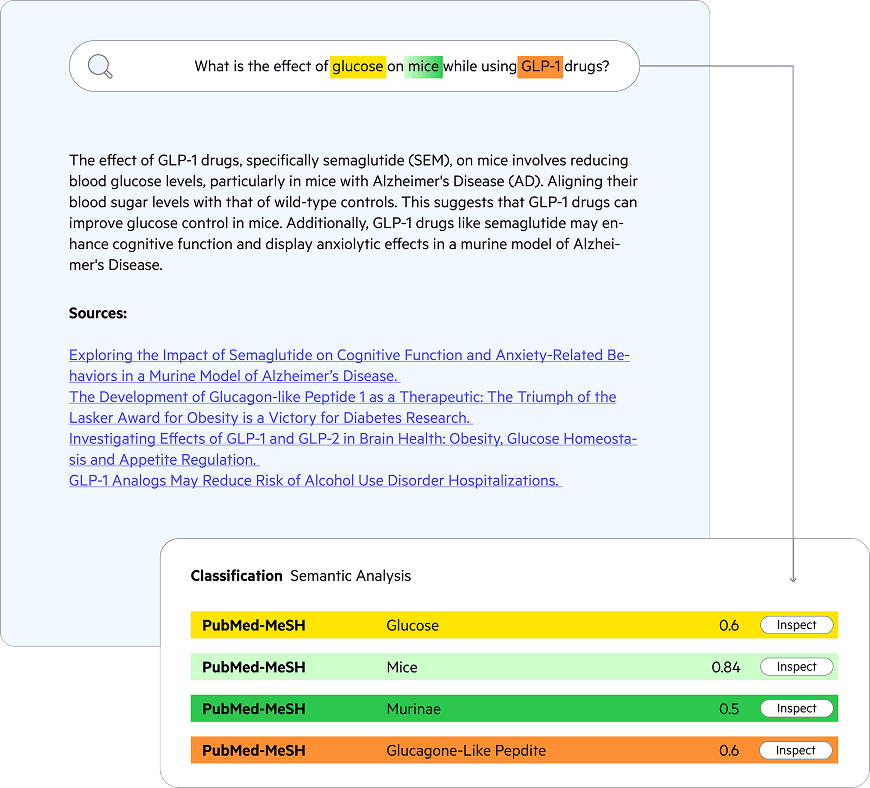
Semantic analysis of a user query identifies similar concepts to discover the relevant content in your knowledge corpus and prepare the prompt.
Understanding the User’s Intent
While you can interact with the GenAI directly using the user’s question, we will be intercepting the question to better understand their intent. The same Semaphore classification process we used earlier to find the key concepts in our chunks may be used to find concepts in the user’s question. The concept labels will be used as a lexical search to find items within your corpus of data—while the identifiers will be used to determine the classified content based on supporting evidence.
We will first create a classification client to use across our application. We are using Spring Framework to read values from an application properties file. However, you can access these values using whatever method you see fit.
TokenFetcher tokenFetcher = new TokenFetcher(this.semaphoreConfig.getTokenRequestURL(),
this.semaphoreConfig.getKey());
Token token = tokenFetcher.getAccessToken();
ClassificationClient classificationClient = new ClassificationClient();
ClassificationConfiguration classificationConfiguration = new ClassificationConfiguration();
classificationConfiguration.setUrl(this.semaphoreConfig.getCsURL());
classificationConfiguration.setApiToken(token.getAccess_token());
classificationClient.setClassificationConfiguration(classificationConfiguration);
Once a classification client is established, it is easy to create a classification request. This request will contain the text from the chunk and a blank title.
classificationClient.getClassifiedDocument(new Body(question, new Title(“”));The Semaphore response will be automatically marshaled into a Java object for you. You can access all the concepts from this result.
LOGGER.info("---------Start Concepts identified----------");
for (Map.Entry<String, Collection<ClassificationScore>> entry : concepts.entrySet()) {
    LOGGER.info(entry.getKey() + ":");
    for (ClassificationScore classificationScore : entry.getValue()) {
        LOGGER.info(String.format(" %s %s %s %f",
                classificationScore.getRulebaseClass(),
                classificationScore.getId(),
                classificationScore.getName(),
                classificationScore.getScore()
        ));
    }
}
LOGGER.info("---------Ending Concepts identified---------");
With these identified concepts, we can start to build a query. We will take each of the concepts and construct a combination of a lexical word search and identifier search against content so we only match content that has been classified.
// Classify user’s query to find the intent using concepts derived from the knowledge graph. ClassificationClient classificationClient = this.connectionUtils.getClassificationClient();
Result result = classificationClient.getClassifiedDocument(new Body(query.text()), new Title(BLANK));
this.printClassification(result);

// Convert these concepts into a MarkLogic query to find relevant chunks. List<CtsQueryExpr> queryExprList = new ArrayList<>(); for (Map.Entry<String, Collection<ClassificationScore>> entry : result.getAllClassifications(). entrySet())
{
 for (ClassificationScore classificationScore : entry.getValue())
 {
  queryExprList.add(op.cts.wordQuery(classificationScore.getName(),
   “case-insensitive”, “punctuation-insensitive”, “lang=en”));
queryExprList.add(op.cts.jsonPropertyValueQuery(“id”,
classificationScore.getId()));
  }
}
Finding Relevant Content
We now have a well-structured query based on the user’s intent. Next, we will build a composable query to find the relevant chunks with the MarkLogic Optic API. It can search all forms of data stored in MarkLogic Server. By default, MarkLogic Server uses a scoring algorithm of Term Frequency/Inverse Document Frequency (TF-IDF) to score and order results.
// Convert these concepts into a MarkLogic query to find relevant chunks.

List<CtsQueryExpr> queryExprList = new ArrayList<>();

for (Map.Entry<String, Collection<ClassificationScore>> entry : result.getAllClassifications().entrySet()) {

        for (ClassificationScore classificationScore : entry.getValue()) {

        queryExprList.add(op.cts.wordQuery(classificationScore.getName(), "case-insensitive", "punctuation-insensitive));

        queryExprList.add(op.cts.jsonPropertyValueQuery("id", classificationScore.getId()));

        }

}


// Build the query to only look at chunks of documents that have been loaded.

CtsQueryExpr andQuery = op.cts.andQuery(

        op.cts.collectionQuery(DocumentConstants.COLLECTION_CHUNK),

        op.cts.orQuery(queryExprList.toArray(CtsQueryExpr[]::new))

);


// The following query plan searches for the matching fragments utilizing the key concepts that have been

// extracted from the knowledge graph.

PlanBuilder.ModifyPlan plan =

        op.fromSearchDocs(andQuery)

                .orderBy(op.desc(op.col("score")))

                .limit(10);
Hybrid Search Using Lexical Search and Vector Search
As you see in the query above, we are using a relevance-based search. MarkLogic Server 12 has introduced two new features to aid in search. Best Match 25 (BM25) and native vector search are available to enhance your experience.
BM25 is a relevance ranking algorithm like TF-IDF used in lexical queries. BM25 takes into consideration several facets such as term frequency and document length. BM25 also has a tunable parameter for weight when taking the document length into consideration.
Vector search allows you to query the vector embeddings stored in MarkLogic Server. To support vector search, MarkLogic Server has introduced a specialized vector index along with ANN (Approximate Nearest Neighbor) search. ANN is a fast and efficient way to find content based on the similarity of the vectors.
In this example, vector search is used along with lexical search. We can take a vectorization of the user’s question and search for content based on ANN. There is now a full outer join in place to combine both vector and lexical search. This allows you to find content that may be missed by one of the methods. A hybrid score is created based on the vector score and lexical score. This combined relevancy score is used to re-rank the result, placing the most relevant at the top of the search results.
// Build an Optic Query Plan to find the relevant chunks. MarkLogic utilizes TF/IDF by default.
// However, you can configure it to utilize BM25
PlanSearchOptions planSearchOptions = op.searchOptions()
        .withScoreMethod(PlanSearchOptions.ScoreMethod.BM25)
        .withBm25LengthWeight(0.5);

// The following query plan searches for the matching fragments utilizing the key concepts that have been
// extracted from the knowledge graph. It joins in a view that contains the vector embedding for the chunk
// and re-ranks the results utilizing a hybrid score of cosine similarity and the BM25 score.


// Build the lexical search plan

PlanBuilder.ModifyPlan lexicalSearchPlan =
  op.fromSearchDocs(andQuery, null, planSearchOptions)
    .orderBy(op.desc(op.col("score")))
    .limit(LEXICAL_LIMIT)


// Fetch the vector embedding for the user's query to re-rank the search results
Response<Embedding> response = this.embeddingModel.embed(query.text());

Map<String, Object> options = new HashMap<>();
PlanBuilder.ModifyPlan vectorSearchPlan =
    op.fromView("GenAI", "Chunks", null, op.fragmentIdCol("vectorsDocId"))
        .joinDocUri(op.col("uri"), op.fragmentIdCol("vectorsDocId"))
        .annTopK(
            TOP_K_COUNT,
            op.col("embedding"),
            op.vec.vector(op.xs.floatSeq(response.content().vector())),
            op.col("distance"),
            options)
        .orderBy(op.asc(op.col("distance")));


// Set default values in case a document is found in only one plan.
ServerExpression scoreBinding = op.caseExpr(op.when(op.isDefined(op.col("score")), op.col("score")), op.elseExpr(op.xs.longVal(0L)));
ServerExpression distanceBinding = op.caseExpr(op.when(op.isDefined(op.col("distance")), op.col("distance")), op.elseExpr(op.xs.longVal(2L)));

PlanBuilder.ModifyPlan plan =
    lexicalSearchPlan
        .joinFullOuter(
            vectorSearchPlan,
            op.on(op.fragmentIdCol("fragmentId"), op.fragmentIdCol("vectorsDocId"))
        )
        .bind(op.as("score", scoreBinding))
        .bind(op.as("distance", distanceBinding))
        .bind(op.as("hybridScore", op.vec.vectorScore(op.col("score"), op.col("distance"))))
        .joinInner(
            op.fromView("Article", "Metadata"),
            op.on(op.col("contentURI"), op.col("source"))
        )
        .orderBy(op.desc("hybridScore"))
        .limit(FINAL_LIMIT);
This hybrid search approach allows you to build your retrieval flow to find both semantically similar concepts and exact matches like proper names and labels. This surfaces the most relevant documents to inform the output of the generative model.
Hybrid Search Using Lexical Search and KNN Vector Search
KNN (k-nearest neighbors) is an exact method that finds the closest points to a query, but it can be slower for larger datasets. KNN leverages algorithms such as Euclidian distance or Cosine distance to determine the closet point. In certain cases, you may prefer precision over efficiency.
We will take a similar approach to the example above. However, note that in this example the lexical search is executed first and then the items are re-ranked using the vector score.
// Build an Optic Query Plan to find the relevant chunks. MarkLogic utilizes TF/IDF by default.

// However, you can configure it to utilize BM25

PlanSearchOptions planSearchOptions = op.searchOptions()

        .withScoreMethod(PlanSearchOptions.ScoreMethod.BM25)

        .withBm25LengthWeight(0.5);


// The following query plan searches for the matching fragments utilizing the key concepts that have been

// extracted from the knowledge graph. It joins in a view that contains the vector embedding for the chunk

// and re-ranks the results utilizing a hybrid score of cosine similarity and the BM25 score.

PlanBuilder.ModifyPlan plan =

        op.fromSearchDocs(andQuery, null, planSearchOptions)

                .joinInner(

                        op.fromView("GenAI", "Chunks", null, op.fragmentIdCol("vectorsDocId")),

                        op.on(op.fragmentIdCol("fragmentId"), op.fragmentIdCol("vectorsDocId"))

                )

                .limit(20)

                .bind(op.as(op.col("distance"), op.vec.cosine(

                        op.vec.vector(op.col("embedding")),

                        op.vec.vector(op.xs.floatSeq(response.content().vector()))

                )))

                .bind(op.as("hybridScore",

                        op.vec.vectorScore(op.col("score"), op.col("distance"))

                ))

                .orderBy(op.desc(op.col("hybridScore")))

                .limit(5)

                .joinInner(

                        op.fromView("Article", "Metadata"),

                        op.on(op.col("contentURI"), op.col("source"))

                );
In systems with larger datasets, it is a good approach to pre-narrow the items you are comparing. The hybrid approach here works well by filtering down the content with the lexical matches.
Reciprocal Rank Fusion (RRF) vs MarkLogic Vector Score
Reciprocal Rank Fusion or RRF is a method of combining scores from different algorithms. In our example, we use BM25 to determine relevance scores for lexical searches and cosine distance to calculate the similarity between vectors. By themselves, these values are incompatible. RRF takes these scores and combines them in a way that allows items to be sorted. Items that appear in both results sets will appear higher.
The MarkLogic Server vector score function allows for more granular control on inputs. In the code example above, we label it as a “hybrid” score. The vector score formula enhances the lexical-based score by incorporating vector similarity, specifically boosting scores for documents with higher cosine similarity. This approach prioritizes semantically similar documents in search results and is used as an alternative to the RRF method for combining search results.
Providing the New Context to the GenAI
The final part of the RAG workflow will be to execute the query with the GenAI. We will build a new prompt that utilizes our semantic knowledge graph for new terminology and the chunks discovered as part of the search. This will enhance the context for the LLM and provide a more accurate and traceable response. The search responses need to be converted into a RowSet that LangChain4j can interpret.
// Convert the row result set to a list of content for langchain4j
RowSet<RowRecord> rows = rowManager.resultRows(plan);

rows.stream().forEach(row -> {
String source = row.getString("source");
String title = row.getString("title");
String abstractText = row.getString("text");
String text = "Title: " + title + " Abstract:" + abstractText;

Metadata metadata = new Metadata();
metadata.put("uri", row.getString("uri"));
metadata.put("title", title);
metadata.put("text", text);
metadata.put("source", source);
metadata.put("score", row.getString("score"));
metadata.put("distance", row.getString("distance"));
metadata.put("hybridScore", row.getString("hybridScore"));

Content content = Content.from(new TextSegment(text, metadata));
chunks.add(content);

});
The incoming user query is handled in a controller and leverages the LangChain4j query assistant to add your internal knowledge into the LLM’s context.
public interface QueryAssistant {

@SystemMessage("You are a researcher. " +

"1. Answer the question in a few sentences." +

"2. Answer the question using text provided." +

"4. Answer the question using chat memory. " +

"5. If you don't know the answer, just say that you don't know. " +

"6. You should not use information outside the context or chat memory for answering."

)

Result<String> chat(@UserMessage String question);

}


// Build the Query Assistant to interact with the LLM,

QueryAssistant queryAssistant = AiServices.builder(QueryAssistant.class)

.chatLanguageModel(this.chatLanguageModel)

.chatMemory(this.chatMemory)

.retrievalAugmentor(DefaultRetrievalAugmentor.builder()

.contentRetriever(this.progressDataPlatformQueryRetriever)

.queryTransformer(new CompressingQueryTransformer(chatLanguageModel))

.build()

)

.build();


}
The final result provides a textual answer to the question along with citational links for the content used to answer the question.
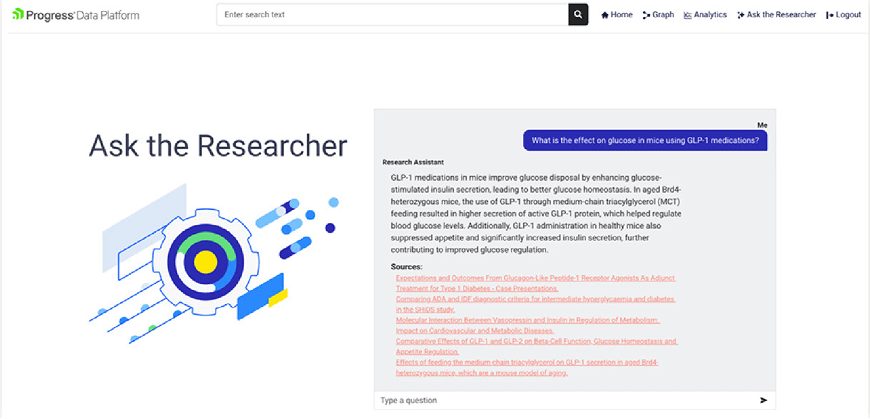
Image 1: Results of hybrid search and use of private data with the GenAI
In the next blog, we’re going to look at how to integrate this flow with the chatbot in your React application’s middle tier.
Author: Drew Wanczowski
