Real-World Sitecore Migrations: Q&A with Pavel Donchev, Eveliko
Pavel Donchev shares his insights behind the scenes of why companies choose to migrate their websites from Sitecore to platforms like Progress Sitefinity CMS.
Eveliko has been a Progress Service Delivery Partner since 2012, working with enterprise clients on Progress Sitefinity CMS implementations, integrations and migrations. The team works directly with clients on full implementation projects and also supports other agencies and partners who want to leverage Chameleon—Eveliko’s migration intelligence tool—to accelerate and de-risk their own CMS migration projects.
1. Why Are Teams Starting to Look for Alternatives to Sitecore?
When teams are starting to look for alternatives to Sitecore, cost is usually what starts the conversation, but the real trigger is frustration. Not always with the platform itself—Sitecore is a capable system. It is more the feeling of being slowed down.
It’s like driving a freight truck on a highway where everyone else is in a car. You bought the truck because you expected to move heavy freight, and you customized it for that job. Every decision was made in favor of handling that big imaginary load, typically at the price of agility. But most of the time, the truck is running almost empty, and the fuel bill is enormous.
What we often see is organizations that invested in Sitecore for its enterprise capabilities, but in practice they use maybe 30-40% of what the platform offers. The other pattern is developer dependency—seemingly simple changes require developer assistance. That is not always the platform’s fault; it’s often the implementation. But it creates a real bottleneck.
A business user should be able to update a product listing or publish a flash promotion in hours, not days. When that kind of agility requires a developer ticket, something is off.
Platforms like Progress Sitefinity CMS are often evaluated as modernization options because they provide enterprise CMS capabilities while supporting simpler operations, marketer autonomy and flexible development models.
2. When Is It Worth Leaving Sitecore—And When Is It Not?
It is worth leaving Sitecore when your team spends more time managing the platform than using it.
If content editors cannot publish without developer help, if the annual costs feel disproportionate to how the platform is actually being used, or if your version is approaching end of support with no clear upgrade path—those are real signals.
It is not worth leaving if you are genuinely using the advanced features at scale, if you have a strong internal team, or if you are mid-project on an investment that has not yet delivered its return.
One thing I always tell teams: do the math on what you actually use, not what you bought.
3. How Do I Migrate Away from Sitecore to a More Modern CMS?
Migrating away from Sitecore usually involves content auditing, integration mapping, architecture review and phased implementation. Many organizations pursue migration to reduce complexity, cost and dependency on specialized development resources.
Before we touch any data, we think in terms of capabilities. What functionality does the current platform provide? Does it cleanly map to Sitefinity CMS? Are there custom integrations that need special attention?
Once we see a fit, we go deeper. We use our own tool, Chameleon, to scan the database and codebase and produce a structured report of content types, volumes, components and media.
In many cases, the people who built the platform have left. This inspection allows us to recreate the tribal knowledge and make sure we are not missing something important.
It is also a chance to decommission old functionalities or data that no one uses anymore. Chameleon lets you mark individual items or full content branches as “not needed,” and that is directly reflected in the migration report.
From there: map the content model, rebuild the frontend, migrate content programmatically, reconnect integrations. Moving the bytes is fast. Deciding what the bytes should look like on the other side is where the real time goes.
4. What Surprises Teams Most When They Start Migrating from Sitecore?
When teams start migrating from Sitecore, the biggest surprise is the sheer number of vectors you need to keep in mind.
People think of migration as moving content from A to B, but it is a full software project: SEO, security, performance, maintainability, best practices, content ease of use, infrastructure, integrations. Each of those is a dimension that needs attention, and teams that come in thinking “we are just switching CMS” are the ones who get caught off guard.
Over time, we have mapped many of these vectors so they do not cause the project scope to explode or force severe compromises. But this is also a chance for the client to step back and review where they can and want to compromise, and where they want to improve.
That conversation rarely happens during normal operations. Migration is often the first time a team looks at all of these dimensions together.
5. Do Most Sitecore Migrations Require a Full Rebuild?
The frontend view needs to be recreated, but things have changed. This is not the full-blown, all-stakeholders exercise it used to be. If you keep to a lift-and-shift approach or reduce the changes to logic and UI, it is mostly very predictable work.
Both Sitecore and Sitefinity CMS work with .NET, so the concepts are similar. It is more like translating between two dialects of the same language. The visual output stays the same, and you skip the redesign phase and all the back and forth that comes with it before the migration even starts.
Of course, a full redesign is possible if carefully considered, but it comes with the risk of paying for both systems if the project goes sideways.
We have seen this happen. We advised one client to do a lift-and-shift first so they could cut the Sitecore payments right away, then improve on Sitefinity CMS at their own pace. They decided instead to rebuild everything from scratch in-house using newer technologies. The result was three additional years of Sitecore licensing before they could switch.
You can always improve the frontend afterward, but you cannot get those license payments back.
6. What Does a Typical Sitecore-to-Sitefinity Migration Actually Look Like?
A typical Sitecore-to-Sitefinity CMS migration starts with a Chameleon scan of the Sitecore instance to inventory everything—templates, fields, content volumes, renderings, media. That scan produces an Excel report that becomes the migration specification.
From there, we map Sitecore templates to Sitefinity dynamic content types, which is mostly a one-to-one exercise since both platforms use structured content models. Fields like short text, rich text, related items, classifications and images have direct equivalents.
The frontend gets rebuilt using the chosen Sitefinity frontend—ASP.NET Core or Next.js—reusing the existing design but restructuring the component model. In our approach, many of the details that are typically error-prone are handled automatically by the system—things like rich content, relations, image uploads and fallbacks.
This quickly earns the confidence of the client. And once set up properly for the specific project, we have seen many clients skip reviewing 100% of the content because they trust the output.
7. What Are the Biggest Risks in a Sitecore Migration—And How Do You Avoid Them?
The biggest risk in a Sitecore migration is the one we covered earlier—trying to rebuild everything from scratch and ending up paying for both systems while the new one is not ready. Keeping the migration focused on a lift-and-shift first, then improving, is the single most effective way to reduce risk.
The second risk is scope creep from undocumented customizations. Sitecore implementations accumulate custom logic over years, and the people who built that logic often leave. If you do not audit the codebase alongside the content, you will discover these mid-migration. We address this by scanning the codebase and Git history during discovery, not just the content tree.
Third is SEO. Where possible, we replicate the URL structure precisely so there is no disruption.
The one risk that often gets overlooked is people. You are not just migrating a system—you are migrating a team. New workflows, new UI, new habits. We have built tooling that brings step-by-step guidance directly into where the work happens and allows locking critical sections behind a training gate. The person can skip it, but they were properly supported. It is a small thing, but it makes the difference between a team that is trained and a team that is actually confident.
8. Where Do Teams See the Biggest Improvements After Moving Off Sitecore?
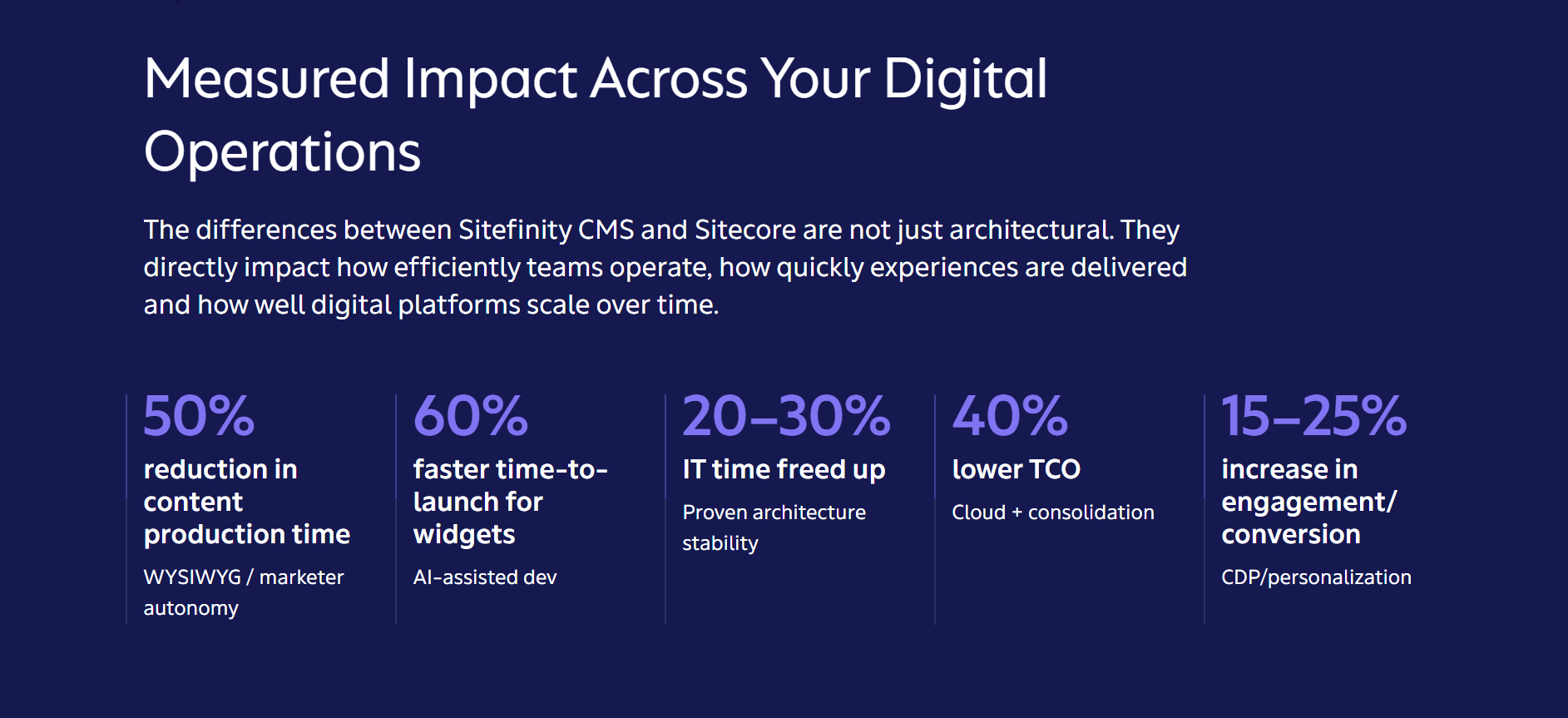
The most immediate improvement when migrating from Sitecore to Sitefinity is editorial independence. Content editors can manage page layouts, add components and publish without developer involvement. That shift alone changes the team’s velocity.
The second is operational cost. Sitefinity licensing sits in a fundamentally different bracket, and the difference in total cost of ownership starts aggregating quickly—not just the license, but hosting, maintenance and the developer time needed for routine work.
What this does in practice is make things that seemed impossible yesterday routine work today. It does not just save time—it unlocks opportunities. Imagine being able to put together a quick landing page for a prospect, using existing saved presets, in an afternoon.
Even if you do invest in personalization, you still need an easy way to build the actual layouts that personalization serves. To our knowledge, Sitecore is already addressing this with their newer offerings, but that functionality is not within reach for many existing customers.
9. How Do Teams Keep Websites Updated Without Constantly Pulling in Developers?
Teams reduce reliance on developers by using CMS platforms with visual editing tools, reusable components and governed workflows. These capabilities allow non-technical users to manage routine updates while developers focus on higher-value work.
Platforms like Progress Sitefinity CMS are designed around this balance, enabling marketers to update content independently while maintaining governance, security and technical flexibility.
In Sitefinity CMS, content teams can build custom landing pages using the page editor, save presets—preconfigured portions of pages that can be reused across the site—and manage content without touching code. The UI is simpler in general, which has been noted by many side-by-side comparisons. A business user who needs to update a listing or launch a campaign page can do it themselves, in hours, not days.
10. What Should a Team prioritize in a CMS to Avoid Constant Rebuilds Later?
To avoid repeated CMS rebuilds, organizations should prioritize flexibility, scalability, integrations, governance and content architecture. A CMS should support current requirements while adapting to future channels, systems and team structures.
Flexible content modeling allows organizations to structure and reuse content across channels. This includes defining content types, relationships, metadata and delivery methods.
Platforms like Progress Sitefinity support this flexibility while maintaining usability, making them suitable for organizations that need scalable content operations without introducing unnecessary complexity.
Think of content in two categories. Reusable, omnichannel content—product listings, news, events—should be structured modules so anything from a mobile app to an airport kiosk can consume it without rebuilding. Landing pages and campaign content can be free-form, easy-to-configure page editor work where editors have full control. A CMS that supports both patterns means your structured content travels wherever it needs to go, and your marketing team is not waiting on developers for a campaign page.
Beyond that, ask about the upgrade path. If the last three major version upgrades were each a project with a dedicated budget, that is a warning sign.
11. What CMS Platforms Are Better Than Sitecore for Mid-sized Company Websites?
I can only speak from what we work with day to day. There are many options, and different organizations choose differently. Some even mix multiple platforms. For my company, Eveliko, we work with Sitefinity CMS for enterprise and mid-market clients.
For clients who are not yet mature enough for Sitefinity CMS, Umbraco is a good mid-point—very affordable and fully managed by us. This allows us to handle the full lifecycle of a business—from very small businesses that are just starting to find their voice, all the way to larger enterprise organizations that need more structure and enterprise features with Sitefinity CMS.
If a company has five people with a small website today, we can host them fully and securely. If it becomes 100+ people with the need to support 20, 50 or even hundreds of websites tomorrow, we can expedite the evolution significantly.
Similarly, larger companies in some cases want to offload parts of their portfolios somewhere lighter, and we can handle that direction too. WordPress is a global leader in the nano sector, but we monitor security daily and will publish a report soon. Not a single day passes without a CVE on a random WordPress plugin. Even if you do not use that plugin, you have to check and mitigate if you want any sort of security compliance. That eats time. The popularity and variety of the WordPress community is a blessing and a curse. We prefer a world with less noise.
12. How Are Teams Actually Using AI in Their CMS Today?
Organizations are using AI in CMS platforms primarily to improve efficiency and relevance. The most effective implementations integrate AI directly into CMS workflows rather than using standalone tools, helping outputs to remain governed and consistent.
My personal vision, and one that Eveliko is gearing toward, is that people will spend significantly less time in the backend of a CMS. Most content will be defined using the language the business already understands—a Word document, an email, a webpage. AI is already able to put together a rough first version, follow marketing and branding guidelines, use existing content as a basis and prepare an initial draft.
We are running such tests both against Sitefinity CMS and Umbraco, and doing research work and discussions with the Product team at Progress. There are things that are still easier to do with a mouse, and those will likely remain. That is the human side.
For AI consumers—structured content, SEO and GEO optimization—we just enrolled in a Google experimental program that will likely change the way AI interacts with your web estates. As soon as we have tangible results, we will bring them to Sitefinity CMS and Umbraco.
Long story short, we have produced more content over the past two months than we did in the last 10 years. We had many things to say before, but now it just gets easier to speak out.
Learn more about how Sitecore vs. Sitefinity stack up.