How to Choose Between Progress-Hosted and Self-Hosted MFT Agents

Learn how to choose Progress-hosted vs. self-hosted Automate MFT agents based on location, network access, compliance, uptime and processing needs.
Pull up the last file-transfer workflow your team stood up and ask two questions. Where does it actually run? What network boundary does the data cross to get there? If nobody in the room can answer without opening a config screen, the deployment model got picked by default.
The Progress Automate MFT platform splits that question into two clean options. A Progress-hosted agent lives in the Progress cloud, and a self-hosted agent lives inside your network. That choice affects the network boundaries your files cross, the firewall rules that may be required and how you can support organizational policies governing where regulated data may travel. An inappropriate deployment choice can introduce security risks or make it more difficult to meet applicable compliance requirements.
An inappropriate deployment choice can cause regulated data to cross network boundaries that conflict with organizational policies or applicable requirements, or result in firewall rules that require additional management. Validate placement decisions against your organization’s governance policies and applicable requirements.
Two Agents, One Console: What You’re Choosing Between
The Progress Automate MFT platform runs on a coordinator-agent topology. The cloud management console manages endpoint configurations, credentials and schedules. Agents do the actual file transfers. The console tells them what to do and records the results, but the file payload follows the agent’s transfer path, not the management console.
| Progress-Hosted Agent | Self-Hosted Agent | |
|---|---|---|
| Where it runs | Cloud, provisioned automatically | Your Windows Server or Ubuntu Linux host |
| Reaches | Public endpoints only | Public and private, firewalled endpoints |
| Lifecycle | Provisioned for each task and cleaned up after completion | Persistent service you install once |
| Maintenance | Managed by Progress | Low-touch agent updates: automatic, scheduled or manual update options |
| Custom Scripting Run modes | Secure only | Secure and Unrestricted |
The Automate MFT platform supports secure file transfer via SFTP, FTPS, HTTPS, SMTP, IMAP and CIFS/SMB/ UNC protocols and includes connectors for storage services like Amazon S3, Azure Blob and SharePoint. Progress-hosted agents can connect to publicly accessible endpoints. Private resources, such as internal SMB file shares, require a self-hosted agent deployed within a network that can access them.
Decision One: Where the Work Should Execute
Start with where the data already lives. When a file moves from a public cloud bucket to a partner’s public SFTP server, there’s no reason to route it through your on-premises network. Doing so sends the file into your network and back out again, adding an unnecessary hop, potential transfer costs and another point of failure. A Progress-hosted agent can handle the exchange in the cloud without routing the transfer through local infrastructure.
The Automate MFT platform is built for hybrid estates. Progress-hosted agents carry the public-cloud exchanges while self-hosted agents handle whatever’s still anchored to legacy infrastructure, under one console.
Pro Tip: Don’t standardize on one agent type across the whole estate. Forcing a cloud-to-cloud exchange through a self-hosted agent adds a hop for nothing. If you assign a workflow to a Progress-hosted agent when the endpoint has no public route, the agent cannot connect to that endpoint. If the endpoint is internet-facing but firewalled, allowing access becomes another rule someone has to maintain.
Decision Two: Does the Workflow Need to Reach Private Endpoints?
The location of your endpoints is one of the clearest factors in choosing an agent.
Progress-hosted agents are designed to connect to publicly accessible endpoints. This makes them a good fit when the systems involved in a workflow, such as an SFTP server or cloud storage service, are reachable over the public internet.
Self-hosted agents can reach both public endpoints and private or firewalled resources that are accessible from the network where the agent runs. For example, if a workflow needs to retrieve files from an internal file share or connect to a server that isn’t exposed publicly, placing a self-hosted agent inside that environment allows the workflow to reach those resources without making the endpoint publicly accessible.
This also supports segmented environments. Organizations can place self-hosted agents in the network locations where access is required, allowing Automate MFT workflows to execute closer to private systems while management and monitoring remain centralized.
Decision Three: Where the Payload Can (and Can’t) Go
Does using a cloud console mean your files pass through the Progress cloud? Not necessarily. The console manages the workflow and collects status and audit information, but the agent handles the actual file transfer. With a self-hosted agent, the payload uses the network path available to that agent rather than a Progress-hosted agent’s transfer path, based on the customer’s configuration. With a Progress-hosted agent, the file passes through infrastructure managed by Progress.
This is helpful when policies restrict where sensitive data can travel. You can manage transfers centrally without necessarily routing every file through the cloud.
Consider a hospital with a policy that prohibits patient records from passing through an unapproved vendor cloud environment. Or a bank that must keep certain customer data within an approved region. In either case, the organization may need to demonstrate that files follow paths permitted under its policies and applicable requirements.
A self-hosted agent can help organizations keep file payloads on network paths available within their private environments while centrally managing workflows and audit information. Logging data from the transfer executed by the self-hosted agent is sent back to the admin console.
The Automate MFT platform provides security-related capabilities including centralized key and certificate management, multi-factor authentication (MFA), single sign-on (SSO), role-based access control (RBAC) and consolidated audit logging.
Decision Four: Who Answers When an Agent Goes Down
Reachability and availability are two different questions. One self-hosted agent answers only the first. Treat them as one question, and a critical workflow ends up depending on a single VM nobody is watching.
Picture that VM taking an overnight reboot. The transfer stays silent, and you find out when the partner’s reconciliation team asks where Tuesday’s file went.
Agent pools reduce that risk. Instead of assigning a workflow to one specific machine, you assign it to a group of self-hosted agents. If one agent is unavailable, another eligible agent in the pool can handle a subsequent run.
| Workload | Recommended Agent |
|---|---|
| Public bucket to public SFTP | Progress-hosted |
| Internal file share to any destination | Self-hosted |
| Regulated data whose payload cannot cross vendor cloud | Self-hosted |
| Mission-critical workflow where downtime hurts most | Self-hosted, in a pool |
| Tasks requiring unrestricted custom scripting | Self-hosted |
Warning: Avoid assigning a firewalled workflow to a single named self-hosted agent without pooling, as this can introduce a single point of failure. Progress-hosted agents use redundancy managed by Progress.
Decision Five: How Much Processing Does the Workflow Need?
Not every file transfer workflow begins and ends with moving a file. Some workflows also need to transform content, apply business logic or perform specialized processing as part of the exchange.
Automate MFT supports custom PowerShell scripting for those cases. The platform is designed to let teams extend workflows with scripting while keeping that automation within the managed file transfer workflow rather than relying on disconnected scripts. The key deployment question is how much execution freedom the script requires.
Progress-hosted agents support scripting in Secure Runner mode. If your workflow requires Unrestricted scripting mode, the task needs to run on a self-hosted agent. This matters for more advanced automation with PowerShell.
Factor those processing requirements into your deployment decision early. A cloud-to-cloud transfer might look like an ideal candidate for a Progress-hosted agent until you account for the scripts that need to run alongside it.
Building the Reference Pattern
The right agent type depends on where the data sits today, so every new workflow earns its own answer to all five questions.
Writing the defaults down costs an afternoon and saves the next architect from relitigating the same five questions.
Build a simple deployment matrix. For each workflow, record where the data lives, which network boundaries it can cross, what compliance requirements apply and how you’ll keep the transfer running if an agent goes down. Include the firewall rules and a migration or exit plan.
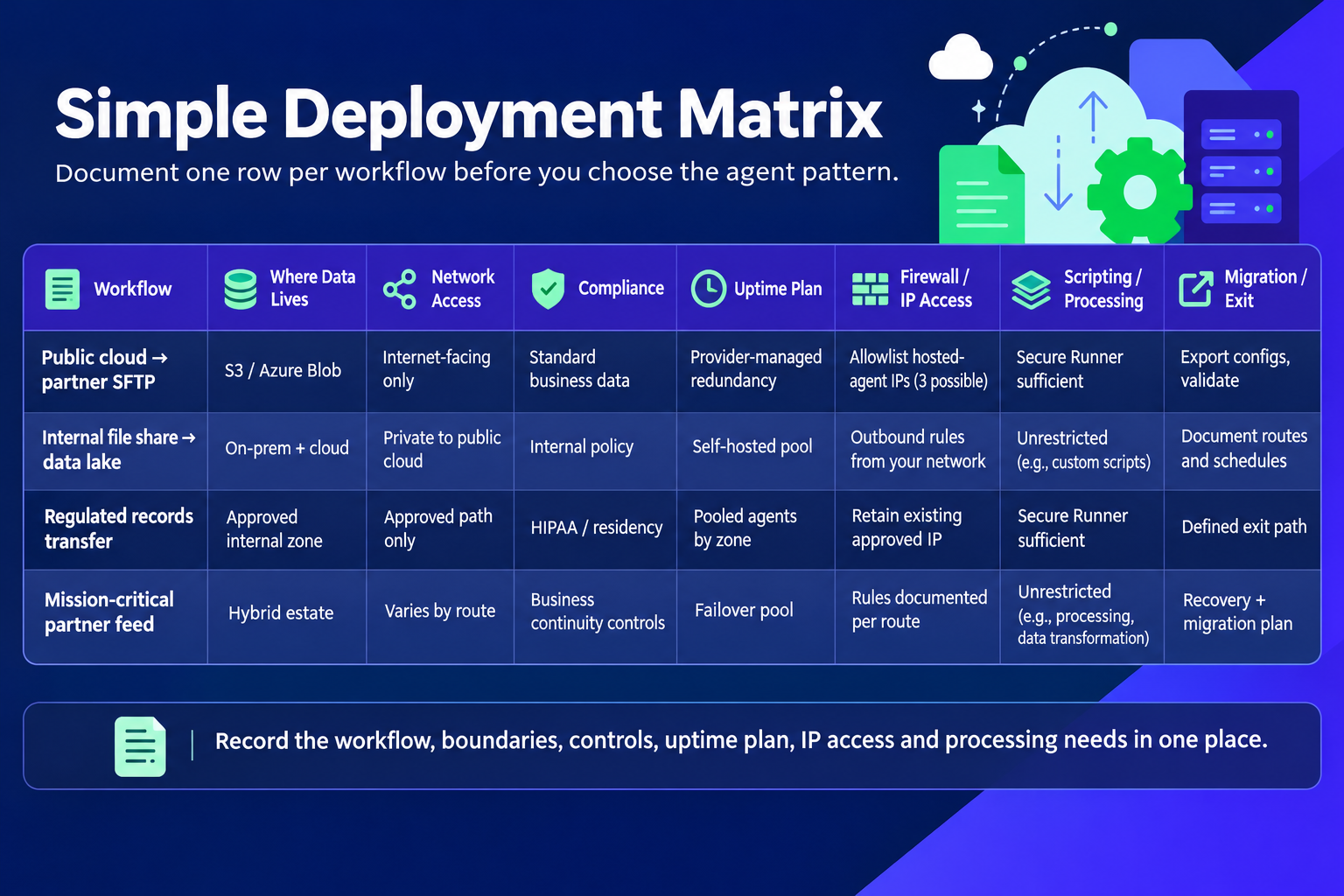
That matrix is the difference between an MFT environment that grew by accident and one you can explain in the next audit. Start with one real workflow, work through the five decisions and use the answers to choose the right Automate MFT agent.
Enjoyed this article?
Add Progress as a preferred source to see more of our content in Google search.
Add Progress as a preferred source on Google
Adam Bertram
Founder & Principal Consultant