How to Replace Legacy FTP Servers Without Disrupting Operations

Here are some things to consider before migrating from FTP to MFT, while keeping your operations running.
Most organizations do not deliberately choose to keep a legacy FTP (File Transfer Protocol) server running for decades.
It usually happens gradually. A server is deployed for a specific workflow, performs its job for years, and slowly becomes part of the organization’s load-bearing infrastructure.
By the time anyone considers replacing it, finance depends on it for partner file exchanges, IT relies on it for scheduled batch jobs, and the last person who fully understood its configuration may have left years ago.
Many IT and operations teams find themselves in this position not because the original decision was wrong, but because FTP was a reasonable choice at the time. The business then grew around it faster than the underlying infrastructure could be modernized.
That is what makes replacement difficult. Leaving the server in place may create security risks, but changing it may raise the possibility of disrupting workflows the business still depends on every day.
This article explains how to manage that transition: what to do before you touch anything, how to migrate without breaking operations, and what a modern managed file transfer platform changes once you get to the other side.
Why the FTP Server You’ve Had Forever Is Now a Problem
FTP dates back to 1971. It was created to move files across networks at a time when the internet was smaller, less commercial and far less hostile than it is today. Plain FTP reflects that history.
Plain FTP does not encrypt traffic by default, which can mean:
- Data can travel in cleartext.
- Credentials can be transmitted without encryption.
- Available audit logging may be limited.
- Access control may extend little beyond a username and password.
As of April 2026, Censys researchers report that nearly 6 million public-facing servers are still running legacy FTP protocols globally. Of those, approximately 2.45 million show no evidence of TLS encryption, suggesting that a significant share may still be operating without observable transport encryption.
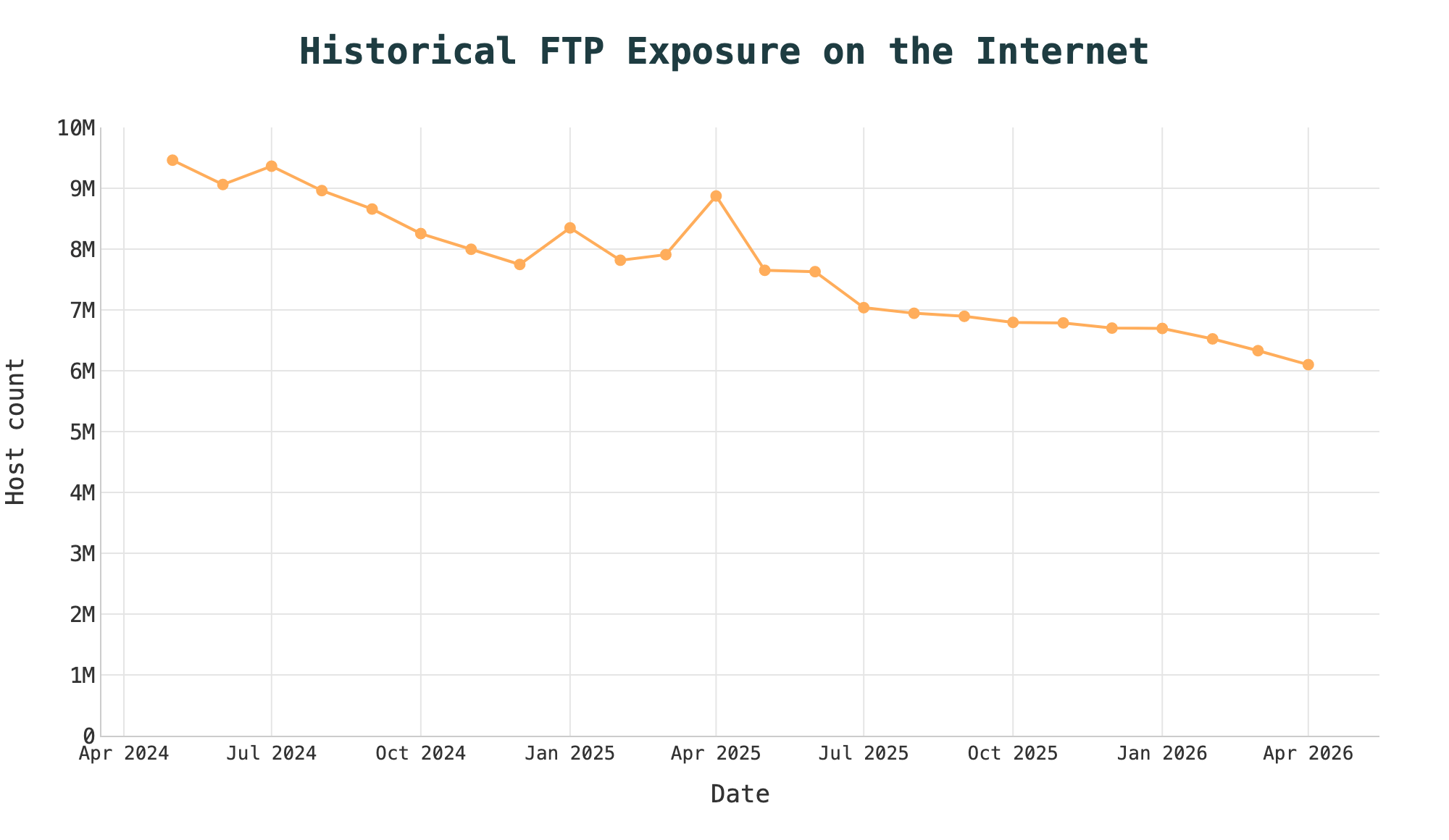
Image source: Censys
Much of this exposure is probably not deliberate. FTP may remain active when it was enabled by default, inherited from an older environment or not subsequently reviewed.
The consequences are becoming harder to ignore. Verizon’s 2026 Data Breach Investigations Report found that vulnerability exploitation had become the most common initial access vector, accounting for 31% of breaches.
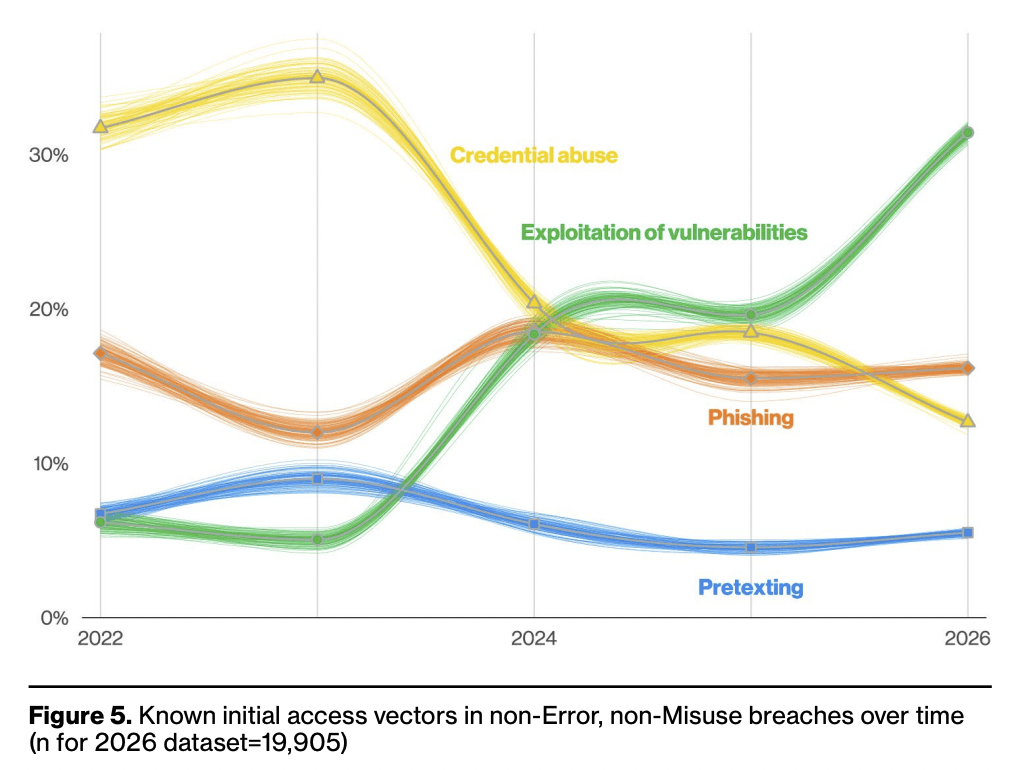
Image source: Verizon
An FTP server running without encryption, appropriate audit logging or active patch management may increase an organization’s exposure to security risk.
Regulators have taken notice, too. Organizations subject to standards such as PCI DSS may have requirements related to encryption of data across public networks and logging and monitoring.
For organizations in regulated industries, replacing legacy FTP may help organizations address security and compliance considerations as they modernize their file transfer environments.
The goal isn’t simply to replace an outdated protocol. It’s to create a file transfer environment designed to help protect sensitive data in transit, provide visibility and auditability, and incorporate security controls into everyday operations. A managed file transfer (MFT) platform can help organizations work toward those objectives.
Know What You’re Migrating Before You Begin
One of the most common mistakes in an FTP migration is starting with the technology before understanding the environment.
Most legacy FTP setups were never designed as a single system. They grew gradually, one workflow, partner connection and undocumented batch job at a time. What looks like one server from the outside may represent years of operational decisions layered on top of one another.
That means mapping every workflow that touches the server. Before you move anything, you need answers to at least the following:
Who connects to it, and do they use FTP, FTPS or SFTP?
Which internal systems push or pull files, and how often?
Which external partners still have active credentials?
Are undocumented automated jobs running against it?
Is old data sitting on the server without a clear owner?
Does the server accept inbound partner or user connections, initiate outbound transfers, or do both?
Are files stored on the server, and what retention, encryption-at-rest or downstream-processing requirements apply?
Which workflows depend on user accounts, folder structures, IP allowlists, certificates, SSH keys, scripts, schedules or naming conventions?
Does the replacement need a partner-facing secure endpoint, workflow orchestration, or both?
The answers will not always be easy to find, and that is precisely the point. If your team cannot answer these questions confidently, then the migration is not ready to begin.
The audit should produce three clear outputs:
- A complete inventory of connections and workflows
- A tiered view of which workflows are business-critical and time-sensitive
- A list of external partners who will need advance notice and coordination before cutover
That third step may take longer than the technical migration itself. Partners connecting over FTP may be running their own legacy infrastructure on the other end. They would need time to test the new connection.
How to Reduce Operational Risk During Migration
FTP migrations rarely stall because the technology is too complex. They stall because nobody wants to be responsible for taking down a system that half the business depends on.
The risk is well-founded: move too many workflows at once, and a single misconfiguration error can break file exchanges relied on by partners, finance teams and automated systems.
One approach is a phased migration, where the new platform runs in parallel with the old server while workflows migrate one by one. This can help reduce the all-or-nothing risk of the process.
The sequence looks like this:
- Stand up the new platform first. Deploy the managed file transfer platform alongside the existing server. Nothing has moved yet, so the team can become familiar with it in a live environment while helping to limit potential impact to active workflows.
- Start with a controlled pilot. Select workflows with known owners, representative technical requirements, strong observability and a practical rollback path. Avoid using business criticality alone as the selection criterion; the best pilot is meaningful enough to validate the design but contained enough to troubleshoot safely.
- Validate before moving critical workflows. Once pilot transfers are running as expected against defined validation criteria, the team has evidence that those tested workflows are operating as intended in the new environment. Critical workflows can move next, with the original FTP server retained as a fallback during validation.
- Coordinate external partner transitions in parallel. Partners connecting via FTP need new connection details, time to test and a point of contact if something breaks. Running both platforms in parallel can provide partners greater flexibility in scheduling their migrations.
- Decommission only after confirmation. The old FTP server can remain available during validation. Once identified workflows have been validated and relevant partners have confirmed successful connections. Teams can then decommission it based on their defined operational and security criteria.
What Actually Changes on the Other Side
We know plain FTP has security limitations, including a lack of encryption by default.
What receives less attention is how much easier file transfer operations become when they are managed through a modern platform rather than a collection of servers, scripts and manual checks.
With a managed file transfer platform such as Progress Automate MFT, that change looks like this:
Modern encryption and secure transfers: Unlike plain FTP, which does not encrypt traffic by default, modern MFT platforms support secure protocols such as SFTP, FTPS and HTTPS to help protect files in transit. Automate MFT supports encrypted transfers and centralized management of cryptographic keys and certificates, which can help organizations address risks associated with unprotected file transfers.
Granular access control and authentication: Legacy FTP environments may rely on separately managed accounts and permissions, making access harder to govern consistently. Automate MFT provides role-based access controls, multi-factor authentication and single sign-on capabilities. Administrators can define who can view, run or modify workflows, which can help organizations manage access and address the risk of unauthorized changes.
Centralized operational visibility: Visibility into file transfer activity can vary across legacy FTP environments. Depending on the environment, teams may have limited centralized visibility into transfer activity and failures. Automate MFT brings transfer status, failure alerts and audit records into one place, helping teams identify problems that could disrupt downstream work.
Cloud-managed control with flexible execution: Automate MFT provides a cloud-based management and orchestration layer. Workflows can run through Progress-hosted agents when all endpoints are publicly accessible or through self-hosted agents deployed on Windows or Linux systems with access to private endpoints. This enables execution within on-premises, cloud or distributed environments while workflow management remains cloud-based.
No-code workflow automation: FTP servers primarily move files. However, any processing, routing or retry logic usually depends on separate scripts. Automate MFT lets teams build workflows for tasks such as encryption, compression, conditional routing, scheduling and notifications through a visual interface, which can reduce the need for development work for workflow changes. Custom PowerShell scripting is available when a workflow requires logic beyond the built-in capabilities.
Protocol flexibility without fragmentation: Partners and internal systems rarely use the same protocol. One may use SFTP, another FTPS and another HTTPS. Automate MFT supports multiple protocols and endpoints through the same platform, which can help organizations consolidate management of supported file transfer connections.
Robust operational reporting and audit history: Task-run and file-activity reports show how workflows and individual files were processed, while audit reports record user and system actions involving resources such as tasks, endpoints, authentication methods and schedules. Together, these records can support troubleshooting, traceability and compliance review processes.
Greater resilience: When multiple self-hosted agents are configured in a pool, Automate MFT can use another available agent to support workflow execution if one becomes unresponsive or loses connectivity. It can also distribute execution across the agents in the pool as transfer volume increases, which can help reduce reliance on a single execution point.
Concluding Thoughts
Keeping a legacy FTP server running can appear to carry less operational risk than replacing it. But postponing the decision still carries a cost.
The Censys finding that nearly 6 million internet-facing hosts still run FTP services shows that FTP services remain publicly accessible at significant scale. In many cases, FTP remains active because it was inherited, enabled by default or not reviewed closely enough to be retired.
Replacing it does not have to mean disrupting the workflows built around it. With a clear dependency map and a phased migration, organizations can move connections gradually, validate each workflow and keep the existing server during validation of the new environment.
A managed file transfer platform such as Progress Automate MFT can support that transition by centralizing, automating and monitoring supported file workflows across cloud and on-premises environments, while helping teams manage migration pacing with the goal of limiting operational disruption.
Enjoyed this article?
Add Progress as a preferred source to see more of our content in Google search.
Add Progress as a preferred source on Google
John Iwuozor
Content Lead