A Simple Step-by-Step Guide to Building a Company Knowledge Assistant with Agentic RAG
Agentic RAG can help you build a company knowledge assistant so you can use actual data from your company. Here’s a practical guide for how to get started.
Most companies sit on years of accumulated knowledge: reports, presentations, documentation, email threads, training materials.
But almost none of it is actually accessible when people need it. Someone asks a question, and the answer exists somewhere in a folder three levels deep on a shared drive that nobody remembers exists.
You could build an internal search tool. You could spend months wiring up APIs and databases. Or you could use Progress Agentic RAG to turn that scattered knowledge into an AI assistant that employees can actually rely on.
This guide walks through the process from start to finish, showing you the practical steps for getting your company’s knowledge working for you instead of sitting idle in storage.
Step 1: Identify What Knowledge Matters Most
Before you upload anything, figure out what your team actually needs access to.
The mistake most organizations make is trying to index everything at once. Twenty years of emails, every version of every document, archived projects that nobody remembers. That’s not a knowledge base; it’s digital hoarding.
Start with a pilot dataset. What are the documents your team references constantly? What information do people waste time searching for? What knowledge gets asked about in Slack channels because nobody knows where the official answer lives?
For a financial services team, this might be recent research reports, client presentations and market analysis. For a product team, it could be feature specs, user research and engineering documentation. For customer support, maybe it’s troubleshooting guides, product manuals and common issue resolutions.
Pick 20 to 50 of your most critical documents. You’re not building the entire system in one day. You’re proving that this approach works, and you’re doing it with the content that delivers immediate value.
Step 2: Create Your Knowledge Box
A knowledge box is where all your indexed content lives. Think of it as a specialized AI brain trained specifically on your data.
Log into the Progress Agentic RAG dashboard and create a new knowledge box. You’ll need to choose a region (Europe, USA, etc.) where your data will be stored. This matters for compliance and data residency requirements, so pick based on where your organization operates.
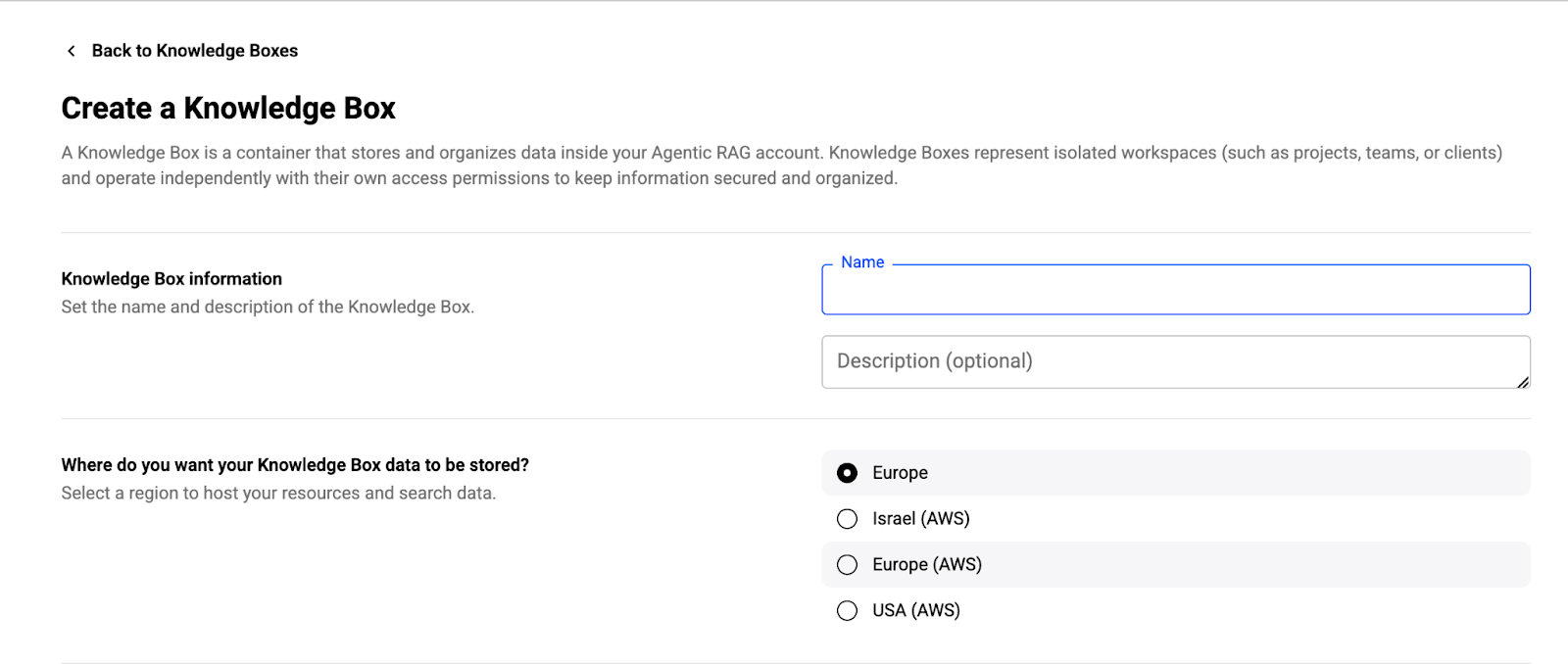
Name it something that makes sense for your use case. If you’re starting with a pilot for your sales team, call it “SalesIntelligence” or “ClientResearch.” If it’s for engineering, maybe “TechnicalDocs” or “ProductKnowledge.” The name doesn’t change functionality, but it helps when you’re managing multiple knowledge boxes later.
Once created, the knowledge box is ready to ingest data. It’s an empty container waiting to be filled with your company’s expertise.
Step 3: Get Your Data In
There are a few ways to upload content, and the right method depends on how often your documents change.
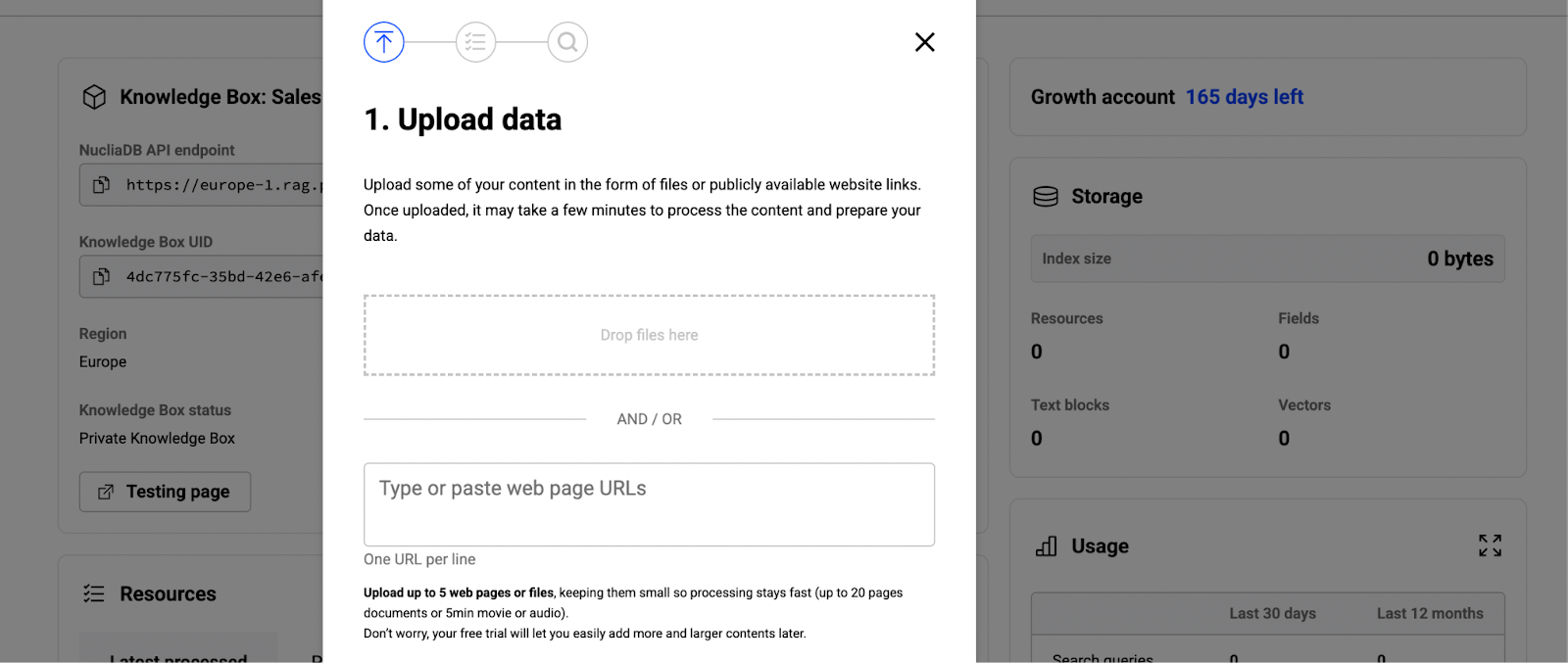
For one-time uploads or testing, use the web dashboard. Drag and drop your pilot dataset directly into the interface. Progress Agentic RAG handles almost any format: PDFs, Word documents, PowerPoints, spreadsheets, text files, even videos. Upload them all at once or in batches, whatever works for your workflow.
For ongoing synchronization, use the Sync Agent. Download it to your local machine or server, then point it at the folder where your team stores documents. The agent monitors that folder and automatically syncs new or updated files to your knowledge box. You can also trigger manual syncs when you need something indexed immediately.
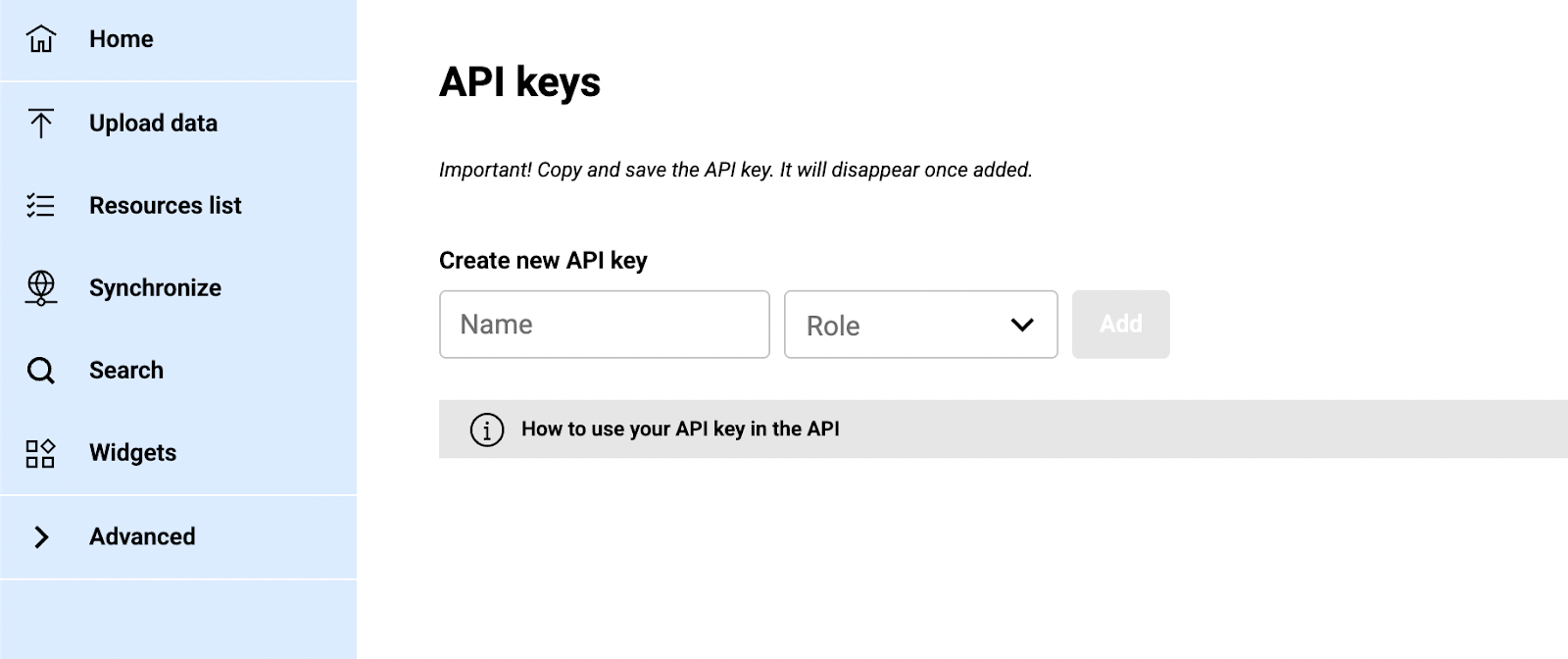
The Sync Agent requires API credentials to connect securely to your knowledge box. Generate these in the Advanced settings section of your dashboard.
As files upload, Progress Agentic RAG processes them automatically. The platform handles various file formats and prepares your content for indexing and retrieval. You don’t need to configure this processing manually. It happens in the background while you move on to the next step.
Step 4: Let the AI Agents Do Their Work
Progress Agentic RAG includes several AI agents that enrich your data automatically during ingestion:
- The Labeler agent classifies content by topic, making it easier to filter search results later.
- The Generator agent creates summaries and extracts structured information.
- The Graph Extraction agent identifies named entities (people, places, organizations, dates) and maps relationships between them.
- The Q&A Generator creates question-and-answer pairs from your content, which improves how the system handles common queries.
There’s also a Content Safety agent that flags inappropriate material and an LLM Security agent that detects potentially malicious prompts in your data.
These agents run automatically unless you configure them otherwise. You can set them to trigger based on labels, customize their behavior or turn specific ones off if they’re not relevant to your use case.
Step 5: Test Your First Query
Once your pilot dataset is indexed, try asking it a question.
Go to the search interface in the dashboard and type a query in natural language.
- “What were the key findings from last quarter’s market analysis?”
- “How do we handle customer refund requests?”
- “What are the recommended troubleshooting steps for network connectivity issues?”
The system interprets your query semantically, searches the indexed content for relevant passages and generates an answer based on what it finds. The response includes citations, so you can click through to the original documents and verify the information.
If the answer is good, you’re on the right track. If it’s not quite right, that’s useful feedback. Maybe the documents you uploaded don’t contain the information you thought they did. Maybe the query needs to be more specific. Maybe you need to adjust how the system retrieves or ranks results.
This is why you start with a pilot. You’re learning how the system behaves with your data before you scale it to the entire organization.
Step 6: Configure Retrieval and Generation
Progress Agentic RAG gives you control over how information gets retrieved and how answers get generated.
Choose your LLM. The platform supports multiple language models: OpenAI, Anthropic, Mistral, Llama, Google Gemini and others. You can experiment with different models to find what works best for your use case and budget.
Define your retrieval strategy. The platform allows you to customize how the system finds and ranks relevant content from your knowledge box. You can adjust these settings to match your specific use case and data types.
Customize the prompt. The prompt controls how the LLM generates answers. You can set a system prompt that defines the assistant’s behavior and a user prompt template that structures how queries are processed. Progress Agentic RAG includes example prompts you can use as starting points.
These configurations apply to your entire knowledge box and are used by any query sent to the /ask endpoint.
Step 7: Evaluate Quality with REMi
Progress Agentic RAG includes REMi, an evaluation model that scores every output across three dimensions:
Answer Relevance measures whether the response actually addresses the question, or if it drifts into unrelated information.
Context Relevance checks if the retrieved documents were relevant to the query, or if the system pulled in noise.
Groundedness evaluates whether the answer is supported by the retrieved documents, or if the LLM introduced claims not present in the source material.
REMi runs automatically and logs results so you can track quality over time. If groundedness scores drop, the LLM might be hallucinating despite having good source material. If context relevance is low, retrieval needs adjustment. If answer relevance suffers, the prompt might need refinement.
Most teams don’t look at these metrics daily, but they’re invaluable when something feels off or when you’re comparing configuration changes.
Step 8: Integrate into Your Workflow
A knowledge assistant only works if people actually use it. That means putting it where your team already spends time.
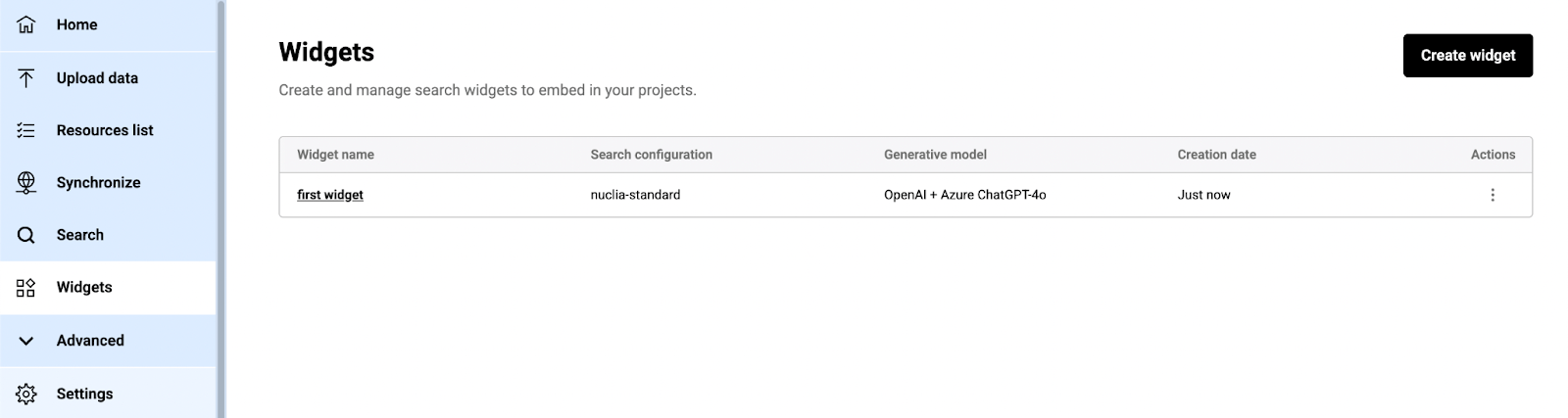
Progress Agentic RAG provides a search widget that you can embed on your intranet, internal wiki or documentation site. The widget allows employees to type questions and get answers directly on the page. It requires a few lines of JavaScript code to implement.
For custom applications, use the REST API. The /ask endpoint allows you to query your knowledge box from your own applications and build custom interfaces. The API returns results as a readable HTTP stream in NDJSON format, so you can display answers as they’re generated rather than waiting for the complete response.
Step 9: Expand Beyond the Pilot
Once your pilot works, scale it. Add more documents, expand to additional departments and create separate knowledge boxes for different teams or use cases. Each knowledge box can have its own configuration, access controls and data sources.
Set up automated ingestion so new content gets indexed without manual intervention. Point the Sync Agent at your team’s shared drives or connect to your document management system through the API. Pull in data from wherever it lives and make it searchable.
Common Pitfalls and How to Avoid Them
Most teams make the same mistakes when building their first knowledge assistant. Here’s what to watch for:
Starting too big: Don’t try to index every document in your company on day one. Start with your most valuable content, prove the system works, then expand. A pilot with 20 well-chosen documents will teach you more than 200 random files.
Ignoring data quality: If your source documents are poorly written, outdated or full of errors, the AI will surface those issues. Clean up your content before you index it. The system retrieves what you give it; garbage in means garbage out.
Skipping user training: Even the best system fails if nobody knows how to use it. Invest time in showing people how to phrase queries effectively and how to interpret results. Explain how citations work and why they matter.
Not measuring quality: Use REMi and pay attention to what users report. If people stop using the system, figure out why and fix it. Quality metrics tell you where the system struggles before users give up entirely.
Treating it as a black box: Progress Agentic RAG is configurable for a reason. Test different settings, experiment with prompts and adjust retrieval strategies.
The Bottom Line
Building a company knowledge assistant doesn’t require months of engineering work or a dedicated data science team. Progress Agentic RAG handles the infrastructure, the AI agents, the retrieval pipeline and the generation layer. You handle the content and the configuration.
Start small, test with real queries, refine based on results and scale when it works. The goal isn’t to build the perfect system from the beginning. It’s to get your team’s knowledge out of storage and into their hands when they need it.
Ready to start building? Try Progress Agentic RAG with your pilot dataset, or schedule a demo to see how it handles your specific use case.
And now, you can use the insights of Progress Agentic RAG inside your website: Progress unveiled the first Generative CMS. Progress Sitefinity CMS powered by Progress Agentic RAG transforms enterprise knowledge into adaptive experiences—each assembled in real time by AI that understands your users, your brand and your goals.
Request early access for Sitefinity Generative CMS and get started with your own innovations.

John Iwuozor
Content Lead

