How to Manage Multilingual Content with Sitefinity CMS
With Microsoft Translator integration to Sitefinity CMS, teams can more easily keep content consistent across different languages as their websites grow.
Publishing a product update in English is typically straightforward. But getting that same update onto your French, German and Spanish websites can take a lot more work.
Someone has to coordinate the translations, track the different versions, review the returned copy and make sure every language gets updated. And when the English version changes again, much of that process begins all over.
For marketing teams managing multilingual websites, these handoffs can quickly become a bottleneck. While the translated content is being prepared, visitors in other markets may still be reading outdated information.
The Progress Sitefinity platform helps simplify the process through its Microsoft Translator integration, available through Sitefinity Integration Hub. Teams can connect their CMS to Microsoft’s translation service and automate parts of the translation process, reducing the manual coordination involved in keeping regional websites updated.
So, what does this look like when you’re managing content across multiple languages?
Start with an Update to Your English Content
Say your company has just updated a product page with new features, revised specifications and changes to product availability.
The English version is ready, but your company also operates websites for its customers in Germany and France. Those pages need the updated information too.
Normally, someone might export the English copy, send it to a translation provider, track the requests and coordinate the translated versions when they come back.
Sitefinity already supports multilingual content management, including a Translations module for sending content to translation services and tracking translation jobs.
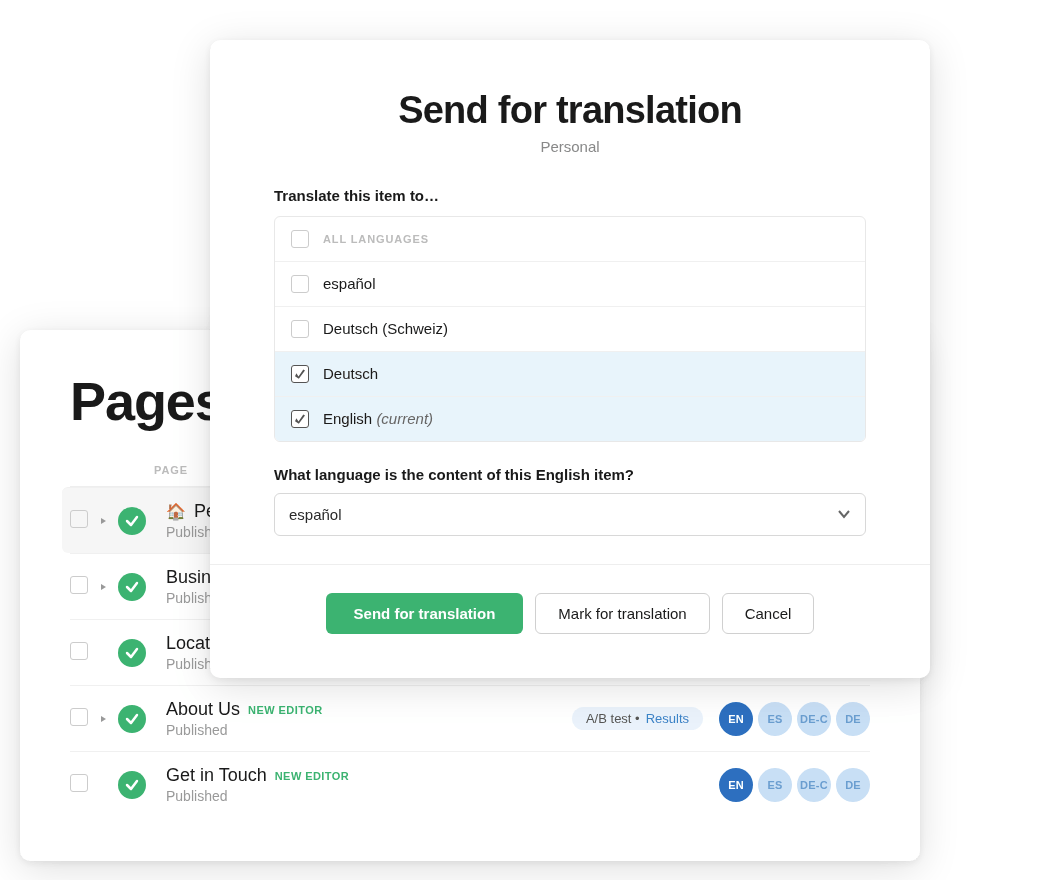
To do this, an editor can open a content item, select “Send for translation” from its Actions menu and choose the target languages. They can send it immediately or mark it for translation later. The Translations module provides visibility into sent, completed and failed translation jobs.
Sitefinity CMS also provides a Microsoft Machine Translator connector for teams that want to use Azure AI Translator through this native translation process. Once configured, the connector becomes an available translation service in the CMS.
Automate Translation with Integration Hub
The Sitefinity Integration Hub connects Sitefinity CMS with Microsoft Translator through a low-code/no-code visual designer.
Instead of manually coordinating each translation request, teams can create automated workflows called recipes. These define what should trigger a translation and which actions should follow.
With the appropriate recipe configured, publishing or updating the English page could trigger a workflow that sends its content to Microsoft Translator for translation into French and German.
Teams can also configure workflows for batch translation, which is useful when several pages or documents need updating as part of the same release.
That becomes particularly helpful when your website contains hundreds of product pages, blog posts or support articles. Rather than treating each translation request as a separate task, you can build repeatable processes around the types of content your team publishes regularly.
The Integration Hub also supports prebuilt recipes and a visual workflow editor, so teams can adapt their automation as content requirements change without building every workflow from scratch.
Review the Translated Content Before Publishing
Once the product-page content has been translated, the next task is making sure the French and German versions are suitable for their audiences.
How the translated text returns to Sitefinity CMS and moves through the review process depends on how your Integration Hub recipe is configured.
Teams can build the workflow around their existing content management and approval processes, so editors can check the translated content before publishing it.
A product name might need to remain in English. A technical term might need different wording for French and German audiences. If the announcement includes pricing or product availability, the regional team needs to check that those details apply to its market.
Machine translation can help prepare the first version, but editors still need to decide whether it’s accurate and appropriate for the intended audience.
That is especially important for organizations publishing financial, legal, healthcare or other regulated information, where a small translation error can change the meaning of a statement.
Keep Regional Websites Updated as Content Changes
Translating a new page is only part of the work. You also need to keep it updated whenever the original content changes.
Say your company updates its product specifications every few months. The English page gets revised immediately, but the French and German versions still need someone to identify the changes and initiate the translation process.
If those updates are missed, visitors in different markets may end up seeing conflicting product information.
Through the Integration Hub, teams can configure translation workflows that respond to content changes. This can help reduce the manual effort of identifying which updates need translation and initiating the appropriate workflow.
The same approach is useful beyond product pages:
- Blog posts and resources: Marketing teams can translate articles, guides and other content for regional campaigns.
- Support documentation: Software companies can use batch translation workflows when several help articles or product guides need updating.
- Localized marketing content: Global organizations can prepare translated versions of selected campaign pages and content variations for different audiences.
These workflows can be adapted to different content types and publishing requirements, giving teams more control over how multilingual updates are handled.
The goal is to make translation a repeatable part of content operations rather than a separate project every time something changes.
Make Multilingual Publishing Easier to Manage
As marketing teams plan their content operations for 2027, keeping multilingual websites up to date is one area worth paying attention to.
Translations still need to be reviewed, and regional teams still need to check terminology, accuracy and local requirements. But the repetitive work of routing translation requests and tracking content updates can be handled through configured workflows.
With Sitefinity Microsoft Translator integration through the Integration Hub, teams can connect translation tasks to the CMS they already use, helping them keep content consistent across different languages as their websites grow.
To explore the available workflows, visit the Sitefinity Microsoft Translator integration page.
Enjoyed this article?
Add Progress as a preferred source to see more of our content in Google search.
Add Progress as a preferred source on Google
John Iwuozor
Content Lead

