Avoid the Detective Work: Automating Role Transitions Within a Podio App

Save time and detective work: Set up workflows with roles instead of individuals and keep operational momentum moving even when someone leaves.
We have all experienced that specific, stomach-dropping moment. You are pushing a massive deal across the finish line. The client is ready; the integration is scoped. All you need is the final technical sign-off. You tag the lead engineer on the project item, hit enter, and immediately receive the dreaded automated reply. The person you need is … gone.
In a rigid system, this auto-response is the sound of your operational momentum crashing into a brick wall. It means someone is about to spend the next couple of hours (which usually turn into days) manually hunting down every email, channel communication, message, task, client folder and approval gate tied to that user’s email address, trying to figure out whose desk the work belongs on now.

Image sourced from Unsplash
A game of digital detective is not a productive use of anyone’s time. Your tech stack should adapt to your org chart, not the other way around. Yet, the way most teams handle task assignment is inherently firm.
We assign an X amount of active client deliverables to Y’s email address. When Y changes to the successor Z, those tasks do not magically route themselves. They comfortably sit in the dark, gathering digital dust, until someone volunteers to manually hunt them down, clicking “reassign” hundreds of times until their mouse-clicking finger goes numb (based on a true story).
Let’s try to fix this!
We are going to build a “Pooled Assignee App” architecture with Progress Podio software. Progress Podio is a flexible, no-code/low-code digital workspace builder that helps you structure, automate, scale and simplify your work.
Then we’ll use Podio Workflow Automation (PWA) on top. Think of PWA as the rules engine that listens for specific data changes within your apps and instantly executes a sequence of predefined actions like assigning tasks, updating records or triggering webhooks to eliminate manual administrative friction.
By combining the Podio relational data model with PWA, we can create a system where tasks are assigned to roles, not individuals. When a person leaves, you update a single field in one directory, and Podio automatically hunts down every item assigned to them, reroutes it to the new hire and sends them a clean digest of their inherited workload.
Pull the plug on manual reassignments!

Image sourced from Unsplash
Note: The purpose of this blogpost is to outline important concepts, provide connections between them and produce a real-life example. While it is not a step-by-step guide, detailed setups will be provided and linked ad-hoc, so that you can build the same solution yourself.
Step 1: Building the ‘Directory’ (a Podio App)
Podio exists as a well-balanced system of Workspaces, Apps and Items.
Workspaces are the command centers. In this case, we can set up a “Core Operations” workspace and invite the relevant stakeholders.
An App defines the structure of the data you want to collect. For our Directory setup, we need a centralized roster. Let’s create a brand-new app in our core Operations workspace called “Roles Directory.” This is our single source of truth.
In the ideal case of being lean, as a bare minimum the structure requires exactly two fields:
- Role – Single-line text field (e.g., “VP of Magical Engineers - EMEA”).
- Email – Email or member field with the exact email of the person holding the seat.
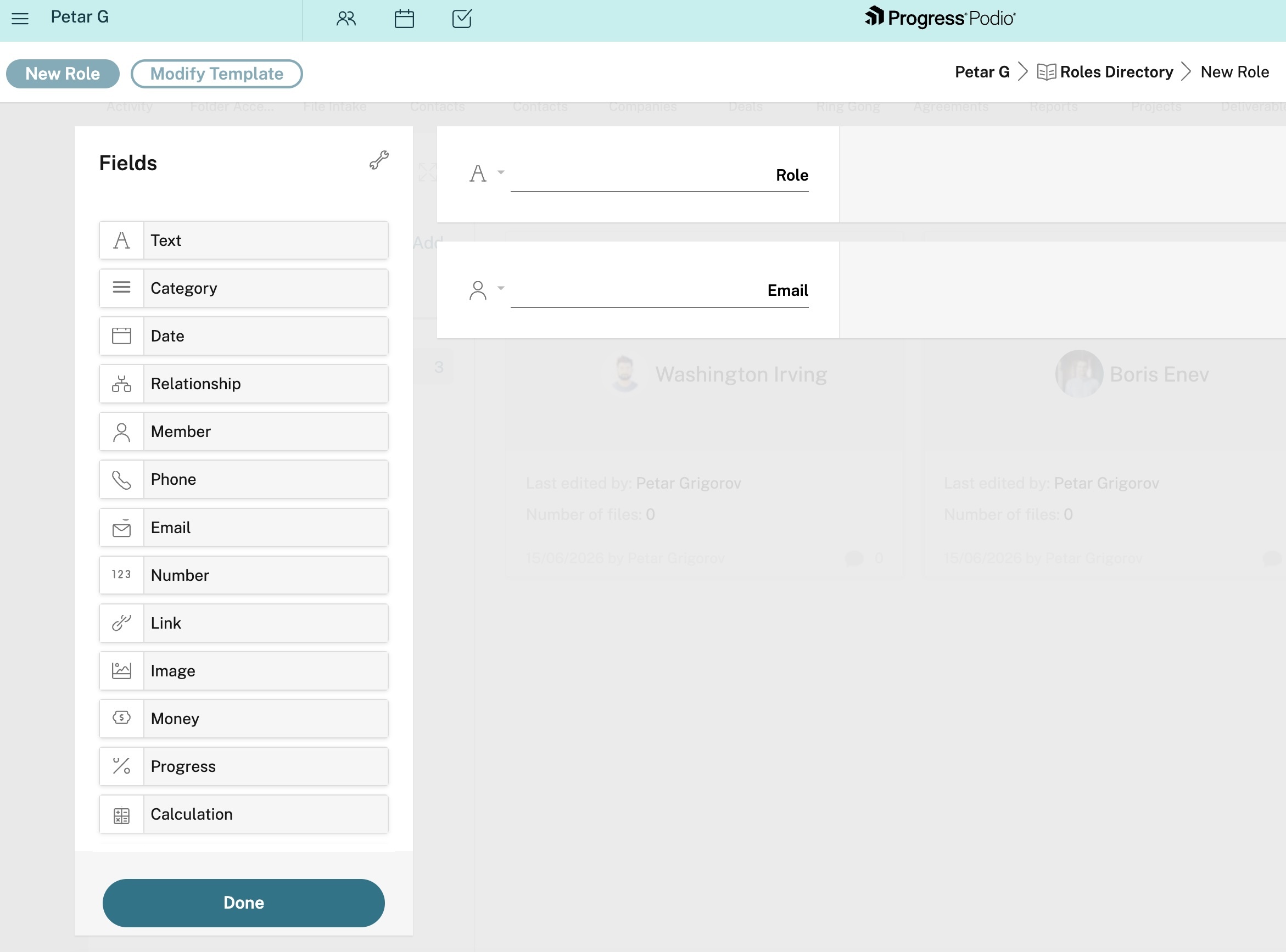
That is it. No clutter. When an employee departs, you do not touch the plethora of tasks they were working on. You simply open this directory, clear their address from the “Email” field and slot in the new hire’s address.
Step 2: The Operational Hub (The Roles Assignee App)
We’re missing the magical spark of the directory app, however, unless it talks to the rest of the system. We need another app to represent our daily grind, our deliverables, our project trackers or our IT intake requests. We will call this the “Roles Assignee” app.
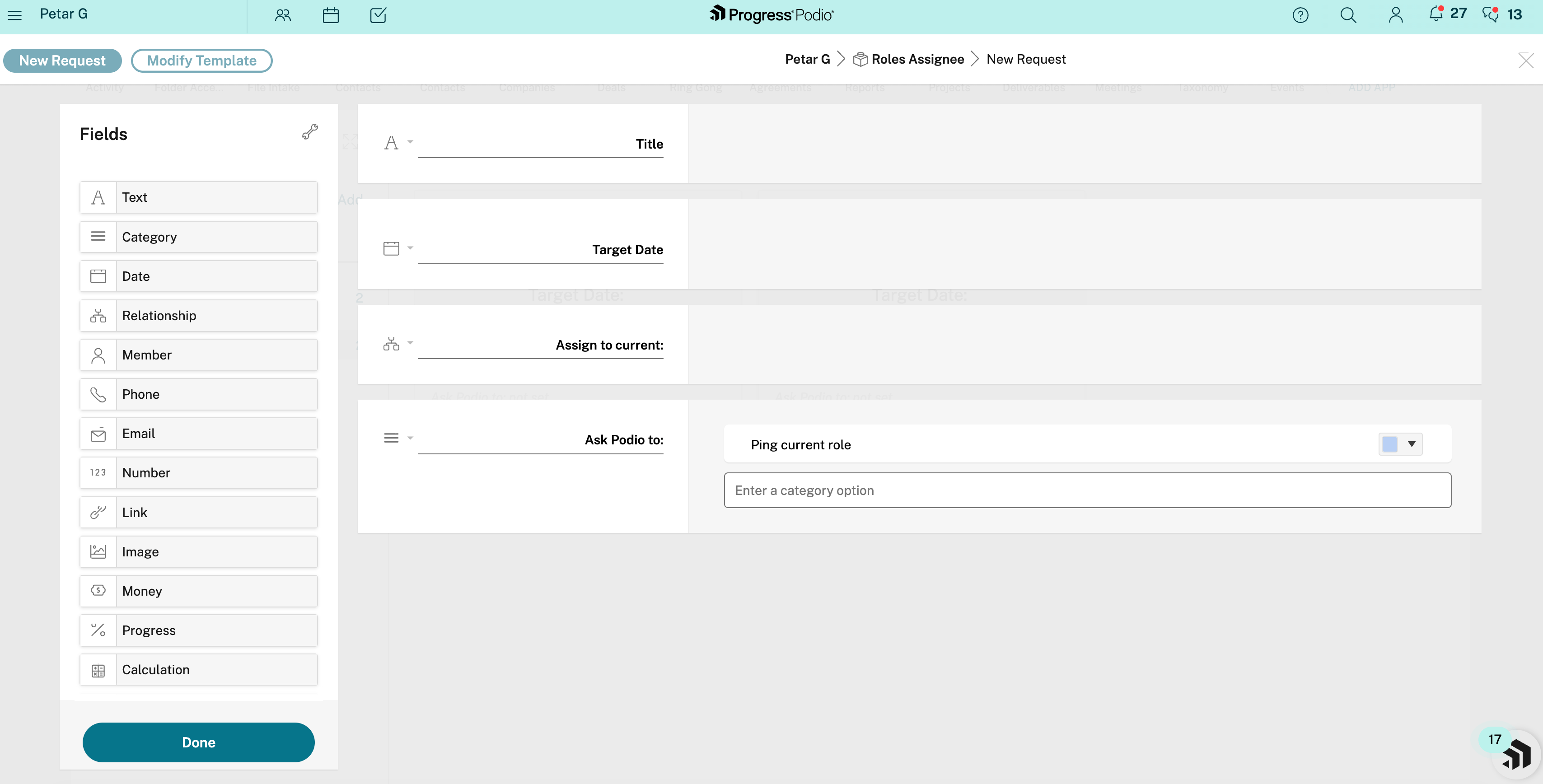
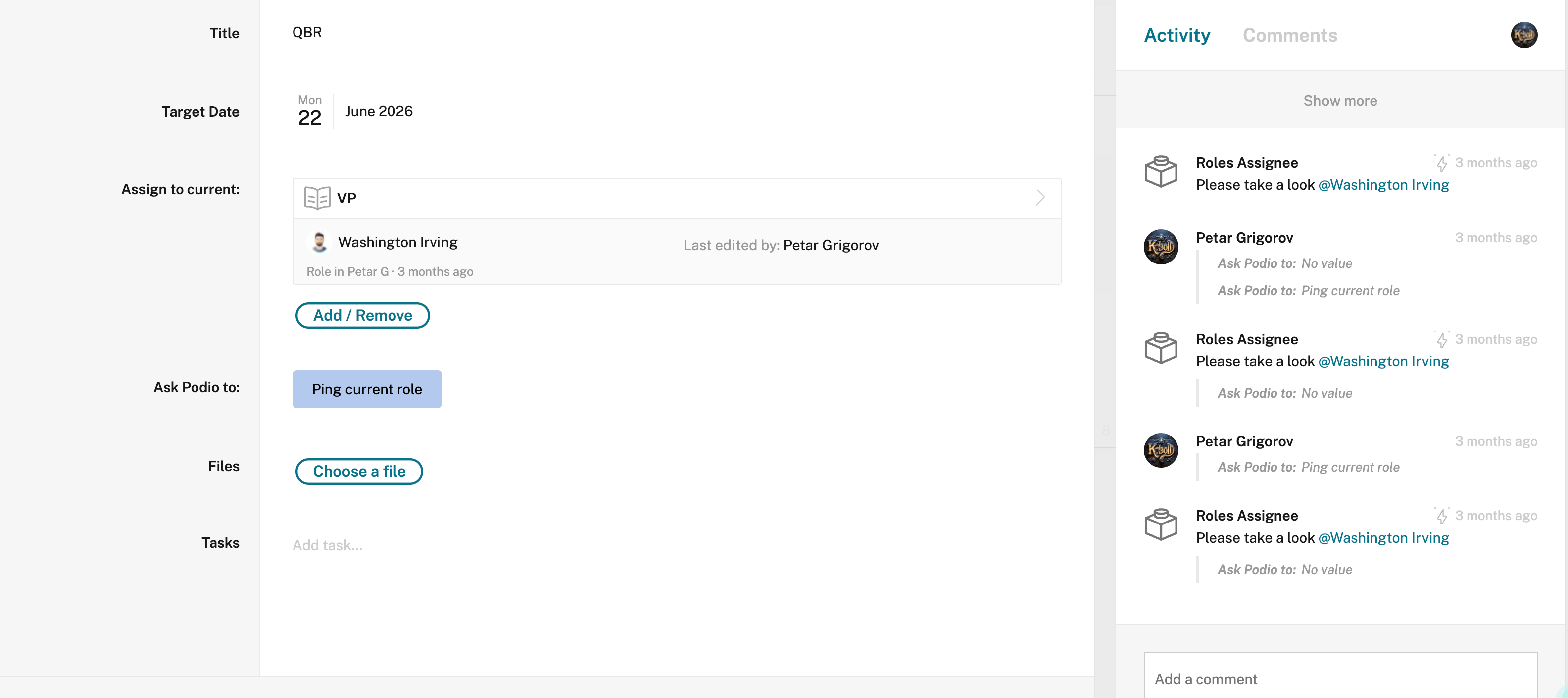
To bridge the gap between the work and the worker, we replace standard user tags with a relational structure. Our app needs these fields:
- Title – Single-line text field for the name of the task.
- Target Date – Date field for the deadline.
- Assign to current – Relationship field. This is the critical piece: It must point directly to our new Roles Directory app.
- Ask Podio to – Category field. Use it to create a single dropdown option here called “ping current role” (we will use this later to trigger a brilliant micro-automation).
When our team logs a new request, they no longer tag the new person’s name. They tag the relationship field with the appropriate role. The system now inherently knows what the job is, and the Relationship field acts as a live conduit to who is doing it.
Step 3: The Handover (Automating the Transition)
Once the data is structured, we need it to move. We don’t want items sitting silently, but we also do not want to bombard a new hire with 20(0) separate email notifications the second they take over a role. We need the system to react instantly, with the mechanical precision of a perfectly extracted espresso shot, delivering a single, consolidated briefing.
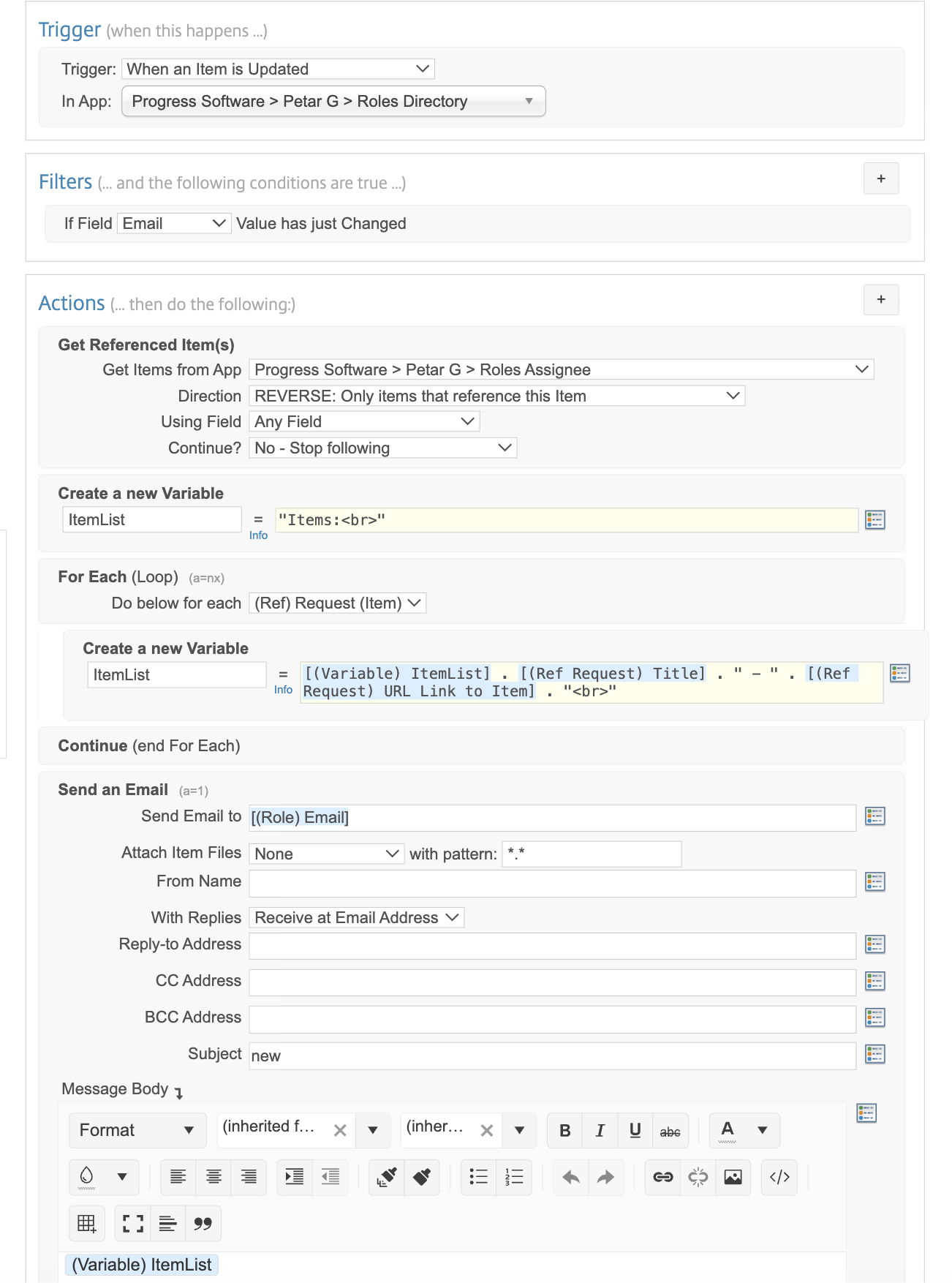
We can do that easily with Podio Workflow Automation. Create a new flow on your Roles Directory app called “Send emails to new roles.”
The Trigger & Filter
We need to set these fields as follows:
- Trigger: When an item is updated
- Filter: If field “Email” value has just changed (This means the heavy lifting only happens when someone or something swaps out the person in the seat)
The Pro Tip
Instead of firing off an email for every single task, we are going to build an HTML string and send one unified digest.
Get Referenced Item(s): Set the direction to “REVERSE.” Tell PWA to look back at the Roles Assignee app and fetch every active task that points to this specific role.
Create a New Variable: Name it “ItemList.” In the value box, type
"Items:<br>". This initializes our text block with a line break.For Each (Loop): Instruct PWA to loop through every single task it just found.
Update the Variable: Inside the loop, update ItemList to equal:
[(Variable) ItemList] . [(Ref Request) Title] . " - " . [(Ref Request) URL Link to Item] . "<br>". (In other words, for every task, take the running list, add the new task’s title, add a dash, add the clickable URL to the task, and drop down to the next line.)Continue: End the loop.
Send an Email: Outside the loop, set the recipient to
[(Role) Email]. In the Message Body, simply drop in the(Variable) ItemListfor it to visualize.
Remember, the examples here are lean, but you can add much more text if needed.
When the trigger fires, PWA executes the handover. It scans your pipeline, compiles a beautifully formatted list of all items, delivers it directly to the new assignee’s inbox. They log in on day one with a complete, clickable roadmap of their exact responsibilities.
Step 4: Dynamic Ping (Micro-Automations for the Win)
Routing the tasks during a transition is a massive win, but what about the day-to-day operations?
Imagine a scenario where someone needs an urgent update on a task. In a standard setup, they have to manually check the directory, figure out who the current “VP of Magical Engineers - EMEA” is and engage in the comments. This is indeed unnecessary friction. They shouldn’t have to care who holds the role; they just need the role to answer.
We can solve this using the Ask Podio to: category field we built in Step 2.
Flow A: Check Role Change and Notify
Creates a flow on the Roles Assignee app.
Trigger: When an item is updated.
Filter: IF
Ask Podio to:equalsPing current role.Action 1 (Get Referenced Items): Set the direction to
FORWARD. Tell PWA to look at the Roles Directory app.Action 2 (Add a Comment): Tell PWA to drop a comment on the task reading: “Please take a look
[(Ref Role) Email (Mention)].”
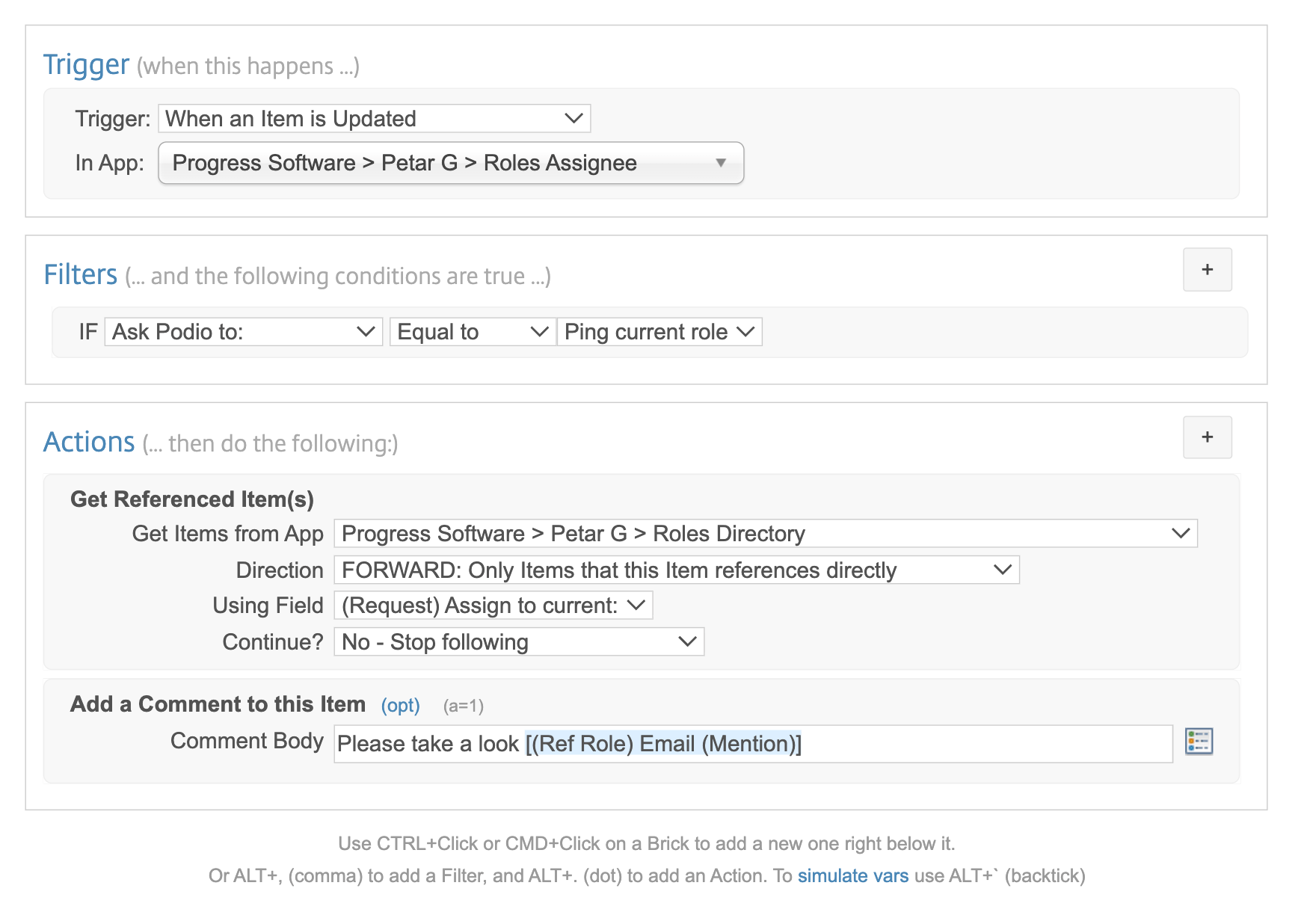
What happens now: A user just clicks “Ping current role” button, and PWA dynamically looks up whoever currently holds the seat and formally @mentions them in the item comments, triggering an instant Podio notification for that specific user.
Flow B: Reset the Button
A dropdown field stays on whatever you select. If you leave it on “Ping current role,” you can’t click it again next week. We need to turn this static dropdown field into a reusable macro button.
Create a second flow on the Roles Assignee app.
- Trigger: When an item is updated.
- Filter: IF
Ask Podio to:value has just changed and equalsPing current role. - Action (Update This Request): set
Ask Podio to:to equalValue (Previous Request) Ask Podio to:
The moment a user clicks Ping, Flow A sends the notification and Flow B instantly reverts the dropdown back to blank. It acts exactly like a physical push-button on a control panel. How cool is that?
Conclusion
Building a corporate tech stack shouldn’t be an exercise in collecting software licenses like expensive, disconnected paperweights. It should be about designing systems that actively eliminate the soul-crushing administrative drag we all pretend is just “part of the job.”
When you stop forcing your highly trained experts to play digital detective just to find a task, you give them their time and their operational momentum back.
By pairing the relational architecture of Podio Apps with the routing efficiency of PWA variables and loops, you start making your pipeline bulletproof. You help prevent critical client deliverables from vanishing into the ether during a departmental reshuffle, and your team can collaborate seamlessly without having to consult the corporate org chart like it is an ancient, rapidly changing prophecy.
Go ahead, build that directory app, wire up those workflow loops, and let the automated transitions begin. Your operations team has definitely earned a permanent vacation from manual reassignment duty. After all, nothing signals a truly agile enterprise quite like permanently retiring the phrase “Whose desk is this sitting on?”
Good luck and happy automating!
.jpg?sfvrsn=c2fd3013_3 "Petar-Grigorov-headshot-(2)")