What Are Add-ons in Podio?
Add-ons let you increase specific usage limits in Podio and Podio Workflow Automation. You can purchase the extra capacity you need, for the exact API key or Automation Account that needs it.
This article introduces what add-ons are, the add-ons currently available for purchase, and where to find and manage them in Podio.
What Add-ons Do
An add-on increases a specific usage limit for a specific target — either an API key or an Automation Account — for as long as the add-on stays active. Add-ons are optional and prepaid: there are no automatic overage charges, and additional capacity is only added when the contract owner intentionally purchases it. Add-ons are billed separately from your employee seats but are shown on your contract alongside your plan charges.
Note:
Add-ons increase the limit of what's already included for your API key or Automation Account. They don't change your employee seat pricing.
Types of Add-ons
Two types of add-ons are currently available for purchase:
-
API Add-ons
Increase the hourly API request limit for a specific API key. Useful when an integration needs to make more API calls per hour than the included base limit allows.
-
Automation Add-ons
Increase the number of monthly actions available to a specific Podio Workflow Automation Account . Useful when the account’s automations are approaching or exceeding their included monthly action limit.
Note:
Automation add-ons are only available on Premium plans.
How Add-ons Work
-
Each add-on is purchased for one target — a single API key (for API add-ons) or a single Automation Account (for Automation add-ons).
-
The contract owner can purchase an add-on for any employee in the organization, or for any service Account in the organization.
-
An add-on is billed starting the moment you purchase it, and continues renewing automatically with each of your regular billing cycles until you cancel it.
-
A target can only have one active add-on from the same group at a time.
-
Add-ons stay tied to the contract they were purchased on.
Later articles in this series cover the full details of purchasing, upgrading, cancelling, and billing for add-ons.
Who Can Manage Add-ons
Only the Contract owner can purchase, upgrade, or cancel add-ons. Other organization admins can view add-on details but cannot make changes.
Where to Find Add-ons in Podio
-
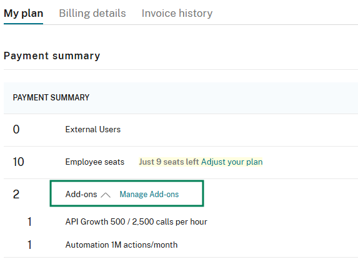
Go to Billing > Contract > My Plan.
-
In the Payment Summary section, you'll see any active add-ons that will be included in your next billing cycle.
-
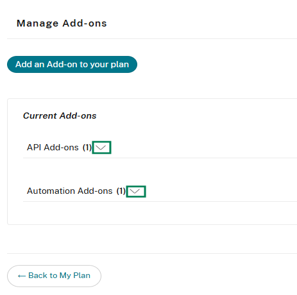
Select Manage add-ons to open the add-ons management view.
Before You Purchase an Add-on
-
Your contract is on an eligible paid plan (Free/Trial plans cannot purchase add-ons).
-
Your contract is active and in good standing.
-
You have a valid payment method on file.
-
Your plan meets any minimum plan requirement for the add-on.
Note:
If your contract has a payment error, purchasing or upgrading add-ons is temporarily disabled until the payment issue is resolved. Contact Podio Support to resolve such issues.