Is Your Retail Website Accessible?

Let’s look at the most prevalent accessibility issues in online retail and ways to remove these obstacles from all your users’ paths.
According to data aggregated by Statista, 85% of people in the U.S. alone have shopped online. Whether or not they successfully completed their purchases is another story.
A recent study reveals that many retail websites have big issues when it comes to accessibility.
Can your retail website afford to cater only to users without impairments? And, more importantly, do you want to be known as a retail brand that doesn’t care about accessibility?
In this post, we’re going to have a look at the accessibility study as well as what retailers in particular can do to get their websites up to speed with WCAG guidelines and local disability-related legislation.
Retail Has a Big Problem with Accessibility
At the end of 2024, AudioEye analyzed 15,000 websites and published the data in the 2025 Digital Accessibility Index.
In general, these were the most common accessibility violations discovered:
- 98% of pages didn’t have sufficient color contrast when it came to buttons, labels or text.
- 80% of pages had links without clear, descriptive link text.
- 75% of pages didn’t offer alt-text (alternative text) for images.
- 62% of pages didn’t properly label input fields or buttons.
Many of these issues pose problems for people with visual impairments. To make matters worse, anyone who relies on screen reading technology will be left out as well as it won’t just be difficult to see the page, but to understand what different elements do.
This is just the data for all websites. Now let’s have a look at why retail websites are so problematic.
AudioEye reviewed nearly 86,000 pages from more than 2,500 retail websites. They looked at components that are especially critical along the user journey, like the product pages, checkout experience and order summary page.
Retail websites had an average of 350.1 accessibility issues per page—more than any other industry looked at. They also had a high rate of errors with images.
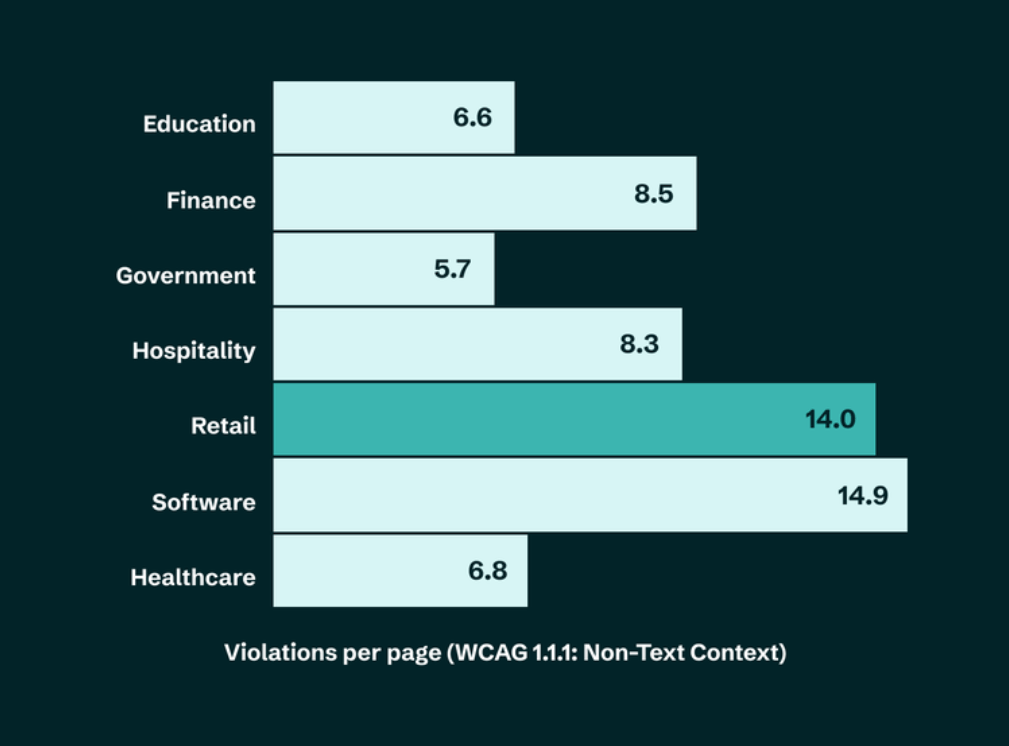
On average, there were 14.0 inaccessible non-text components (i.e., images, videos and other graphics). The only other type of website with more issues was software with a rate of 14.9.
Imagery is a critical component of the online shopping experience. With images, we can show off different variations, views, sizes, contexts, 2D vs. 3D, and more. If any of these images are inaccessible to users, they’ll miss out on critical info that can help them decide whether or not they want to buy from your store.
Other issues that plague retail/ecommerce websites include:
- Low color contrast (73 elements per page)
- Keyboard inaccessibility (9.5 violations per page)
- Non-descriptive links (8 per page)
- Unusable forms (11.5 inaccessible input fields, elements or buttons per page)
There isn’t just one kind of inaccessibility standing in the way of users with disabilities when they shop online. Even if they can get past a poorly labeled link, they may also have to contend with missing image alt text, keyboard inaccessibility and checkout forms that don’t work.
What Is Accessibility Worth to You?
According to the World Health Organization, about 1.3 billion people or 16% of the global population has a significant disability. While not every disabled person is negatively impacted by inaccessible web interfaces, plenty of them may be—like people with blindness, cerebral palsy, dyslexia, epilepsy and more.
Let’s say it’s only people dealing with some level of blindness who are unable to use your website fully.
A 2019 study tested hundreds of websites from the perspective of a blind person. They found that 70% of them were inaccessible. Ecommerce/retail was a top offender in this case, with two-thirds of the 10 most popular sites having serious accessibility problems.
According to blind advocacy groups, 2% of all ecommerce transactions are done by blind people. What’s more, they represent $10.3 billion spent every year.
Considering how frequently they have to abandon online transactions (two-thirds, on average), that’s a lot of money to leave on the table. But don’t fret. They don’t give up entirely. They just scour the web for a retailer that has an accessible website.
Blind consumers aren’t the only ones who are being left out in the cold. A Fable survey found that 6% of people with disabilities shop online every day, and 50% of them shop online for physical goods every week.
Unfortunately, this same survey found that inaccessible retail experiences are pushing disabled persons to large marketplace websites like Amazon and Walmart. Accessibility is the most important deciding factor when choosing a website, with 56% of people making it a top priority. It’s no wonder they’re moving away from smaller or more independent retailers who fail to cater to them.
It happens quite often, too. Similar to what we saw with the blind segment, disabled consumers abandon about 39% of online experiences every year.
For some, it doesn’t get to that point. They’re able to work around inaccessible features: 81% encountered some form of inaccessibility but didn’t give up despite being frustrated. But how long will customers put up with frustrating experiences if they know there’s a convenient, accessible alternative offering super cheap prices and fast shipping just around the corner?
Knowing this, you need to ask yourself if your retail company can afford all these lost opportunities and to frustrate users on such a sizable scale? And if these statistics alone aren’t worrisome, how about the potential added cost of an accessibility lawsuit?
How to Improve Retail Site Accessibility
Your technology shouldn’t be an impediment to anyone’s ability to shop online. In addition to it costing you customers, an inaccessible store can hurt your online reputation and lead to costly and time-consuming lawsuits.
There are a number of regulating bodies and legislation that can now help consumers fight back against inaccessible online shops:
To verify your retail website complies with these mandates, here’s what you need to do:
- Familiarize yourself with all relevant accessibility guidelines and legislation.
- Update your web design and development workflow to incorporate these guidelines.
- Pay close attention to the violations noted by AudioEye—missing alt text, vague links, inaccessible checkout forms, low-contrast elements (like buttons) and keyboard inaccessibility.
- Consider other important parts of your shoppers’ journey as well—like using search functionality, creating an account, copying discount codes and getting past CAPTCHA.
- If your shop includes lots of videos, make sure the players are accessible and each video includes captions or transcripts.
Once you’ve made your website accessible, schedule regular audits and tests of it as well. This will help keep updates to your design and content from presenting new challenges for your users. This will also make it easier to keep your shop in compliance even as legislation and web standards evolve.
Wrapping Up
Accessibility is something that people focus on a lot around the holidays because it’s one of the busiest shopping periods all year. Look back on the statistics mentioned earlier and you’ll see how much money the retail space stands to lose if it can’t serve the 16% of consumers with severe disabilities.
But accessibility isn’t something to talk about and to “fix” for holiday shoppers, and then to forget about the rest of the time. Your web design and development strategy should prioritize accessibility from the get go. There are many reasons to improve web accessibility, including enhancing the user experience, improving SEO, expanding your business’s reach and creating a more inclusive brand.
Enjoyed this article?
Add Progress as a preferred source to see more of our content in Google search.
Add Progress as a preferred source on Google
Suzanne Scacca
Freelance Writer & Consultant

