Pre-compiling Decision Service Files for .NET Environments

Learn how to save time and get better performance while using Progress Corticon with this helpful tip for .NET environments.
While in a .NET environment, the time it takes for a Decision Service to be deployed into a Corticon Server can vary based on the size of the Decision Service. This post will describe the benefits of pre-compiling the Decision Service into a CLI .dll for better performance in deploying Decision Services into a Corticon Server.
The deployment unit for a Decision Service on a CcServer is a .eds file. The .eds file can be created before deployment into the CcServer by using various utilities (i.e. Deployment Console or ICcServer APIs), or the .eds file can be dynamically compiled if the user deploys a Decision Service using a Ruleflow file (.erf). In both cases, the final deployment file is a .eds file.
The .eds file will contain two sets of .class files that are needed to execute Rules. The .class files include the internal data model, used by Corticon, and the compiled rules. The number of .class files in each .eds file will depend primarily on how big the Vocabulary is (# of Entities/Attribute/Associations) and the number of Rules in the Ruleflow.
For obvious reasons, Java .class files cannot directly run into a .NET environment. If the .eds file only contains .class files, how can an .eds file get deployed as a Decision Service in an IIS Server?
Corticon uses a third party product called IKVM, which translates Java bytecode to CLI, and then stores it in memory in that form. However, dynamic translation from Java bytecode to CLI can be time consuming. The time depends on how many .class files need to be translated. As stated above, the number of .class file in any one .eds file is dependent on the size of the Vocabulary and the number of Rules.
Fortunately, IKVM offers utilities to pre-compile the Java bytecode into CLI, which results in a .dll file. By pre-compiling into CLI ahead of time, the IKVM translator won’t need to spend time translating the .classes in each of the .eds files to CLI on every restart of the Corticon Server, which happens whenever the .NET application or IIS Server restarts. Using Corticon utilities, the .eds file will now contain the CLI version of the .class files in an Assembly.dll.
Here is what a compiled .eds file would look like :
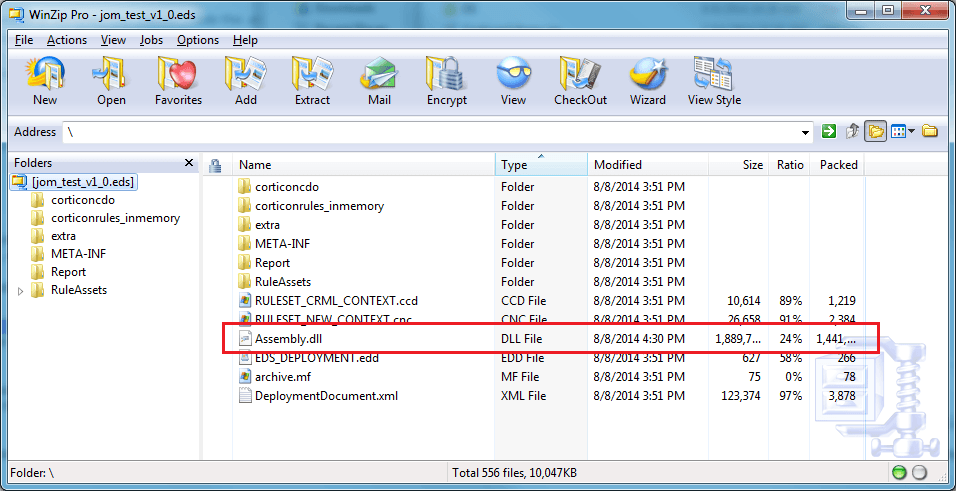
The steps to translate the .eds file into an Assembly.dll are documented in the Corticon Server: Deploying Web Services with .NET guide. Please use that as a reference.
When the CcServer loads a .eds file into memory during re-initialization or a new deployment, the Corticon CcServer will check to see if the .eds file contains an Assembly.dll and if the running environment is .NET. If both conditions are true, the CcServer will use a special IKVM AssemblyLoader to load the Assembly.dll into memory, rather than going to the .class files. As stated before, this step will bypass any .class to CLI translation, which will speed up deployment.
Examples of Performance Gains Using the Assembly.dll File
Whether large or small numbers of classes are in an .eds file, there is a noticeable difference in load time when an Assembly.dll is read into memory versus dynamically converting the .classes to CLI.
Simple Case
This .eds file only contains 11 classes (6 related to the internal model and 5 related to Rules).
Two copies of the same .eds were made (DSWithClasses.eds and DSWithAssembly.eds).
Using the Corticon utilities, an Assembly.dll was created from DSWithAssembly.eds and added to the .eds file.
I used a .cdd file to deploy both Decision Services and recorded the time it took each Decision Service to load into memory after a server reboot.
I rebooted the CcServer 3 times to get an average.
As you can see from the chart, load times are very fast in both cases, but the “Average Time” loading the Assembly.dll is amazingly fast. The unit of time is expressed in h:mm:ss.SSS, with S=milliseconds.
|
Decision Service Name |
Type |
Server reboot 1 Initialize Time |
Server reboot 2 Initialize Time |
Server reboot 3 Initialize Time |
Average Time |
|
DSWithClasses |
11 classes |
0:00:00.140 |
0:00:00.016 |
0:00:00.047 |
0:00:00.068 |
|
DSWithAssembly |
1 Assembly.dll |
0:00:00.000 |
0:00:00.015 |
0:00:00.000 |
0:00:00.005 |
Extreme Case
This test case is very similar to the above Simple Case. The only difference is that there will be 5210 classes inside the .eds file. It is rare, but customers have created such complex Ruleflows with hundreds of Rulesheets that produced over 5000 .class files inside the .eds file.
Once again, the load time for the Decision Service with the Assembly.dll is much faster than the Decision Service with the .class files.
|
Decision Service Name |
Type |
Server reboot 1 Initialize Time |
Server reboot 2 Initialize Time |
Server reboot 3 Initialize Time |
Average Time |
|
DSWithClasses |
5210 classes |
0:00:55.224 |
0:00:58.219 |
0:00:58.239 |
0:00:57.227 |
|
DSWithAssembly |
1 Assembly.dll |
0:00:00.062 |
0:00:00.078 |
0:00:00.078 |
0:00:00.073 |
Actual Customer Scenario
We recently worked with a customer to help them speed up their .NET deployment. The customer was deploying 12 different Decision Services. As expected, each .eds file has a different number of .class files in it, which ranged between 200–2000 .class files.
We advised the customer to use our utilities pre-compile each .eds file to create an associated Assembly.dll file, and to redeploy the .eds files. The chart below shows that total deployment time dropped from approximately 173 seconds (02:53 min) to six seconds.
|
Decision Service Name |
Type |
Initialize Time |
|
Type |
Initialize Time |
|
Difference |
|
DS_1 |
classes |
0:00:05.118 |
|
Assembly.dll |
0:00:00.723 |
|
0:00:04.395 |
|
DS_2 |
classes |
0:00:05.492 |
|
Assembly.dll |
0:00:00.520 |
|
0:00:04.972 |
|
DS_3 |
classes |
0:00:06.893 |
|
Assembly.dll |
0:00:00.480 |
|
0:00:06.413 |
|
DS_4 |
classes |
0:00:08.391 |
|
Assembly.dll |
0:00:00.516 |
|
0:00:07.875 |
|
DS_5 |
classes |
0:00:15.171 |
|
Assembly.dll |
0:00:00.542 |
|
0:00:14.629 |
|
DS_6 |
classes |
0:00:09.349 |
|
Assembly.dll |
0:00:00.438 |
|
0:00:08.911 |
|
DS_7 |
classes |
0:00:13.200 |
|
Assembly.dll |
0:00:00.492 |
|
0:00:12.708 |
|
DS_8 |
classes |
0:00:12.091 |
|
Assembly.dll |
0:00:00.452 |
|
0:00:11.639 |
|
DS_9 |
classes |
0:00:17.943 |
|
Assembly.dll |
0:00:00.490 |
|
0:00:17.453 |
|
DS_10 |
classes |
0:00:23.065 |
|
Assembly.dll |
0:00:00.525 |
|
0:00:22.540 |
|
DS_11 |
classes |
0:00:24.990 |
|
Assembly.dll |
0:00:00.501 |
|
0:00:24.489 |
|
DS_12 |
classes |
0:00:31.947 |
|
Assembly.dll |
0:00:00.571 |
|
0:00:31.376 |
|
|
|
||||||
|
Total time: |
0:02:53.650 |
|
Total time: |
0:00:06.250 |
|
0:02:47.400 |
Based on the incredible time-savings, I personally think that more and more customers will soon be pre-compiling their .eds files into Assembly.dll files. In upcoming releases, Corticon will be working hard to make the pre-compile process as easy and seamless as possible through automation scripts. You can find out about Corticon here, and for more don’t forget to read up on all our latest updates.
Enjoyed this article?
Add Progress as a preferred source to see more of our content in Google search.
Add Progress as a preferred source on Google