How to Build a RAG Test Set Before You Launch
Test how your RAG system handles vague, misspelled, random and generally human questions before adding it to your production site. Here’s how.
AI is moving from pilots into everyday work pretty quickly. KPMG found that the share of organizations where AI had become part of everyday work rose from 13% in Q1 to 22% in Q2 2026.
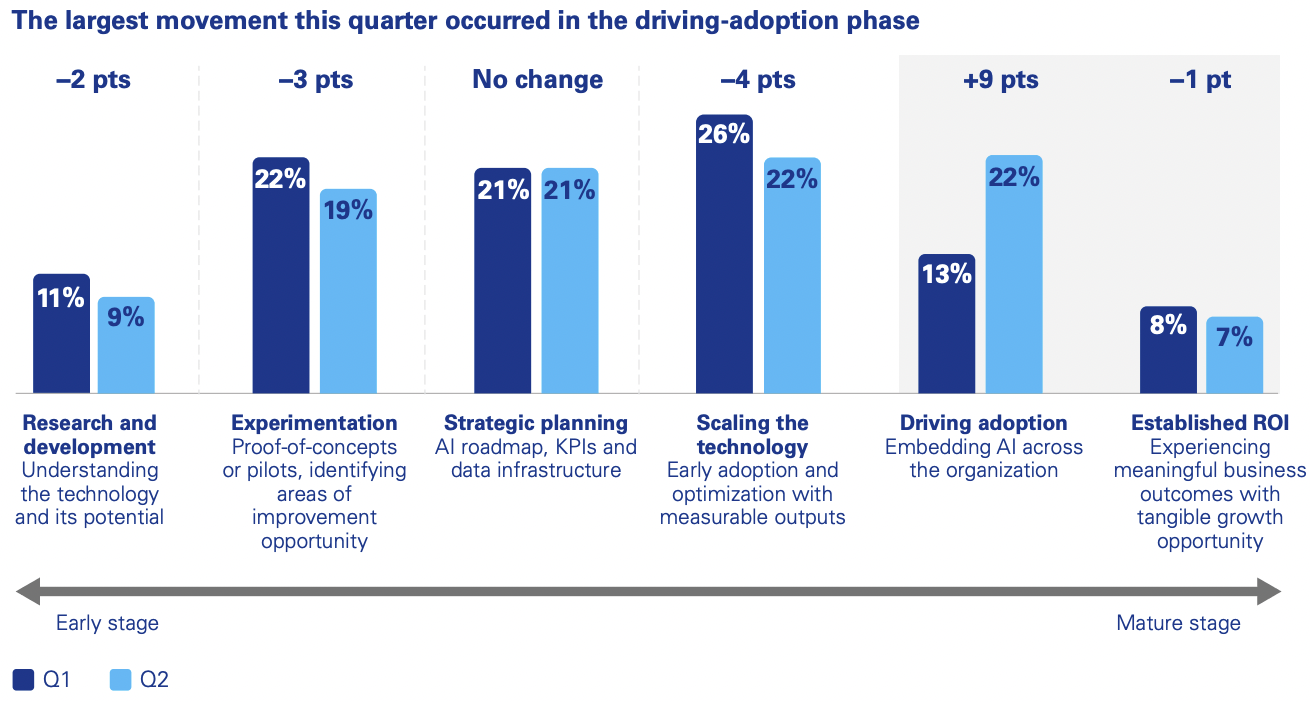
Source: KPMG
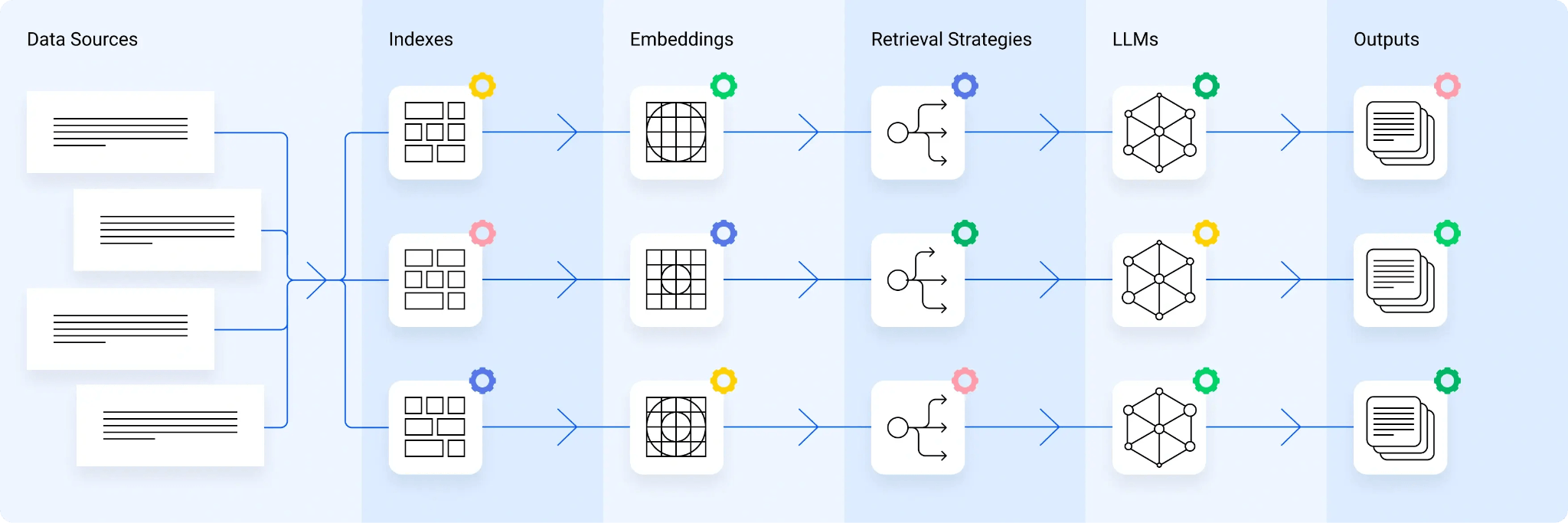
Retrieval-augmented generation (RAG) systems are a big part of that shift. They retrieve relevant information from your own content or data and pass it to an AI model as context for the answer it generates.
But putting that kind of system in front of people naturally means exposing it to a much wider range of questions. People misspell things, use old product names, ask vague questions, look for information that does not exist and, every now and then, ask for something they should not be allowed to see.
This is where a test set becomes useful. Instead of finding out how your RAG system handles those situations after launch, you can test a representative set of questions beforehand, define what a good answer should look like, and see where things start to wobble.
What Goes into a RAG Test Set?
At its simplest, a RAG test set is a collection of questions you can repeatedly run against your RAG system.
You can make this considerably more sophisticated later. To start, these are the cases worth getting into the set.
1. Start With Real User Questions
Pull your first questions from places where users are already telling you what they need. That could be support tickets, search logs, FAQs, customer service transcripts or internal help desk requests.
If the support team gets the same question every week, it probably belongs in the test set. You do not need hundreds of questions to start. Around 20 to 50 representative ones can give you a useful baseline, and you can add more as you learn how people actually use the system.
2. Establish the Ground Truth
For every question, write down what you would consider the correct answer and where it should come from. The source matters almost as much as the answer because RAG is supposed to retrieve information before generating a response.
So, for a question like “How many days of annual leave do employees get?” your record might say the expected answer is 25 days, sourced from HR Policy v3, section 4.2. That is much more useful than simply noting “HR policy” and hoping everyone knows which version or section you mean.
This detail becomes handy when a test fails. If the system answers incorrectly and retrieves an old HR policy, you probably want to investigate retrieval, metadata or ranking. If it retrieves section 4.2 of the current policy and still says 20 days, the problem may sit further down the pipeline.
3. Include Questions That Have No Answer
It’s tempting to fill a test set entirely with questions you know the system should answer. Add a few where the correct response is essentially: “We don’t have enough information to answer that.”
Say someone asks whether Product X supports biometric authentication, but your documentation never mentions biometric authentication. You probably don’t want the system finding a vaguely related security page and reasoning its way into a “yes.”
Those cases tell you whether the system knows when to stop. They are also useful for testing groundedness, because an answer can sound perfectly reasonable while being poorly supported by the material that was actually retrieved.
4. Test What Different Users Can See
If everyone using the system has access to exactly the same information, permissions may not be much of a test. In an enterprise setting, though, that is rarely the case.
An employee may be able to search one set of documents, while a manager can search another. HR, finance and legal teams may have information that should never surface to everyone else. So include a few questions where you already know the answer exists, but the person asking should not be able to retrieve it.
AI governance and auditability depend partly on applying access rules during retrieval, rather than trying to remove sensitive information after the model has already seen it.
5. Make Some Questions Messy
Once the obvious cases are covered, start making the test set look a little more like the way people actually search.
Try misspellings, acronyms, old product names, vague phrasing, two near-duplicate documents or questions that need information from more than one source. You can also deliberately include conflicting versions of the same document and see whether the system finds the current one.
These messy cases are often where a test set becomes genuinely useful. The straightforward questions tell you that the system works. The awkward ones are more likely to tell you where it doesn’t.
Decide What a Pass Looks Like
Once you have the questions, you still need to decide what “good” means before looking at the results.
For a normal question, perhaps the answer needs to contain two specific facts and retrieve the expected source or an approved equivalent. For a no-answer case, success means not inventing information. If the query is genuinely ambiguous, asking the user to clarify may be a perfectly good result.
It also helps to score retrieval and the final answer separately. You can retrieve exactly the right document and still generate a poor answer from it. The reverse can happen too: the answer looks correct, but the source the system retrieved does not actually support it.
A simple first version could look like this:
| Question | Expected answer | Expected source | Category | Pass? |
|---|---|---|---|---|
| What is the refund period? | 30 days | Refund Policy v3, Section 4 | Ground truth | Yes |
| What is the 2027 pricing? | No answer | None | No-answer | Yes |
| What is the employee bonus? | Restricted | HR Policy, Section 7 | Permission | Yes |
| Does Product X support SSO? | Yes | Product Guide, Section 8 | Edge case | Yes |
You can add scores, automated evaluation and more detailed criteria later.
What matters is that the questions, expected answers and rules stay consistent enough for you to run the same test again.
When Something Fails, Work Backward
This is probably the most useful part of having a structured test set. Instead of ending an investigation with “the AI got it wrong,” you have a better idea of where to start looking.
| What happened? | Where you might look |
|---|---|
| Wrong answer, wrong source | Retrieval, metadata, ranking or indexing |
| Wrong answer, right source | Chunking, context, prompt or generation |
| Answered when no answer existed | Grounding or fallback behavior |
| Restricted information appeared | Permissions and access control |
These are starting points, not perfect diagnoses. If the correct document keeps coming back but a qualification is missing from the answer, for example, you might want to look at how the source was chunked.
A poorly placed chunk boundary can separate a statement from the heading or surrounding context that makes it understandable, which is why content preparation matters long before the model generates anything.
The point is that you now have somewhere sensible to look first, rather than changing the prompt, model and retrieval configuration at the same time and hoping one of them fixes it.
Keep the Test Set After Launch
“Before you launch” is only half the story. Once you have built the test set, keep it.
Your content will change. So will metadata, prompts, models, chunking and retrieval settings. A change that fixes one awkward query can also, somewhat annoyingly, make another one worse.
Running the same questions again gives you something to compare against. Over time, your pre-launch test set becomes a regression suite: make a change, rerun the tests and see what improved, what stayed the same and what quietly broke.
That kind of repeated testing is also what Progress Prompt & RAG Labs are built for. Teams can experiment with prompts, models and retrieval configurations before changes reach production, while REMi can continue evaluating the quality of the RAG experience afterward.
For teams using Progress Sitefinity AI Search, the same principle applies. Start with the questions people are likely to ask, decide what a good answer should look like, and keep that test set around as the content and search experience evolve.
Because eventually someone will ask the odd question nobody thought of during the demo. The point of the test set is to make sure that is not also the first time you discover what your RAG system does with it.
Enjoyed this article?
Add Progress as a preferred source to see more of our content in Google search.
Add Progress as a preferred source on Google
John Iwuozor
Content Lead