
Progress Automate MFT vs. Progress MOVEit Automation: Bring Your Workflows Forward
Your Progress® MOVEit® Automation workflows help keep important file transfer processes running. Now, the Progress® Automate MFT migration assistant gives customers a practical way to bring supported MOVEit Automation tasks forward with less manual rework.
Built for MOVEit Automation Customers Ready to Modernize Without Starting Over
MOVEit Automation customers have already invested in file transfer automation. Your workflows may include years of business logic, partner requirements, schedules, credentials, file processing steps, scripts, notifications and downstream dependencies. As your organization evolves, your automation requirements may evolve too. You may need to support more cloud storage, SaaS applications, hybrid endpoints, distributed environments, email-driven workflows, reporting APIs, analytics pipelines and AI-related data movement.
Automate MFT gives MOVEit Automation customers a modern path forward: centralized cloud-based management, flexible agent-based execution and expanded endpoint support without forcing every workflow into one operating model. The goal is not to start from scratch. The goal is to bring proven workflows forward and build from there.
Automate MFT Unlocks New Use Cases and Flexibility for File Transfer Automation
Cloud-based management with less infrastructure overhead
With MOVEit Automation, your team manages the automation environment, including infrastructure, maintenance, upgrades, patching and availability planning.
Automate MFT shifts the management layer to a SaaS model, helping reduce operational overhead while keeping organizations updated with the latest platform improvements and security enhancements. For teams facing changing governance, compliance and security expectations, cloud-based delivery can help reduce the burden of keeping the automation management layer current.
Expanded endpoints for new file workflow use cases
Migration is only the starting point. Automate MFT helps teams expand file transfer automation beyond existing tasks with modern endpoint support for cloud, hybrid, SaaS, email-driven, reporting, analytics, AI-related and partner workflows.
Use Automate MFT to help support use cases such as IMAP email retrieval, reporting API integrations, cloud storage workflows, hybrid endpoint automation, operational dashboards, audit processes and governed data movement for analytics or AI initiatives.
Agent-Based Execution for on-premises levels of control
Automate MFT centralizes workflow management while allowing execution to happen where your files, systems and business requirements need it. With self-hosted agents, teams can run workflows close to private systems, internal applications and restricted network environments. Each agent functions like a lightweight MOVEit Automation server that can be pooled for greater resiliency while requiring significantly less infrastructure. With Progress-hosted agents, teams can simplify execution to publicly-accessible endpoints. This model helps customers modernize automation while maintaining flexibility over where work gets done and keeps sensitive files out of the cloud as needed.
Automate MFT vs. MOVEit Automation Product Breakdown
| Capability | Progress Automate MFT | Progress MOVEit Automation |
|---|---|---|
| Platform Architecture and Availability |
|
|
| Task Creation |
|
|
| Workflow Management |
|
|
| Protocols |
|
|
| APIs |
|
|
| Endpoints |
|
|
| Security and Governance |
|
|
Why MOVEit Automation Customers Consider Automate MFT
Centralize Management While Keeping Execution Close To the Data
Automate MFT is designed for hybrid and distributed file workflow environments. Teams define, schedule, monitor and manage workflows centrally while agents execute tasks where the work needs to happen.
This helps customers modernize the management experience without giving up control over where critical workflows run.
Reduce Operational Burden On IT Teams
As file transfer automation expands, managing the automation infrastructure can consume valuable IT time. Automate MFT helps reduce the burden of maintaining the management layer, including patching, upgrades, infrastructure planning and platform availability.
This gives teams more time to focus on improving workflows, onboarding new use cases and supporting business needs.
Support Changing Governance and Security Expectations
Security and governance standards continue to evolve. Automate MFT's cloud-based delivery model helps customers stay closer to the latest platform improvements and security enhancements while maintaining agent-based execution options for private and hybrid environments.
This gives IT teams a more modern foundation for file transfer security without forcing a one-size-fits-all deployment model.
Expand Beyond Existing Tasks
Your current MOVEit Automation tasks are valuable, but they may not represent everything the business needs next. Automate MFT helps teams build beyond existing workflows with support for new cloud storage, SaaS, hybrid, email-driven, reporting, analytics, AI-related and partner automation use cases.
Start with Proven Workflows, Then Modernize in Phases
The Automate MFT migration assistant helps customers begin with workflows they already know. Supported tasks can be brought into Automate MFT, reviewed, validated and expanded over time.
This phased approach helps reduce disruption and makes modernization more practical.

MOVEit Automation to Automate MFT Migration
Modernization does not need to be a disruptive project. Many customers can start by assessing their MOVEit Automation environment, selecting supported workflows for an initial pilot and validating those workflows in Automate MFT before expanding adoption.
The Automate MFT migration assistant helps reduce manual task recreation, but a thoughtful migration is still important. Some workflows may require review, adjustment or redesign depending on task type, configuration, endpoint, script, dependency or workflow complexity.
A practical phased modernization plan with the Automate MFT migration assistant:
1
Inventory active MOVEit Automation tasks, schedules, endpoints, credentials, scripts, notifications, dependencies and business owners.
2
Identify supported tasks that may be strong candidates for migration into Automate MFT.
3
Select pilot workflows that are important enough to prove value but controlled enough to validate safely.
4
Map security, compliance and governance requirements with key IT and business owners.
5
Plan agent deployment based on where files, systems and endpoints need workflow execution to occur.
6
Use the Automate MFT migration assistant to import supported tasks into Automate MFT.
7
Validate file movement, timing, routing, credentials, notifications, logging, error-handling and downstream dependencies.
8
Expand in controlled phases, adding new cloud, hybrid, partner, reporting, analytics, AI-related and SaaS workflow opportunities as confidence grows.
Automate MFT Is Trusted by Security and Compliance-Focused Enterprises


PaperTrl Secures High-Value Financial Transfers with Progress Automate MFT
PaperTrl strengthened its secure file transfer operations by adopting Progress Automate MFT, enabling trusted, compliance-ready ACH file exchanges with banks, improving visibility and efficiency and supporting the secure movement of more than $250 million in transactions per quarter.
Read the storySee How Automate MFT Works
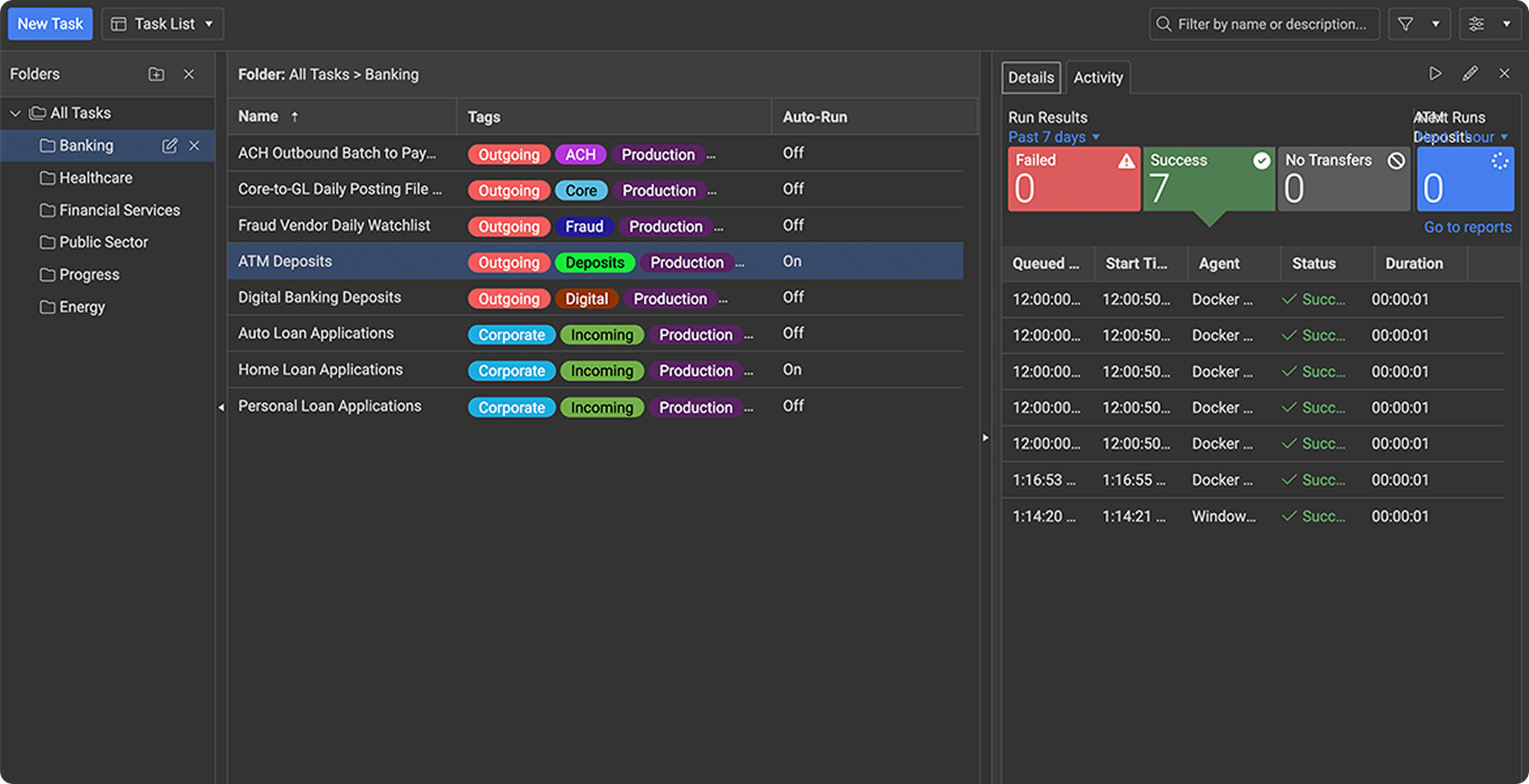

Follow a sample task from setup to execution and see how Automate MFT simplifies secure, scheduled and governed file transfers
Take a Tour
Modernize File Transfer Automation Without Starting from Scratch
Bring supported MOVEit Automation tasks forward to Automate MFT with less manual rework.
