
Progress Automate MFT vs. Axway Managed File Transfer: A Practical Comparison for Modern File Transfer Automation
Looking for an Axway SecureTransport alternative built for cloud-first automation, ease of use and faster workflow creation? Progress® Automate MFT gives IT teams a single platform to design, schedule, monitor and scale secure file transfer workflows without managing MFT infrastructure.
Built for Enterprises That Need Control Without Legacy Complexity
Large enterprises and financial services organizations rely on managed file transfer to support regulated, business‑critical processes, but many legacy MFT platforms were designed primarily as file gateways, not as automation platforms. As requirements grow more complex, teams are left managing scripts, add‑on tools and distributed infrastructure just to maintain reliability and compliance.
Automate MFT gives enterprises a modern path forward: centralized control, strong governance and audit‑ready visibility without forcing teams to expand infrastructure or compromise existing security models.
A Cloud-Native Axway MFT Alternative
True SaaS Managed File Transfer
If your organization is rethinking the cost and effort of maintaining traditional MFT infrastructure, Automate MFT provides a modern SaaS approach that can reduce administrative burden, simplify updates and help teams scale secure automation without expanding the infrastructure footprint.
No-Code Workflow Automation
Automate MFT gives teams a faster way to build and manage recurring file workflows without turning every new business request into a custom scripting project. From scheduled financial files to partner data exchanges, IT teams can create governed workflows in a visual interface and monitor activity from one place.
Agent-Based Execution for Distributed Environments
Automate MFT centralizes control while allowing execution to happen close to the data source. That means teams can build workflows centrally, execute transfers locally and keep sensitive file movement aligned with existing network and security boundaries.
See How Progress Automate MFT Compares
| Capability | Progress Automate MFT | Axway Secure Transport |
|---|---|---|
| Platform Architecture | Cloud-native SaaS platform with a centralized management plane and distributed execution via agents. | Gateway-centric architecture focused on ingress and egress of files, with additional products required to extend automation, visibility and orchestration. |
| Deployment and Time to Value | Deploy agents and begin automating workflows in minutes using a SaaS console and no-code design. No multi-component architecture to assemble or maintain. | While one of the most scalable traditional MFT solutions, deployment often involves multiple components and environments, increasing configuration effort and time before delivering automation value. |
| Workflow Creation | Users can create secure file transfer tasks in minutes using an intuitive no-code builder, prebuilt actions, error handling, scheduling and conditional logic. | May require deeper configuration or adjacent Axway capabilities which increase architectural complexity. |
| User Experience | A modern UI helps teams build, organize, monitor and update file transfer workflows without heavy scripting or specialized MFT administration. | More complex, component-based tooling often requires specialized expertise across multiple interfaces and products. |
| Hybrid Execution | Agents execute transfers locally, on‑premises or in the cloud, while governance and monitoring remain centralized. | Supports hybrid deployment models, but often requires multiple gateways, clusters or region-specific components. |
| Auditing and Management | Centralized control of workflows, schedules, credentials and audit data across all agents from a single SaaS console. | Management and visibility are distributed across products such as Workbench and other tooling. |
| Availability | Highly available out of the box with updates handled by Progress. | High availability and upgrades depend on customer-managed clustering and operational practices. |
| Add-On Considerations | Core automation, agent-based execution, task management and audit visibility are delivered through a unified Automate MFT experience. | Some broader Axway MFT capabilities, such as workflow orchestration, fleet-wide observability, managed cloud services or client-side transfer functionality, may require additional Axway products, modules, licensing or services. |
Why Automate MFT Is the Best Axway Alternative
Automate File‑Driven Processes, Not Just File Movement
Automate MFT enables IT teams to automate complete file-driven workflows rather than treating file transfer as a disconnected handoff. Files can be validated, routed, converted and tracked as part of a governed workflow, reducing manual intervention, downstream errors and operational risk across recurring enterprise processes such as financial reporting, partner data exchanges and regulatory submissions.
This automation-first approach helps organizations move beyond gateway-centric MFT architectures that depend on scripting and fragmented orchestration.
Reduce Operational Risk and Dependency on Specialized Expertise
Enterprise MFT environments often depend on a small number of specialists who manage scripts, configurations and troubleshooting across multiple components. Automate MFT reduces this risk by providing no-code workflow creation, centralized monitoring and consistent execution models that are easier to understand, support and audit.
By lowering the learning curve, teams reduce key-person dependency while maintaining strong governance and change control—an important consideration for regulated environments.
Centralize Governance While Keeping Execution Close to the Data
Automate MFT is designed for hybrid and distributed enterprise environments. Teams define and govern workflows, schedules, credentials and audit policies centrally through a SaaS management console, while agents execute file transfers locally on‑premises or in the cloud.
This model allows organizations to modernize automation while maintaining existing network segmentation, data residency and security controls commonly required in financial services and highly distributed enterprise environments.
Simplify Architecture Without Sacrificing Enterprise Controls
Rather than assembling and operating multiple MFT components, Automate MFT delivers core automation, orchestration, visibility and governance capabilities as part of a single platform. The SaaS control plane handles availability and updates, reducing infrastructure overhead while preserving the controls enterprises rely on for security, access management and auditing.
The result is a simpler architecture with fewer operational touchpoints without reducing oversight.
Gain Audit‑Ready Visibility Across Every Workflow
Automate MFT provides unified audit logs, execution history and monitoring across endpoints and agents. Teams can clearly see what files moved, where they went, how they were processed and whether workflows completed successfully.
For enterprises with strict security controls and regulatory obligations, this centralized visibility supports audit confidence, operational transparency and faster incident response without stitching together reports from multiple tools.

Axway to Automate MFT Migration
Enterprises do not need to “rip and replace” existing Axway environments to modernize. Many teams start by automating high‑value or new workflows in Automate MFT while existing gateways continue to operate. Over time, organizations expand adoption as confidence and value grow.
This phased approach de-risks change, supports coexistence and allows modernization to proceed at a pace aligned with governance, compliance and business priorities.
A practical phased, low-risk modernization plan may include:
1
Inventory recurring Axway MFT workflows, scripts, endpoints, schedules and partner exchanges.
2
Identify workflows that are strong candidates for SaaS-based automation.
3
Design a phased coexistence model for Axway and Automate MFT.
4
Map security, compliance and governance requirements with key IT and business owners.
5
Deploy Automate MFT agents to execute workflows where your files live: in cloud environments, on-premises data centers, regional offices or restricted network zones.
6
Rebuild and standardize workflows in Automate MFT using no-code task creation, endpoint integrations, schedules and agent-based execution.
7
Validate through enterprise-grade testing.
8
Cut over in controlled waves, expanding modernization and decommissioning legacy complexity.
Automate MFT Is Trusted by Security and Compliance-Focused Enterprises


PaperTrl Secures High-Value Financial Transfers with Progress Automate MFT
PaperTrl strengthened its secure file transfer operations by adopting Progress Automate MFT, enabling trusted, compliance-ready ACH file exchanges with banks, improving visibility and efficiency and supporting the secure movement of more than $250 million in transactions per quarter.
Read the storySee How Automate MFT Works
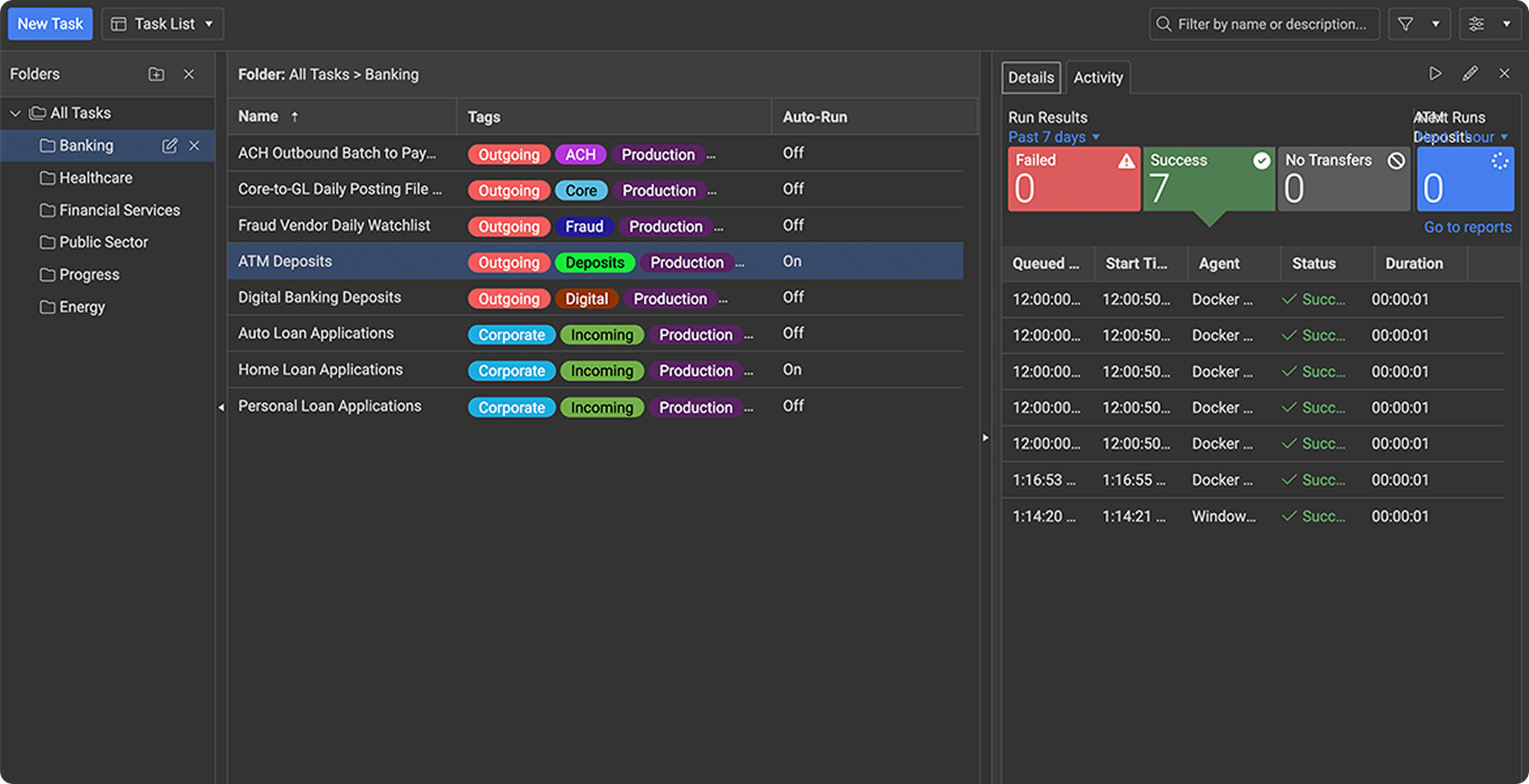

Follow a sample task from setup to execution and see how Automate MFT simplifies secure, scheduled and governed file transfers
Take a Tour
FAQs
Modernize File Transfer Automation Without Increasing Risk
See how Automate MFT helps enterprise IT teams automate secure file workflows with greater control, visibility and efficiency without legacy complexity.
* This page highlights Automate MFT as an alternative to Axway managed file transfer, based on information from Axway’s website. We strive for accuracy, but details may change over time. Automate MFT is not responsible for any discrepancies caused by updates or modifications to Axway’s products after publication. Some features mentioned not supported by Axway SecureTransport may be available in other Axway products and may require additional licensing.
