
Dashboard and navigation
Overview
The Dashboard with the main menu on top looks similar to the following:
Main menu
Sitefinity CMS main menu gives you access to all Sitefinity CMS capabilities and functions. You use the main menu as the primary navigation in the administrative backend of Sitefinity CMS.
The main menu is divided in the following sections, represented by sections:
- Pages
Use this section to create, edit, and delete pages and page templates. You can change the status and the properties of pages and manage the sitemap.
For more information, see the Pages: Structure functionality and appearance. - Content
Use this section to create and classify reusable content items, such as news, events, blog posts, etc. You can also upload different kind of media and documents.
This guide describes the actions which you can perform in this section.
For more information, see Content: Create and manage website content. - Design
Use this section to create and design page and widget templates and themes.
For more information, see Widgets: Add content and functionality to pages. - Administration
Use this section to activate and manage your license, to manage roles, users, and permissions, and to perform various administration tasks.
For more information, see Install, upgrade, and deploy. - Marketing
Use this section to track your website traffic and marketing effectiveness as well as to configure Sitefinity CMS personalization and Email campaigns.
For more information, see Overview: Sitefinity CMS Analytics, Overview: Personalization, and Overview: Email campaigns.
For more information about the complete set of capabilities, see Sitefinity Features & Capabilities.
Dashboard
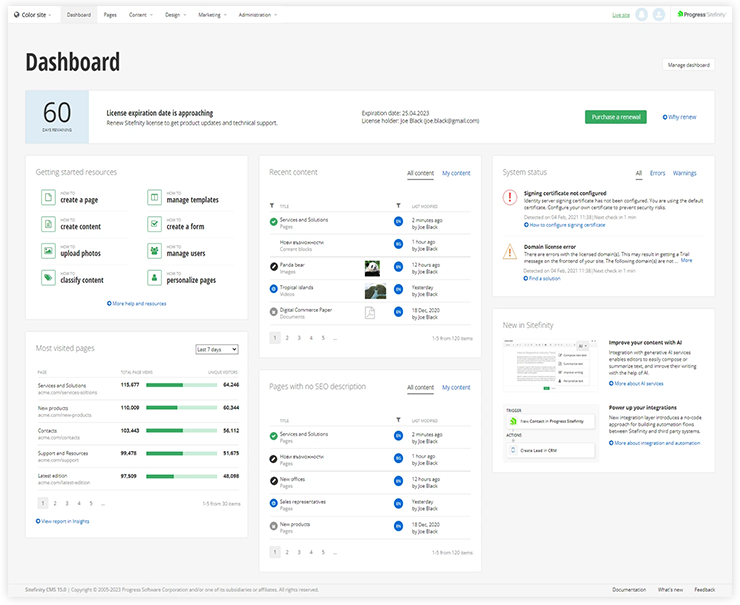
The Dashboard is the welcome page of Sitefinity CMS backend.
The Dashboard is preconfigured to display useful links and widgets. You can also customize it according to your specific needs.
By default, the Dashboard displays the following widgets:
- License expiration Information about your license.
- Getting started resources List of useful links to documentation resources
- Recent items
- An instance of the Recent items widget, configured to display all recently modified content items and pages, with all statuses, modified by thecurrently logged user .
- An instance of the Recent items widget, configured to display all recently modified content items and pages, with all statuses, modified by all users .
- An instance of the Recent items widget, configured to display all recently modified blog posts, with all statuses, modified by the all users .
- System status The System status dashboard widget provides website administrators with a central hub for monitoring the status of key system components.
- Most visited pages After setting up a connection with Sitefinity Insight, you can use this widget to quickly evaluate the most visited pages for the selected site.
- Pages with no SEO description
- New in Sitefinity Summary of the new features
NOTE: The Dashboard is a backend page that you can configure according to your specific needs. For more information, see Customize your dashboard.
This section contains
