AI Demystified for OpenEdge Developers: Real-World AI Workflows

Welcome to the fourth post on AI for OpenEdge developers. My earlier posts introduced GenAI, its key components, and how it works. We broke down the GenAI components and discussed the purpose and behavior of each with a focus on how to think about GenAI from the OpenEdge developer’s point of view.
Organizations running OpenEdge can already begin their integration of large language models (LLM) into their business processes — not to replace ABL, but to augment it. In this post we will walk through three real-world GenAI workflow patterns you can build today, with concrete examples grounded in the OpenEdge ecosystem.
Bringing AI Into Your Business
For OpenEdge developers, there are two distinct ways to leverage AI, at development and at runtime. At development you can use AI to boost productivity and improve code quality while you build and maintain OpenEdge systems. At runtime, AI has many applications. You can use it to automate tasks normally requiring human interaction, to search your product’s content and to enable natural language queries from your users.
In production setups, you do not want every part of your application working with an AI provider directly. A common pattern is to put the AI call in a dedicated integration service so authentication, logging, throttling, and governance live in one place—and your OpenEdge runtime stays protected from variability. This can be done for your OpenEdge business application using the OpenEdge MCP Server to define and catalog your exposed functionality, known as MCP tools.
MCP (Model Context Protocol) tools are part of an open standard designed to connect AI models (LLMs), to external tools and data sources in a consistent and scalable way. Each tool is uniquely identified and includes metadata describing its schema, allowing models to discover and invoke them automatically based on context and user prompts. MCP tools can be integrated into AI workflows to enhance capabilities, such as accessing business data, performing code analysis, or managing cloud resources.
While it is possible to access your business logic through REST endpoints, it is not recommended from a security viewpoint. Instead put you ABL business logic behind an MCP Server is preferred in AI workflows. With the MCP Server, the same logic as your REST services can be exposed but in a well-defined AI model. Additionally, the tools, available through OpenAPI methods, can be narrowly scoped with limited lifetime and managed transactions.
Real-World Workflow Examples for OpenEdge
In blog three we introduced two different workflow execution paths: explicit ordering, or agentic execution where the model can decide the next action based on the result of the previous action. An explicit workflow predefines a strict ordering of tasks. An agentic workflow defines a set of allowed tasks (and tools) and lets the model choose among them at runtime.
In explicit workflows, an AI model (LLM) can be involved for any single step. The LLM builds the response and then returns to the orchestrator for explicit instructions on what to do next. In the agentic model, the LLM controls the workflow. It decides which tools to call, in what order, based on what it observes. The developer defines the available tools and the goal (output) of the tool but not the order of when it is called during execution.
Let’s explore three real world use cases you can consider for your use.
1. Order Processing and Exception Handling
Your OpenEdge ERP application processes hundreds of purchase orders daily. Most are clean and process automatically. But a meaningful percentage have exceptions: missing fields, pricing discrepancies, unusual quantities, new vendors, mismatched part numbers.
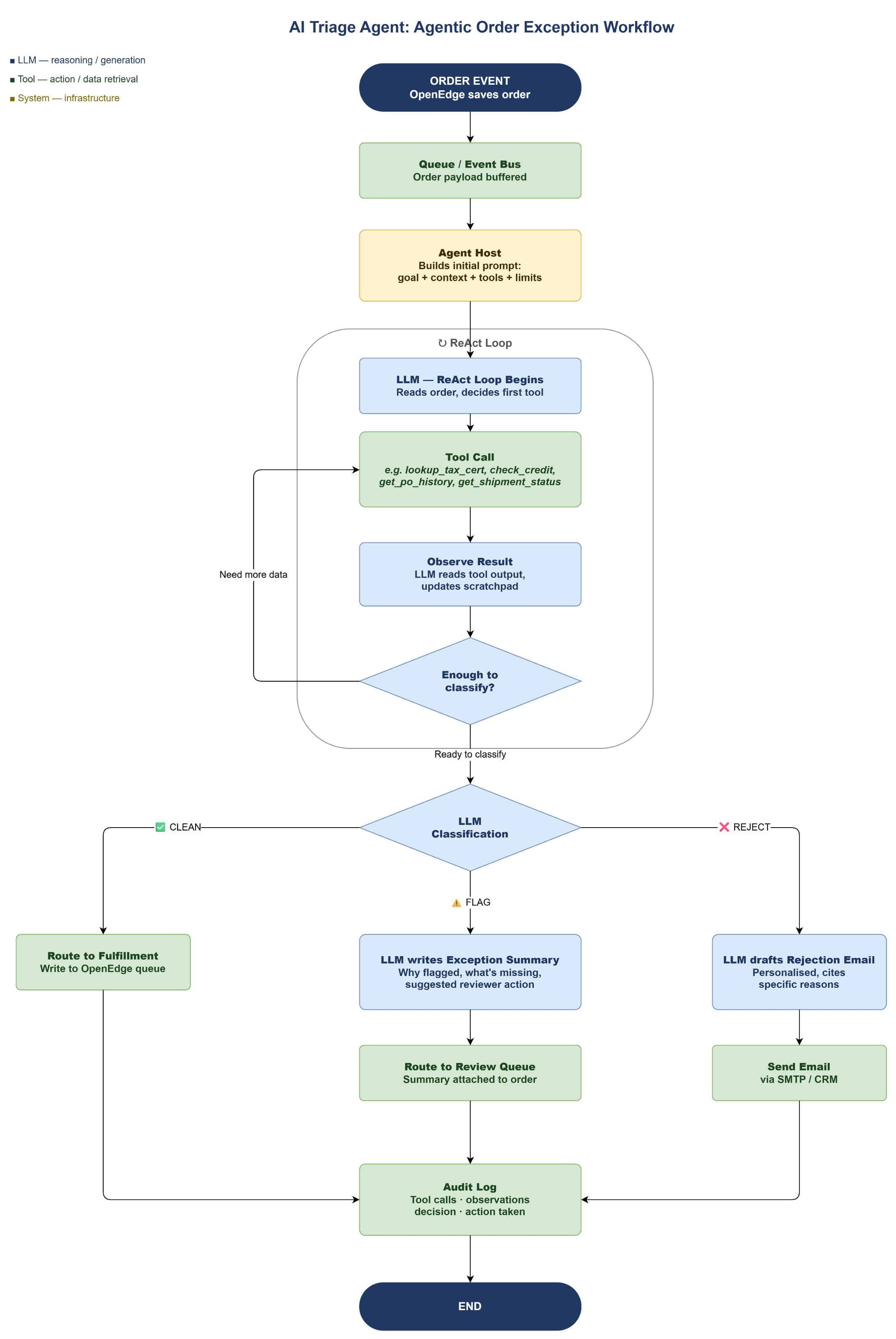
An AI workflow can read each incoming order, compare it against your business rules (from your OpenEdge application), and classify it: clean, needs review, or reject with reason. Clean orders flow straight through. Flagged orders get an AI-generated exception summary — explaining why it was flagged and what data is missing — which routes for review. Rejections get an auto-drafted response email.
The ABL code you write handles the orchestration and the database interactions. The AI handles the interpretation and the natural language generation. Neither could do this alone as effectively.
2. Customer-Facing Knowledge Base
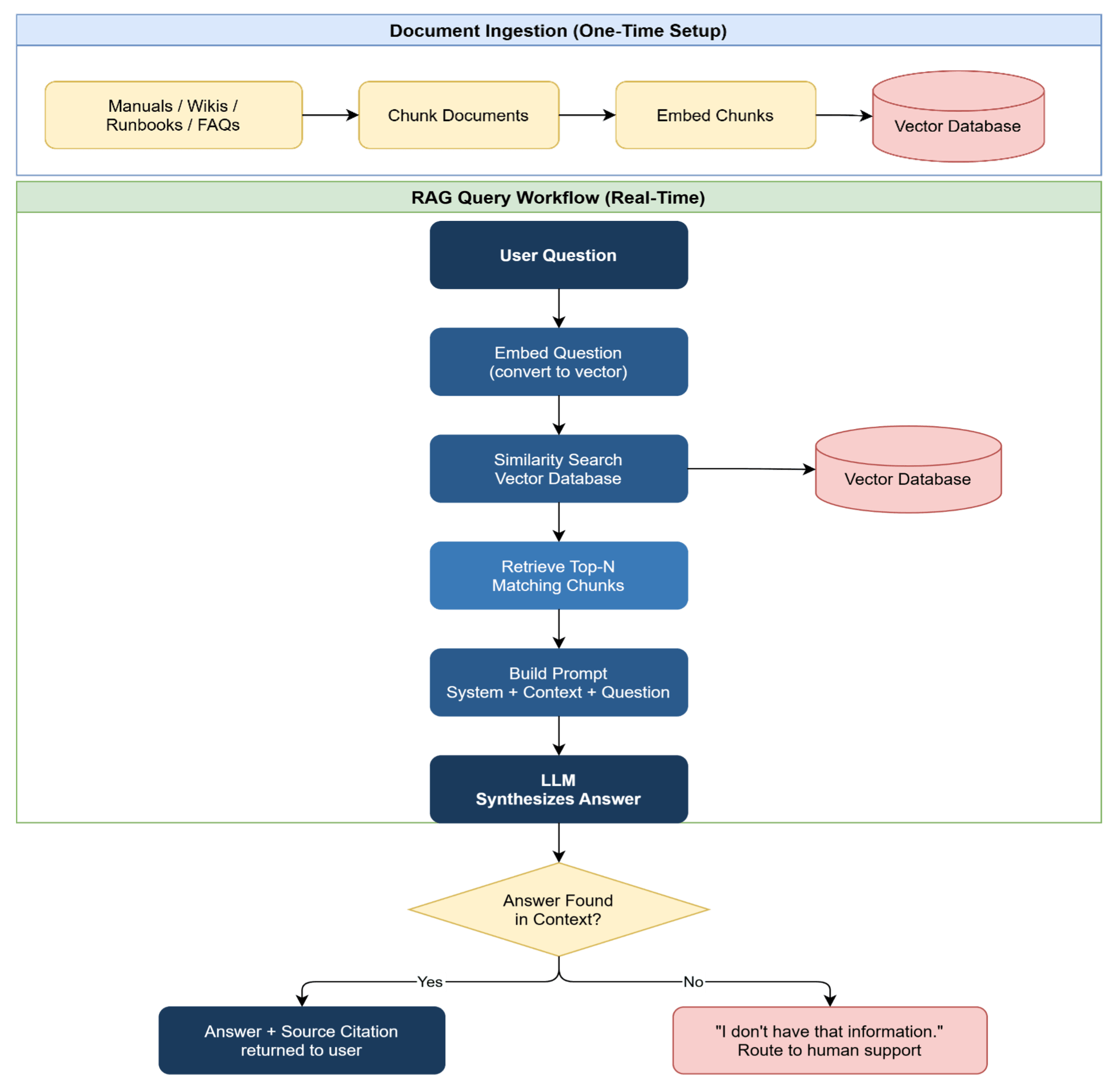
Your support team answers the same fifty questions about your OpenEdge-based product every week. With AI, this information can be provided directly to your customers without any tax on support. A workflow leveraging an LLM with RAG (Retrieval-Augmented Generation) enables customers to get these FAQ answers without involving support. When a customer asks a question, the workflow does not just send it to the AI cold. It first searches your internal documentation — user manuals, release notes, known issue logs, past resolved tickets — and retrieves the most relevant passages. Those passages get included in the prompt as context. The model can now take in a user question and generate an answer grounded in your actual documentation, not its general training data.
The result is accurate, specific, and up-to-date answers — because the knowledge base is yours, updated by your team, not baked into a model trained months ago. You own the data, you own the quality, and you can update it without retraining anything.
3. Automated Code Review and Documentation
Every ABL developer on your team writes code slightly differently. Reviewing for consistency, catching edge cases, and keeping documentation current are all time-consuming tasks that tend to get deprioritized.
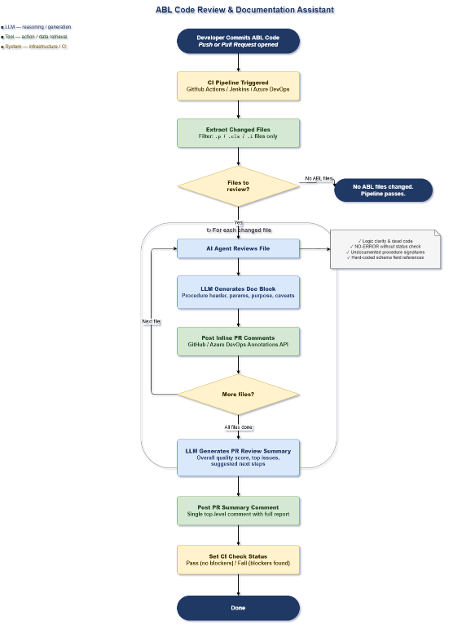
An AI workflow triggered on commit or pull request can: read the changed ABL code, check it against a set of standards you define in a prompt (error handling patterns, naming conventions, transaction scope), flag specific lines with specific feedback, suggest improvements, and generate or update the inline documentation — all before a human reviewer looks at it. Developers get actionable, consistent feedback in seconds. Senior developers spend their review time on architecture and logic, not formatting and boilerplate.
Use Case 1: Order Processing and Exception Handling
The Problem
Your order entry system has run on OpenEdge for 20 years. It handles the happy path beautifully. But edge cases — partial shipments, credit holds, tax exemption mismatches, duplicate POs — still land in someone’s inbox as a manual task. That person spends their morning reading notes, cross-referencing tables, and deciding what to do. Instead of routing exceptions to a human immediately, introduce an AI triage agent between your order capture logic and your exception queue. New orders are processed against your business rules, and classify the order: clean, needs review, or reject with reason. Clean orders flow straight through. Flagged orders get an AI-generated exception summary — explaining why it was flagged and what data is missing — which routes the order for review. Rejections get an auto-drafted response email sent to the salesperson.
Key Design Decisions
Your ABL rules still fire first — the AI does not replace business
logic; it triages what falls throughAI never releases an order autonomously — CLEAN releases are
rule-based, not AI decisionsREVIEW keeps a human in the loop — AI summarizes, human decides
REJECT emails are drafted, not auto-sent — salesperson or manager
approvesEvery classification is logged — for audit trail and model
improvement over time
Implementing the AI Agentic Workflow
The workflow is initiated after a new order is created by your application. The application can initiate the agent with the prompt “Triage new order” along with key input data like customer ID and order number. A possible workflow could look like:
Use Case 2: Customer-Facing Knowledge Base (RAG)
The Problem
Your support team answers the same questions every day for customers: “How do I generate a year-end report?” “Why did my invoice get put on hold?” “What’s the lead time on product X?” The answers live in user manuals, internal wikis, presentations and the heads of your five most experienced staff members. This information is available to your customers, but there is no easy way for customers to search this wealth of information on their own. It is also critical that the search only uses the specific information we want since other documents found on the web might not be accurate.
Implementing the AI Workflow - Retrieval-Augmented Generation (RAG)
RAG combines a vector search over your own documents with an LLM that synthesizes the answer. The LLM will use your content and optionally its own training . The first step is to load your content into a vector database such as the Progress® Agentic RAG platform. Progress Agentic RAG capabilities deliver AI search and generative answers on top of your structured and unstructured data, providing trusted answers from almost any data, in any language, to drive your organization forward. In this model, only the static information you load is publicly available. The LLM never sees your database directly — it only sees the text chunks you explicitly feed it. That is a clean, auditable boundary your security team can approve. A possible workflow could look like:
Use Case 3: Automated Code Review and Documentation
The Opportunity
AI brings automation to the mundane but necessary tasks for a development organization. One use case is to automate your CI/CD process when a developer saves and submits their code changes.
The AI Workflow
The workflow uses an LLM as a code review and documentation assistant that runs automatically on every commit or pull request. No one needs to remember to kick it off and it can provide consistent rules across all your ABL code base. It first checks whether any of the changed files are ABL code files (the language your OpenEdge system runs on), and if there are none, it simply moves on. For each ABL file that was changed, an AI assistant reads through the code the same way an experienced developer would during a code review — looking for logic that’s hard to follow, error handling that was skipped, procedures that aren’t documented, and places where the code is too tightly tied to specific database field names. As it works through each file, it writes its findings as comments directly on the pull request, exactly where the relevant code is, so the developer sees the feedback in context rather than in a separate report. It also drafts a header for each procedure, function and method, describing what it does and what inputs it expects — work that can get skipped under deadline pressure. Once every file has been reviewed, the AI writes a single summary comment at the top of the pull request with an overall picture of the code quality and the most important things to address. Finally, the system marks the automated check as passed or failed, giving the team a clear signal before the code is merged. The whole process happens in the background while the developer moves on to their next task. A possible workflow could look like:
Summary
In this post we defined the workflow for three common AI use cases.
AI use cases can augment your OpenEdge development or runtime experiences. As shown in the three use cases above, AI can assist in automating manual order triage, making your knowledge base searchable, or acting as a code reviewer. Sample implementations of these use cases are in the works and will be shared when ready.
With the combination of an LLM, a RAG, AI Assistants and AI Agents along with MCP tools provides an extremely powerful environment that you can now use, create and extend to meet your needs. The difficulty rating for the use cases presented are:
| Use Case | Requires | Difficulty |
| Customer-Facing Knowledge Base | Load your information into a RAG | Basic: Use Progress Agentic RAG |
| Order Processing and Exception Handling | Follow a workflow based on pre-defined business rules | Medium: Define workflow steps and tools |
| Automated Code Review and Documentation | Validate code according to your guidelines | Advanced: Create agentic workflow of tools including external products like Jira and GitHub |
It is well within your grasp to implement one or all of these workflows!
Post five, the last in this series, will cover the AI products currently available to OpenEdge developers.
Enjoyed this article?
Add Progress as a preferred source to see more of our content in Google search.
Add Progress as a preferred source on Google