Modern AI Concepts for OpenEdge Developers
Welcome to the second post on AI for OpenEdge developers. The first post introduced GenAI along with its basic capabilities. It also discussed real-world uses for AI in your product, both during development and runtime. In this post, we’ll continue to discuss the modern concepts of GenAI—what they mean, why they matter, and how to think about them as an OpenEdge developer.
As discussed in post one, Generative AI (GenAI) can produce new content—such as text, code, summaries, or synthetic data—rather than just analyzing or classifying existing information. For an OpenEdge developer, GenAI can be a productivity booster to DevOps by generating output that would otherwise require significant manual effort, such as documentation, test data, UI text, queries, or code scaffolding. GenAI can also be used at runtime to augment traditional application features while leaving the critical behavior to your business logic.
Models – The Workhorse of AI
Think of a model as the “engine” behind AI. It’s trained on a huge pile of text, images, code, etc., and it learns patterns—then it uses those patterns to predict what should come next. That’s why it can sound confident while still being wrong: it’s not looking up facts in a database, and it’s not running your business rules like an OpenEdge procedure would. It makes a “best guess” based on the input you gave it and the training it has had. Also, be aware that the result is non-deterministic and can provide a different answer given the same input and same training. In a later section, we will cover retrieval which looks up specific stored information from a knowledge source (database, index, or context) to return a precise answer.
Picking the “right” model has many dimensions to consider speed, cost, and quality. Some models are great at quick summaries. Some are better at reasoning. Some handle code better. You will select a model to match the requirements of the job—then design your OpenEdge integration so you’re not depending on “perfect answers” to stay correct. There are three basic categories for models:
- General-purpose chat: Good for generating summaries, drafting, Q&A, and general coding help when you don’t need deep multi-step planning.
- Reasoning-focused models: Harder problems that benefit from structured thinking: multi-step troubleshooting, tradeoff analysis, planning.
- Code models: Code generation/refactoring, test scaffolding, code review assistance, and repo-aware workflows.
Consider that the model is a broad category (any trained AI/ML system: vision models, speech models, embedding models, forecasting models, etc.). An LLM (large language model) is a type of model specialized for spoken languages (trained to predict/generate text, and often code).
Popular LLMs available (this list changes rapidly):
| Provider | General Chat | Reasoning | Code |
| OpenAI | GPT-4.1 / GPT-5 | o-series | GPT-5.3-Codex |
| Anthropic | Claude | Claude | Claude |
| Gemini | Gemini | Gemini | |
| Meta | Llama | — | Code Llama |
| Mistral | Mistral | — | Codestral |
| xAI | Grok | — | — |
GenAI models are trained and hosted outside your OpenEdge environment and accessed through APIs or services. When working with GenAI, you are always working with a specific model. And the models themselves are being updated/trained at an incredibly fast pace by their creators.
Prompts Are Instructions, Not Conversation
A prompt is simply what you send to the model—your instructions, query and related context. The chat UI makes it feel like a conversation, but AI is actually just parsing what it is given: small wording changes can produce noticeably different results.
It is important to understand that the key to a good response is a good prompt. Make sure to be explicit about the task, provide only the context that matters, a target persona, constraints and output formatted so you can validate the response (a checklist, JSON-like fields, a table, etc.)
Treat prompts the same way you treat other critical artifacts: version them, test them, and change them intentionally. The better the prompt, the better the result.
Tokens, Context, and Practical Limits
AI models don’t read text like we do—they read tokens (roughly: chunks of words). Tokens are the meter running in the background: they limit how much the model can “see” at once, they influence latency, and they drive cost.
If you dump a novel into the prompt “just in case”, you will pay more and get worse answers. When someone says the AI “forgot” an important detail, what often happened is simpler: the important detail got crowded out by a bunch of irrelevant information.
Next we will introduce retrieval, a way to provide relevant context based on the user query. Retrieval avoids training a model on a broad set of data by providing a focused set of relevant information that can augment the user query.
RAG: How AI Stays Grounded
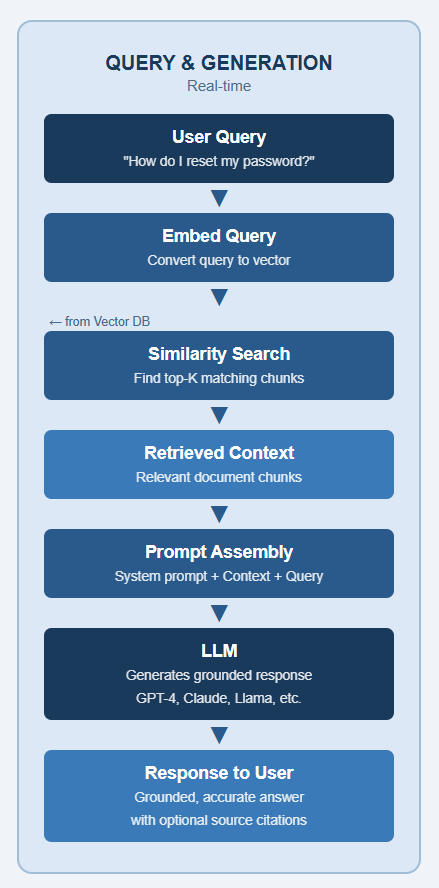
If there’s one enterprise pattern worth remembering, it’s RAG (Retrieval‑Augmented Generation). It’s the difference between “the AI guessed” and “the AI answered using information relevant to the answer—your documentation and your system assets.”.
RAG is a technique that enhances an LLM by combining it with an external, up-to-date knowledge before generating a response. With RAG, you do not pretend the model already knows your schemas, your field meanings, or why that one batch job always fails on month-end. You retrieve the relevant snippets (runbooks, KB articles, ABL notes, schema docs) and include them as context for the model—so it can stay grounded in your world.
Retrieve: User query is matched against the information loaded into a vector database
Augment: The retrieved content is injected into the LLM prompt as context
Generate: The LLM generates a response using its training along with the augmented content
The benefits of RAG are better AI responses since they are based on real source information. Before the first query, relevant content is embedded and stored in a vector database as a list of numbers (a vector) that represents the semantic meaning of the content. The meaning of the content is embedded so that similar concepts end up close together in the vector space. "dog" and "puppy" will have vectors near each other; "dog" and "database" will be far apart.
In RAG, the user query is converted to an embedding and passed through a neural network (embedding model). The resulting query vector is compared against pre-computed vectors (e.g., documents, code, snippets) to find the most relevant matches. Without RAG, the user query is sent directly to the LLM.
The workflow in RAG is:
- User sends query to AI
- System converts user query to an embedding used by the vector database
- System matches user query embedding to similar concepts in the vector space.
- Context is retrieved
- System prepares the prompt for the LLM by combining the user query and context
- System sends the prompt to the LLM.
- System returns the response to the user
Adding context to the user query gives the LLM a much better chance of producing a relevant, accurate response by combining its training with context. RAG dramatically reduces guesswork and makes AI responses align with your system’s reality instead of generic training data.
What RAG can retrieve in an OpenEdge shop (examples):
- ABL source (selected procedures/classes) and your internal coding standards
- Database schema, data dictionary notes, and field-level meanings (what a value actually represents)
- Service contracts (REST endpoints, input/output shapes), including temp-table / ProDataSet definitions used at boundaries
- Operational runbooks: common PASOE/AppServer failure modes, startup sequences, and “how to recover” steps
- Known issues lists, release notes, and internal KB articles/tickets
- Curated log snippets/error catalogs (so responses can cite exact messages and IDs)
AI Assistants, AI Agents and Tools
There are two specific ways to work with an LLM—AI Assistants and AI Agents. By default, an LLM can only generate text. Tools extend that — letting the model take action and gives an LLM the ability to interact with the outside world.
AI Assistants are reactive. They wait for your input, respond to it, and stop. A classic chatbot is a great example — you ask a question, it answers, and the interaction ends there. The LLM is called once per turn. AI assistants can call the LLM multiple times.
AI Agents are proactive. They run in a loop and perform multiple steps, making decisions along the way. Agents leverage available tools to define a sequence of actions that are run in a loop. Agents are smart—after a tool runs, the results are sent to the LLM for it to determine the next step, following different paths based on the tool’s result. Agents run in a loop, letting the LLM perform an action in each pass until it has completed its objective.
AI Assistants respond in a single step. AI Agents autonomously execute multiple steps. AI agents leverage available tools, dynamically deciding which action to take next based on the results of the previous step.
Summary
This post builds on GenAI basics from the first post and explains key modern AI concepts.
- Model — the engine under the hood. It’s trained on a mountain of text, code, and data, and it’s really good at predicting what should come next.
- Prompts — specific instructions for the LLM. Small wording changes can make a big difference in what you get back. The better your prompt, the better your answer.
- RAG — a means to get a better result. Before asking AI anything, go grab relevant context first and hand it to the model as context.
- AI Assistants — answers your question and stop.
- AI Agents — takes your question, use tools, checks results, and loops until the job is done.
Post three will cover practical GenAI applications and guardrails to use for reliable systems. We will connect a series of AI-powered steps using prompts, models, tools, and logic into an automated system that can take a goal from input to outcome.
Learn more about Progress OpenEdge and its AI capabilities.