What’s New in Progress Automate MFT: August 2026
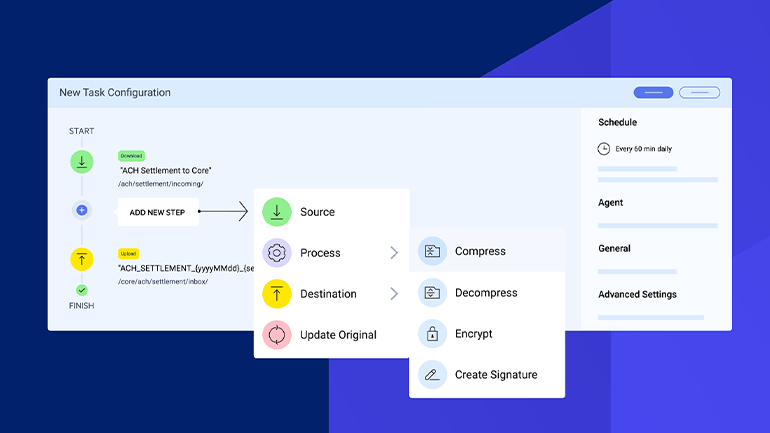
File transfer workflows are no longer contained to one server, one folder or one network. Today, files move across cloud storage, data lakes, partner SFTP servers, shared mailboxes, private applications, branch systems, production environments and reporting tools.
The newest features of Progress Automate MFT help IT teams adapt to this reality. Automate MFT helps teams centrally design, schedule, monitor and govern file transfer workflows while using agent-based execution to run workflows where the data lives. That means organizations can modernize file transfer automation across cloud, on-premises, hybrid and distributed environments without forcing every file through a cloud management layer.
Now Automate MFT expands that value with new endpoint connectors and integrations, usability enhancements and security and governance updates designed to help teams automate more workflows, reduce manual effort and strengthen oversight.
New Endpoint Connectors and Integrations
Azure Data Lake Storage Support

Automate MFT helps teams automate recurring file movement into and out of Azure Data Lake Storage environments. Instead of relying on scripts, manual uploads or one-off jobs to feed a data lake, IT teams can bring these workflows into centralized Automate MFT orchestration.
This is especially valuable in hybrid environments. Files that need to feed Azure analytics may originate in private systems, partner environments, branch locations or local applications. With Automate MFT, teams can manage the workflow centrally while executing transfers closer to the source, helping respect secure zones, private networks and data residency requirements.
S3-Compatible Endpoint Support

Object storage is no longer limited to AWS S3. Many organizations use S3-compatible storage for private cloud, sovereign cloud, multi-cloud, edge, backup, archive or cost-optimized storage strategies.
Automate MFT helps teams bring S3-compatible storage workflows into a centralized automation model. This matters because object storage has become a common landing zone for operational data, analytics feeds, partner files and long-term retention. But the workflows that connect to those storage environments are often fragmented across scripts, provider-specific tools or manually managed processes.
IMAP: Get File from Mailbox

Email is still one of the most common hidden file transfer channels to receive files from partners, suppliers, brokers, providers, customers or internal teams. A file is sent to a mailbox, then someone downloads the attachment, renames it, saves it to a folder, uploads it to another system or forwards it to another team.
IMAP-based file retrieval helps teams turn mailbox-based intake into a governed workflow. Instead of treating emailed attachments as an exception process, teams can retrieve attached files from a mailbox folder and route them through automated file transfer workflows. This helps organizations reduce manual inbox monitoring while bringing more real-world file workflows under centralized control and governance.
REST API Reports

Automate MFT can provide a central record for file transfer activities, but some organizations need that truth to live in larger operational or reporting environments. Automate MFT REST API endpoints can now access task run data, file activity and audit information for use in operational dashboards and tools. This helps file transfer visibility become part of the broader operational picture, not something trapped inside one platform.
Strengthen Security and Governance
As more workflows involve cloud storage, partner endpoints and sensitive operational data, teams need stronger ways to govern file movement.
Authentication
S3 OIDC authentication with role-based access control helps organizations align S3 workflows with modern identity and access practices. This is especially important for teams looking to reduce reliance on static credentials and apply stronger access governance to recurring file movement.
Support for SFTP authentication using both password and SSH private key helps teams meet stricter partner and enterprise authentication requirements. When a partner requires a specific authentication pattern, the workflow should not have to remain in a script or legacy tool. Automate MFT helps bring more of those partner workflows into centralized automation.
Enhanced Filtering for Reports and Logs

Enhanced filtering and search for reports and audit logs helps teams find the activity that matters faster. Admins, security teams and compliance stakeholders need to answer questions like: Did the task run? Did the file arrive? Who changed the workflow? What happened during a specific time period?
Key and Certificate Generation
Key and certificate generation helps simplify setup for secure file transfer workflows. By streamlining more of this work inside the platform where workflows are built and monitored, Automate MFT helps admins create secure workflows faster and more consistently.
Reduce Manual Work for File Transfer Admins
File workflows often require more than moving a file from one location to another. Teams may need to validate filenames, transform data, call another system, apply business logic or handle workflow-specific exceptions.
Enhanced PowerShell Custom Scripting
Enhanced PowerShell and custom scripting capabilities help teams support specialized logic without falling back into unmanaged script sprawl. The goal is not to create more isolated scripts. The goal is to bring needed scripting flexibility into a centralized, governed automation platform.
Endpoint Cloning
Endpoint cloning helps admins create similar endpoint configurations faster. As organizations automate more workflows across partners, regions, business units or environments, repeated manual setup can slow teams down and introduce configuration errors. Cloning helps improve consistency while reducing repetitive work.
Recycle Bin

Recycle bin functionality helps teams recover deleted tasks and library assets. Production file workflows are too important to rely on manual rebuilds when something is accidentally deleted. A faster recovery path helps reduce rework, limit disruption and give admins more confidence when managing critical workflows.
In-Task Comments
Comment steps help teams document workflow context directly inside tasks. This matters because complex workflows often become tribal knowledge. By capturing why a step exists or why a partner requires specific handling, teams can make automation easier to maintain, troubleshoot and hand off.
Modern File Transfer Requires More Than Moving Files
Modern file transfer is not just about getting a file from one system to another. It is about making file movement secure, repeatable, visible and governed across the environments where business actually happens.
The newest Automate MFT features helps teams do exactly that. With expanded integrations, usability enhancements and security and governance updates, Automate MFT helps organizations automate more real-world file workflows, reduce manual effort and strengthen control across cloud, on-premises, hybrid and distributed environments.
Ready to explore what’s included in this release and how it fits your use cases? Visit our What’s New in Progress Automate MFT page to see the highlights and get started.