Sun Java System Application Server
Introduction
This tutorial explains the steps required to use the DataDirect Connect for JDBC™ drivers with the Sun Java System Application Server1, which include:
- Install DataDirect Connect for JDBC.
- Create a JDBC Connection Pool.
- Validate the Connection Pool.
- Create a JDBC Resource.
- Generate the Java Server Page (JSP) test page. A sample JSP test page is provided in the JavaSystemASTest.war file, which is available with this document.
- Deploy the JavaSystemASTest web application to the Sun Java System Application Server.
- Run the JavaSystemASTest web application.
Detailed information about each of these steps is included in the following sections.
Install DataDirect Connect for JDBC
- Install the DataDirect Connect for JDBC drivers using the instructions in the DataDirect Connect for JDBC Installation Guide.
- Copy the DataDirect Connect for JDBC jar files (util.jar, base.jar, db2.jar, informix.jar, oracle.jar, sqlserver.jar, and sybase.jar) from:
install_dir/lib
to:
SJSAS_home/domains/domain_dir/lib
where install_dir is your DataDirect Connect for JDBC installation directory, SJSAS_home is your Sun Java System Application Server installation directory, and domain_dir is the name of the server domain being configured. For example, to install the JDBC drivers in the domain named domain1, copy the driver jar files to SJSAS_home/domains/domain1/lib.
- Make sure that the Sun Java System Application Server is running, and open the Sun Java System Application Server Admin Console (referred to as "Admin Console" in later occurrences in this document). If the Sun Java System Application Server is running on your local machine, you can open the Admin Console by navigating to http://localhost:4848/asadmin/index.html in a web browser.
- If prompted, enter the administrator user ID and password.
- Add the drivers to the server's classpath. At the top of the left pane of the Admin Console, select the Application Server item.
- In the right pane, click the JVM Settings tab. Then, click the Path Settings tab to display the classpath settings for your Java Virtual Machine (JVM).
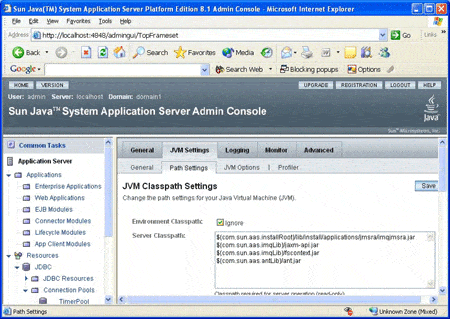
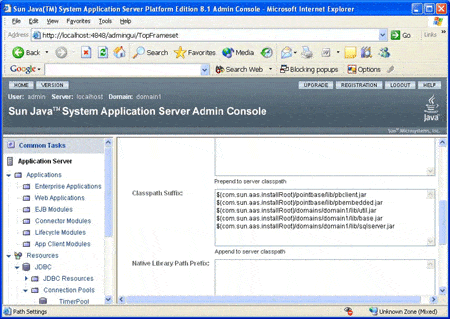
- Add entries in the Classpath Suffix list for the DataDirect Connect for JDBC jar files. Then, click the Save button to save your entries. The entries must include the fully qualified path to the jar files. Be sure to include the util.jar and base.jar files in addition to any driver-specific jar files. The following example shows entries added for the DataDirect Connect for JDBC SQL Server driver.
Create a JDBC Connection Pool
- Ensure that the Sun Java System Application Server is running.
- Open the Sun Java System Application Server Admin Console. If the Sun Java System Application Server is running on your local machine, you can open the Admin Console by navigating to http://localhost:4848/asadmin/index.html in a web browser.
- If prompted, enter the administrator user ID and password.
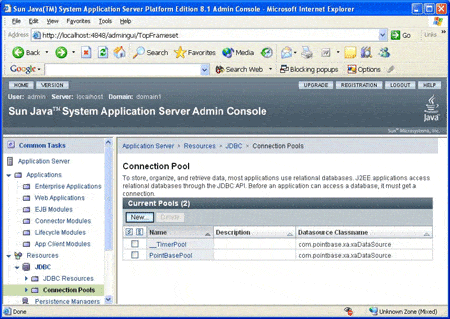
- In the left pane, expand the Resources item. Then, expand the JDBC item under the Resources item. Select the Connection Pools item. The Connection Pool page appears in the right pane, displaying a list of available connection pools.
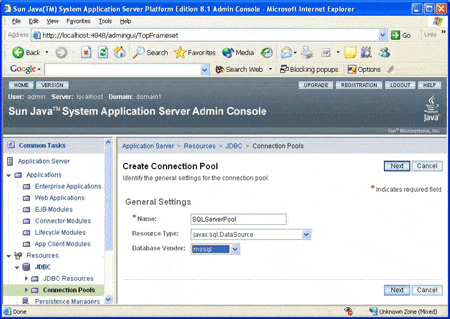
- On the Connection Pool page, click the New button. The Create Connection Pool - General Settings page appears in the right pane allowing you to configure the general settings for the new connection pool. Provide the following information:
- a. Type the name of the connection pool. Do not use spaces in the name. In the following example, the connection pool name is SQLServerPool.
- b. Select one of the following resource types:
- Select javax.sql.DataSource if the connection uses local transactions only.
- Select javax.sql.XADataSource if the connection uses XA transactions.
- c. Select the type of database to which the driver connects. In the following example, the type of database selected is mssql.
- a. Type the name of the connection pool. Do not use spaces in the name. In the following example, the connection pool name is SQLServerPool.
- Click Next to continue. The DataSource Classname field is displayed in the right pane.
- Type the DataSource class name of the driver to be used. The DataSource class names of the DataDirect for Connect for JDBC drivers are:
- Click Next to continue. The Pool Settings, Connection Validation, Transaction Isolation, and Properties sections are displayed.
- The default values for Pool Settings, Connection Validation, and Transaction Isolation do not need to be changed. Refer to the Sun Java System Application Server documentation for more information on the entries in these sections.
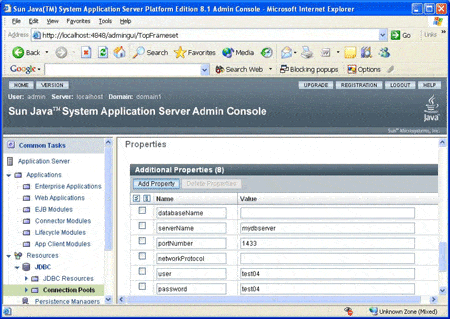
- Scroll down to the Properties section. Configure the required driver properties for your environment. In the following example, the connection pool is being created for the DataDirect Connect for JDBC SQL Server driver. The required properties for the SQL Server driver are: serverName, portNumber, user, and password. For information about required properties for other DataDirect Connect for JDBC drivers, refer to the DataDirect Connect for JDBC User's Guide and Reference.
Important: The Properties section may contain a property named port instead of portNumber. If the port property is present, its name must be changed to portNumber. The JDBC specification defines the standard name of this property as portNumber. The DataDirect Connect for JDBC drivers only recognize the portNumber property name.
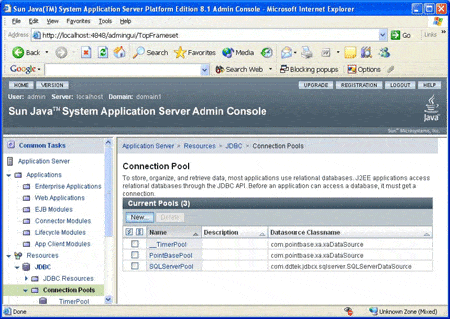
- Click Finish to continue. The connection pool is created and added to the list of available connection pools as shown in the following example.
- Restart the Sun Java System Application Server to allow the server to recognize the additions you just made to the server classpath.
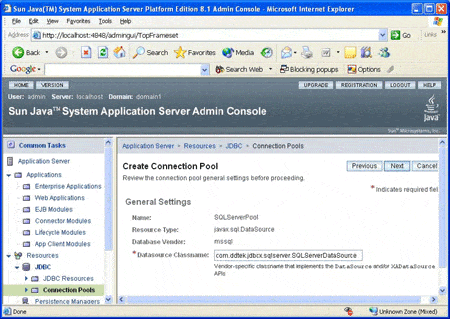
com.ddtek.jdbcx.db2.DB2DataSourcecom.ddtek.jdbcx.informix.InformixDataSourcecom.ddtek.jdbcx.oracle.OracleDataSourcecom.ddtek.jdbcx.sqlserver.SQLServerDataSourcecom.ddtek.jdbcx.sybase.SybaseDataSourceIn the following example, the DataSource class name that was entered is the class name of the DataDirect Connect for JDBC SQL Server driver, com.ddtek.jdbcx.sqlserver.SQLServerDataSource.
Validate the Connection Pool
- Verify that the connection pool list is displayed in the right pane of the Admin Console. In the left pane, expand the JDBC item, and select the Connection Pools item under the JDBC item. The Connection Pool page appears in the right pane, displaying a list of available connection pools.
- On the Connection Pool page, select the name of the connection pool that you created in section 2. In our example, the name of the connection pool is SQLServerPool. The Edit Connection Pool page appears in the right pane.
- On the Edit Connection Pool page, verify that the information for the connection pool is correct. If any information needs to be changed, you can change it now, but make sure that you click Save to keep the changes.
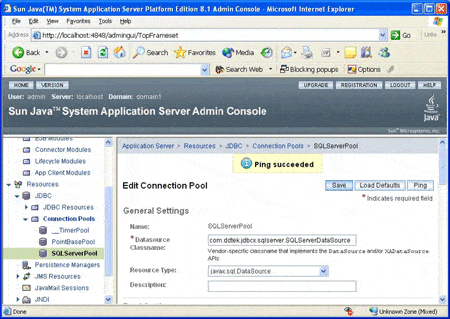
- Click the Ping button to test the connection pool. If the driver and connection information have been specified correctly, a banner telling you the ping was successful, as shown in the following example, should be displayed at the top of the page.
Create a JDBC Resource
- In the left pane of the Admin Console, expand the JDBC item. Select the JDBC Resources item under the JDBC item. The JDBC Resources page appears in the right pane, displaying a list of available JDBC Resources.
Click Graphic for a full-sized image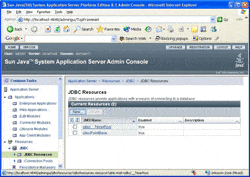
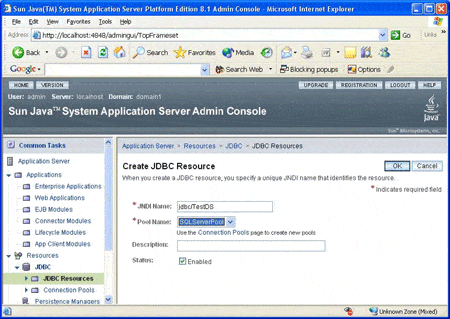
- On the JDBC Resources page, click the New button. The Create JDBC Resource page appears. Provide the following information:
- a. Type the JNDI name for the resource. The JNDI name is case sensitive. This is the name that the application uses when performing a JNDI lookup to obtain a database connection. In the following example, the JNDI Name is jdbc/TestDS.
b. Select the Connection Pool from which the JDBC Resource obtains connections. In the following example, the SQLServerPool connection pool is selected.
c. Ensure that the Status check box "Enabled" is checked as shown in the following example.
Click Graphic for a full-sized image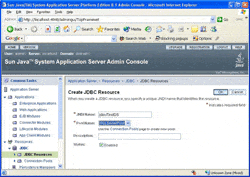
- a. Type the JNDI name for the resource. The JNDI name is case sensitive. This is the name that the application uses when performing a JNDI lookup to obtain a database connection. In the following example, the JNDI Name is jdbc/TestDS.
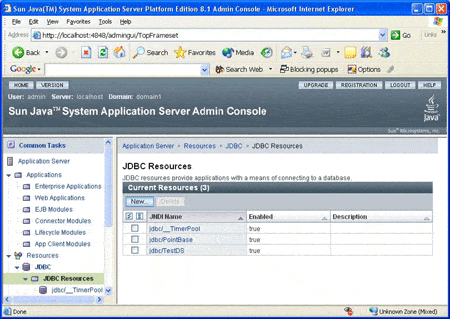
- Click OK to continue. The JDBC Resource is created and added to the resource list as shown in the following example.
Click Graphic for a full-sized image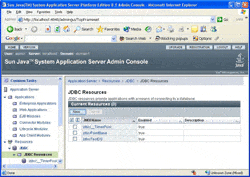
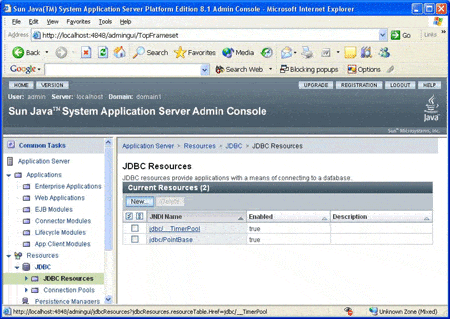
Generate the JSP Test Page
You must create a JSP page that uses the JDBC Resource you created in the previous step. A sample JSP page named JavaSystemASTest.jsp is provided in the JavaSystemASTest.war file, which is available from the same location you obtained this document. This JSP page includes the following code to look up the JDBC Resource and obtain a connection to the database from the data source returned from the lookup.
InitialContext ctxt = new InitialContext();DataSource ds = (DataSource) ctxt.lookup("jdbc/TestDS");con = ds.getConnection();
Deploy the JavaSystemASTest Web Application to the Sun Java System Application Server
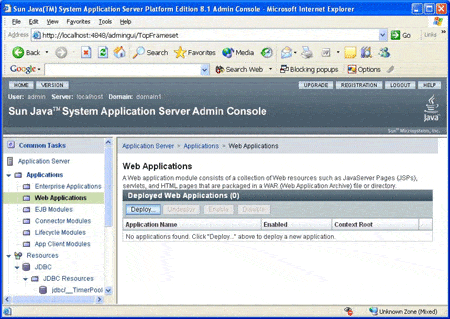
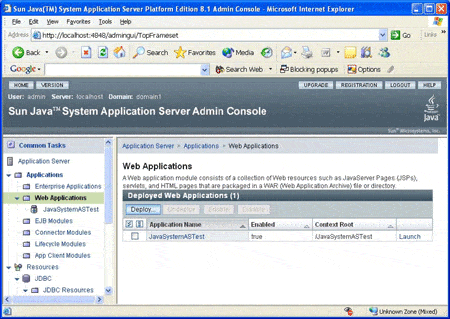
- In the left pane of the Admin Console, expand the Applications item. Then, select the Web Applications item under the Applications item. The Web Applications page is displayed in the right pane as shown in the following example.
- On the Web Applications page, click Deploy. The Deploy Web Module page appears in the right pane, displaying a list of available web modules. Provide the following information:
a. Select the Specify a package file to upload to the Application Server option as shown in the following example.
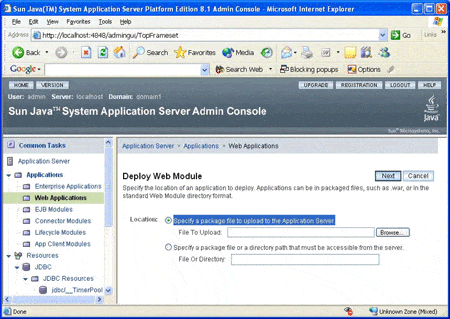
b. Click the Browse button next to the File To Upload field. In the Choose File dialog that is displayed, navigate to the folder where the JavaSystemASTest.war file was saved, and select that file.
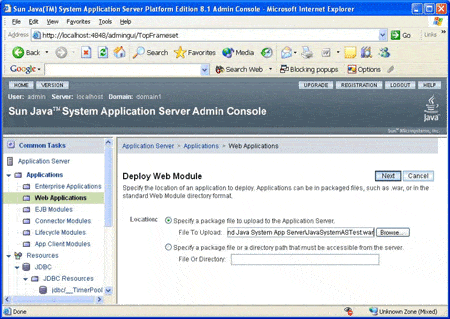
- Click Next to continue. The Web Module page displays values for Application Name, Context Root, and other Web Module settings. The application name is the name of the module as displayed in the Admin Console. The Context Root is the path relative to the Application Server's URL of the Web Module. Use the default values for the Application Name and Context Root.
- On the Deploy Web Module page, ensure that the Status check box "Enabled" is checked as shown in the following example. Leave the default values for the other fields. See the Sun Java System Application Server documentation for information on the other module settings.
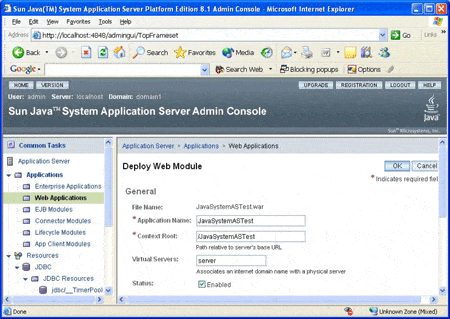
- Click OK to continue. The Web Module is deployed and added to the list of available web modules as shown in the following example.
Run the JavaSystemsASTest Web Application
- Open a web browser and enter the following URL to display the JavaSystemASTest web page:
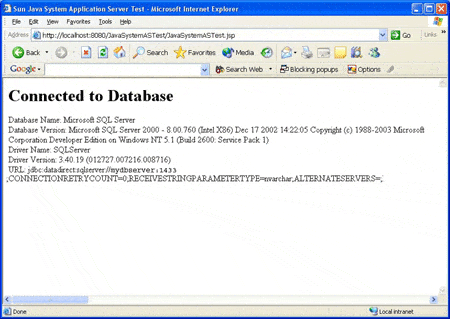
http://localhost:8080/JavaSystemASTest/JavaSystemASTest.jsp - The contents of the page display the version information of the driver and the database server to which it connects, if the DataDirect Connect for JDBC driver has been installed and configured correctly. The following example shows version information for the DataDirect Connect for JDBC SQL Server driver connecting to a database server running Microsoft SQL Server 2000.
1 The steps in this paper were generated using the Sun Java System Application Server Platform Edition 8.1. The steps for other versions may differ.
Or, you may also be interested in learning about:
- Progress Pacific: our revolutionary new Platform as a Service
- Rapid application development tools
- Self-service data integration tools
- Business rules management