Integrate Your SAP HANA Database with Salesforce Using Salesforce Connect
Introduction
If so, you're at the right place. This tutorial will get you started with how you can begin integrating your SAP HANA database with Salesforce via Salesforce Connect by creating a standards-based OData endpoint. Download a free trial of Progress DataDirect Hybrid Data Pipeline to follow along.
In this tutorial, we will show you the following 3 easy steps, with more detailed instructions below.
Step 1:
Install Progress DataDirect Hybrid Data Pipeline, our self-hostable hybrid connectivity solution that you can run in the cloud or on-premises. Hybrid Data Pipeline can give you access to data in the cloud or on-premises behind a firewall. Connect through a standard interface—SQL (ODBC, JDBC) or REST (OData).
Step 2:
Download the SAP HANA JDBC driver from SAP (ngdbc.jar) and drop it into Progress Hybrid Data Pipeline, using Hybrid Data Pipeline’s 3rd party JDBC support.
Step 3:
Use the OData v4.0 endpoint from Hybrid Data Pipeline with Salesforce Connect to access your SAP HANA data directly inside Salesforce.
Step 1: Install and Configure Hybrid Data Pipeline
You need to have a valid SSL certificate for the server address before you install Hybrid Data Pipeline. These are the requirements for Hybrid Data Pipeline: PEM File Configuration.
Install Hybrid Data Pipeline using these instructions. Although the instructions are for AWS, this should be applicable for any CentOS machine.
After you have installed Hybrid Data Pipeline, by default you should be able to access it at https://<server>:8443. We assume that this server is configured to be in your DMZ or behind a reverse proxy, so that Salesforce can connect to your server.
Step 2: Add the SAP HANA JDBC driver to Hybrid Data Pipeline and configure the data source
To plug the SAP HANA JDBC driver (ngdbc.jar) into Hybrid Data Pipeline, take the driver and copy it to the following location:
Now Stop and Start the Hybrid Data Pipeline Server by running the scripts as shown below in the Hybrid Data Pipeline install folder.
$pwd
/home/users/
$ ./stop.sh
$ ./start.sh
Configure your SAP HANA JDBC driver in Hybrid Data Pipeline
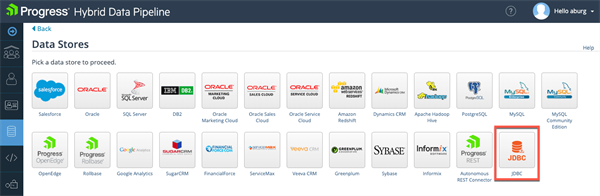
After you have re-started the server, go to https:// :8443 to access the web UI. Go to Data Sources tab and create a New Data Source. Choose JDBC.
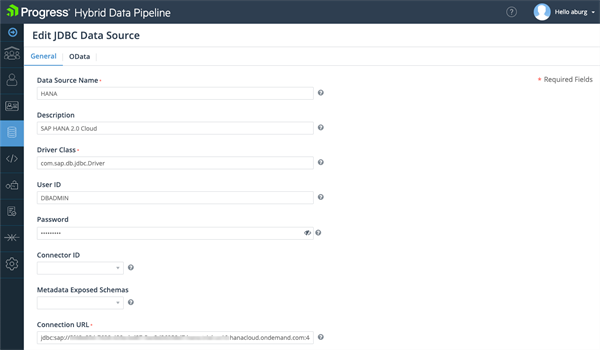
Configure the JDBC Data Source as shown below to connect to your SAP HANA database. This will need to include: - Driver Class: com.sap.db.jdbc.Driver
- User ID
- Password
- Connection JDBC URL:
jdbc:sap://
.hana.trial-us10.hanacloud.ondemand.com:443/?encrypt=true
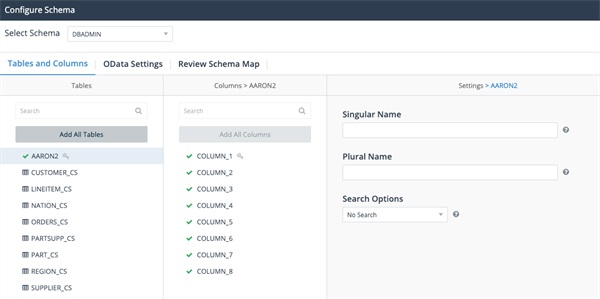
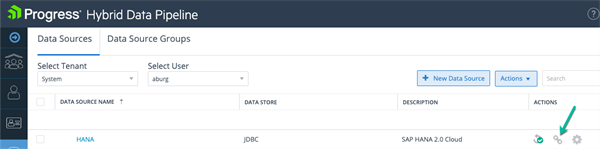
Click on Test Connection to connect to your SAP HANA database. Go to the OData tab and click the Configure button. You should now see the list of available schemas. Choose the one you want. Once you have selected a schema, you should see a list of tables as shown below. Select the table and columns you would like exposed as OData. Then click “Save Map” and “Update” on the following screen. On your Data Sources list, find your new SAP HANA source and click the link icon to open the OData endpoint: Log into the browser window which opens using your Hybrid Data Pipeline credentials. You should now see the OData endpoint. Copy the URL to your clipboard for use later.
Step 3: Configure Salesforce Connect to access the OData endpoint
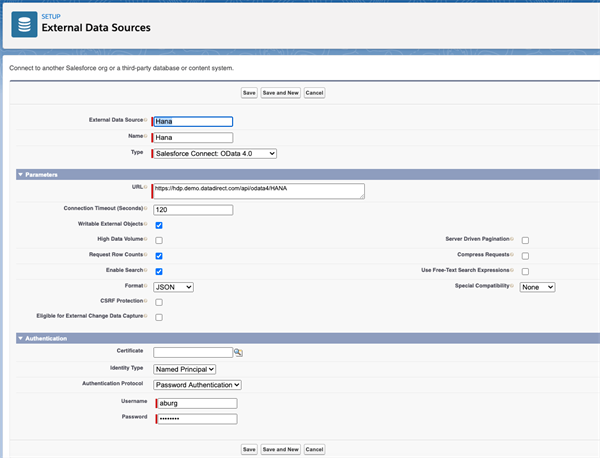
- Log in to Salesforce, Go to Setup -> External Data Source and Create a new Data Source and configure it as shown below.
- Click the Save button after you have configured the External Data Source. On the next screen, click on Validate and Sync.
- On the next screen, choose the tables that you want to sync.
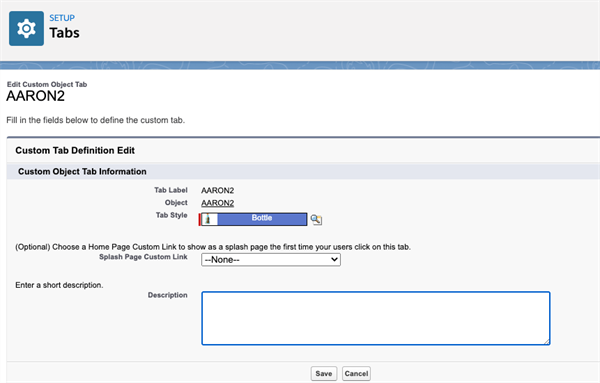
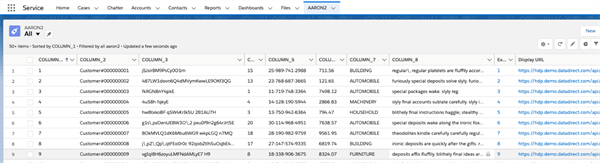
- To easily view your data in Salesforce, we recommend creating a Tab under Settings and linking it to your external tables.
- You should now be able to access your data from your internal REST API from Salesforce.
We hope this tutorial lets you see how you can easily access an SAP HANA database from Salesforce using OData, without needing to move your data. Feel free to contact us if you have any questions.