
Enable AI services on-premises
Overview
PREREQUISITES: To take advantage of all AI-powered capabilities described in this article, Sitefinity CMS 15.4.8633 or a newer version is recommended.
Use this article as a single reference for enabling Sitefinity AI-powered capabilities in a self-hosted Sitefinity CMS setup. It covers the required Sitefinity NuGet packages, the required license add-ons, and the manual setup steps you must perform for each supported AI capability, including sample configuration values.
IMPORTANT:
- Always confirm the exact Sitefinity CMS version and build number before you start. Some AI features require specific builds, and configuration behavior differs by version.
- Back up the current configuration before applying any of the described changes.
- The configuration values used below are examples only. Replace them with the credentials and endpoints provided for your own organization, project, and environment. Never share or commit sample values to source control or public locations.
Required NuGet packages
Install the required NuGet packages for the Sitefinity AI-powered capabilities you want to enable, available on NuGet.org.
Progress.Sitefinity.AI.CoreProgress.Sitefinity.AIServiceConnectorProgress.Sitefinity.AssistantProgress.Sitefinity.AgenticRAGConnectorProgress.Sitefinity.DynamicExperienceProgress.Sitefinity.AgentsProgress.Sitefinity.Mcp
Required license add-ons
| AI-powered capability | Required license add-on |
|---|---|
| Sitefinity AI Assistant (SAIA) | Sitefinity AI Assistant |
| AI content generation and classification | Sitefinity AI |
| Dynamically Generated Experience (DGE) | Sitefinity AI |
| DX Assistant | Sitefinity AI |
| AI Agents | Sitefinity AI |
| Sitefinity MCP Server | Sitefinity AI |
| Hybrid backend search | Sitefinity AI |
Shared connection configuration
Some AI features use the same shared Sitefinity AI service connection or the same Agentic RAG system connection. Configure these once for the target environment, before you enable the dependent features.
Configure the shared SitefinityAIService connection
The shared SitefinityAIService connection settings are required for multiple AI features, such as Dynamically Generated Experience, AI Agents, AI content generation and classification, and Sitefinity MCP Server.
- Log in to your Sitefinity CMS backend.
- Navigate to Administration » Settings » Advanced » AI » AIServiceConnections » SitefinityAIService.
- Enter the provided AccessKeyId, AccessKeySecret, and BaseUrl values.
- Click Save changes.
- Recycle the Sitefinity project or application pool so the updated shared connection settings are loaded.
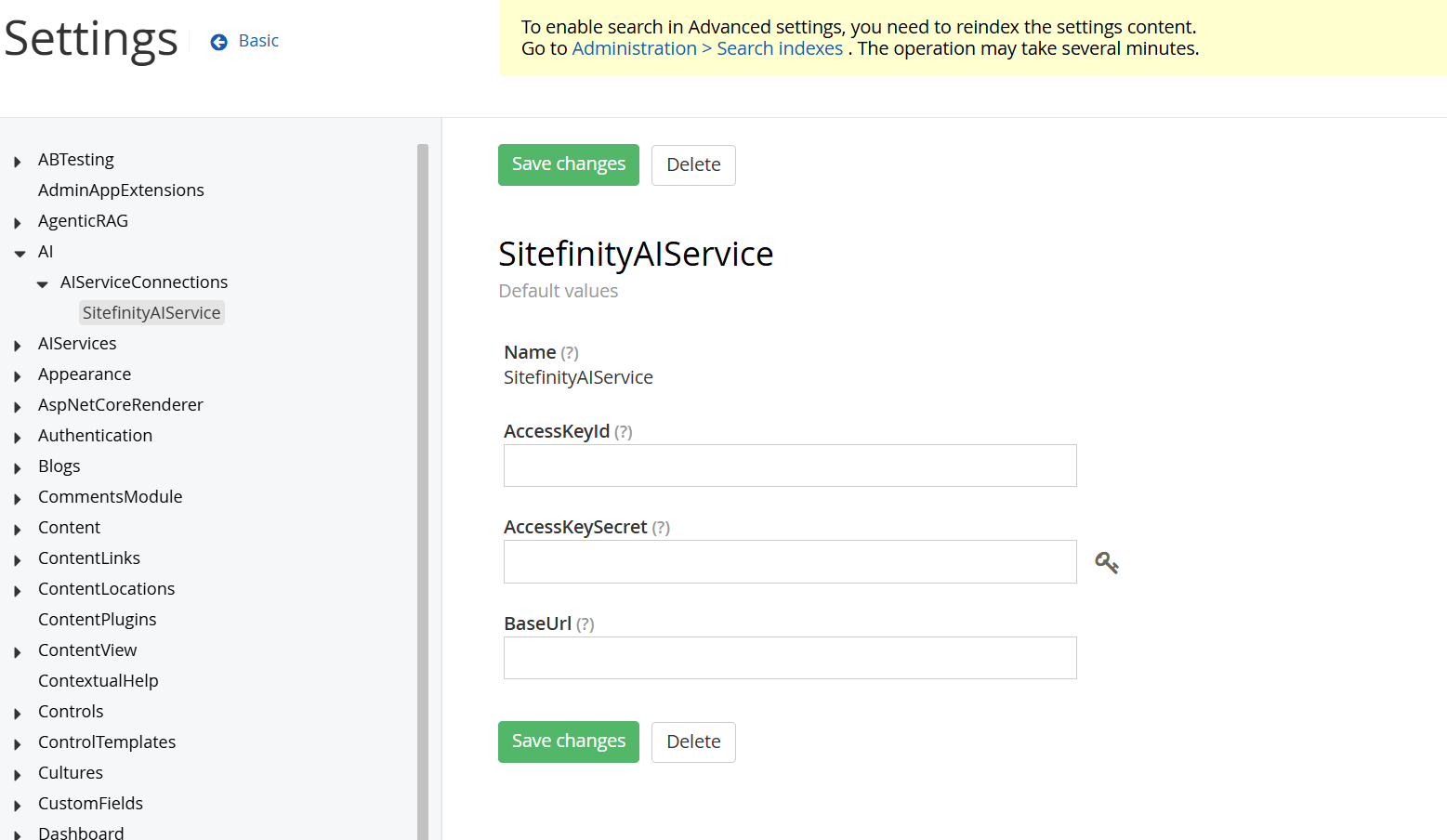
Sample values:
| Field | Sample value |
|---|---|
| AccessKeyId | <your-access-key-id> |
| AccessKeySecret | <your-access-key-secret> |
| BaseUrl | https://api.sitefinity.cloud/v1/organizations/<organization-id>/projects/<project-id>/environments/<environment-name> |
Configure the Agentic RAG system connection
The built-in system connection is required for Sitefinity AI Assistant, Dynamically Generated Experience and Hybrid backend search, after Progress.Sitefinity.AgenticRAGConnector is installed.
- Log in to your Sitefinity CMS backend.
- Navigate to Administration » Agentic RAG connection.
- Locate and open the System connection.
- Click Edit on the Knowledge box area.
- Enter the provided NucliaDB API endpoint, Knowledge box UID, and API key.
- Click Save.
- Verify that the connection is available.
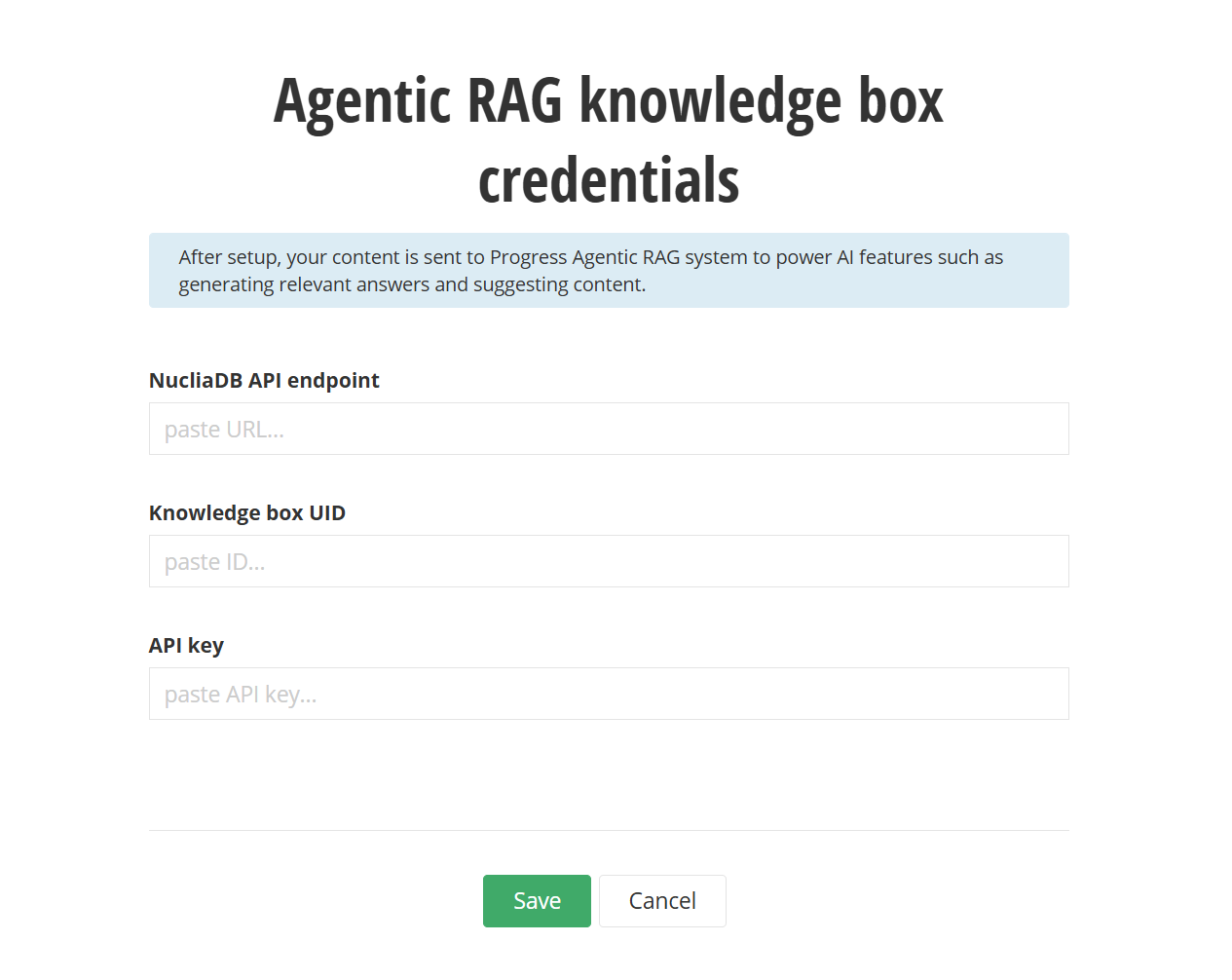
For more information, see Agentic RAG connection.
Sample values:
| Field | Sample value |
|---|---|
| NucliaDB API endpoint | https://<your-nucliadb-endpoint> |
| Knowledge box UID | <knowledge-box-uid> |
| API key | <api-key> |
AI feature-specific configuration
Sitefinity AI Assistant (SAIA)
PREREQUISITES:
- Sitefinity CMS 15.4.8630 or later is required.
- You must have the
Progress.Sitefinity.AssistantNuGet package installed.
- Navigate to Administration » Settings » Advanced » SitefinityAssistant.
- Enter the provided SAIA settings, including admin frontend base URL, AI service base URL, AI service access key ID and secret, CDN host name, connection string, and feature state.
- Click Save changes.
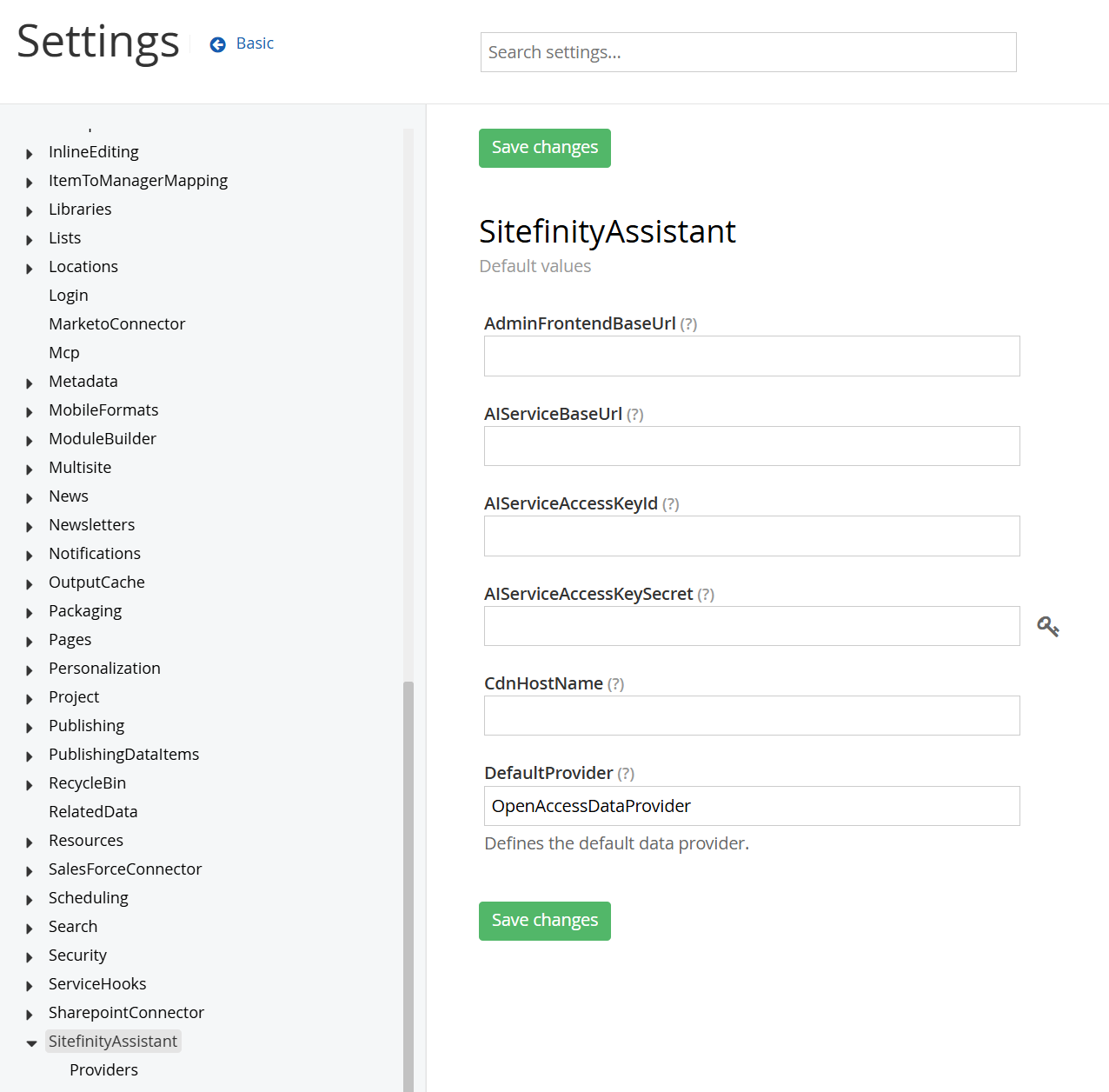
- In the same Advanced settings area, navigate to AgenticRAG » Assistant.
- Enter the remaining values, including the admin API base URL and CDN host name.
- Click Save changes again.
- Recycle the Sitefinity project or application pool.
- Open the Sitefinity CMS backend and verify that SAIA is enabled and available.
Sample values:
{
    "AdminFrontendBaseUrl": "https://api.sitefinity.cloud/ui/",
    "AIServiceBaseUrl": "https://api.sitefinity.cloud/v1/organizations/<organization-id>/projects/<project-id>/aiAssistantTenants/<tenant-id>/environments/<environment-name>/ai/assistants/",
    "CdnHostName": "cdn.assistant.cloud.sitefinity.com",
    "DefaultProvider": "OpenAccessDataProvider",
    "AIServiceAccessKeyId": "<access-key-id>",
    "AIServiceAccessKeySecret": "<access-key-secret>",
    "AdminApiBaseUrl": "https://api.sitefinity.cloud"
}
The ASP.NET Core Renderer configuration for SAIA must also be added, because this part is not configured in the Sitefinity CMS backend. Add it to the Renderer application that hosts the assistant UI. Add the following configuration to the appsettings.json file of the environment where the assistant UI is hosted.
{
  "SitefinityAssistant": {
    "CdnHostName": "cdn.assistant.cloud.sitefinity.com"
  }
}
For more information, see Sitefinity AI Assistant.
Dynamically Generated Experience (DGE)
PREREQUISITES: Sitefinity CMS 15.4.8630 or later is required. Progress Agentic RAG connector is also required.
- Add the required key to the
appSettingssection of the Sitefinity projectweb.config. - Configure the shared SitefinityAIService connection in your Sitefinity CMS backend, if not already configured.
- Recycle the Sitefinity project or application pool.
- Verify that DGE is available and functioning in your Sitefinity CMS backend.
NOTE: The following DGE setting is not available through the Sitefinity CMS backend, so adding it to
web.configis required.
<appSettings>
    <add key="sf-env:dynamicExperienceConfig:adminFrontendBaseUrl" value="https://api.sitefinity.cloud/ui/" />
</appSettings>
For more information, see Dynamically Generated Experience.
AI content generation and classification
PREREQUISITES:
- Sitefinity CMS 15.4.8630 or later is required.
- You must have the
Progress.Sitefinity.AI.CoreNuGet package installed.
- Navigate to Administration » Settings » Advanced and open AI services.
- Set Default AI service to
SitefinityAIClient. - Click Save changes.
- Configure the shared SitefinityAIService connection in your Sitefinity CMS backend, if not already configured.
Beware that to be able to use this AI feature, your user account must be granted required AI permissions. For more information, see Permissions for using the built-in AI features.
For more information, see Generate AI content and Create tags with AI.
Sitefinity AI Agents
PREREQUISITES: Sitefinity CMS 15.4.8632 or later is required.
Configure the shared SitefinityAIService connection from your Sitefinity CMS backend, if not already configured.
No feature-specific configuration is required. Beware that to able to manage or use Sitefinity AI agents, your user account must be granted required AI permissions. For more information, see Permissions for using the built-in AI features.
For more information, see Custom AI agents.
Sitefinity MCP Server
PREREQUISITES: Sitefinity CMS 15.4.8633 or later is required.
Configure the shared SitefinityAIService connection in your Sitefinity CMS backend, if not already configured.
No feature-specific configuration is required.
For more information, see Sitefinity MCP server.
DX Assistant
PREREQUISITES: Sitefinity CMS 15.4.8633 or later is required.
Configure the shared SitefinityAIService connection in your Sitefinity CMS backend, if not already configured.
No feature-specific configuration is required. Beware that to be able to use the DX Assistant, your user account must be granted required AI permissions. For more information, see Permissions for using the built-in AI features.
For more information, see DX Assistant.
Final validation checklist
- Sitefinity CMS version and build number confirmed
- Required license add-on confirmed
- Required NuGet packages installed
- Shared
SitefinityAIServiceconnection configured, where required - Agentic RAG system connection configured, where required
- Feature-specific settings updated, where required
- Application restarted or recycled, where required
- AI feature tested successfully in Sitefinity CMS
Additional resources
