What Is an Agentic Workflow?
An agentic workflow is a multi-step process in which AI agents plan tasks, choose tools, take actions, evaluate the results, and adjust their approach to reach a goal with limited human intervention. Instead of executing a script someone wrote in advance, the agent works out the steps itself and changes them when the situation calls for it.
The difference shows up when nobody hands the model its inputs. Suppose we want to know how our Q3 earnings stack up against a competitor’s. Paste both reports into the prompt and an LLM will compare them in a single call. Ask for that comparison from scratch and something has to locate our filing, track down the competitor’s, pull the right figures from each and run another search when the first one comes back thin. An agentic workflow is the structure that carries that kind of task from goal to finished output.
We covered how agents change the retrieval pipeline in our article on agentic RAG vs. traditional RAG. Here we zoom out to the workflow itself: what makes one agentic, how the loop runs and where the approach earns its cost.
What Makes a Workflow “Agentic”?
Plenty of software calls itself an agent these days, so the label needs criteria. A workflow is agentic when five traits work together.
Goal-oriented planning: The workflow starts from an outcome, such as “produce a competitive analysis for Q3,” and the agent breaks that outcome into steps. Nobody hands the agent a list of steps to follow.
Autonomous decision-making: At each step, the agent decides what to do next based on what it has learned so far, not based on a branch someone coded ahead of time.
Tool use: The agent acts through tools we expose to it: a search index, a SQL database, a ticketing API, a code runner. The model picks the tool and the arguments, our infrastructure executes the call, and the result feeds the next decision.
Memory and state: Agents rely on two kinds of memory. Short-term memory is the working context of a single run, the conversation and intermediate results that let step six build on step two. Long-term memory persists across sessions in external storage, holding facts and preferences the agent retrieves when they become relevant again.
Adaptation: When a search returns nothing useful or an API call fails, the agent rephrases, retries or picks another route instead of passing the failure downstream.
Remove any of these and the workflow slides back toward ordinary automation. The last trait matters most in practice. Fixed pipelines break at the first unexpected result, while an agentic workflow treats that result as information.
How Does an Agentic Workflow Work?
Most implementations run the same loop, whatever the framework underneath. The agent receives a goal, drafts a plan, selects a tool for the first step, executes the action and observes the result. Then it decides: finish, move to the next step or revise the plan. The loop repeats until the goal is met, or the agent runs out of options and escalates to a human.
Run our competitive analysis task through that loop. The agent plans three steps: gather our Q3 figures, gather the competitor’s, then write the comparison. The first retrieval succeeds. The second returns a thin press release rather than the actual report, so the agent revises its plan, queries an external search tool for the filing, and only then moves on to writing. A fixed pipeline would have compared our real numbers against a press release headline, and nothing in it would have noticed.
The observe step deserves a closer look because it’s an evaluation rather than a passive read. After every action, the agent judges whether the result moves it closer to the goal. That judgment is what buys flexibility, and it’s also where things go wrong. We’ll get to that below.
Agentic Workflows vs. Traditional Automation
Traditional automation, whether a cron job, an RPA bot or a step-function pipeline, executes a path someone designed ahead of time. Every run visits the same steps in the same order. An agentic workflow decides which steps are necessary at runtime and changes course when conditions change.
| Dimension | Traditional Automation | Agentic Workflow |
| Path | Fixed, designed in advance | Planned at runtime, revised mid-task |
| Decisions | Rule-based branches | Model reasoning over |
| Failure Handling | Halts or follows a predefined fallback | Retries, rephrases or reroutes on its own |
| Output | Deterministic, same input gives same result | Probabilistic, results vary run to run |
| Cost Per Run | Low and predictable | Multiple LLM calls, higher and variable |
Our take: the table isn’t a ranking. Deterministic automation is the right choice when the steps never change, and it’s cheaper, faster and easier to audit. A payroll run doesn’t need an agent making decisions. The agentic approach earns its cost where the path can’t be known in advance, which is exactly the property that makes those tasks resistant to traditional automation in the first place.
What Are Common Examples of Agentic Workflows?
Researching and drafting a report: The agent first breaks the question into smaller, composable pieces, then gathers sources across a knowledge base and the web for each one. It extracts the relevant figures, notices gaps, runs follow-up searches and assembles a draft with citations. The plan grows as the research does.
Resolving a customer support request: Instead of matching a ticket to a canned macro, the agent reads the issue, pulls the customer’s account state and checks recent incidents. It then searches the relevant knowledge bases, synthesizes an answer, and either resolves the ticket or routes it to the right person with a summary attached.
Analyzing an operational incident: Given an alert, the agent queries logs and metrics, correlates the timeline across services. Then it drafts an incident summary with the linked evidence, a task that could have taken a whole morning for an engineer to complete.
Processing documents across enterprise systems: An invoice arrives as a PDF. The agent extracts the fields, validates them against the purchase order in another system, flags a mismatched total and files the exception for human review rather than pushing bad data forward.
What Are the Risks and Challenges of Agentic Workflows?
Autonomy cuts both ways. A tool call can return malformed data, an ambiguous instruction, or an hallucinated file path; any of these can send an agent down a wrong branch. And because each step feeds the next, small errors compound. A wrong figure retrieved in step two becomes a confident wrong conclusion by step six.
Cost and latency scale the same way. Every planning pass, retry and validation check is another LLM call. This means a task pipeline that finishes in seconds might take an agent minutes and cost several times more. Security adds a further dimension. An agent with write access to production systems can do real damage with a single bad decision, and prompt-injected content hidden inside a retrieved document can steer it there.
None of this argues against agentic workflows, but it does make the case for guardrails. Validate tool outputs before they enter the next step. Scope permissions so the agent can read broadly but write narrowly. Trace every step so we can inspect what the agent saw and why it acted, and then put a human approval checkpoint in front of any action that’s expensive to reverse. The teams getting value from agents in production expand autonomy one step at a time, after each step has earned it.
Progress Agentic RAG
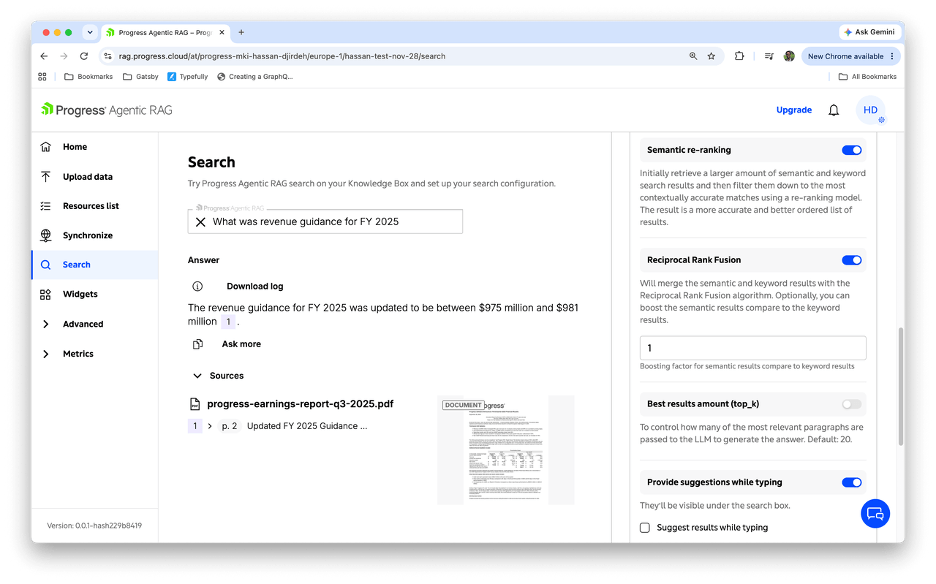
Most of the steps in an agentic workflow are knowledge steps, and the agent can only plan and act as well as the information it retrieves. An agent grounded in model memory alone will improvise facts the moment retrieval falls short. The Progress Agentic RAG solution supplies that knowledge layer as a governed service. Documents live in Knowledge Boxes where the platform handles extraction, chunking, embeddings and indexing, and every answer traces back to a source passage that both the agent and the humans reviewing it can verify.
The platform’s retrieval agents run the workflow loop on the retrieval side. They analyze a question, split it into sub-questions and decide which sources to query for each part, including multiple Knowledge Boxes, SQL databases and internet search. For the broader workflows we build around it, that gives our agents a retrieval step that is citable and permissioned rather than a black box.
Wrap-Up
An agentic workflow hands a goal to an AI agent that plans the steps, acts through tools, evaluates the results and revises until the work is done. That loop handles tasks fixed automation can’t, and it introduces costs and risks that guardrails, permissions and human checkpoints have to manage. The knowledge the agent acts on decides most of the outcome, which is why grounding the workflow in governed, citable retrieval matters as much as the loop itself.
To give your own agents a knowledge layer they can act on, book a live demo with a Progress AI expert or start a free trial and index a document in a Knowledge Box.
FAQs
What is the difference between an AI agent and an agentic workflow?
An AI agent is the actor: the LLM-driven component that reasons, picks tools and takes actions. An agentic workflow is the process the agent carries out, covering the goal, the loop of planning and acting, the tools available and the checkpoints around them. One agent can serve many workflows, and one workflow can coordinate several agents.
Do agentic workflows require human oversight?
In production, yes, and the right amount varies with the stakes. A research workflow might run end to end and only face review at the finished draft, while a workflow that touches customer accounts or production systems should pause for approval before any irreversible action. Oversight also includes observability, meaning every step is traced so we can audit what the agent did and why.
When should I use an agentic workflow instead of traditional automation?
Reach for an agentic workflow when the steps can’t be fully specified in advance because the task varies case by case, the sources differ or recovery from partial failure matters. Stick with traditional automation when the path is stable and known, since it’s cheaper, faster and deterministic. Many systems combine the two, running fixed pipelines for the predictable stages and an agent for the parts that require judgment.
Enjoyed this article?
Add Progress as a preferred source to see more of our content in Google search.
Add Progress as a preferred source on Google