Unit Tests Using Unity Dependency Injection In Sitefinity CMS

The content you're reading is getting on in years.
This post is on the older side and its content may be out of date.
Be sure to visit our blogs homepage for our latest news, updates and information.
Unit testing and dependency injection are inseparable concepts. Therefore it is quite possible that you are using or planning to use some dependency injection mechanism for the code you write with Sitefinity. Hence I decided to write about the option to use what is built in Sitefinity. In the content management system we use an abstraction over the Microsoft's Unity Container for dependency injection. It is used as expected to register various components and their implementations for future use by the CMS.
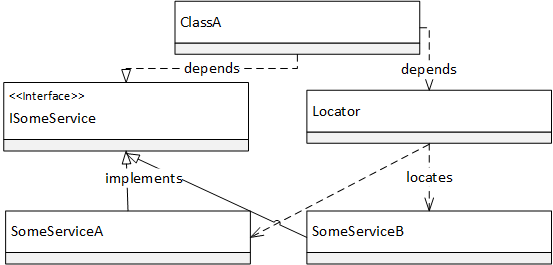
The advantage of using the Sitefinity container in your code and tests is that in addition to being able to register and resolve dependencies in your own code you will also be able to inject your implementations for use by the CMS code. In some cases this will speed up your development and testing since you will not need to abstract everything that works with Sitefinity in order to unit test your implementation but just find the extensibility point provided by the CMS and plug in your mocks. This will also shape your implementation in a way that supports system restarts. The system restart is big topic on its own but for clearness I will explain it as the ability of the Sitefinity CMS to reinitialize the whole system without unloading the application domain or restart the hosting process. This involves the recreation of this Unity container and its registrations.
The entry point for interacting with the Sitefinity unity container is the Telerik.Sitefinity.Abstractions.ObjectFactory class which manages the life cycle of the container available through the property Container. The problem is that accessing this property in a unit test will start the initialization of the container that Sitefinity uses and this means initializing a lot of components that can't and shouldn't function in a unit test. This is why in Sitefinity 7.0 we have exposed a method that allows you to initialize the unity container on your own.
Here is a unit test of the exposed method itself that gives a good example of its usage:
[Test]public void RunWithContainerReplacesTheUnityContainer()
{
//creating an empty unity container
UnityContainer mockedContainer = new UnityContainer();
//registering my implementation of NewsManager
mockedCOntainer.RegisterType<NewsManager, MyNewsManager>();
ObjectFactory.RunWithContainer(mockedContainer, () =>
{
//resolving NewsManager
var manager = ObjectFactory.Resolve<NewsManager>();
//ensuring that in the scope of the RunWithContainer,
//the ObjectFactory class will resolve the expected manager.
Assert.AreEqual(typeof(MyNewsManager), manager.GetType());
});
}


