Styling Sitefinity blog posts with summaries

The content you're reading is getting on in years.
This post is on the older side and its content may be out of date.
Be sure to visit our blogs homepage for our latest news, updates and information.
I’m having a blast lately toying around with Widget Templates and exploring various techniques for customizing and re-styling content. Earlier today, while recording a marketing video for Sitefinity’s blog feature, I became unhappy with how the blogs look, by default, using the the University Template found in the Sitefinity SDK.
Look at the feature, not the design
I didn’t want the styling and design of the blogs to detract from the Sitefinity features being shown in the video. Consequently, I took at stab at modifying the styling of these blogs.
Here is what I ended up with …
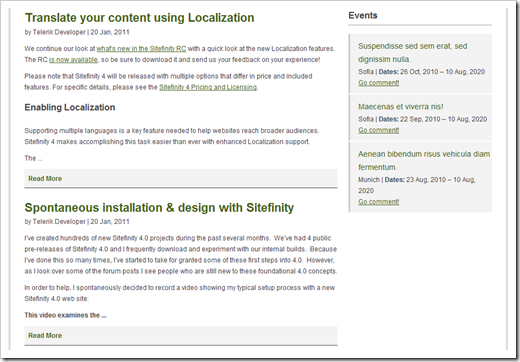
What’s happening here?
There are a few things going on in this design:
- I added some new styling
- I’m using a custom control to truncate blog post content to 100 words
- I added a “Read more” link
Show me the code
Below is the code involved in creating this design.
1. Create a Truncate control for safely truncating your blog post content & HTML.
2. Modify the widget template associated with blog lists in Sitefinity
3. Add the CSS styles in your Theme
That’s it. In general, I’m finding it a lot easier to control the HTML & styling in Sitefinity 4.0.