Slower website startup times when uploading to live

The content you're reading is getting on in years.
This post is on the older side and its content may be out of date.
Be sure to visit our blogs homepage for our latest news, updates and information.
This article could help you investigate slower startup times when deploying your asp.net application to your live environments.
Let's start with some basics of how an ASP.NET website is hosted in the w3wp.exe process created by the IIS for each application pool.
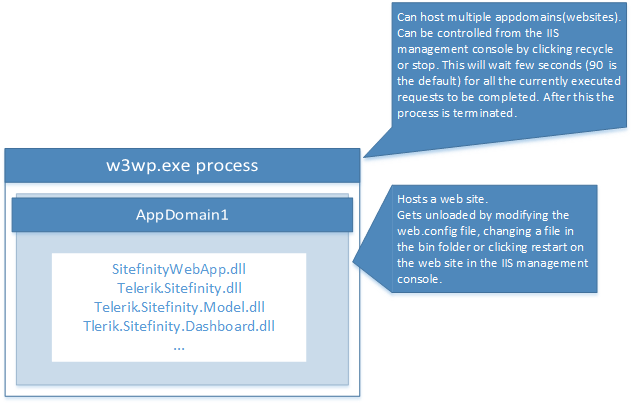
Our experience shows that in most of the cases when uploading a websites to your live environment the web site is restarted several times (the application domain which resides in the application pool worker process is unloaded several times). Since the dlls of all asp.net applications are loaded from the temporary asp.net folder when the application starts it will first make sure that the files in the bin folder are the same as the files in the temporary asp.net folder. And if the application is on the large side this operation could happen several times during the file write operation done by the site deployment. This in terms causes more input output operations for the hard drive which slows down the file writing operation even more prolonging the effect.
To prevent this you need to change the following settings in the web.config. The highlighted values must be higher than the total time taken by the file writing operation in seconds.
<?xml version="1.0" encoding="UTF-8"?>
<configuration>
<system.web>
<httpRuntime waitChangeNotification="60" maxWaitChangeNotification="60" />
</system.web>
</configuration>
Here is more info for those configurations in MSDN:


