
Translate page templates
You can create a new language translation of an existing template. To do this, in Sitefinity CMS backend, navigate to Design » Page Templates. The system displays all language translations, in which a template exists in the following way:

NOTE: If you have added more than six language translation, on the Page Templates page the system displays only the first six language icons. To view all created languages, click More translations… link of the respective template.
For each template, languages are displayed in the following way:

To display back only the first six translations, click Basic translations only… of the respective template.
- Language translations of templates, whose language icons are dark blue, already exist.
- Language translations of templates, whose icons are light blue, have not been created yet.
NOTE: Before you create a template in a different than the default language, you must have added this language in the settings of Sitefinity CMS. For more information, see Setup languages.
The system displays templates that exist in multiple languages in the following way:
-
The following screenshot displays the English versions:
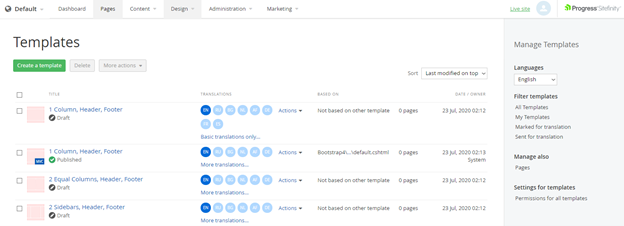
NOTE: In Languages dropdown box in the right pane, English is selected.
-
The following screenshot displays the Dutch versions:
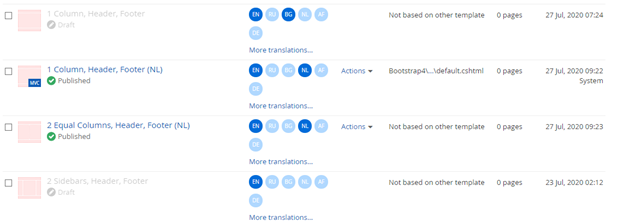
NOTE: In Languages dropdown box in the right pane, Netherlands is selected.
The templates that appear inactive have no translation in the language, selected in Languages dropdown.
NOTE: The content items, which are displayed on the template, can also have language translations. When a content item exists in different languages, each translation is displayed with its respective template translation.
For example, a news item in Spanish is displayed in the News widget in the Spanish version of the template, the English news item is displayed in the English version of the page. If the French translation of the template contains the News widget, but there is no French version of the news, the widget does not display anything. For more information, see Translate content items and taxonomies.
This section contains
