
Load balancing
Overview
Sitefinity CMS can run in load balanced environment. You use a load balanced environment, commonly referred as web farm, to increase scalability, performance, or availability of an application.
The main components of a load-balanced setup are the load balancer and multiple server nodes that are hosting an application. The number of servers depends on the specific needs and parameters requirements, such as throughput and reliability. The load balancer’s main task is to dynamically decide which node processes the incoming requests. The decision is based on rules that are configurable and depend on the limitations of the applications that are being hosted.
All web servers participating in the setup must be accessible through http requests to one another because of the cache synchronization requirements mentioned above.
Sticky session is not required by Sitefinity's load balancing implementation.
Use Sitefinity CMS in a load balanced environment
There are different available options that you can use to load balance the traffic to your Sitefinity CMS application. You must decide which setup to use after considering all application requirements.
Sitefinity CMS supports both software and hardware load balancers. When you use load balanced server architecture, you can have multiple Sitefinity CMS applications, which are hosted on multiple web servers that are serving requests to a single user. This means that, depending on the settings of the load balancer, a user can be redirected to a different application on each request. The output of this request, or the data constructing it, could be cached. Sitefinity CMS supports in memory storage of this cached content, this way each application has its own set of cached objects. This is why, when a user modifies cached data, all applications participating in the setup must be notified about this action. This is done by the application that is processing the request that changed the data. It issues HTTP requests to all applications participating in the setup, as shown on the diagram below. The notifications are sent in parallel and the invoking request is not waiting for their response.
The following screenshot is an example diagram of load balancing:
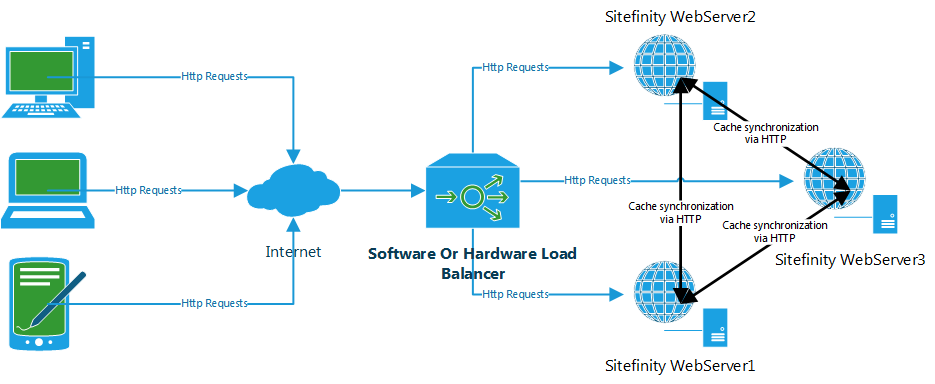
For more architecture and load balancing scenarios, see Reference: Architecture diagrams.
IMPORTANT: When you configure the load balancer, it is important to consider whether the requests will be sticky by IP, session or not. If required all requests grouped by a rule, like IP address, will always be sent to one of the nodes in the farm. Most often, this is limitation of one of the applications hosted on the farm that has in memory storage not synchronized to the other applications, like sessions or cache. Sitefinity CMS does not require any stickiness, but any dynamic module or implementation, or any other application can have such requirement. In this case, you must configure your web farm to require stickiness, which has disadvantages.
This section contains
