
Templates grid
Overview
To view and manage all templates that your website pages are based on, navigate to Design » Page templates.
The Templates grid provides you with details about each template, sorting, filtering, and searching options.
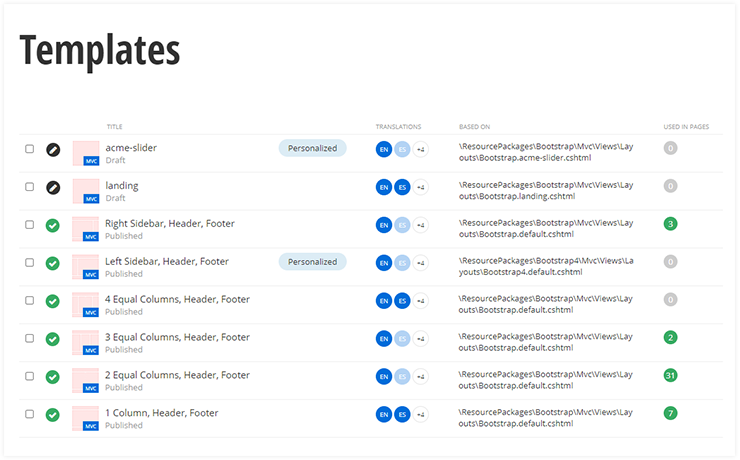
Templates details
|
Column |
Description |
|
TITLE |
This column displays the title of the template, its status, and its thumbnail. Click the title to open the template for editing. By clicking the column header, you can sort the templates by the date that they were last modified.
|
|
TRANSLATIONS |
If your site uses multiple languages, for each template, the Templates grid displays which languages the template is translated to. |
|
BASED ON |
MVC and .NET Core templatesThe column displays the path to the layout file or a link to an existing page template, which the template is based on. The system automatically generates the location path of the layout file, based on Sitefinity CMS templates conventions. Thus, you can easily check the resource package that the template uses - for example, Bootstrap4. |
|
USED IN PAGES |
In this column, you can see how many pages use this template. |
|
LAST MODIFIED |
This column displays the date and the user that last modified the template. By clicking the column header, you can sort the templates by the date that they were last modified. |
|
ACTIONS |
By expanding the Actions menu of a template, you can:
|
Sort page templates
To sort page templates, on the Templates grid, click  (Filter templates).
You can sort templates using the Sort templates dropdown box in the toolbar of the page.
There are the following sorting options:
- Last modified on top
Sorts templates in descending order according to time of modification. - Alphabetically ascending or descending.
NOTE: You can also sort the templates, using the TITLE and the LAST MODIFIED column headers.
Filter page templates
To filter page templates, on the Templates grid, click (Filter templates).
You can use the following filters:
- Language
If you have multiple languages, the Language dropdown box appears and you can use it to filter the template that have translation only in a selected language. - All Templates
Displays all created templates. - Filter by ownership.
To display page templates, created only by your user, click My page templates. - Translation status
- If you have multiple languages, the following filtering options appear:
- Marked for translation Filters all templates that are is status Marked for translation.
- Sent for translation Filters all templates that are is status Sent for translation.
- Special filtering
- If you have a multisite instance, the following filtering options appear:
- This site
Filters the page templates that are shared only on the current site from the multisite instance. - Not shared with any site
If you deselect all the sites where a template is visible, you can still see the template on the Templates page by clicking this filter.
- This site
NOTE: If you have a multisite instance, except for the special filters, the filters display all templates from all sites, regardless of whether the templates are shared with the current site or not.
Permissions for templates
You can manage the permissions for page templates, by clicking  Settings for templates.
For more information, see Permissions by section.
