
Send custom payload
To change the default payload sent by service hooks, you need to create a custom action that modifies the payload before executing the service hook.
To achieve this, inherit from the default webhook action as shown in the following example:
using System;
using System.ComponentModel;
using System.ComponentModel.DataAnnotations;
using System.Threading;
using System.Threading.Tasks;
using Progress.Sitefinity.Renderer.Designers.Attributes;
using Telerik.Sitefinity.ServiceHooks;
using Telerik.Sitefinity.ServiceHooks.Model;

namespace SitefinityWebApp
{
    public class CustomWebhookActionSettings : WebhookActionSettings
    {
        /// <inheritdoc />
        public override string Title
        {
            get
            {
                return ActionTitle;
            }
        }

        /// <inheritdoc />
        public override Type ParametersType
        {
            get
            {
                return typeof(CustomWebhookActionParameters);
            }
        }

        /// <inheritdoc />
        public override Task<ServiceHookActionResult> ExecuteActionAsync(ITriggerData triggerData, object parameters, CancellationToken cancellationToken)
        {
            // Set custom payload before calling base.ExecuteActionAsync()
            // in order to override the default payload
            triggerData.CustomPayload = new
            {
                Name = triggerData.Name,
                Item = triggerData.Item,
                SendDate = DateTime.Now.ToString(),
                ApiKey = ((CustomWebhookActionParameters)parameters).ApiKey
            };

            return base.ExecuteActionAsync(triggerData, parameters, cancellationToken);
        }

        private const string Name = "CustomWebhookAction";
        private const string ActionTitle = "Send data to URL (Custom)";

        public class CustomWebhookActionParameters : WebhookActionSettings.WebhookActionParameters
        {
            [Required]
            [DisplayName("API Key")]
            [Placeholder("Please enter your API key here...")]
            public string ApiKey { get; set; }
        }
    }
}NOTE: In order to use all available attributes in
CustomWebhookActionParametersclass you need to installProgress.Sitefinity.Renderernuget package. For more information, see Widget designers.
To register your custom action in the system, you need to have a module that implements the IServiceHookActionProvider interface which returns the new action in the GetServiceHookActionsSettings() method.
using System;
using System.Collections.Generic;
using SitefinityWebApp;
using Telerik.Sitefinity;
using Telerik.Sitefinity.Abstractions;
using Telerik.Sitefinity.Configuration;
using Telerik.Sitefinity.ServiceHooks;
using Telerik.Sitefinity.Services;

[assembly: SitefinityModule(SampleModule.ModuleName, typeof(SampleModule), SampleModule.ModuleName, "", StartupType.OnApplicationStart)]
namespace SitefinityWebApp
{
   public class SampleModule : ModuleBase, IServiceHookActionProvider
   {
       public override Guid LandingPageId
       {
           get { return Guid.Empty; }
       }

       public override void Initialize(ModuleSettings settings)
       {
           base.Initialize(settings);

           App.WorkWith().Module(Name)
               .Initialize();
       }

       public override void Install(SiteInitializer initializer)
       {
       }

       protected override ConfigSection GetModuleConfig()
       {
           return null;
       }

       public override Type[] Managers
       {
           get { return null; }
       }

       IDictionary<string, IServiceHookActionSettings> IServiceHookActionProvider.GetServiceHookActionsSettings()
       {
           var actionSettings = new Dictionary<string, IServiceHookActionSettings>();
           actionSettings.Add("CustomWebhookAction", new CustomWebhookActionSettings());

           return actionSettings;
       }

       internal const string ModuleName = "SampleModule";
   }
}
After you have implemented and registered your custom action you are ready to configure your first service hook to start sending the new payload.
- Navigate to Administration » Servicehooks.
- Click Create.
- Under the Action label there is a dropdown selector where you can now select your custom action (Send data to URL (Custom) in the example) instead of the default one
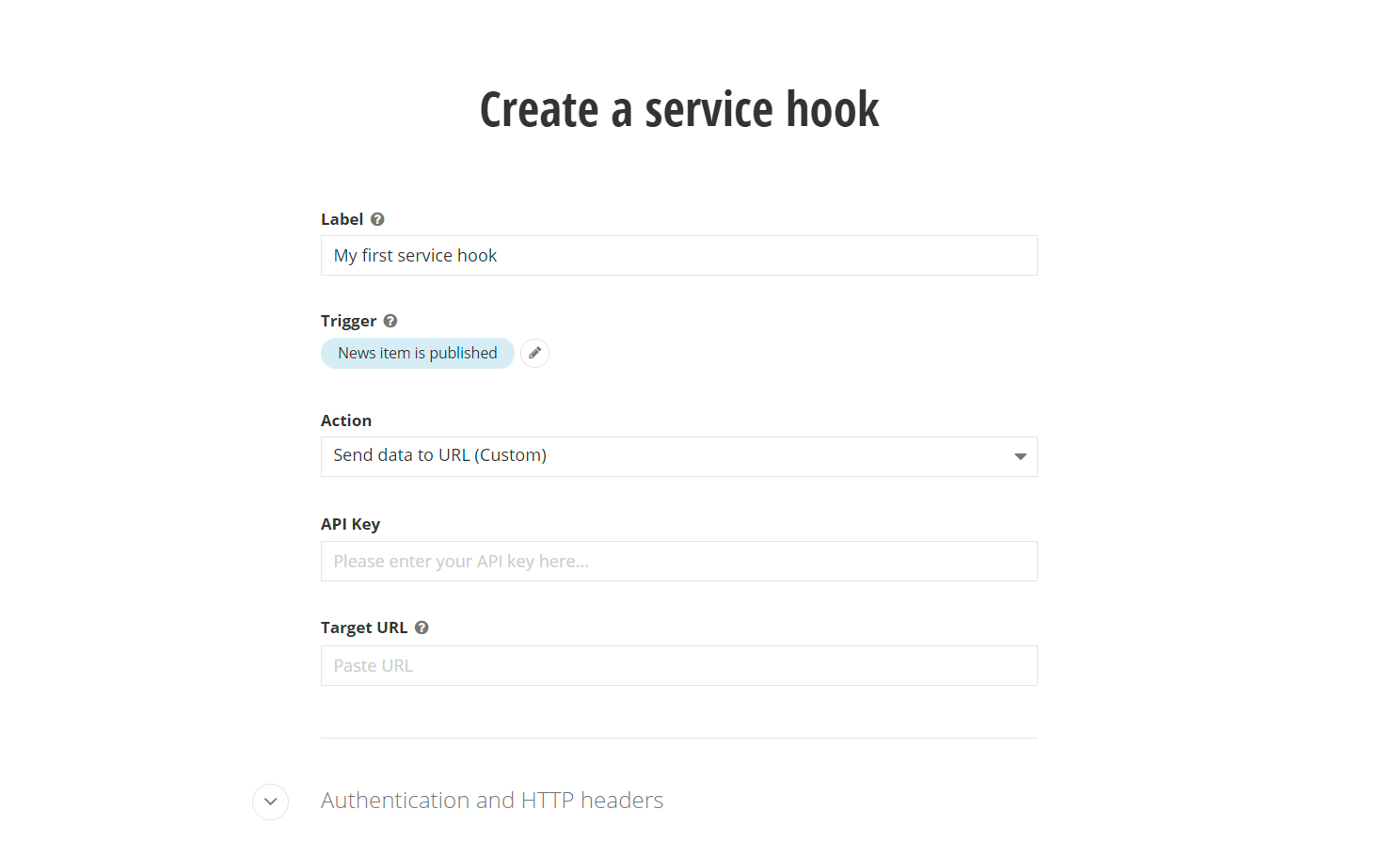
- With the custom action, there is a new field in the UI, API Key, which can now be configured and used in the construction of the modified payload. Here’s an example payload from the new service hook:
{
 "Name": "News item is published",
 "Item": {
   "Id": "2757f79a-b143-462b-9ddc-32bf586b968e",
   "LastModified": "2021-08-11T15:21:37+03:00",
   "PublicationDate": "2021-08-11T14:48:01+03:00",
   "Title": "Sample news item",
   "Description": "",
   "DateCreated": "2021-08-11T14:48:01+03:00",
   "IncludeInSitemap": true,
   "UrlName": "sample-news-item",
   "ItemDefaultUrl": "/2021/08/11/sample-news-item",
   "Tags": [],
   "Category": [],
   "AllowComments": true,
   "Summary": "",
   "Content": "The content of the news item.",
   "Author": "",
   "SourceName": null,
   "SourceSite": null,
   "Provider": "OpenAccessDataProvider",
   "Comments": []
 },
 "SendDate": "8/11/2021 3:21:38 PM",
 "ApiKey": "My_personal_API_Key"
}