Site-specific taxonomies
Taxonomies are supported in multisite mode. You can customize the taxonomy per site, for example, you can set different categories for different sites, while using the same taxonomy.
When a taxonomy is set to be used on a specific site only, all existing relations between the taxa and their content items are removed and a new set of taxa is created for the specific site only.
NOTE: The original taxa are still available and visible on all other sites.
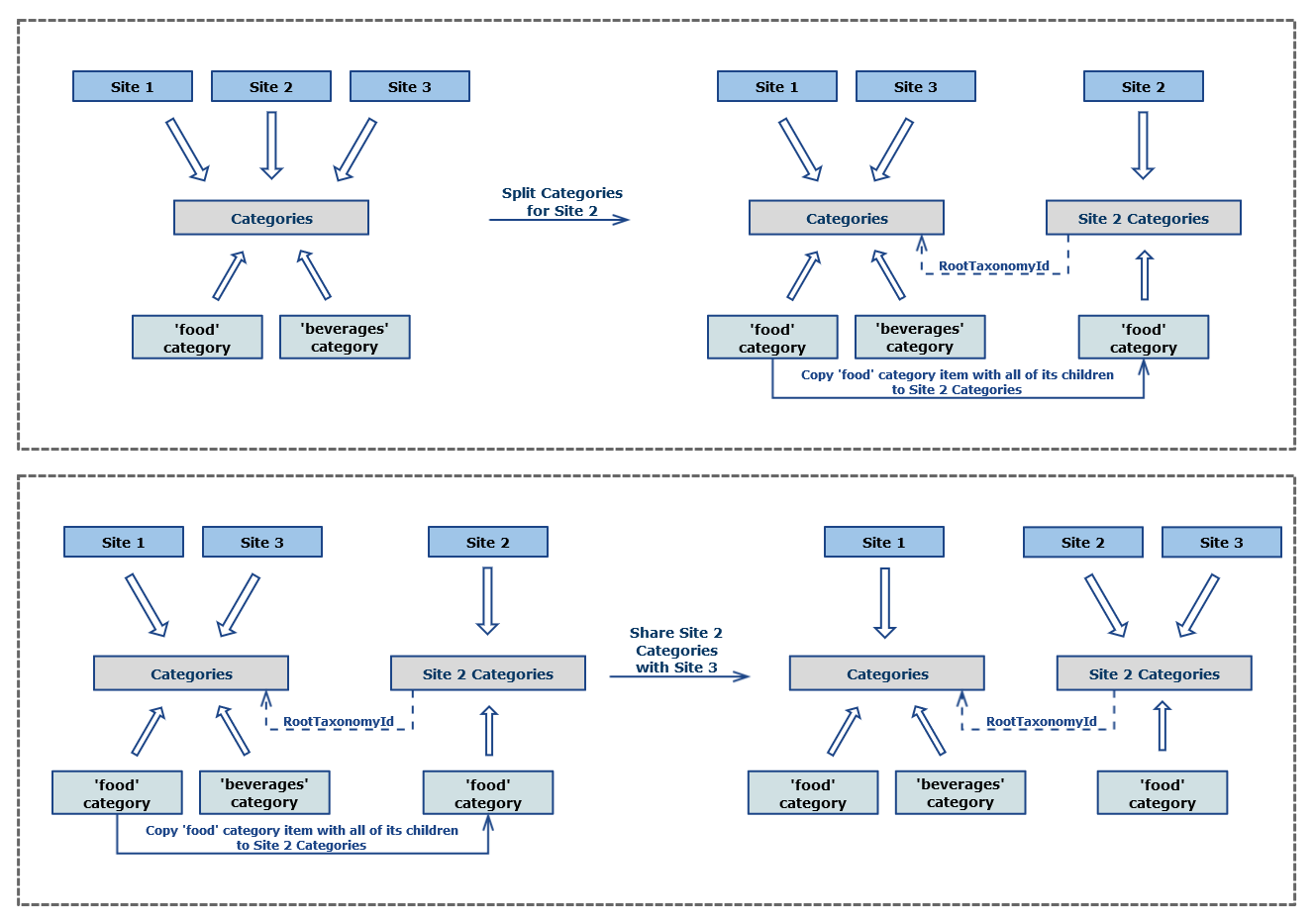
The code sample below shows how to set Categories to be used on a specific site and how to duplicate the items from one site to another, based on specific rules. In this example, the Categories taxonomy is set to be specific for Site 2. After that, only the food category and its children are copied from Site 1to* Site 2*.
Once the Categories taxonomy is set to be specific for Site 2, it is shared with Site 3, so that all taxonomy items get shared and synced between both sites. Use the following code sample:
using System.Linq;
using Telerik.Sitefinity.Multisite;
using Telerik.Sitefinity.Taxonomies;
using Telerik.Sitefinity.Taxonomies.Model;

namespace SitefinityWebApp
{
    public class SiteSpecificTaxonomies_MultisiteTaxonomiesShowCase
    {
        public void MultisiteTaxonomiesShowCase()
        {
            var taxonomyManager = TaxonomyManager.GetManager();
            var multisiteManager = MultisiteManager.GetManager();

            var sites = multisiteManager.GetSites().ToArray();
            var site1 = sites[0];
            var site2 = sites[1];
            var site3 = sites[2];

            // Get "Categories" used in all sites by default.
            var categories = taxonomyManager.GetTaxonomies<HierarchicalTaxonomy>().Single(t => t.Name == "Categories");

            // Get "Categories" used in site1.
            var categoriesSite1 = taxonomyManager.GetSiteTaxonomy<HierarchicalTaxonomy>(categories.Id, site1.Id);

            // Split "Categories" for site2.
            var categoriesSite2 = taxonomyManager.SplitSiteTaxonomy<HierarchicalTaxonomy>(categories, site2.Id);

            // Copy all child categories below "food" in site1 to "Categories" in site2.
            this.CopyFoodCategories(categoriesSite1, categoriesSite2, taxonomyManager);
            taxonomyManager.SaveChanges();

            // Share categories used in site2 with site3.
            taxonomyManager.UseTaxonomyInSite(categoriesSite2, site3.Id);
            taxonomyManager.SaveChanges();

            // "Categories" taxonomy used in site3 is now the same as the one used in site2 (categoriesSite2.Id == categoriesSite3.Id)
            var categoriesSite3 = taxonomyManager.GetSiteTaxonomy<HierarchicalTaxonomy>(categories.Id, site3.Id);
        }

        public void CopyFoodCategories(HierarchicalTaxonomy sourceTaxonomy, HierarchicalTaxonomy targetTaxonomy, TaxonomyManager taxonomyManager)
        {
            var foodCategory = sourceTaxonomy.Taxa.Where(t => t.Name == "food").First() as HierarchicalTaxon;
            var foodCategories = taxonomyManager.GetTaxa<HierarchicalTaxon>().Where(t => t.Parent.Id == foodCategory.Id);

            var targetFoodCategory = taxonomyManager.CopyTaxon(foodCategory, targetTaxonomy);

            foreach (var sourceTaxon in foodCategories)
            {
                var targetTaxon = taxonomyManager.CopyTaxon(sourceTaxon, targetTaxonomy);
                targetTaxon.Parent = targetFoodCategory;
            }
        }
    }
}
To retrieve taxonomies used in a specific site, the TaxonomyManager method GetSiteTaxonomy resolves the correct taxonomy instance of a site. If no site is specified, the site from the current context is used.
In order to get the specific taxonomy used in Site 3, the sample above passes to the method the Categories taxonomy, obtained by name, and the ID of Site 3. In this scenario, the ID of the resolved Categories taxonomy for Site 2 and Site 3 is the same, since they share this taxonomy.
If you retrieve Categories taxonomy for Site 1, it will be the same one that you have specified as argument, because it has never been set to be specific for Site 1.
The above scenario is explained by the following chart: