
Flat taxon selector
This tutorial demonstrates how to add a taxon selector in a widget's designer view. You can select taxa from a flat taxonomy like Tags or a custom classification. For more information on Sitefinity CMS tag, see For developers: Flat taxonomies. For more information on custom classifications in Sitefinity CMS, see Create custom classifications.
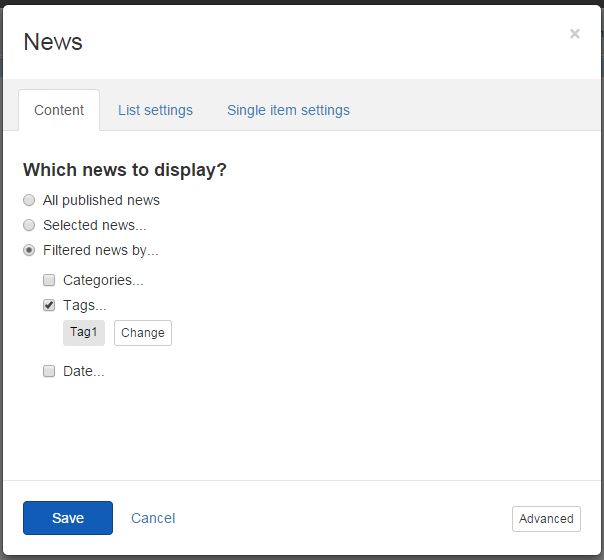
The image below shows a flat taxon selector for the News widget:
In your DesignerView.YourView.cshtml file, place one of the following tags anywhere in the HTML code:
Single item selection:
Razor
<sf-list-selector sf-taxon-selector sf-multiselect="false" sf-sortable="true"
                                 sf-provider="properties.ProviderName.PropertyValue"
                                 sf-selected-item-id="properties.SelectedItemId.PropertyValue"
                                 sf-selected-item="properties.SelectedItem.PropertyValue"></sf-list-selector>
Multiple items selection:
Razor
<sf-list-selector
    sf-taxon-selector
    sf-multiselect="true"
    sf-sortable="true"
    sf-provider="properties.ProviderName.PropertyValue"
    sf-selected-ids="properties.SelectedItemIds.PropertyValue"
    sf-selected-items="properties.SelectedItems.PropertyValue">
</sf-list-selector>
The values of the attributes are scope properties that you define in the MVC widget controller.
| Attribute | Description |
|---|---|
sf-selected-item-id | Single select only. Stores the ID of the selected item. |
sf-selected-item | Single select only. Stores the serialized information of the selected item. |
sf-selected-ids | Multi select only. Stores the IDs of the selected items. |
sf-selected-items | Multi select only. Stores the serialized information of the selected items. |
sf-provider | Configures the provider to use when retrieving the items to display. |
sf-taxonomy-id | Accepts a scope property holding the GUID of the taxonomy. |
Want to learn more?
Enhance your Sitefinity skills by enrolling in free training sessions. Become Sitefinity certified through Progress Education Community to strengthen your professional credentials.

Get started with Integration Hub | Sitefinity Cloud
This free lesson teaches administrators, marketers, and other business professionals how to use Sitefinity Integration Hub to create automated workflows between Sitefinity and other business systems.
Web Security for Sitefinity Administrators
This free lesson teaches administrators the basics about protecting your Sitefinity instance and your sites from external threats. Configure HTTPS, SSL, allow lists for trusted sites, and cookie security, among others.
Foundations of Sitefinity ASP.NET Core Development
The free on-demand video course teaches developers how to use Sitefinity ASP.NET Core and take advantage of its decoupled architecture and modern development model.