Encrypt configurations
Encrypt sensitive data in configurations
Sitefinity CMS enables you to encrypt sensitive data located in the system configurations. For example, you can encrypt passwords or secret keys. You configure encryption options per configuration section. The administrative backend UI (Administration » Settings » Advanced) exposes an option to encrypt settings, which are considered sensitive data. This functionality is available via the Show encryption options button, located in the upper right-hand corner of each configuration section, for example:
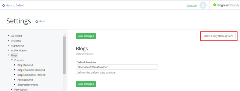 Clicking the button displays the persistence options for each applicable configuration setting:

Out of the box, Sitefinity CMS supports the following built-in options to persist configuration values:
-
No encryption
The value is persisted in plain text.
This is the default option. -
Encrypted value
The value is encrypted with the default Sitefinity CMS encryption algorithm, and the encrypted value is persisted. For example:
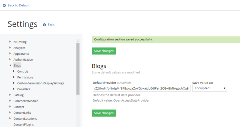
NOTE: When retrieving a configuration setting value via the Sitefinity CMS Configurations API, you do not need to decrypt the value yourself - Sitefinity CMS will decrypt the value internally for you.
-
Key to app setting
Using this option instructs Sitefinity CMS to look for the value of the configuration setting inside the web.config<appSettings>section, instead of persisting it in the default configuration location. Use this option if you want to take control over the encryption of the values yourself, for example leverage the default ASP.NET mechanism for encrypting web.config sections. For more information, refer to this MSDN article: Encrypting a Web Configuration Section. Unlike the first two modes, when using Key to app setting option, you do not enter the desired configuration setting value in Sitefinity CMS, but you specify a key name instead. You can use some unique prefix when coming up withthe key name, so it's easily distinguishable that this is not a configuration value, but a key name. For example:
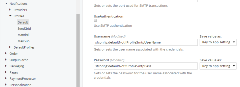
Sitefinity CMS will use this key to look for the value of the setting inside the web.config<appSettings>section. Then you must manually add that key and the desired configuration value inside the web.config<appSettings>section as a key-value pair. For example:XML<appSettings> ... <add key="sfconfig:defaultNotifProfileSmtpUserName" value="testUser@123!"/> <add key="sfconfig:defaultNotifProfileSmtpPass" value="P@$$w0rd!"/> ... </appSettings>
Integrate a custom encryption logic
You can customize the way Sitefinity CMS handles persistence of encrypted configuration settings. This is useful in cases where you want to use a different encryption algorithm for settings that are stored using the Encrypted persistence option, or if you want to specify different persistence location for settings where you have used the Link to App Setting option. For more information about the Sitefinity CMS configuration setting encryption options, see Encrypt sensitive data in configurations.
Implement the custom resolver class
The default logic for encrypting configuration settings is implemented inside the SecretDataResolver class. To implement your custom logic, you must first add a new class that inherits from SecretDataResolver.
Specify your custom resolver Mode
The SecretDataResolver class exposes a Mode property, which helps Sitefinity CMS identify whether this resolver is used for working with configuration settings that are stored using one of the following modes:
- Encrypted
You implement your own encryption and decryption logic for the configuration setting value that is persisted by Sitefinity CMS - Link to App Setting The actual value of the configuration settings is stored externally, whereas Sitefinity CMS only persists a key. You implement the logic that associates the key, stored by Sitefinity CMS with the atual value of the configuration settings.
In other words, you must implement a separate resolver for each of the modes and specify the Mode accordingly. You do this by overriding the Mode property in your custom class and returning either SecretDataMode.Encrypt or SecretDataMode.Link for its value.
Implement the encrypt and decrypt logic
Once you have specified your resolver mode, you must override the GenerateKey and Resolve base methods. The implementation of these methods differs depending on the specified Mode:
-
For
SecretDataMode.Encryptmode- Your
GenerateKeymethod receives the value you entered in the configuration settings UI. You must implement the encryption logic of the received value, so that the `GenerateKey ```method returns the encrypted value. Sitefinity CMS persists this returned value. - When the configuration settings value is requested, Sitefinity CMS calls the custom resolver
Resolvemethod and passes the decrypted value as a method parameter. You must handle the decryption logic inside the method and return the decrypted value.
For example, your custom resolver class needs to look like this:
C#using System; using System.Collections.Generic; using System.Linq; using System.Security; using System.Web; using Telerik.Sitefinity.Configuration; namespace SitefinityWebApp { public class SecretDataResolverEncryptMode : SecretDataResolver { public override SecretDataMode Mode { get { return SecretDataMode.Encrypt; } } public override string Resolve(string key) { // the key parameter contains the encrypted config setting value var encryptedValue = key; var decryptedValue = ""; // implement your own decryption logic here! // and return the decrypted value return decryptedValue; } public override string GenerateKey(string value) { // the key parameter contains the config setting value var configSettingValue = value; var encryptedValue = ""; // implement your own encryption logic here! // and return the encrypted value return encryptedValue; } } } - Your
-
For
SecretDataMode.Linkmode- Your
GenerateKeymethod only needs to return the value that is passed by Sitefinity CMS as a method parameter. The reason is that when using theSecretDataMode.Linkmode, Sitefinity CMS requires you to specify a key inside the configuration settings UI, instead of providing the actual setting value. Thus, Sitefinity CMS needs to persist just the key, and no additional logic is necessary inside theGenerateKeymethod. The retrieval of the actual value will be handled inside theResolvemethod, based on this key. - Your
Resolvemethod needs to handle the retrieval of the actual configuration settings value, based on the key, persisted in Sitefinity CMS. The key is received as a method parameter. Your method implementation must retrieve the value, based on the key, and return it as a result. Usually, when usingSecretDataMode.Linkmode, you handle the encryption and decryption of the configuration setting value externally from Sitefinity CMS.
For example, your custom resolver class needs to look like this:
C#using System; using System.Collections.Generic; using System.Linq; using System.Web; using Telerik.Sitefinity.Configuration; namespace SitefinityWebApp { public class SecretDataResolverLinkMode : SecretDataResolver { public override SecretDataMode Mode { get { return SecretDataMode.Link; } } public override string Resolve(string key) { // Sitefinity CMS stores only a key when using Link mode // you manually enter the config setting value in external configuration as a key-value pair // use the key passed as a parameter to this method // and implement you rlogic for retrieving the actual setting value //for example, if you're storing the setting value inside web.config <appSettings>: return System.Configuration.ConfigurationManager.AppSettings[key]; } public override string GenerateKey(string value) { // Sitefinity CMS stores only a key when using Link mode // you manually enter the config setting value in external configuration as a key-value pair // Thus, no implamentation is needed, simply return the received value (which is the key you entered in the administrative UI) return value; } } } - Your
Register the class
You register the custom resolver classes in the web.config file of your application. For example, to register the above demonstrated Encrypt and Link mode resolvers, modify the web.config in the following way:
 <!-- Begin telerik section  -->
  <telerik>
    <sitefinity>
      <sitefinityConfig storageMode="Auto">
        <secretResolvers>
          <add name="customSecretDataResolverEncryptMode" type="SitefinityWebApp.SecretDataResolverEncryptMode, SitefinityWebApp" title="Custom SecretDataResolver EncryptMode" />
          <add name="customSecretDataResolverLinkMode" type="SitefinityWebApp.SecretDataResolverLinkMode, SitefinityWebApp" title="Custom SecretDataResolver LinkMode" />
        </secretResolvers>
      </sitefinityConfig>
    </sitefinity>
  </telerik>
  <!-- End telerik section  -->
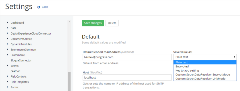
As a result, the custom resolvers appear in the list of available configuration setting encryption options: