
Create Add-ons in Continuous delivery
The following chart demonstrates how to develop and test an add-on in a continuous delivery process:
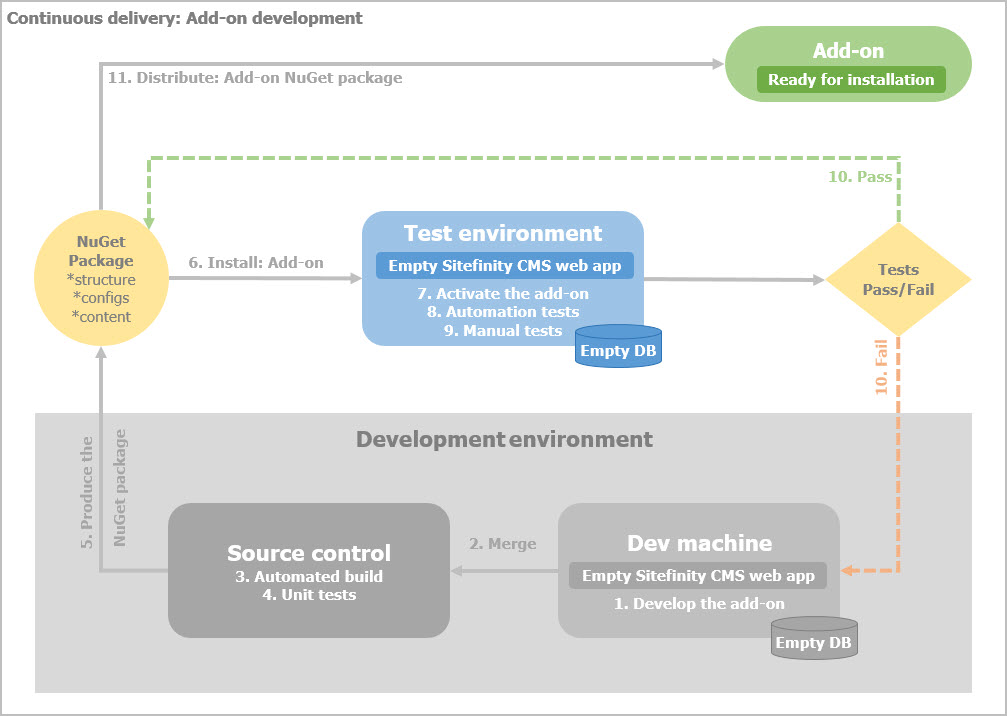
To properly develop, test, and deliver an add-on, we recommend using the following continuous delivery process:
PREREQUISITES: You have setup Continuous delivery.
For more information, see Setup the Continuous delivery process.
Development environment
- Develop the add-on in your local development environment.
Use a solution, containing an empty Sitefinity CMS web application, which directly references all custom projects that are part of the add-on. Use an empty database.
For more information, see Best practices: Add-on development. - Store the solution in a source control system, such as Microsoft TFS.
- Use an automated build, such as MSBuild that is integrated with the source control system.
- Execute Unit tests.
- Export the add-on.
- Edit the .nuspec file.
- Create the NuGet package.
Test environment
- Install the add-on NuGet package on a test environment.
For more information, see Install add-ons.
The test environment must also use an empty Sitefinity CMS web application and an empty database. - Open the test environment and activate the add-on.
For more information, see Activate an add-on. - Perform UI automation tests, manual tests, performance tests, and security tests.
RESULT: After the add-on passes all test, you can release the NuGet package, so that it can be installed in another Sitefinity CMS project.
If any of the tests fail, go back to your development environment, fix the problem and perform the above procedure again.
This section contains
Export the add-on
After you develop an add-on that you want to distribute, you export from your Sitefinity CMS only the part that you want to distribute.
Edit the .nuspec file
After Sitefinity CMS automatically creates the .nuspec file, you should manually edit it to prepare it for NuGet package generation.
Create the NuGet package
After you have exported your Add-on and edited the .nuspec file, you need to generate a NuGet package out of it.
Manage add-on dependencies
Learn about third party dependencies and Sitefinity CMS assemblies dependencies.
Create Add-ons in Continuous delivery
Develop and test an add-on in a continuous delivery process.
Want to learn more?
Enhance your Sitefinity skills by enrolling in free training sessions. Become Sitefinity certified through Progress Education Community to strengthen your professional credentials.

Get started with Integration Hub | Sitefinity Cloud
This free lesson teaches administrators, marketers, and other business professionals how to use Sitefinity Integration Hub to create automated workflows between Sitefinity and other business systems.
Web Security for Sitefinity Administrators
This free lesson teaches administrators the basics about protecting your Sitefinity instance and your sites from external threats. Configure HTTPS, SSL, allow lists for trusted sites, and cookie security, among others.
Foundations of Sitefinity ASP.NET Core Development
The free on-demand video course teaches developers how to use Sitefinity ASP.NET Core and take advantage of its decoupled architecture and modern development model.