
Caching
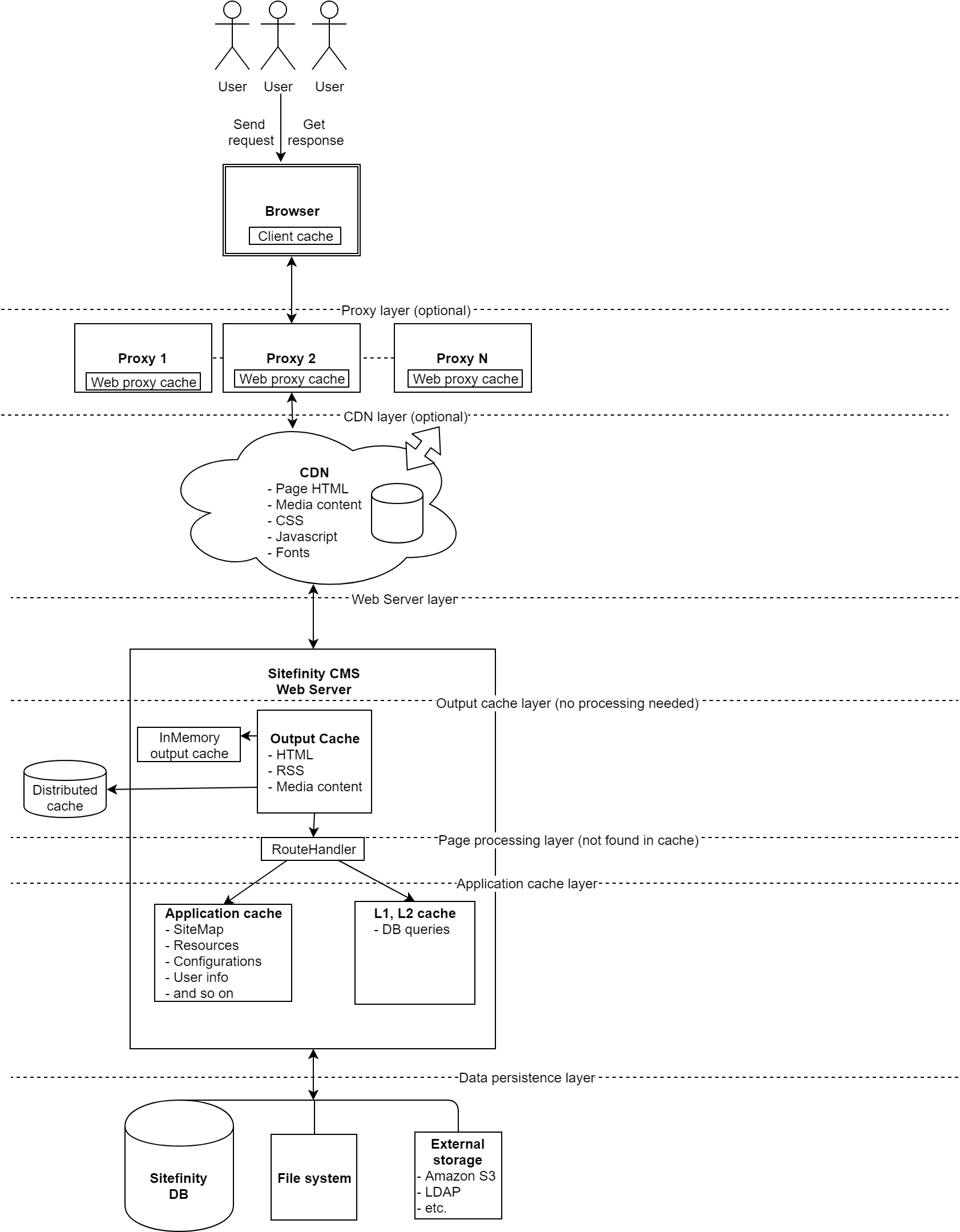
Sitefinity CMS implements several layers of caching to ensure fast content editing and browsing experiences. These caching layers cover all important Sitefinity CMS objects, including page HTML, media content, client resources, configurations, and so on. Sitefinity CMS can store the cache items in the web server memory, on a distributed cache data store, or on the client (browser), and enables you to configure the caching mechanisms to deliver optimal performance matching your desired use case. Client cache headers can be controlled through Sitefinity CMS to fine tune the duration a content item stays in the browser cache. You can give proxy servers instructions how to store Sitefinity CMS content and deliver it faster. CDN is fully supported out of the box for page HTML, JavaScript, CSS, Fonts and media content (e.g. images, videos, documents). Server Output cache implementation in the product guarantees that content is served instantly from memory instead of being processed every time. Application level caches take care of storing data that takes longer time to process (e.g. DB queries, configuration files, etc.) and serving it from the web server memory.
The following diagram demonstrates the types of cache available in Sitefinity CMS and their location in the content delivery execution flow:
This section contains
