Simple CRM Podio Automation with GlobiFlow for Podio
Chef Kat is a high-end gourmet private chef in Calgary, Canada who manages her CRM with Podio and uses Podio webforms to collect leads from her website.
Chef Kat had issues with populating initial data on leads, and keeping prospective dates out of her calendar while showing only confirmed dates.
The solution was a 2-app 2-flow setup using GlobiFlow for Podio to pre-populate data on all new leads, and to automate copying leads to the confirmed customers app, where dates are configured to show in her calendar.
In this video, we show this basic real-world automation on a set of demo data:
GlobiFlow for Podio Automation
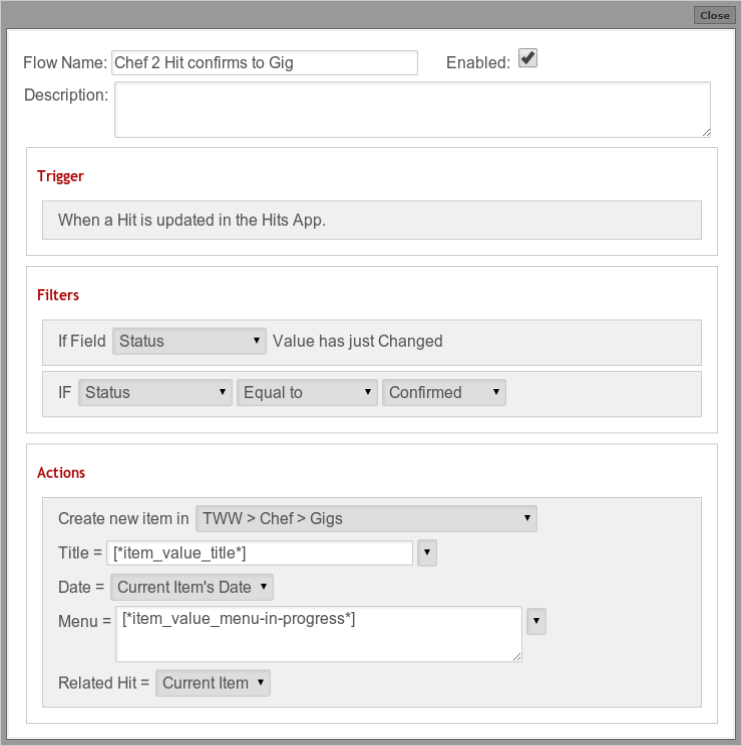
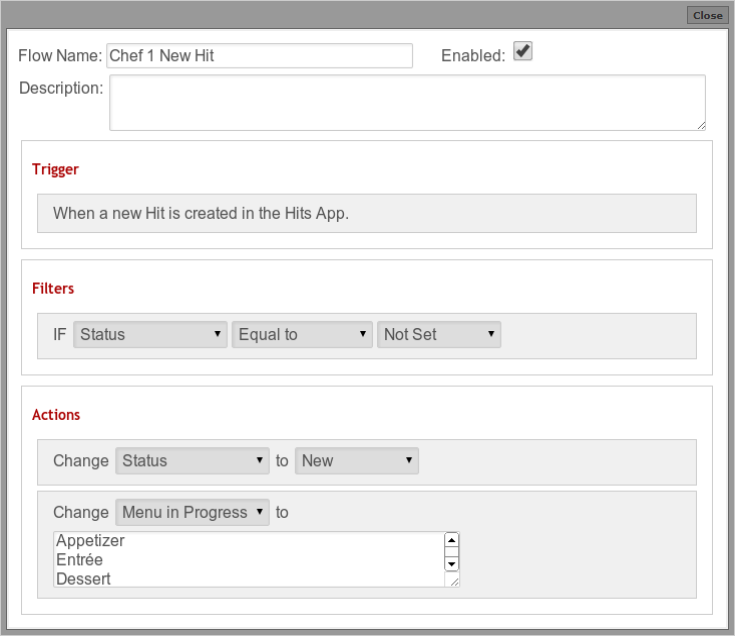
Here are the Flow steps as defined in GlobiFlow for Podio to achieve this automation in her Podio Workspace:
-
1 New Hit from Website
-
2 Gig Confirmed (Lead becomes a Customer)