How to Prevent Overlapping bookings in a Podio Calendar
With a Calendar App, when a meeting Item is added, a previous item for that same date and time may already exist. This could be very problematic.
Solution
Create a flow to check for overlapped bookings and send an alert to the Item Creator to reschedule the new meeting.
-
Add a Podio calculation field to the app to show just the date in format YYYY-MM-DD. We need this only to search on later.

-
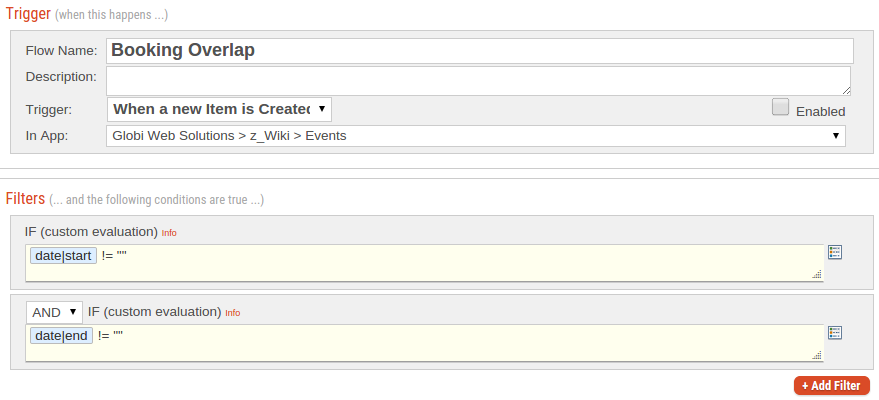
Build your flow on create of an item in the app:
-  If date|start != ""
-  AND If date|end != ""
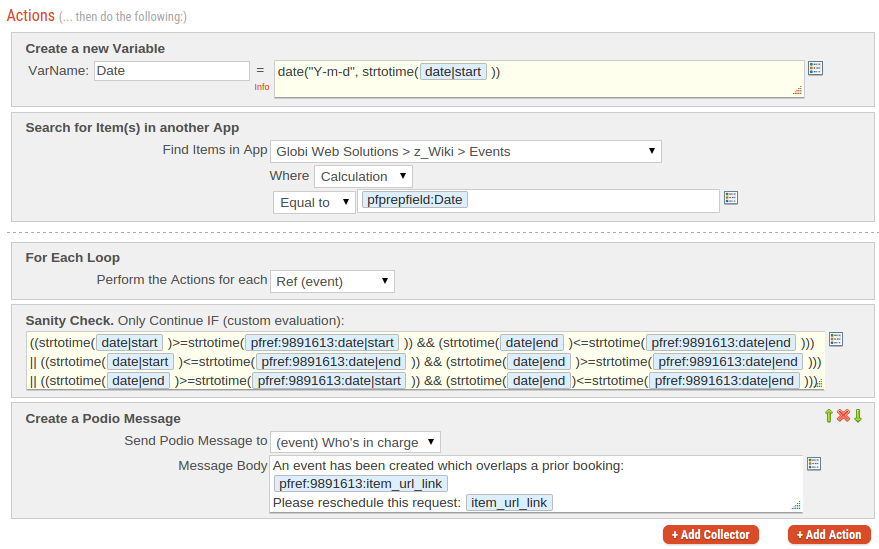
-  Create a custom variable for just the date: date("Y-m-d", strtotime( [date-token] ))
-  Search in App where above new podio calc field equals above variable (ie find all other items for the same day)
-  For each found item
-  Sanity Check: ((strtotime([date-token|start])>=strtotime([found-date|start])) && (strtotime([date-token|end])<=strtotime([found-date|end]))) || ((strtotime([date-token|start])<strtotime([found-date|end])) && (strtotime([date-token|end])>=strtotime([found-date|end]))) || ((strtotime([date-token|end])>strtotime([found-date|start])) && (strtotime([date-token|end])<=strtotime([found-date|end])))
-  add a comment or something
Basically we're searching for all other items on that date, and then comparing the start and end times to see if they overlap.
Result
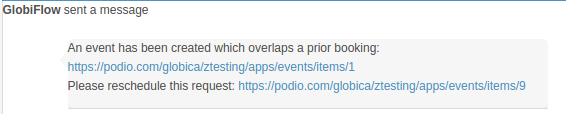
A chat message will now be sent to the person in charge of the meeting to reschedule the event.