
Export and configurations
Configurations and settings
During delivery of source code to a Staging or Live environment some of the environment configurations need to be different. For example, API keys for different connectors and SMTP server settings, which is necessary because you do not want to spam the live accounts with test data.
Continuous delivery automates the delivery of configurations from Development to Live environments. This way, you do not need to manually apply transformation to configurations.
-
Environment configurations
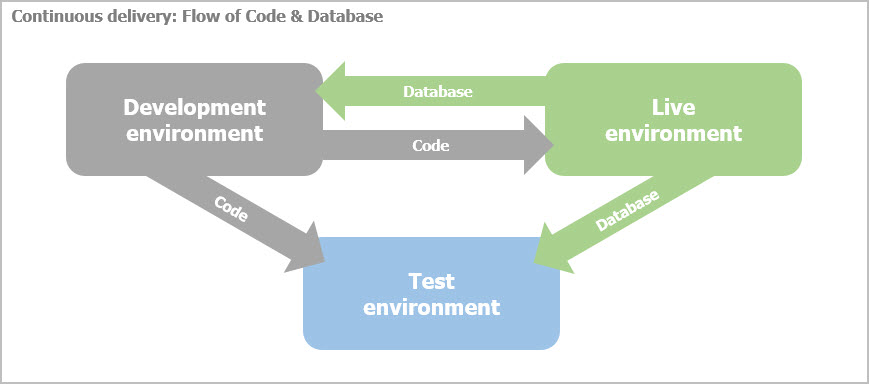
Environment configurations are delivered with the source code and, therefore, must not be saved in the database. This is because, database is never pushed from Development to Test or Live environments. It is pulled from Live, so that new code changes can be tested against actual live application data.NOTE: Labels and messages (resource files) are stored as configurations and not in the database. Therefore, changes to them should pass through the continuous delivery process and not be done on your live environment.
-
Application settings
On the other hand, there are the application configurations that need to be changed during runtime. Application configuration is a setting that is related to the applications actual functionality and is modified on the Live environment runtime. These settings need to be saved in the database, so that they are not overwritten with each subsequent delivery of code.
The following flowchart demonstrates the flow of code and database:
Environment configurations vs. Application settings
|
Environment configurations |
Application configurations |
|
Related to system setup |
Related to applications runtime functionality |
|
No need to change runtime |
Need to be modified runtime |
|
Must have different values on different environments: |
No need to change on different environments |
|
Should not be stored in the database |
Should be stored in the database |
|
Managed by developers |
Managed by users |
Export
The purpose of the export of code changes is to export only the changes to configuration, this way, it does not override configurations that are different on all environments.
Export also takes care of the database, by applying the required changes to the database structure, without overwriting changes in the database that have been done on the Live environment during runtime.
This section contains
