
DateTime picker
By default DateTime picker is used by the timespan selector. For more information, see Use a timespan selector. However you could also use the DateTime picker in your own selector. The following tutorial explains the main properties of the DateTime picker and how to use it.
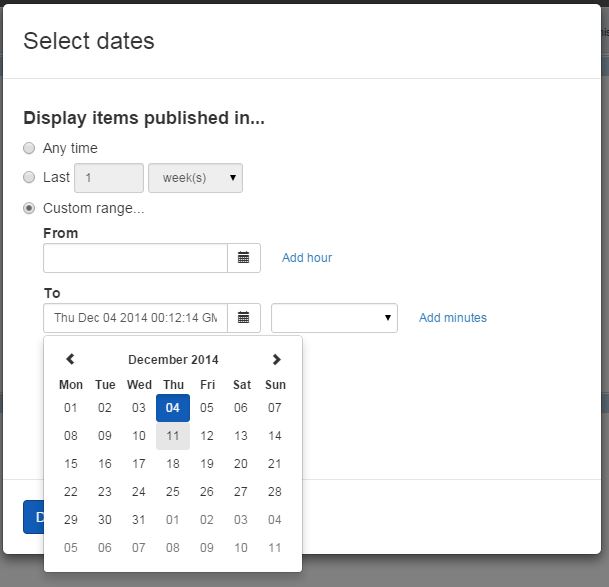
Adding a DateTime picker
-
Sitefinity CMS automatically registers the scripts you need and, if no other designer view with explicitly set priority exists, Sitefinity CMS sets your designer view priority 1. In case you need to have full control over the scripts that are loaded or you want to set custom priority, you can alternatively create your own
DesignerView.<YourView.json>file. If you have aJSONfile that matches the convention (even if empty), this automatic scripts registration will not occur. In yourDesignerView.<YourView>.jsonfile you have to add ascriptsarray. The content of the file should be similar to:JSON{ "priority": 1, "components" : ["sf-date-time-picker"] } -
In your
DesignerView.YourView.jsfile, place the following code:JavaScript(function () { var designerModule = angular.module('designer'); angular.module('designer').requires.push('sfSelectors'); designerModule.controller('YourViewCtrl', ['$scope', function ($scope) { $scope.$watch('properties.StartDate.PropertyValue', function (newValue, oldValue) { if (newValue) { $scope.startDate = new Date(newValue); } }, true); $scope.$watch('startDate', function (newValue, oldValue) { if (newValue) { $scope.properties.StartDate.PropertyValue = newValue.toUTCString(); } }, true); }]); })(); -
In your
DesignerView.YourView.cshtmlplace the following tag somewhere in the HTML:Razor<sf-date-time-picker ng-model="startDate" sf-show-meridian="true" sf-hour-step="3" sf-minute-step="5"></sf-date-time-picker > -
Add the Date object in your widget controller:
C#using BooksWidget.Mvc.Models; using System; using System.Collections.Generic; using System.Linq; using System.Web; using System.Web.Mvc; using Telerik.Sitefinity.Mvc; namespace BooksWidget.Mvc.Controllers { [ControllerToolboxItem(Name = "Books", SectionName = "MVC samples", Title = "Books")] public class BookController_DatePickerExample : Controller { //custom logic public string StartDate { get; set; } } }The
Dateobject that provides the time state. The value of the attribute is a scope property that you must have added in your widgets controller.
The DateTime picker has the following properties which you could set via attributes:
ng-modelsf-show-meridian
Whether to display 12H or 24H mode. The default value istrue.sf-hour-step
Step used for values displayed in hours drop-down. The default value is1.sf-minute-step- Step used for values displayed in minutes drop-down. The default value is10.sf-min-date
Sets the minimal date allowed for selection.sf-max-date
Sets the maximal date allowed for selection.
