
Sample: Tabs section
Overview
This sample demonstrates how to create a custom widget that you can use to create two tabs, each with different layout, using the build-in tab change functionality of Bootstrap 5.
PREREQUISITES: You must set up a Sitefinity renderer application and connect it to your Sitefinity CMS application. For more information, see Install Sitefinity in ASP.NET Core mode.
NOTE: The instructions in this sample use Visual Studio 2022 and a Sitefinity renderer project named
Renderer.
Folder structure
Under your Renderer project, you must create the following folders:
ViewModels/TabsSectionViewComponentsViews/Shared/Components/TabsSection
Create the widget
1. Create the ViewModel
- In the context menu of folder
ViewModels/TabsSection, click Add » Class… - In Name, enter
TabsSectionViewModel.csand click Add. - In the class, paste the following code and save your changes:
using System;
using System.Collections.Generic;
using System.Linq;
using System.Threading.Tasks;
using Progress.Sitefinity.AspNetCore.ViewComponents;
using Progress.Sitefinity.AspNetCore.Widgets.Models.Navigation;
using Progress.Sitefinity.AspNetCore.Widgets.Models.Section;
using Renderer.ViewComponents;

namespace Renderer.ViewModels.TabsSection
{
    public class TabsSectionViewModel
    {
        public string FirstTabLabel { get; set; }

        public string FirstTabSectionCss { get; set; }

        public IList<string> FirstTabSectionProportions { get; set; }

        public string SecondTabLabel { get; set; }

        public string SecondTabSectionCss { get; set; }

        public IList<string> SecondTabSectionProportions { get; set; }

        public ICompositeViewComponentContext<TabsSectionEntity> Context { get; set; }
    }
}
2. Create the ViewComponent
- In the context menu of folder
ViewComponents, click Add » Class… - In Name, enter
TabsSectionViewComponent.csand click Add. - In the class, paste the following code and save your changes:
using System;
using System.Collections.Generic;
using System.ComponentModel;
using System.ComponentModel.DataAnnotations;
using System.Threading.Tasks;
using Microsoft.AspNetCore.Mvc;
using Progress.Sitefinity.AspNetCore.ViewComponents;
using Progress.Sitefinity.AspNetCore.Web;
using Progress.Sitefinity.Renderer.Designers.Attributes;
using Renderer.ViewModels.TabsSection;

namespace Renderer.ViewComponents
{
    [SitefinityWidget(Title = "Tabs Section", Category = WidgetCategory.Layout, EmptyIconText = "No tabs has been created", EmptyIconAction = EmptyLinkAction.None, EmptyIcon = "file-text-o")]
    public class TabsSectionViewComponent : ViewComponent
    {
        private IRenderContext renderContext;

        public TabsSectionViewComponent(IRenderContext renderContext)
        {
            this.renderContext = renderContext;
        }

        public IViewComponentResult Invoke(ICompositeViewComponentContext<TabsSectionEntity> context)
        {
            if (context == null)
                throw new ArgumentNullException(nameof(context));

            var viewModel = new TabsSectionViewModel();

            viewModel.FirstTabLabel = context.Entity.FirstTabLabel;
            viewModel.FirstTabSectionCss = context.Entity.FirstTabSectionCss;
            viewModel.FirstTabSectionProportions = context.Entity.FirstTabSectionProportions ?? new List<string>();

            viewModel.SecondTabLabel = context.Entity.SecondTabLabel;
            viewModel.SecondTabSectionCss = context.Entity.SecondTabSectionCss;
            viewModel.SecondTabSectionProportions = context.Entity.SecondTabSectionProportions ?? new List<string>();
            viewModel.Context = context;

            return this.View(viewModel);
        }
    }

    public class TabsSectionEntity
    {
        [Required]
        [DisplayName("First tab label")]
        public string FirstTabLabel { get; set; }

        [ContentSection("First Tab Section", 1)]
        [DisplayName("First tab section css")]
        public string FirstTabSectionCss { get; set; }

        [Required]
        [ContentSection("First Tab Section", 2)]
        [DisplayName("First tab section proportions")]
        public IList<string> FirstTabSectionProportions { get; set; }

        [Required]
        [DisplayName("Second tab label")]
        public string SecondTabLabel { get; set; }

        [ContentSection("Second Tab Section", 1)]
        [DisplayName("Second tab section css")]
        public string SecondTabSectionCss { get; set; }

        [Required]
        [ContentSection("Second Tab Section", 2)]
        [DisplayName("Second tab section proportions")]
        public IList<string> SecondTabSectionProportions { get; set; }
    }
}
3. Create the View
- In the context menu of folder
Views/Shared/Components/TabsSection, click Add » Class… - Select Code File.
- In Name, enter
Default.cshtmland click Add. - In the class, paste the following code and save your changes:
@addTagHelper *, Microsoft.AspNetCore.Mvc.TagHelpers
@addTagHelper *, Progress.Sitefinity.AspNetCore

@using Progress.Sitefinity.AspNetCore.ViewComponents;
@using Progress.Sitefinity.AspNetCore.Mvc.Rendering;
@using Progress.Sitefinity.AspNetCore.Web;
@using Renderer.ViewModels.TabsSection;

@inject IRenderContext renderContext;

@model TabsSectionViewModel

<environment include="Development">
    <script src="Scripts/bootstrap.bundle.min.js" section-name="Top" integrity="sha384-ygbV9kiqUc6oa4msXn9868pTtWMgiQaeYH7/t7LECLbyPA2x65Kgf80OJFdroafW" crossorigin="anonymous"></script>
    <script src="Scripts/accordion.js" section-name="Bottom" assembly-ref="Progress.Sitefinity.AspNetCore.Widgets"></script>
</environment>
<environment exclude="Development">
    <script src="https://cdn.jsdelivr.net/npm/bootstrap@5.1.3/dist/js/bootstrap.bundle.min.js"
            section-name="Top"
            asp-fallback-href="Scripts/bootstrap.bundle.min.js"
            integrity="sha384-ygbV9kiqUc6oa4msXn9868pTtWMgiQaeYH7/t7LECLbyPA2x65Kgf80OJFdroafW" crossorigin="anonymous"></script>
    <script src="Scripts/accordion.min.js" section-name="Bottom" assembly-ref="Progress.Sitefinity.AspNetCore.Widgets"></script>
</environment>

@{
    var firstTabId = Html.GetUniqueId("firstTab");
    var secondTabId = Html.GetUniqueId("secondTab");
}

@if (!(string.IsNullOrEmpty(Model.FirstTabLabel) && string.IsNullOrEmpty(Model.SecondTabLabel)))
{
    <ul class="nav nav-tabs">
        <li class="nav-item">
            <a class="nav-link" href="#@firstTabId" type="button" data-bs-toggle="tab">@Model.FirstTabLabel</a>
        </li>
        <li class="nav-item">
            <a class="nav-link" href="#@secondTabId" type="button" data-bs-toggle="tab">@Model.SecondTabLabel</a>
        </li>
    </ul>

    <div class="tab-content">
        <div class="tab-pane container active" id="@firstTabId">
            <section class="row @this.Model.FirstTabSectionCss">
                @for (var i = 0; i < this.Model.FirstTabSectionProportions.Count; i++)
                {
                    <div class="col-md-@this.Model.FirstTabSectionProportions[i]" data-sfcontainer container-context="@this.Model.Context.ContainerContext("Column1" + i, "Column 1." + i)">
                    </div>
                }
            </section>
        </div>
        <div class="tab-pane container" id="@secondTabId">
            <section class="row @this.Model.SecondTabSectionCss">
                @for (var i = 0; i < this.Model.SecondTabSectionProportions.Count; i++)
                {
                    <div class="col-md-@this.Model.SecondTabSectionProportions[i]" data-sfcontainer container-context="@this.Model.Context.ContainerContext("Column2" + i, "Column 2." + i)">
                    </div>
                }
            </section>
        </div>
    </div>
}
else
{
    <div>No tabs selected</div>
}
Build your solution.
Result
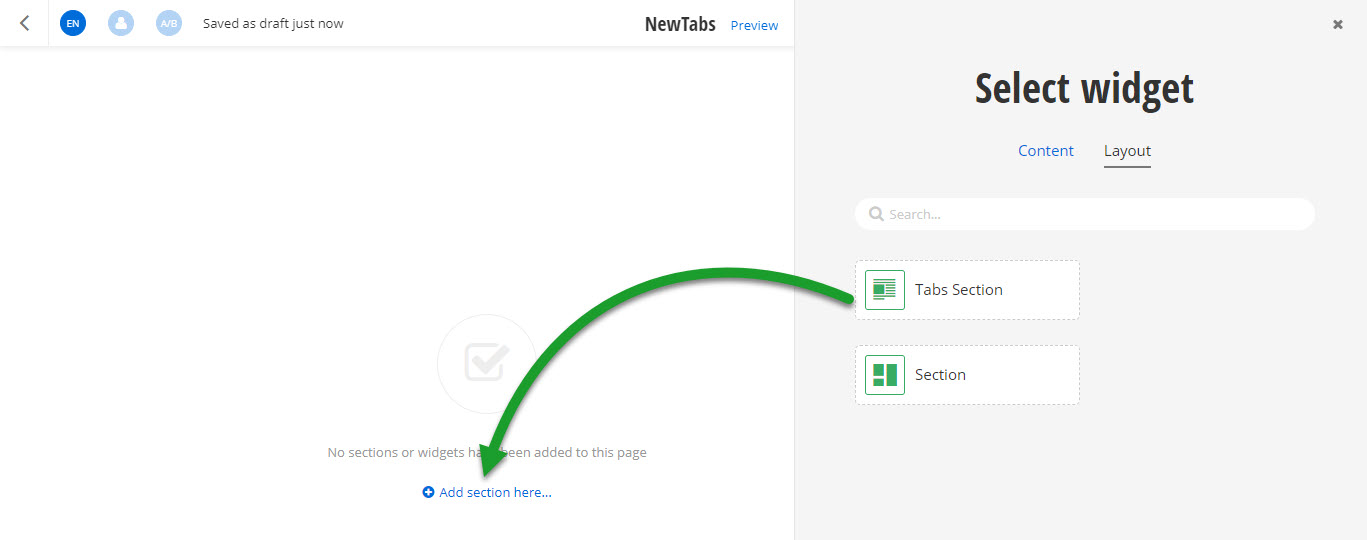
When you open your Renderer application and open the New editor, you will see the Tabs Section widget in the widget selector. When you add the widget on your page and edit it, you can choose different layouts for the two tabs and configure how to name and display the tabs.
Run the sample
This sample is available in Sitefinity’s GitHub repository. You can run and play with it.
To do this, perform the following:
- Go to Sitefinity’s GitHub repository Sitefinity ASP.NET Core samples.
- Expand Code and click Download ZIP.
- Extract the files on your computer.
- In the extracted folder, navigate to
sitefinity-aspnetcore-mvc-samples-master/src/tabs-sectionfolder. - Open the
tabs-section.slnin Visual Studio. - Open the
appsettings.jsonfile. - In section
Sitefinity, change theUrlproperty to the URL of your Sitefinity CMS site.
If you have deployed Sitefinity CMS on the IIS, point tohttps://localhost:<https_port>. - In Visual Studio, in the context menu of
tabs-sectionproject, click View in Browser. - Log in to your Sitefinity CMS instance and place the widget on a page.
