
Sample: Mega menu
Overview
This sample demonstrates how to build a custom navigation menu with nested child widgets. It is useful for large sites where the sitemap does not fit into one or two levels. Additionally, you can use the sample to insert custom widgets inside the menu and display them when hovering over a specific page.
You can choose from the following options:
PREREQUISITES: You must set up a Sitefinity renderer application and connect it to your Sitefinity CMS application. For more information, see Install Sitefinity in ASP.NET Core mode.
NOTE: The instructions in this sample use Visual Studio 2022 and a Sitefinity renderer project named
Renderer.
Folder structure
Under your Renderer project, you must create the following folders:
Entities/MegaMenuModels/MegaMenuViewModels/MegaMenuViewComponentsViews/Shared/Components/MegaMenuwwwroot/styles
Create a custom layout file
You must register the scripts in the _Layout.cshtml file. You must then use this custom base layout for every page where the MegaMenu is placed
Create the layout file
Perform the following:
-
In the context menu of folder
Views/Shared, click Add » Class… -
Select Code File.
-
In Name, enter
_Layout.cshtmland click Add. -
In the file, paste the following code and save your changes:
Razor@model Progress.Sitefinity.AspNetCore.Models.PageModel @using Progress.Sitefinity.AspNetCore.Mvc.Rendering @addTagHelper *, Microsoft.AspNetCore.Mvc.TagHelpers @addTagHelper *, Progress.Sitefinity.AspNetCore @inject Progress.Sitefinity.AspNetCore.Web.IRequestContext requestContext; @inject Progress.Sitefinity.AspNetCore.Web.IRenderContext renderContext; <!DOCTYPE html> <html id="html" lang="@requestContext.Culture"> <head> <meta charset="utf-8" /> <meta name="viewport" content="width=device-width, initial-scale=1.0" /> <link rel="icon" type="image/x-icon" href="favicon.ico"> @Html.RenderSeoMeta(this.Model) <environment include="Development"> <link rel="stylesheet" href="@Progress.Sitefinity.AspNetCore.Constants.PrefixRendererUrl("Styles/bootstrap.css")" /> </environment> <environment exclude="Development"> <link rel="stylesheet" href="@Progress.Sitefinity.AspNetCore.Constants.PrefixRendererUrl("Styles/bootstrap.min.css")" /> </environment> @* Scripts for the OOB Sitefinity widgets *@ <link rel="stylesheet" href="@Progress.Sitefinity.AspNetCore.Constants.PrefixRendererUrl("styles/main.css")" type="text/css" /> @* Custom styles *@ <link rel="stylesheet" href="~/styles/styles.css" /> @if (this.renderContext.IsEdit) { @* Custom styles loaded only in Edit mode *@ <link rel="stylesheet" href="~/styles/edit.css" /> } @* Custom scripts *@ <script src="~/scripts/scripts.js"></script> </head> <body class="container-fluid"> @RenderSection("Scripts") </body> </html>
Create the widget
1. Create the Entity
- In the context menu of folder
Entities/MegaMenu, click Add » Class… - In Name, enter
MegaMenuEntity.csand click Add. - In the class, paste the following code and save your changes:
using System.Collections.Generic;
using System.ComponentModel;
using Progress.Sitefinity.AspNetCore.Widgets.Models.Common;
using Progress.Sitefinity.AspNetCore.Widgets.Models.Navigation;
using Progress.Sitefinity.AspNetCore.Widgets.Models.Section;
using Progress.Sitefinity.Renderer.Designers;
using Progress.Sitefinity.Renderer.Designers.Attributes;
using Progress.Sitefinity.Renderer.Entities.Content;
using Progress.Sitefinity.RestSdk;

namespace Renderer.Entities.MegaMenu
{
    public class MegaMenuEntity : NavigationEntity
    {
        [ContentSection("First Section", 0)]
        [DisplayName("First page")]
        [Content(Type = KnownContentTypes.Pages, AllowMultipleItemsSelection = false)]
        public MixedContentContext FirstPage { get; set; }

        [ContentSection("First Section", 1)]
        [DisplayName("First section css")]
        public string FirstSectionCss { get; set; }

        [ContentSection("First Section", 2)]
        [DisplayName("First section proportions")]
        public IList<string> FirstSectionProportions { get; set; }

        [ContentSection("Second Section", 0)]
        [DisplayName("Second page")]
        [Content(Type = KnownContentTypes.Pages, AllowMultipleItemsSelection = false)]
        public MixedContentContext SecondPage { get; set; }

        [ContentSection("Second Section", 1)]
        [DisplayName("Second section css")]
        public string SecondSectionCss { get; set; }

        [ContentSection("Second Section", 2)]
        [DisplayName("Second section proportions")]
        public IList<string> SecondSectionProportions { get; set; }

        [ContentSection("Third Section", 0)]
        [DisplayName("Third page")]
        [Content(Type = KnownContentTypes.Pages, AllowMultipleItemsSelection = false)]
        public MixedContentContext ThirdPage { get; set; }

        [ContentSection("Third Section", 1)]
        [DisplayName("Third section css")]
        public string ThirdSectionCss { get; set; }

        [ContentSection("Third Section", 2)]
        [DisplayName("Third section proportions")]
        public IList<string> ThirdSectionProportions { get; set; }

        public bool HideSectionsInEdit { get; set; }
    }
}
2. Create the Model class
- In the context menu of folder
Models/MegaMenu, click Add » Class… - In Name, enter
MegaMenuModel.csand click Add. - In the class, paste the following code and save your changes:
using System.Collections.Generic;
using System.Threading.Tasks;
using Progress.Sitefinity.RestSdk;
using Progress.Sitefinity.RestSdk.Client;
using Progress.Sitefinity.RestSdk.Client.Dto;
using Progress.Sitefinity.RestSdk.Clients.Pages.Dto;
using Progress.Sitefinity.AspNetCore.Web;
using Progress.Sitefinity.AspNetCore.Widgets.Models.Navigation;
using Progress.Sitefinity.AspNetCore.Widgets.Models.Section;
using Renderer.Entities.MegaMenu;
using Renderer.ViewModels.MegaMenu;
using System;
using Progress.Sitefinity.AspNetCore.RestSdk;

namespace Renderer.Models.MegaMenu
{
    public class MegaMenuModel : IMegaMenuModel
    {
        private IRestClient restClient;
        private INavigationModel navigationModel;

        public MegaMenuModel(IRestClient restClient, INavigationModel navigationModel)
        {
            this.restClient = restClient;
            this.navigationModel = navigationModel;
        }

        public async Task<MegaMenuViewModel> InitializeViewModel(MegaMenuEntity entity, IRenderContext renderContext)
        {
            var viewModel = new MegaMenuViewModel();
            viewModel.HideSectionsInEdit = entity.HideSectionsInEdit;

            viewModel.FirstSectionCss = entity.FirstSectionCss;
            viewModel.FirstSectionProportions = entity.FirstSectionProportions ?? new List<string>();

            viewModel.SecondSectionCss = entity.SecondSectionCss;
            viewModel.SecondSectionProportions = entity.SecondSectionProportions ?? new List<string>();

            viewModel.ThirdSectionCss = entity.ThirdSectionCss;
            viewModel.ThirdSectionProportions = entity.ThirdSectionProportions ?? new List<string>();

            var allContexts = new[] { entity.FirstPage, entity.SecondPage, entity.ThirdPage };
            var allPagesResponse = await this.restClient.GetItems<PageNodeDto>(allContexts, new GetAllArgs()).ConfigureAwait(true);

            if (allPagesResponse.Items.Count > 0)
                viewModel.FirstPageId = allPagesResponse.Items[0].Id;
            else
                viewModel.FirstPageId = Guid.Empty.ToString();

            if (allPagesResponse.Items.Count > 1)
                viewModel.SecondPageId = allPagesResponse.Items[1].Id;
            else
                viewModel.SecondPageId = Guid.Empty.ToString();

            if (allPagesResponse.Items.Count > 2)
                viewModel.ThirdPageId = allPagesResponse.Items[2].Id;
            else
                viewModel.ThirdPageId = Guid.Empty.ToString();

            viewModel.NavigationViewModel = await this.navigationModel.InitializeViewModel(entity).ConfigureAwait(true);

            return viewModel;
        }
    }
}
3. Create the Model interface
- In the context menu of folder
Models/MegaMenu, click Add » Class… - In Name, enter
IMegaMenuModel.csand click Add. - In the class, paste the following code and save your changes:
using System.Threading.Tasks;
using Progress.Sitefinity.AspNetCore.Web;
using Renderer.Entities.MegaMenu;
using Renderer.ViewModels.MegaMenu;

namespace Renderer.Models.MegaMenu
{
    public interface IMegaMenuModel
    {
        Task<MegaMenuViewModel> InitializeViewModel(MegaMenuEntity entity, IRenderContext renderContext);
    }
}
4. Create the ViewModel
- In the context menu of folder
ViewModels/MegaMenu, click Add » Class… - In Name, enter
MegaMenuViewModel.csand click Add. - In the class, paste the following code and save your changes:
using System;
using System.Collections.Generic;
using System.Linq;
using System.Threading.Tasks;
using Progress.Sitefinity.AspNetCore.ViewComponents;
using Progress.Sitefinity.AspNetCore.Widgets.Models.Navigation;
using Progress.Sitefinity.AspNetCore.Widgets.Models.Section;
using Renderer.Entities.MegaMenu;

namespace Renderer.ViewModels.MegaMenu
{
    public class MegaMenuViewModel
    {
        public string FirstPageId { get; set; }

        public string FirstSectionCss { get; set; }

        public IList<string> FirstSectionProportions { get; set; }

        public string SecondPageId { get; set; }

        public string SecondSectionCss { get; set; }

        public IList<string> SecondSectionProportions { get; set; }

        public string ThirdPageId { get; set; }

        public string ThirdSectionCss { get; set; }

        public IList<string> ThirdSectionProportions { get; set; }

        public bool HideSectionsInEdit { get; set; }

        public NavigationViewModel NavigationViewModel { get; set; }

        public ICompositeViewComponentContext<MegaMenuEntity> Context { get; set; }
    }
}
5. Create the ViewComponent
- In the context menu of folder
ViewComponents, click Add » Class… - In Name, enter
MegaMenuViewComponent.csand click Add. - In the class, paste the following code and save your changes:
using System;
using System.Threading.Tasks;
using Microsoft.AspNetCore.Mvc;
using Progress.Sitefinity.AspNetCore.ViewComponents;
using Progress.Sitefinity.AspNetCore.Web;
using Renderer.Entities.MegaMenu;
using Renderer.Models.MegaMenu;

namespace Renderer.ViewComponents
{
    [SitefinityWidget(Title = "Mega Menu", Category = WidgetCategory.Content, Section = WidgetSection.NavigationAndSearch, EmptyIconText = "No pages have been published", EmptyIconAction = EmptyLinkAction.None, EmptyIcon = "file-text-o")]
    public class MegaMenuViewComponent : ViewComponent
    {
        private IMegaMenuModel megaMenuModel;
        private IRenderContext renderContext;

        public MegaMenuViewComponent(IMegaMenuModel megaMenuModel, IRenderContext renderContext)
        {
            this.megaMenuModel = megaMenuModel;
            this.renderContext = renderContext;
        }

        public async Task<IViewComponentResult> InvokeAsync(ICompositeViewComponentContext<MegaMenuEntity> context)
        {
            if (context == null)
                throw new ArgumentNullException(nameof(context));

            var viewModel = await this.megaMenuModel.InitializeViewModel(context.Entity, this.renderContext);
            viewModel.Context = context;

            return this.View(viewModel);
        }
    }
}
6. Create the View
- In the context menu of folder
Views/Shared/Components/MegaMenu, click Add » Class… - Select Code File.
- In Name, enter
Default.cshtmland click Add. - In the class, paste the following code and save your changes:
@addTagHelper *, Microsoft.AspNetCore.Mvc.TagHelpers
@addTagHelper *, Progress.Sitefinity.AspNetCore

@using Progress.Sitefinity.AspNetCore.ViewComponents;
@using Progress.Sitefinity.AspNetCore.Mvc.Rendering;
@using Progress.Sitefinity.AspNetCore.Web;
@using Progress.Sitefinity.AspNetCore.Widgets.Models.Navigation;
@using Renderer.ViewModels.MegaMenu;

@inject IRenderContext renderContext;

@model MegaMenuViewModel

<environment include="Development">
    <script src="Scripts/bootstrap.bundle.js" section-name="Top" integrity="sha384-ygbV9kiqUc6oa4msXn9868pTtWMgiQaeYH7/t7LECLbyPA2x65Kgf80OJFdroafW" crossorigin="anonymous"></script>
</environment>
<environment exclude="Development">
    <script src="https://cdn.jsdelivr.net/npm/bootstrap@5.0.1/dist/js/bootstrap.bundle.min.js"
            section-name="Top"
            asp-fallback-href="Scripts/bootstrap.bundle.min.js"
            integrity="sha384-ygbV9kiqUc6oa4msXn9868pTtWMgiQaeYH7/t7LECLbyPA2x65Kgf80OJFdroafW" crossorigin="anonymous"></script>
</environment>

<div class="@Model.NavigationViewModel.WrapperCssClass mega-menu">
    <nav class="navbar navbar-expand-md navbar-light">
        <div class="container-fluid">
            <button class="navbar-toggler ms-auto" type="button" data-bs-toggle="collapse" data-bs-target='@Html.GetUniqueId("#navbar")' aria-controls='@Html.GetUniqueId("navbar")' aria-expanded="false" aria-label="Toggle Navigation">
                <span class="navbar-toggler-icon"></span>
            </button>
            <div class="collapse navbar-collapse" id="@Html.GetUniqueId("navbar")">
                <ul class="navbar-nav mb-2 mb-md-0 flex-wrap">
                    @foreach (var node in @Model.NavigationViewModel.Nodes)
                    {
                        await RenderRootLevelNode(node);
                    }
                </ul>
            </div>
        </div>
    </nav>

    @if (this.renderContext.IsEdit)
    {
        await RenderSections(null);
    }
</div>

@*Here is specified the rendering for the root level*@
@{ async Task RenderRootLevelNode(PageViewModel node)
    {
        var hasSection = await HasSection(node);
        if (hasSection || node.ChildNodes.Count > 0)
        {
            <li class="nav-item me-md-3 dropdown @GetClass(node)">
                <a class="nav-link dropdown-toggle" href="#" id='@Html.GetUniqueId("navbarDropdownMenuLink" + node?.Key)' data-bs-toggle="dropdown" aria-haspopup="true" aria-expanded="false">@node.Title</a>

                @{
                    if (!hasSection)
                    {
                        <ul class="dropdown-menu" aria-labelledby='@Html.GetUniqueId("navbarDropdownMenuLink" + node?.Key)'>
                            @{ await RenderSubLevelsRecursive(node); }
                        </ul>
                    }
                    else
                    {
                        await RenderSections(node);
                    }
                }
            </li>
        }
        else
        {
            <li class="nav-item">
                <a class="nav-link @GetClass(node)" href="@node.Url" target="@node.LinkTarget">@node.Title</a>
                @{ await RenderSections(node); }
            </li>
        }
    }
}

@*Here is specified the rendering for all child levels*@
@{ async Task RenderSubLevelsRecursive(PageViewModel node)
    {
        foreach (var childNode in node.ChildNodes)
        {
            if (childNode.ChildNodes.Count > 0)
            {
                <li class="dropdown-submenu nav-item">
                    <a class="dropdown-item nav-link @GetClass(childNode)" href="@childNode.Url" target="@childNode.LinkTarget">
                        @childNode.Title
                        <svg xmlns="http://www.w3.org/2000/svg" width="16" height="16" fill="currentColor" class="bi bi-caret-right-fill" viewBox="0 0 16 16">
                            <path d="M12.14 8.753l-5.482 4.796c-.646.566-1.658.106-1.658-.753V3.204a1 1 0 0 1 1.659-.753l5.48 4.796a1 1 0 0 1 0 1.506z" />
                        </svg>
                    </a>
                    <ul class="dropdown-menu">
                        @{ await RenderSubLevelsRecursive(childNode); }
                    </ul>
                    @{ await RenderSections(node); }
                </li>
            }
            else
            {
                <li class="nav-item">
                    <a class="dropdown-item nav-link @GetClass(childNode)" href="@childNode.Url" target="@childNode.LinkTarget">@childNode.Title</a>
                    @{ await RenderSections(node); }
                </li>
            }
        }
    }
}
@*Resolves the class that will be added for each node depending whether it is selected*@
@{Microsoft.AspNetCore.Html.IHtmlContent GetClass(PageViewModel node)
    {

        if (node.IsCurrentlyOpened)
        {
            return Html.HtmlSanitize("active");
        }

        return null;
    }
}

@{ async Task<bool> RenderSections(PageViewModel node)
    {
        // do not render the sections in edit mode this way
        if (node != null && this.renderContext.IsEdit)
            return false;

        var style = string.Empty;
        var renderedSection = false;
        if (this.Model.HideSectionsInEdit)
            style = "display: none !important";

        @if (node == null || node?.Key.ToUpperInvariant() == this.Model.FirstPageId.ToUpperInvariant())
        {
            @if (this.Model.FirstSectionProportions.Count > 0)
            {
                <section class="row mega-menu__item dropdown-menu @this.Model.FirstSectionCss" aria-labelledby='@Html.GetUniqueId("navbarDropdownMenuLink" + node?.Key)' style="@style">
                    @for (var i = 0; i < this.Model.FirstSectionProportions.Count; i++)
                    {
                        <div class="col-md-@this.Model.FirstSectionProportions[i]" data-sfcontainer container-context="@this.Model.Context.ContainerContext("Column1" + i, "Column 1." + i)">
                        </div>
                    }
                </section>

                renderedSection = true;
            }
        }

        @if (node == null || node?.Key.ToUpperInvariant() == this.Model.SecondPageId.ToUpperInvariant())
        {
            @if (this.Model.SecondSectionProportions.Count > 0)
            {
                <section class="row @this.Model.SecondSectionCss mega-menu__item dropdown-menu" aria-labelledby='@Html.GetUniqueId("navbarDropdownMenuLink" + node?.Key)' style="@style">
                    @for (var i = 0; i < this.Model.SecondSectionProportions.Count; i++)
                    {
                        <div class="col-md-@this.Model.SecondSectionProportions[i]" data-sfcontainer container-context="@this.Model.Context.ContainerContext("Column2" + i, "Column 2." + i)">
                        </div>
                    }
                </section>

                renderedSection = true;
            }
        }

        @if (node == null || node?.Key.ToUpperInvariant() == this.Model.ThirdPageId.ToUpperInvariant())
        {
            @if (this.Model.ThirdSectionProportions.Count > 0)
            {
                <section class="row @this.Model.ThirdSectionCss mega-menu__item dropdown-menu" aria-labelledby='@Html.GetUniqueId("navbarDropdownMenuLink" + node?.Key)' style="@style">
                    @for (var i = 0; i < this.Model.ThirdSectionProportions.Count; i++)
                    {
                        <div class="col-md-@this.Model.ThirdSectionProportions[i]" data-sfcontainer container-context="@this.Model.Context.ContainerContext("Column3" + i, "Column 3." + i)">
                        </div>
                    }
                </section>

                renderedSection = true;
            }
        }

        return renderedSection;
    }
}

@{ async Task<bool> HasSection(PageViewModel node)
    {
        if (node == null || this.renderContext.IsEdit)
            return false;

        @if (node.Key.ToUpperInvariant() == this.Model.FirstPageId.ToUpperInvariant() && this.Model.FirstSectionProportions.Count > 0)
        {
            return true;
        }

        @if (node.Key.ToUpperInvariant() == this.Model.SecondPageId.ToUpperInvariant() && this.Model.SecondSectionProportions.Count > 0)
        {
            return true;
        }

        @if (node.Key.ToUpperInvariant() == this.Model.ThirdPageId.ToUpperInvariant() && this.Model.ThirdSectionProportions.Count > 0)
        {
            return true;
        }

        return false;
    }
}
Import the common directives
Create the <code>_LayoutImports files
The Program.cs file should look in the following way:
- In the context menu of folder
Views, click Add » Class… - Select Code File.
- In Name, enter
_LayoutImports.cshtmland click Add. - In the class, paste the following code and save your changes:
Razor
@addTagHelper *, Microsoft.AspNetCore.Mvc.TagHelpers @addTagHelper *, Progress.Sitefinity.AspNetCore @using Progress.Sitefinity.AspNetCore.ViewComponents; - In the context menu of folder
Views/Shared/Components, click Add » Class… - Select Code File.
- In Name, enter
_LayoutImports.cshtmland click Add. - In the class, paste the following code and save your changes:
Razor
@addTagHelper *, Microsoft.AspNetCore.Mvc.TagHelpers
@addTagHelper *, Progress.Sitefinity.AspNetCore

@using Progress.Sitefinity.AspNetCore.ViewComponents;
@using Progress.Sitefinity.AspNetCore.Mvc.Rendering;
Create the syles
1. Create the styles CSS
- In the context menu of folder
wwwroot/styles, click Add » New Item… - In Name, enter
styles.cssand click Add. - In the file, paste the following code and save your changes:
.mega-menu .mega-menu__item {
    top: 40px;
    width: 50vw;
    padding: 20px;
    background: #fff;
    border-radius: 5px;
    box-shadow: 0px 2px 15px 2px rgba(0,0,0,0.75);
}

.mega-menu .nav-item {
    position: relative;
}

.mega-menu .nav-item .mega-menu__item {
    position: absolute;
    visibility: hidden;
    opacity: 0;
    transition: opacity 0.1s ease;
}

.mega-menu .nav-item .mega-menu__item.show {
    visibility: visible;
    opacity: 1;
    display: flex;
}
2. Create the edit CSS
- In the context menu of folder
wwwroot/styles, click Add » New Item… - In Name, enter
edit.cssand click Add. - In the file, paste the following code and save your changes:
.mega-menu .mega-menu__item {
    position: relative !important;
    top: 0 !important;
    margin-bottom: 30px !important;
    display: flex !important;
}
Build your solution.
Result
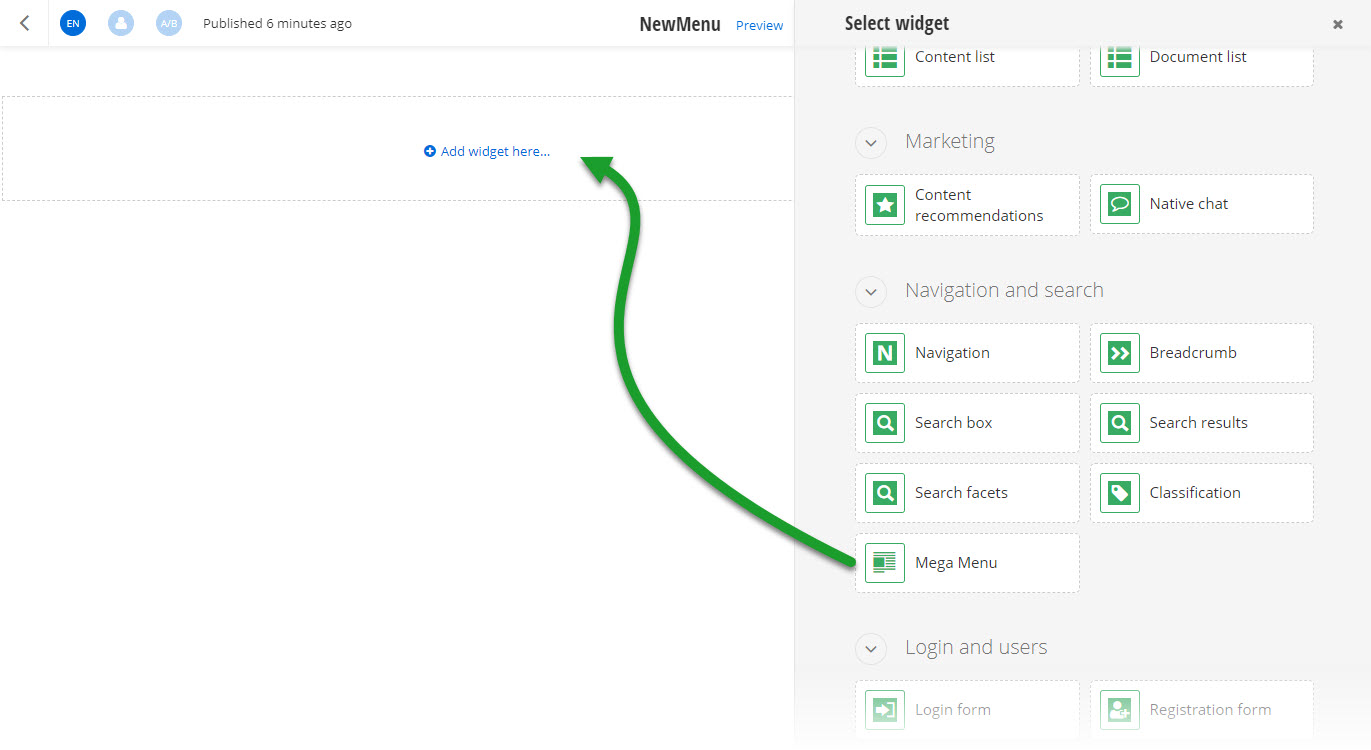
When you open your Renderer application and open the New editor, you will see the MegaMenu widget in the widget selector. When you add the widget on your page and edit it, you can choose which pages to be part of the menu and how to display them.
Run the sample
This sample is available in Sitefinity’s GitHub repository. You can run and play with it.
To do this, perform the following:
- Go to Sitefinity’s GitHub repository Sitefinity ASP.NET Core samples.
- Expand Code and click Download ZIP.
- Extract the files on your computer.
- In the extracted folder, navigate to
sitefinity-aspnetcore-mvc-samples-master/src/mega-menufolder. - Open the
mega-menu.slnin Visual Studio. - Open the
appsettings.jsonfile. - In section
Sitefinity, change theUrlproperty to the URL of your Sitefinity CMS site.
If you have deployed Sitefinity CMS on the IIS, point tohttps://localhost:<https_port>. - In Visual Studio, in the context menu of
mega-menuproject, click View in Browser. - Log in to your Sitefinity CMS instance and place the widget on a page.
