
Sample: Next.js script widget
Overview
The Script widget allows you to embed JavaScript code or external script files on your pages. You can also use it to paste embed codes from third-party tools, such as Google Analytics, social media widgets, or other tracking solutions.
You can choose from the following options:
- Inline
In this mode the Script widget renders the content of the text area in the widget designer on the place where the widget is dropped in the WYSIWYG editor - BodyTop
These modes register scripts with the script injection system. TheScriptInjectorcomponents subsequently retrieve these scripts and position them at the beginning of the<body>tag. - BodyBottomThese modes register scripts with the script injection system. The
ScriptInjectorcomponents subsequently retrieve these scripts and position them at the end of the<body>tag.
PREREQUISITES: You must set up a Sitefinity renderer application and connect it to your Sitefinity CMS application. For more information, see Install Sitefinity in Next.js mode.
Required setup
Two critical configurations are needed:
- Include
ScriptInjectorcomponents in the page template - AddScriptInjectorBodyTopandScriptInjectorBodyBottomcomponents to your page template - Pass
RequestContexttoScriptInjectors- TheScriptInjectorcomponents require theRequestContextto access the layout data
IMPORTANT: This custom template configuration is required for every page where the Script widget is placed with BodyTop or BodyBottomlocation.
Create the widget
The implementation consists of four main components:
- Script Widget (script.tsx)
Main widget component that renders inline scripts or returns null for BodyTop/BodyBottom scripts
In edit mode, displays a preview of the script with location information
Server-side component that processes the widget configuration - ScriptInjector (script-injector.tsx)
Scans the page layout to find all Script widgets with BodyTop or BodyBottom location
Renders the scripts at the appropriate positions in the page template
Disabled in edit mode to prevent script execution during page editing - ScriptEntity (script.entity.ts)
Designer metadata defining the widget properties
Configures the widget editor interface in Sitefinity - ScriptLocation constant (location.ts)
Select where the script should be placed (Inline, Body top, or Body bottom)
- Navigate to '../widgets/script/'
- Create a script.tsx file.
- In the file, paste the following code and save your changes:
import React from 'react';
import 'server-only';
import { WidgetContext, htmlAttributes } from '@progress/sitefinity-nextjs-sdk';
import { ScriptEntity } from './script.entity';
import { ScriptLocation } from './script-location';

export function Script(props: WidgetContext<ScriptEntity>) {
  const { model } = props;
  const entity = model.Properties;

  const location = entity.Location || ScriptLocation.Inline;
  const content = entity.Script || '';
  const scriptId = `script-${model.PlaceHolder}-${location}-${content}`;
  const dataAttributes = htmlAttributes(props);

  if (props.requestContext.isEdit) {
    const paragraphs = content && content.length ? content.split(/\r?\n/).slice(0, 3) : [];
    let scriptLocationString = '';
    if (content) {
      switch (location) {
        case ScriptLocation.Inline: scriptLocationString = 'Included where the widget is dropped.'; break;
        case ScriptLocation.BodyBottom: scriptLocationString = 'Included before the closing </body> tag.'; break;
        case ScriptLocation.BodyTop: scriptLocationString = 'Included after the opening <body> tag.'; break;
        default: break;
      }
    }

    return (
      <div {...dataAttributes}>
        {paragraphs.map((line, i) => (
          <React.Fragment key={i}>
            {line}<br />
          </React.Fragment>
        ))}
        {scriptLocationString && (
          <>
            ...<br />
            <i>{scriptLocationString}</i>
          </>
        )}
      </div>
    );
  }

  if (location === ScriptLocation.BodyBottom || location === ScriptLocation.BodyTop) {
    // BodyBottom and BodyTop scripts are handled by ScriptInjector components
    // which read them directly from the layout data
    return null;
  }

  return (
    <div
      className="script-widget"
      {...dataAttributes}
      id={scriptId + '-container'}
      dangerouslySetInnerHTML={{ __html: content }}
    />
  );
}
- Navigate to '../widgets/script/'
- Create a script-injector.tsx file.
- In the file, paste the following code and save your changes:
import React from 'react';
import { WidgetModel } from '@progress/sitefinity-nextjs-sdk';
import { RequestContext } from '@progress/sitefinity-nextjs-sdk';
import { ScriptLocation, ScriptLocationType } from './script-location';

interface ScriptInjectorProps {
  requestContext: RequestContext;
}

// Helper function to flatten nested widget hierarchy
function flattenWidgets(widgets: WidgetModel[]): WidgetModel[] {
  return widgets.reduce((acc: WidgetModel[], widget: WidgetModel): WidgetModel[] => {
    if (Array.isArray(widget?.Children) && widget.Children.length) {
      return acc.concat(flattenWidgets(widget.Children));
    }

    return acc.concat([widget]);
  }, []);
}

// Helper function to filter and render scripts by location
function renderScriptsByLocation(requestContext: RequestContext, location: ScriptLocationType) {
  // Don't render scripts in edit mode
  if (requestContext.isEdit) {
    return null;
  }

  const allWidgets = flattenWidgets(requestContext.layout.ComponentContext.Components || []);

  const scripts = allWidgets
    .filter(widget => widget.Name === 'Script')
    .filter(widget => {
      const widgetLocation = widget.Properties?.Location || ScriptLocation.Inline;
      return widgetLocation === location;
    });

  if (scripts.length === 0) {
    return null;
  }

  return (
    <>
      {scripts.map((widget) => {
        const scriptId = `script-${widget.PlaceHolder}-${location}-${widget.Id}`;
        const content = widget.Properties?.Script || '';

        return (
          <div
            key={scriptId}
            id={scriptId}
            dangerouslySetInnerHTML={{ __html: content }}
          />
        );
      })}
    </>
  );
}

export function ScriptInjectorBodyTop({ requestContext }: ScriptInjectorProps) {
  return renderScriptsByLocation(requestContext, ScriptLocation.BodyTop);
}

export function ScriptInjectorBodyBottom({ requestContext }: ScriptInjectorProps) {
  return renderScriptsByLocation(requestContext, ScriptLocation.BodyBottom);
}
- Navigate to '../widgets/script/'
- Create a script.entity.ts file.
- In the file, paste the following code and save your changes:
import { Choice, ContentSection, ContentSectionTitles, DataType, DefaultValue, Description, DisplayName, KnownFieldTypes, WidgetEntity } from '@progress/sitefinity-widget-designers-sdk';
import { ScriptLocation } from './script-location';

@WidgetEntity('Script', 'Script')
export class ScriptEntity {
    @ContentSection(ContentSectionTitles.LabelsAndMessages, 0)
    @DisplayName('Script location')
    @Description('Select where the script should be placed on the page')
    @Choice([
        { Title: 'Inline', Name: ScriptLocation.Inline, Value: ScriptLocation.Inline },
        { Title: 'Body top', Name: ScriptLocation.BodyTop, Value: ScriptLocation.BodyTop },
        { Title: 'Body bottom', Name: ScriptLocation.BodyBottom, Value: ScriptLocation.BodyBottom }
    ])
    @DefaultValue(ScriptLocation.Inline)
    Location?: string = ScriptLocation.Inline;

    @ContentSection(ContentSectionTitles.LabelsAndMessages, 1)
    @DisplayName('Script')
    @Description('Put the script with its wrapping tag -> e.g. <script>javascript code</script>')
    @DataType(KnownFieldTypes.TextArea)
    Script?: string;
}
- Navigate to '../widgets/script/'
- Create a location.ts file.
- In the file, paste the following code and save your changes:
export const ScriptLocation = {
    Inline: 'Inline',
    BodyTop: 'BodyTop',
    BodyBottom: 'BodyBottom'
} as const;

export type ScriptLocationType = typeof ScriptLocation[keyof typeof ScriptLocation];
Integrate with page templates
Perform the following:
-
Navigate to your page template file (e.g.
src/app/templates/sitefinity-template.tsx) -
In the file, paste the following code and save your changes:
TSXimport { ScriptInjectorBodyTop, ScriptInjectorBodyBottom } from '../widgets/script/script-injector'; export function SitefinityTemplate({ widgets, requestContext }: { widgets: { [key: string]: ReactNode[] }; requestContext: RequestContext; }): JSX.Element { return ( <> <ScriptInjectorBodyTop requestContext={requestContext} /> <header data-sfcontainer="Header"> {widgets['Header']} </header> <main data-sfcontainer="Content"> {widgets['Content']} </main> <footer data-sfcontainer="Footer"> {widgets['Footer']} </footer> <ScriptInjectorBodyBottom requestContext={requestContext} /> </> );
Register the widget
The next step is to register the component implementation and the designer metadata with the Next.js renderer. The Sitefinity Next.js SDK will automatically generate the needed designer metadata based on the defined entity. The registry is used to find the component function reference for the widget from the response of the Page Layout service. It is also used when generating metadata for the widget when it is used in the WYSIWYG page editor – labels, visuals etc.
The widget-registry.ts file file should include the following code:
import { WidgetRegistry, initRegistry, defaultWidgetRegistry } from '@progress/sitefinity-nextjs-sdk';
import { Script } from './widgets/script/script';
import { ScriptEntity } from './widgets/script/script.entity';

const customWidgetRegistry: WidgetRegistry = {
    widgets: {
        'Script': {
            componentType: Script,
            entity: ScriptEntity,
            ssr: true,
            editorMetadata: {
                Title: 'Script',
                Category: 'Content',
                Section: 'Basic',
                EmptyIconText: 'Set JavaScript',
                EmptyIconAction: 'Edit',
                IconName: 'code'
            }
        }
    }
};

customWidgetRegistry.widgets = {
    ...defaultWidgetRegistry.widgets,
    ...customWidgetRegistry.widgets
};

export const widgetRegistry: WidgetRegistry = initRegistry(customWidgetRegistry);
Result
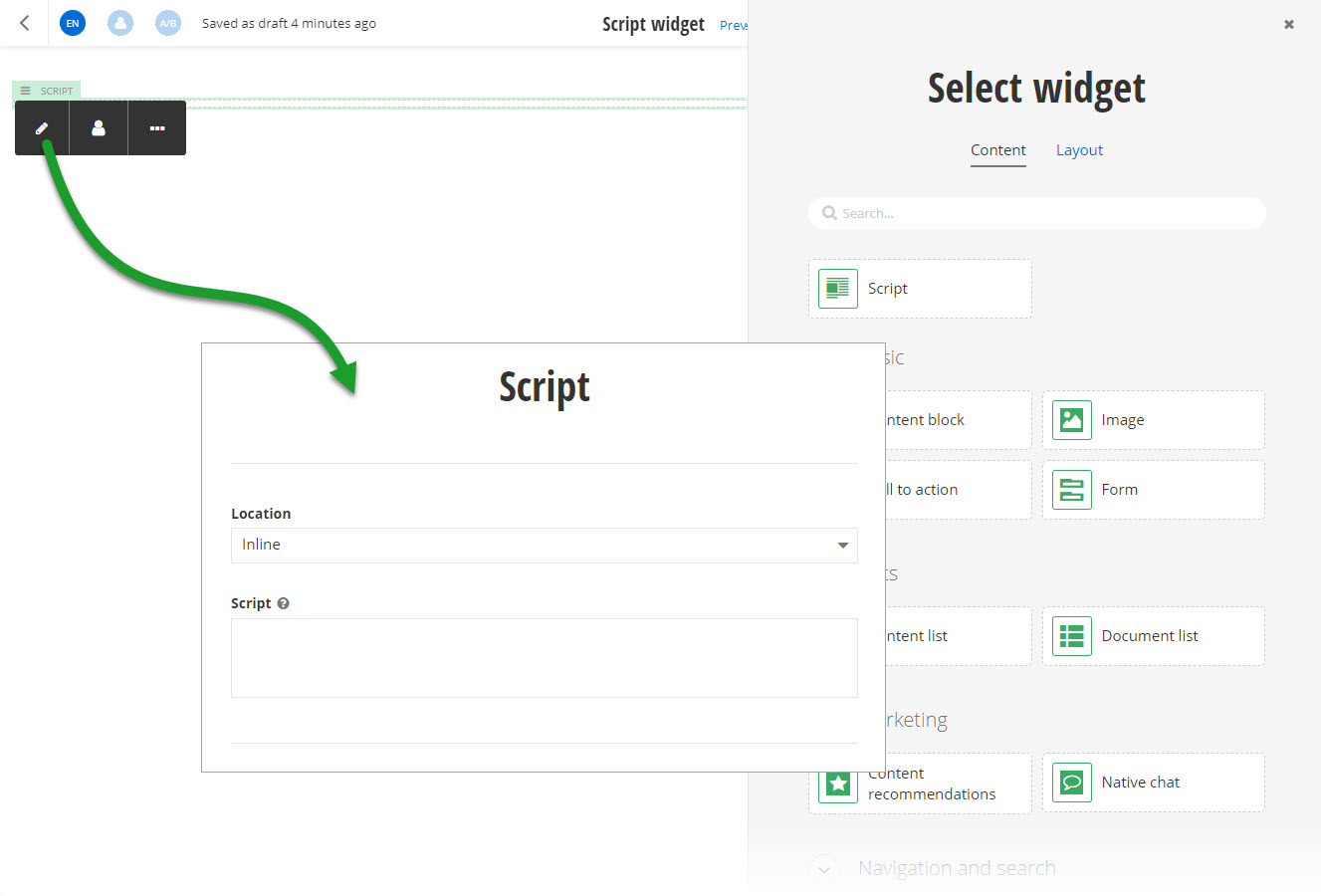
When you open your Renderer application and open the New editor, you will see the Script widget in the widget selector. When you add the widget on your page and edit it, you can choose where to place the script and you can enter the script in the text area.
Key Implementation Details
- Server-Side Rendering: The Script widget is a server component that processes during page rendering
- Edit Mode Preview: In edit mode, shows the first 3 lines of the script with a location hint
- Layout Scanning: ScriptInjector components scan the entire widget tree to find Script widgets
- Unique IDs: Each script gets a unique ID based on placeholder, location, and widget ID
- HTML Injection: Scripts are injected using dangerouslySetInnerHTML for direct HTML rendering
