
Customize form widgets
When working with MVC forms, you use form fields and elements to design the form. Form fields facilitate collecting user input and persisting the input in the response. Form elements do not facilitate user input. They display visual, non-input helper information within the form or to make use of features such as page breaks, navigation, captcha, and so on. The following picture demonstrates the difference between form fields and elements:
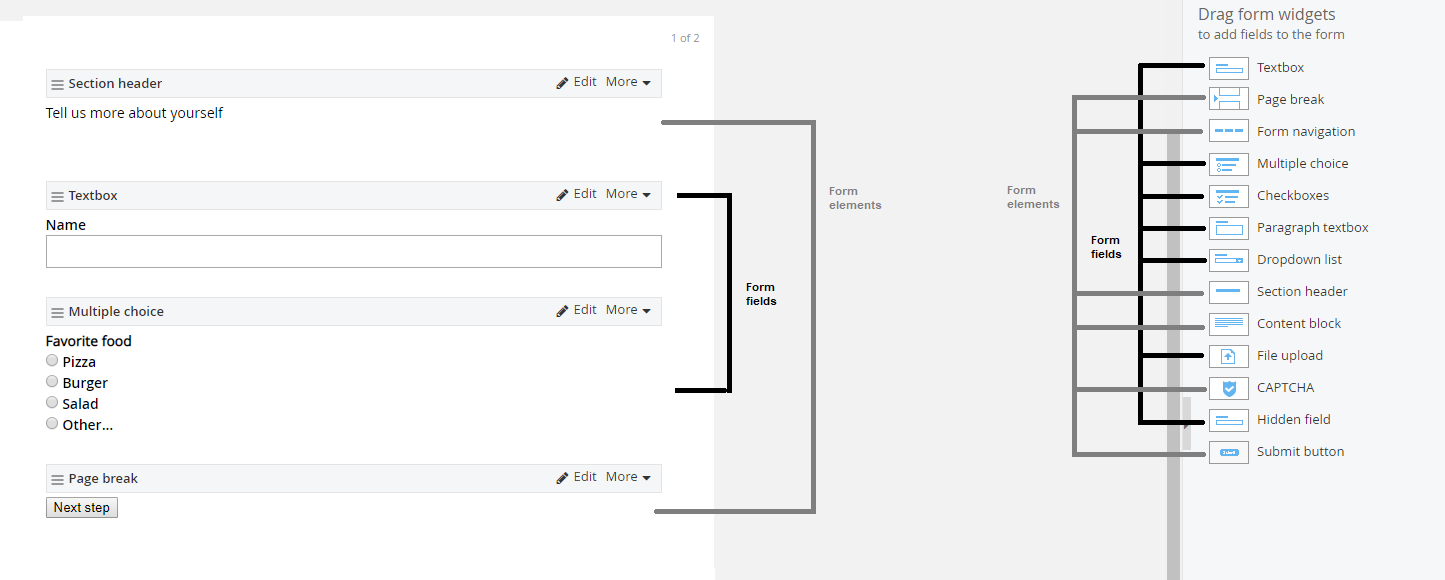
You can customize fields and elements to suit the requirements of your forms. To do this, you use Sitefinity CMS MVC abstract classes and interfaces:
| Model abstract class | Model interface | Controller abstract class | Controller interface | |
| Fields |
|
|
C# |
C# |
|
Elements |
|
|
C# |
C# |
This section contains
Extend the forms TextField
Extend TextFields of MVC forms by extending the business logic behind some of these default fields.
Want to learn more?
Enhance your Sitefinity skills by enrolling in free training sessions. Become Sitefinity certified through Progress Education Community to strengthen your professional credentials.

Get started with Integration Hub | Sitefinity Cloud
This free lesson teaches administrators, marketers, and other business professionals how to use Sitefinity Integration Hub to create automated workflows between Sitefinity and other business systems.
Web Security for Sitefinity Administrators
This free lesson teaches administrators the basics about protecting your Sitefinity instance and your sites from external threats. Configure HTTPS, SSL, allow lists for trusted sites, and cookie security, among others.
Foundations of Sitefinity ASP.NET Core Development
The free on-demand video course teaches developers how to use Sitefinity ASP.NET Core and take advantage of its decoupled architecture and modern development model.