
Compare search services
Compare advantages and disadvantages
Sitefinity CMS supports the following search services out of the box: Lucene.NET, Azure AI Search service, and Elasticsearch service. By default, Sitefinity CMS uses Lucene search, but you can switch between search services or tune their settings. To help you choose which search service suits your needs best, examine the following summary of advantages and disadvantages for each option.
|
|
Lucene (default option) |
Azure AI Search |
Elasticsearch |
|
Advantages |
|
|
|
|
Disadvantages |
|
|
|
(*) To avoid potential issues, the index data must be stored on a network location to make it reusable on multiple instances. For more information, see Change the location of the Lucene search index files.
NOTE: If you use Lucene in a Cloud deployment of Sitefinity (CI/CD setup), you must ensure that the
~/App_Data/Sitefinity/Searchfolder is included in your deployment package.
Compare performance
The following performance test compares the performance of the three search services. The test does not account for machine parameters but highlights the importance of where the server is located. The test scope includes the search for different news items and the following context:
- 50 concurrent users
- Time period is 10 minutes
- Azure AI Search service is running in the cloud
- Elasticsearch is running on the same machine
- Lucene uses local storage for index data
The following diagram illustrates the performance test results:
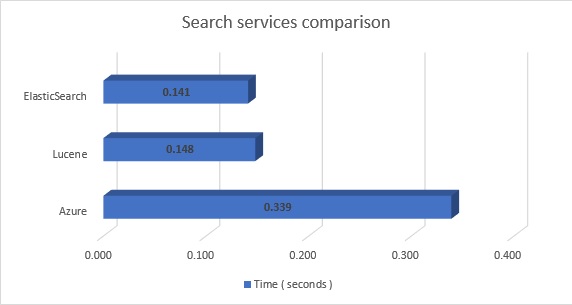
In general, all supported search services perform fast and return results within less than 0.5 second even on a high load.
If you deploy Sitefinity CMS on Azure and use Azure AI Search in a closer location, the search service will perform faster.
