
Application status pages display workflow
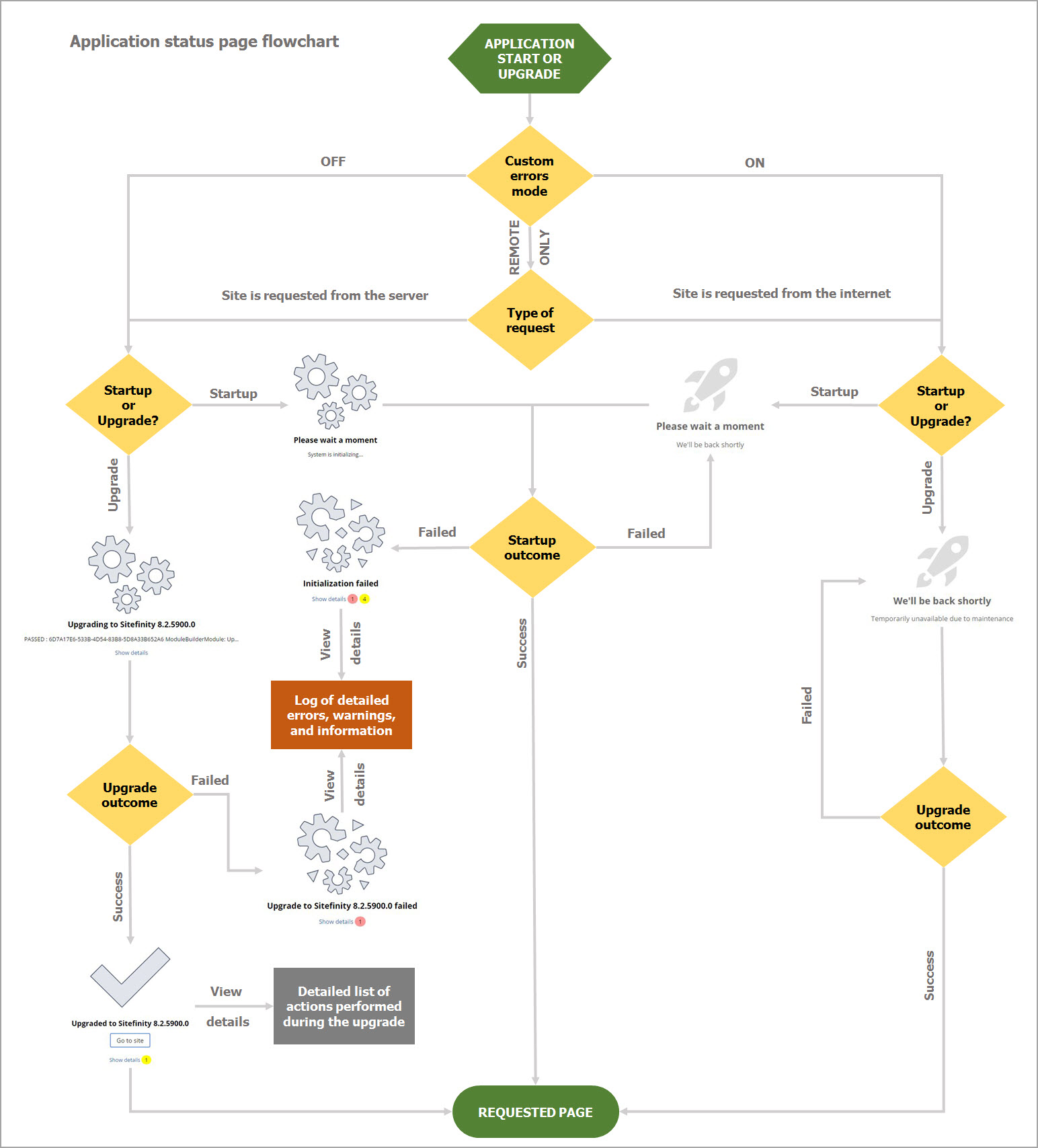
On system start or upgrade the user is redirected to http://<your-site>/sitefinity/status where the application status page is rendered. In case the application is already running and user accesses this URL, automatic redirect to the ReturnUrl is executed. In case there is no ReturnURL, the user is redirected to the home page.
The following diagram illustrates how Sitefinity CMS displays different status pages:
Want to learn more?
Enhance your Sitefinity skills by enrolling in free training sessions. Become Sitefinity certified through Progress Education Community to strengthen your professional credentials.

Get started with Integration Hub | Sitefinity Cloud
This free lesson teaches administrators, marketers, and other business professionals how to use Sitefinity Integration Hub to create automated workflows between Sitefinity and other business systems.
Web Security for Sitefinity Administrators
This free lesson teaches administrators the basics about protecting your Sitefinity instance and your sites from external threats. Configure HTTPS, SSL, allow lists for trusted sites, and cookie security, among others.
Foundations of Sitefinity ASP.NET Core Development
The free on-demand video course teaches developers how to use Sitefinity ASP.NET Core and take advantage of its decoupled architecture and modern development model.