# Send custom payload
To change the default payload sent by service hooks, you need to create a custom action that modifies the payload before executing the service hook.\
To achieve this, inherit from the default webhook action as shown in the following example:
```C#
using System;
using System.ComponentModel;
using System.ComponentModel.DataAnnotations;
using System.Threading;
using System.Threading.Tasks;
using Progress.Sitefinity.Renderer.Designers.Attributes;
using Telerik.Sitefinity.ServiceHooks;
using Telerik.Sitefinity.ServiceHooks.Model;
namespace SitefinityWebApp
{
public class CustomWebhookActionSettings : WebhookActionSettings
{
///
public override string Title
{
get
{
return ActionTitle;
}
}
///
public override Type ParametersType
{
get
{
return typeof(CustomWebhookActionParameters);
}
}
///
public override Task ExecuteActionAsync(ITriggerData triggerData, object parameters, CancellationToken cancellationToken)
{
// Set custom payload before calling base.ExecuteActionAsync()
// in order to override the default payload
triggerData.CustomPayload = new
{
Name = triggerData.Name,
Item = triggerData.Item,
SendDate = DateTime.Now.ToString(),
ApiKey = ((CustomWebhookActionParameters)parameters).ApiKey
};
return base.ExecuteActionAsync(triggerData, parameters, cancellationToken);
}
private const string Name = "CustomWebhookAction";
private const string ActionTitle = "Send data to URL (Custom)";
public class CustomWebhookActionParameters : WebhookActionSettings.WebhookActionParameters
{
[Required]
[DisplayName("API Key")]
[Placeholder("Please enter your API key here...")]
public string ApiKey { get; set; }
}
}
}
```
> info **NOTE**: In order to use all available attributes in `CustomWebhookActionParameters` class you need to install `Progress.Sitefinity.Renderer` nuget package. For more information, see [Widget designers](https://www.progress.com/documentation/sitefinity-cms/widget-designers-mvc).
To register your custom action in the system, you need to have a module that implements the `IServiceHookActionProvider` interface which returns the new action in the `GetServiceHookActionsSettings()` method.
```C#
using System;
using System.Collections.Generic;
using SitefinityWebApp;
using Telerik.Sitefinity;
using Telerik.Sitefinity.Abstractions;
using Telerik.Sitefinity.Configuration;
using Telerik.Sitefinity.ServiceHooks;
using Telerik.Sitefinity.Services;
[assembly: SitefinityModule(SampleModule.ModuleName, typeof(SampleModule), SampleModule.ModuleName, "", StartupType.OnApplicationStart)]
namespace SitefinityWebApp
{
public class SampleModule : ModuleBase, IServiceHookActionProvider
{
public override Guid LandingPageId
{
get { return Guid.Empty; }
}
public override void Initialize(ModuleSettings settings)
{
base.Initialize(settings);
App.WorkWith().Module(Name)
.Initialize();
}
public override void Install(SiteInitializer initializer)
{
}
protected override ConfigSection GetModuleConfig()
{
return null;
}
public override Type[] Managers
{
get { return null; }
}
IDictionary IServiceHookActionProvider.GetServiceHookActionsSettings()
{
var actionSettings = new Dictionary();
actionSettings.Add("CustomWebhookAction", new CustomWebhookActionSettings());
return actionSettings;
}
internal const string ModuleName = "SampleModule";
}
}
```
After you have implemented and registered your custom action you are ready to configure your first service hook to start sending the new payload.
1. Navigate to *Administration » Servicehooks*.
2. Click *Create*.
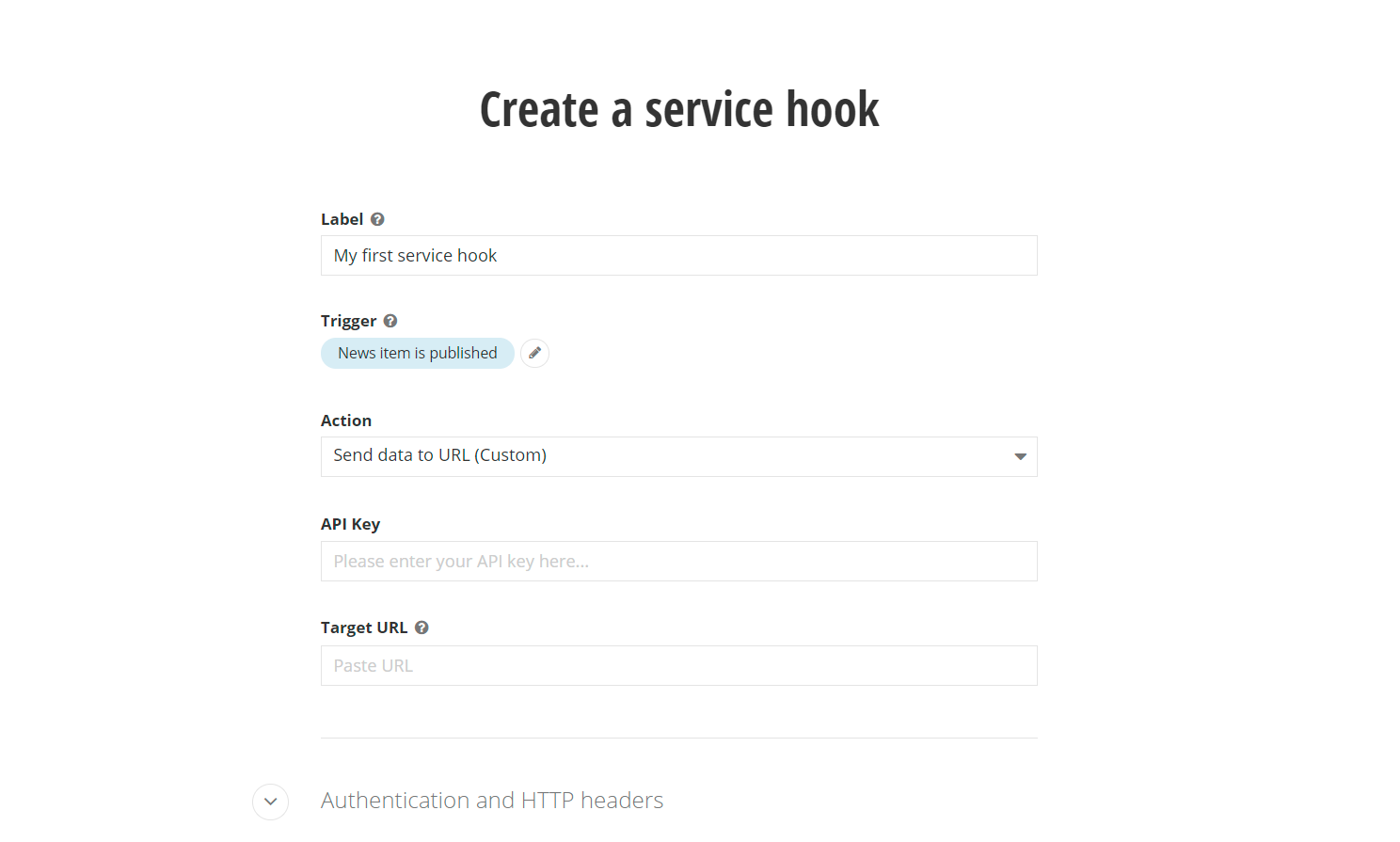
3. Under the *Action* label there is a dropdown selector where you can now select your custom action (*Send data to URL (Custom)* in the example) instead of the default one
[](https://www.progress.com/documentation/sitefinity-cms/assets/368c6769901346ccedfe5524568f6693/custom-service-hook.png)
4. With the custom action, there is a new field in the UI, *API Key*, which can now be configured and used in the construction of the modified payload. Here’s an example payload from the new service hook:
```JSON
{
"Name": "News item is published",
"Item": {
"Id": "2757f79a-b143-462b-9ddc-32bf586b968e",
"LastModified": "2021-08-11T15:21:37+03:00",
"PublicationDate": "2021-08-11T14:48:01+03:00",
"Title": "Sample news item",
"Description": "",
"DateCreated": "2021-08-11T14:48:01+03:00",
"IncludeInSitemap": true,
"UrlName": "sample-news-item",
"ItemDefaultUrl": "/2021/08/11/sample-news-item",
"Tags": [],
"Category": [],
"AllowComments": true,
"Summary": "",
"Content": "The content of the news item.",
"Author": "",
"SourceName": null,
"SourceSite": null,
"Provider": "OpenAccessDataProvider",
"Comments": []
},
"SendDate": "8/11/2021 3:21:38 PM",
"ApiKey": "My_personal_API_Key"
}
```